Here's the list of supported built- in
editors. Use the
Add method to insert a
new property to the browser. Use the
Value
property to assign a value to a property. Use the
PropertyChange
event to notify your application that the property changes its value. Use the
Select
method to browse for a COM object. Use the Property.
Option
property to specify different settings for the current editor. Use the
Option property to customize the strings or behavior
for different editors. Use the
ModalPropertyChange
event to notify your application that the user clicks the cell's button. The
control supports the following type of editors:
| | Name | Value | Description | |
| |
Button | -3
|
Adds a button to the property, that's always visible no matter if the property
is focused or selected. The EditButton or EditPage shows the button ONLY if the
property is selected. The ModalPropertyChange(Property, Value, Cancel) event is fired once the user clicks the property's button (EditTypeEnum.Button type). The PropertyChange(Property) event occurs if the ModalPropertyChange event is not canceled (Cancel property is false) and the Value is changed.
| |
| |
Divider | -2
|
Adds a divider property, that merges the Name and Value columns, and displays
the Name, HTMLName property on the center.
The Selectable property specifies whether
the user can select the property at runtime. The Sortable
property specifies whether the property changes its position once the user sorts
a column.
| |
| |
Label | -1
|
The property is read only ( has no editor assigned ) and it looks not
grayed.
| |
| |
ReadOnly | 0
|
The property is read only ( has no editor assigned ) and it looks grayed. Use the Locked
property to lock a property from being changed by the user.
| |
| |
Edit | 1
|
Uses a standard text box control to edit the property's value. Use the Numeric
property to filter numbers of integer type. Use The NumericFloat
property to filter for numbers of double type. Use the Option(exEditSingleLine)
property on False to specify a multiple-lines editor.
| |
| |
EditColor | 2
|
Provides a drop down portion that includes
standard, system, or EBN colors. Use the EditColorPage type to provide your own color
editor. The EBN colors are shown only if the browsed COM object exposes a VisualAppearance
property like shown in the following movie.
| |
| |
EditFont | 3
|
Changing the property of font types. Use the ModalPropertyChange
event to notify your application that the user clicks the cell's button. The
default implementation calls the common font select dialog. Use the Option
property to specify different settings for the current editor.
| |
| |
EditFontName | 4
|
Displays a list of fonts into your system. Provides a drop down list that
includes the name of the fonts installed on your computer.
| |
| |
EditPicture | 5
|
Displays the picture contained by the property. Provides a small rectangle where
the picture is rendered. Use the ModalPropertyChange
event to notify your application that the user clicks the cell's button. Use
the Option property to specify different
settings for the current editor.
| |
| |
EditPage | 6
|
User can open a custom page. Use the ModalPropertyChange
event to notify your application that the user clicks the cell's button.
| |
| |
EditBoolean | 7
|
Displays a list with boolean values: True and False.
| |
| |
EditEnum | 8
|
Presents a list of predefined values. The property accepts only one
of the predefined values. The AllowMultipleValuesOnEnum
property specifies whether the drop down element displays a checkbox for flags
in the enumeration lists that may be a bit combination.
| |
| |
EditDate | 9
|
Changing the properties of DATE type. Provides a drop down calendar
control. Use the Option property to specify
different settings for the current editor.
| |
| |
EditPassword | 10
|
Password editor. Use the EditPassword type to mask input characters with '*'
character, and to disable copy and paste inside the edit control.
| |
| |
EditDropDown | 11
|
Presents a list of values. The property accepts also values that are not in
the list.
| |
| |
EditObject | 12
|
Specifies that the property is an object property, and the properties of the
object are inserted. Use the EditObject to insert multiple COM objects to the
same browser.
| |
| |
EditColorPage | 13
|
Displays cells of color type and add a button to let user changes the color
using custom color dialog. Use the ModalPropertyChange
event to notify your application that the user clicks the cell's button.
| |
| |
EditCheck | 14
|
Adds a check box entry for properties of boolean type.
| |
| |
EditButton | 15
|
Adds a button and a text box to a cell. Use the ModalPropertyChange
event to notify your application that the user clicks the cell's button.
| |
| |
EditSlider | 16
|
Adds a slider control to the property. The SliderWidth
property specify the width of the slider in the property. The SliderMin
and SliderMax properties indicate the range
of the values used by the slider. The SliderStep
property determines the proposed change when user moves the slider. The
SliderTickFrequency property
specifies the frequency to display ticks on a slider control.
| |
| |
EditFile | 17
|
Adds a button to select a file using the common open file dialog. Use the Option
property to specify different settings for the current editor.
| |
| |
EditFolder | 18
|
Adds a button to select a folder.
| |
| |
EditProperty | 19
|
Edits a property of an object. The property can have multiple parameters
of any type. The ShowMultipleParams
property should be on True, if the property contains multiple parameters. The
property may include several child items, if one or more parameters of the
property are of a predefine type such as Boolean or enumeration, that lists all
possible combinations. For instance, the ItemBar
property (Items.ItemBar(Item as HITEM, Key as Variant, Property as
ItemBarPropertyEnum) as Variant) of the eXG2antt contains 3 parameters, the first two of Variant type,
and the last parameter of it, of Enumeration type. The PropertiesList.Add "ItemBar", Array(G2antt1.Items, i, k), EditProperty
adds a new property ItemBar to the browser and list all available options as
follows:
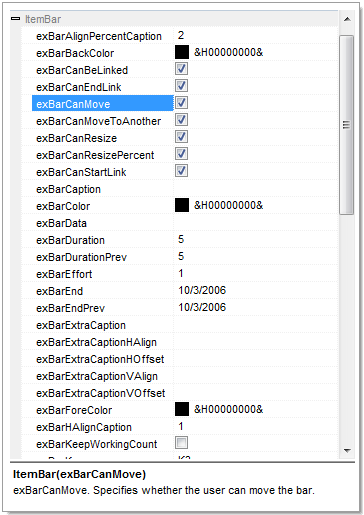
As you can see the exBarCanMove option is a value of ItemBarPropertyEnum
as well as all child items of the ItemBar property. In other words, the
EditProperty may add a single row for a property if the property has no
parameters, or have no predefined parameters, or several rows, if the property
returns another object, or have several parameters of a predefined type such as
Boolean or Enumeration.
The following VB sample lists the ItemBar
property (Items.ItemBar(Item as HITEM, Key as Variant, Property as
ItemBarPropertyEnum) as Variant) property, for the bar
from the focused item:
With PropertiesList1
    .Add "ItemBar", Array(G2antt1.Items, G2antt1.Items.FocusItem, G2antt1.Items.FirstItemBar(G2antt1.Items.FocusItem)), EditProperty
End With
| |
| |
EditPropertyWildcard | 20
|
Reserved.
| |
| |
EditPropertyWildcardParent | 21
|
Reserved.
| |

