private void BeforeDrawPart(object sender,exontrol.EXG2ANTTLib.DrawPartEnum Part,int hDC,ref int X,ref int Y,ref int Width,ref int Height,ref bool Cancel)
{
}
Private Sub BeforeDrawPart(ByVal sender As System.Object,ByVal Part As exontrol.EXG2ANTTLib.DrawPartEnum,ByVal hDC As Integer,ByRef X As Integer,ByRef Y As Integer,ByRef Width As Integer,ByRef Height As Integer,ByRef Cancel As Boolean) Handles BeforeDrawPart End Sub |
Syntax for BeforeDrawPart event, /COM version, on:
private void BeforeDrawPart(object sender, AxEXG2ANTTLib._IG2anttEvents_BeforeDrawPartEvent e)
{
}
void OnBeforeDrawPart(long Part,long hDC,long FAR* X,long FAR* Y,long FAR* Width,long FAR* Height,BOOL FAR* Cancel)
{
}
void __fastcall BeforeDrawPart(TObject *Sender,Exg2anttlib_tlb::DrawPartEnum Part,long hDC,long * X,long * Y,long * Width,long * Height,VARIANT_BOOL * Cancel)
{
}
procedure BeforeDrawPart(ASender: TObject; Part : DrawPartEnum;hDC : Integer;var X : Integer;var Y : Integer;var Width : Integer;var Height : Integer;var Cancel : WordBool); begin end; procedure BeforeDrawPart(sender: System.Object; e: AxEXG2ANTTLib._IG2anttEvents_BeforeDrawPartEvent); begin end; begin event BeforeDrawPart(long Part,long hDC,long X,long Y,long Width,long Height,boolean Cancel) end event BeforeDrawPart Private Sub BeforeDrawPart(ByVal sender As System.Object, ByVal e As AxEXG2ANTTLib._IG2anttEvents_BeforeDrawPartEvent) Handles BeforeDrawPart End Sub Private Sub BeforeDrawPart(ByVal Part As EXG2ANTTLibCtl.DrawPartEnum,ByVal hDC As Long,X As Long,Y As Long,Width As Long,Height As Long,Cancel As Boolean) End Sub Private Sub BeforeDrawPart(ByVal Part As Long,ByVal hDC As Long,X As Long,Y As Long,Width As Long,Height As Long,Cancel As Boolean) End Sub LPARAMETERS Part,hDC,X,Y,Width,Height,Cancel PROCEDURE OnBeforeDrawPart(oG2antt,Part,hDC,X,Y,Width,Height,Cancel) RETURN |
Syntax for BeforeDrawPart event, /COM version (others), on:
<SCRIPT EVENT="BeforeDrawPart(Part,hDC,X,Y,Width,Height,Cancel)" LANGUAGE="JScript"> </SCRIPT> <SCRIPT LANGUAGE="VBScript"> Function BeforeDrawPart(Part,hDC,X,Y,Width,Height,Cancel) End Function </SCRIPT> Procedure OnComBeforeDrawPart OLEDrawPartEnum llPart Integer llhDC Integer llX Integer llY Integer llWidth Integer llHeight Boolean llCancel Forward Send OnComBeforeDrawPart llPart llhDC llX llY llWidth llHeight llCancel End_Procedure METHOD OCX_BeforeDrawPart(Part,hDC,X,Y,Width,Height,Cancel) CLASS MainDialog RETURN NIL void onEvent_BeforeDrawPart(int _Part,int _hDC,COMVariant /*long*/ _X,COMVariant /*long*/ _Y,COMVariant /*long*/ _Width,COMVariant /*long*/ _Height,COMVariant /*bool*/ _Cancel)
{
}
function BeforeDrawPart as v (Part as OLE::Exontrol.G2antt.1::DrawPartEnum,hDC as N,X as N,Y as N,Width as N,Height as N,Cancel as L) end function function nativeObject_BeforeDrawPart(Part,hDC,X,Y,Width,Height,Cancel) return |
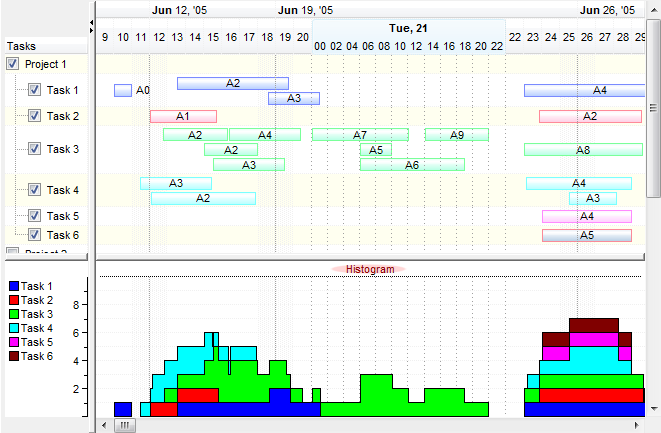
The following VB sample changes the Y and the Height parameters, and paints the "Histogram" text inside the histogram as shown bellow in the screen shot:
Private Type RECT
        Left As Long
        Top As Long
        Right As Long
        Bottom As Long
End Type
Private Const DT_SINGLELINE = &H20
Private Const DT_CENTER = &H1
Private Declare Function DrawText Lib "user32" Alias "DrawTextA" (ByVal hdc As Long, ByVal lpStr As String, ByVal nCount As Long, lpRect As RECT, ByVal wFormat As Long) As Long


Private Sub G2antt1_BeforeDrawPart(ByVal Part As EXG2ANTTLibCtl.DrawPartEnum, ByVal hdc As Long, X As Long, Y As Long, Width As Long, Height As Long, Cancel As Boolean)
    If (Part = exDrawLeftHistogram) Or (Part = exDrawRightHistogram) Then

        Dim h As Long
        h = 16

        If ((Part = exDrawRightHistogram)) Then
            Dim r As RECT
            r.Left = X + 2
            r.Right = r.Left + Width - 4
            r.Top = Y + 1
            r.Bottom = r.Top + h - 2

            DrawText hdc, "Histogram", 9, r, DT_SINGLELINE + DT_CENTER
        End If

        Y = Y + h
        Height = Height - h
    End If
End Sub