

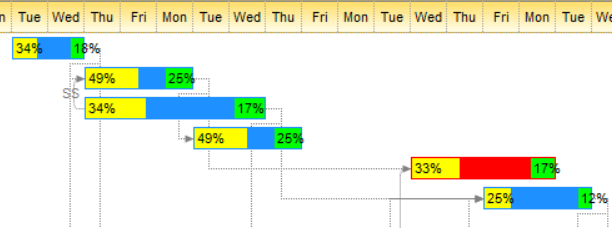
Currently, the control's owner-draw feature allows you to customize the visual-appearance for bars/tasks or control's histogram part.
The control provides the following events:
- BeforeDrawPart, occurs just before drawing a part of the control. For instance, you need to customize the part's background
- AfterDrawPart, occurs right after drawing the part of the control. For instance, you need to customize the part's foreground
Shortly, you can customize the drawing of control's part before and after default-drawing.
For instance, let's say that you need to specify a different background color, for "task" bars, while still keeping the bar's pattern color, which is specified by the bar's exBarColor property. In order to perform owner-draw for bars you need:
- defines a new type of bar called "OwnerDraw", which can be a new bar or a copy of any existing bars (only bars of "OwnerDraw" type fires BeforeDrawPart and AfterDrawPart events when they require to be painted)
- overrides the BeforeDrawPart and / or AfterDrawPart events
During the BeforeDrawPart and AfterDrawPart events, while Part event parameter is exOwnerDrawBar, the control's DrawPartItem and DrawPartKey provides the handle of the item and the key of the bar being drawn. You can use the Items.ItemBar(DrawPartItem, DrawPartKey, BarProperty) property to access any property related to the bar being painted. In the same manner you can use the Items.CellValue/Items.CellCaption properties to access any value/caption from the list/columns part of the control.
Syntax for AfterDrawPart event, /NET version, on:
private void AfterDrawPart(object sender,exontrol.EXG2ANTTLib.DrawPartEnum Part,int hDC,int X,int Y,int Width,int Height)
{
}
Private Sub AfterDrawPart(ByVal sender As System.Object,ByVal Part As exontrol.EXG2ANTTLib.DrawPartEnum,ByVal hDC As Integer,ByVal X As Integer,ByVal Y As Integer,ByVal Width As Integer,ByVal Height As Integer) Handles AfterDrawPart End Sub |
Syntax for AfterDrawPart event, /COM version, on:
private void AfterDrawPart(object sender, AxEXG2ANTTLib._IG2anttEvents_AfterDrawPartEvent e)
{
}
void OnAfterDrawPart(long Part,long hDC,long X,long Y,long Width,long Height)
{
}
void __fastcall AfterDrawPart(TObject *Sender,Exg2anttlib_tlb::DrawPartEnum Part,long hDC,long X,long Y,long Width,long Height)
{
}
procedure AfterDrawPart(ASender: TObject; Part : DrawPartEnum;hDC : Integer;X : Integer;Y : Integer;Width : Integer;Height : Integer); begin end; procedure AfterDrawPart(sender: System.Object; e: AxEXG2ANTTLib._IG2anttEvents_AfterDrawPartEvent); begin end; begin event AfterDrawPart(long Part,long hDC,long X,long Y,long Width,long Height) end event AfterDrawPart Private Sub AfterDrawPart(ByVal sender As System.Object, ByVal e As AxEXG2ANTTLib._IG2anttEvents_AfterDrawPartEvent) Handles AfterDrawPart End Sub Private Sub AfterDrawPart(ByVal Part As EXG2ANTTLibCtl.DrawPartEnum,ByVal hDC As Long,ByVal X As Long,ByVal Y As Long,ByVal Width As Long,ByVal Height As Long) End Sub Private Sub AfterDrawPart(ByVal Part As Long,ByVal hDC As Long,ByVal X As Long,ByVal Y As Long,ByVal Width As Long,ByVal Height As Long) End Sub LPARAMETERS Part,hDC,X,Y,Width,Height PROCEDURE OnAfterDrawPart(oG2antt,Part,hDC,X,Y,Width,Height) RETURN |
Syntax for AfterDrawPart event, /COM version (others), on:
<SCRIPT EVENT="AfterDrawPart(Part,hDC,X,Y,Width,Height)" LANGUAGE="JScript"> </SCRIPT> <SCRIPT LANGUAGE="VBScript"> Function AfterDrawPart(Part,hDC,X,Y,Width,Height) End Function </SCRIPT> Procedure OnComAfterDrawPart OLEDrawPartEnum llPart Integer llhDC Integer llX Integer llY Integer llWidth Integer llHeight Forward Send OnComAfterDrawPart llPart llhDC llX llY llWidth llHeight End_Procedure METHOD OCX_AfterDrawPart(Part,hDC,X,Y,Width,Height) CLASS MainDialog RETURN NIL void onEvent_AfterDrawPart(int _Part,int _hDC,int _X,int _Y,int _Width,int _Height)
{
}
function AfterDrawPart as v (Part as OLE::Exontrol.G2antt.1::DrawPartEnum,hDC as N,X as N,Y as N,Width as N,Height as N) end function function nativeObject_AfterDrawPart(Part,hDC,X,Y,Width,Height) return |
The following VB/NET sample (/NET Assembly) shows how you can divide a bar in three colors with dynamic percentages (percentage of colors can be different for each bar):
Private Sub exg2antt1_AfterDrawPart(ByVal sender As Object, ByVal Part As exontrol.EXG2ANTTLib.DrawPartEnum, ByVal G As System.Drawing.Graphics, ByVal Rect As System.Drawing.Rectangle) Handles exg2antt1.AfterDrawPart
    Rect.Inflate(-1, -1)
    Dim left As Rectangle = New Rectangle(Rect.Location, Rect.Size), right As Rectangle = New Rectangle(Rect.Location, Rect.Size)
    left.Width = left.Width / (2 + exg2antt1.DrawPartItem Mod 3)
    right.Width = left.Width / 2
    right.X = Rect.Right - right.Width
    Using fmt As StringFormat = New StringFormat(StringFormatFlags.NoClip Or StringFormatFlags.NoWrap)
        fmt.Trimming = StringTrimming.None
        fmt.LineAlignment = StringAlignment.Center
        G.FillRectangle(Brushes.Yellow, left)
        G.DrawString(String.Format("{0:0}", 100 * (left.Width / CDbl(Rect.Width))) + "%", exg2antt1.Font, Brushes.Black, left, fmt)
        G.FillRectangle(Brushes.Lime, right)
        G.DrawString(String.Format("{0:0}", 100 * (right.Width / CDbl(Rect.Width))) + "%", exg2antt1.Font, Brushes.Black, right, fmt)
    End Using
End Sub
Prior to this code, you can call the following:
.Chart.Bars.Add("OwnerDraw").Color = Color.DodgerBlue
.Items.set_ItemBar(0, "<*>", exontrol.EXG2ANTTLib.ItemBarPropertyEnum.exBarName, "OwnerDraw")
that adds the "OwnerDraw" type of bar, and converts all existing bars to "OwnerDraw" type
The following VB6 sample paints over the default-visual appearance of the bar:
Private Sub G2antt1_AfterDrawPart(ByVal Part As EXG2ANTTLibCtl.DrawPartEnum, ByVal hdc As Long, ByVal x As Long, ByVal y As Long, ByVal Width As Long, ByVal Height As Long)
    If (Part = exOwnerDrawBar) Then
        Dim nBkMode, nTextAlign, nColor, hBrush As Long
        Height = Height - 1
        hBrush = SelectObject(hdc, GetStockObject(4))
        Ellipse hdc, x + (Width - Height) / 2, y, x + (Width - Height) / 2 + Height, y + Height
        SelectObject hdc, hBrush
        nBkMode = SetBkMode(hdc, 1)
        nTextAlign = SetTextAlign(hdc, 6)
        nColor = SetTextColor(hdc, RGB(255, 255, 255))
        Dim s As String
        s = G2antt1.Items.CellCaption(G2antt1.DrawPartItem, 1)
        TextOut hdc, x + (Width) / 2 - 1, y + Height / 8, s, Len(s)
        SetTextAlign hdc, nTextAlign
        SetTextColor hdc, nColor
        SetBkMode hdc, nBkMode
    End If
End Sub
and previously you have to declare the API functions as:
Private Declare Function Ellipse Lib "gdi32" (ByVal hdc As Long, ByVal X1 As Long, ByVal Y1 As Long, ByVal X2 As Long, ByVal Y2 As Long) As Long
Private Declare Function SetBkMode Lib "gdi32" (ByVal hdc As Long, ByVal nBkMode As Long) As Long
Private Declare Function SetTextAlign Lib "gdi32" (ByVal hdc As Long, ByVal wFlags As Long) As Long
Private Declare Function TextOut Lib "gdi32" Alias "TextOutA" (ByVal hdc As Long, ByVal x As Long, ByVal y As Long, ByVal lpString As String, ByVal nCount As Long) As Long
Private Declare Function SetTextColor Lib "gdi32" (ByVal hdc As Long, ByVal crColor As Long) As Long
Private Declare Function SelectObject Lib "gdi32" (ByVal hdc As Long, ByVal hObject As Long) As Long
Private Declare Function GetStockObject Lib "gdi32" (ByVal nIndex As Long) As Long
The following VB/NET sample (/NET Assembly) shows how you can paint over the default-visual appearance of the bar:
Private Sub Exg2antt1_AfterDrawPart(ByVal sender As System.Object, ByVal Part As exontrol.EXG2ANTTLib.DrawPartEnum, ByVal G As System.Drawing.Graphics, ByVal Rect As System.Drawing.Rectangle) Handles Exg2antt1.AfterDrawPart
    If (Part = exontrol.EXG2ANTTLib.DrawPartEnum.exOwnerDrawBar) Then
        Dim rText As Rectangle = New Rectangle(Rect.Left + (Rect.Width - Rect.Height) / 2, Rect.Top, Rect.Height, Rect.Height)
        G.FillEllipse(Brushes.Black, rText)
        If Not (Exg2antt1.DrawPartItem = 0) Then
            Dim s As String = Exg2antt1.Items.get_CellCaption(Exg2antt1.DrawPartItem, 1)
            G.DrawString(s, sfFont, Brushes.White, rText, sfCenter)
        End If
    End If
End Sub
The following C# sample (/NET Assembly) shows how you can paint over the default-visual appearance of the bar:
private void Exg2antt1_AfterDrawPart(object sender, exontrol.EXG2ANTTLib.DrawPartEnum Part, Graphics G, Rectangle Rect)
{
    if ( Part == exontrol.EXG2ANTTLib.DrawPartEnum.exOwnerDrawBar )
    {
        Rectangle rText = new Rectangle(Rect.Left + (Rect.Width - Rect.Height) / 2, Rect.Top, Rect.Height, Rect.Height);
        G.FillEllipse(Brushes.Black, rText);
        if (Exg2antt1.DrawPartItem != 0)
        {
            String s = Exg2antt1.Items.get_CellCaption(Exg2antt1.DrawPartItem, 1);
            G.DrawString(s, sfFont, Brushes.White, rText, sfCenter);
        }
    }
}
The following C++ sample shows how you can paint over the default-visual appearance of the bar:
void CSchedulingDlg::AfterDrawPartG2antt1(long Part, long hDC, long X, long Y, long Width, long Height)
{
	if ( m_spG2antt != NULL )
		if ( Part == 0 )
		{
			HDC hDCDraw = (HDC)hDC;
			Height = Height - 1;
			HBRUSH hBrush = (HBRUSH)::SelectObject( hDCDraw, GetStockObject( 4 /*BLACK_BRUSH*/ ) );
			Ellipse( hDCDraw, X + (Width - Height)/2, Y, X + (Width - Height)/2 + Height, Y + Height );
			::SelectObject( hDCDraw, hBrush );
			int nBkMode = SetBkMode( hDCDraw, 1 /*TRANSPARENT*/ );
			int nColor = SetTextColor( hDCDraw, RGB(255,255,255) );
			int nTextAlign = SetTextAlign( hDCDraw, 6 /*TA_CENTER*/ );
			CString s = m_spG2antt->Items->CellCaption[m_spG2antt->DrawPartItem, 1];
			TextOut( hDCDraw, X + (Width)/2 - 1, Y + Height/8, s, s.GetLength() );
			SetTextAlign( hDCDraw, nTextAlign );
			SetTextColor( hDCDraw, nColor );
			SetBkMode( hDCDraw, nBkMode );
		}
}