

Based on the values of the Link Key parameter the Link property changes a property for none, one or multiple links as follows:
- Link("<*>",Property) = Value changes the Property of all links in the chart.
- Link("<pattern>",Property) = Value changes the Property of all links in the chart that match a specified pattern using wild characters as *,?,# or []
The pattern may include the space character which indicates multiple patterns to be used when matching. For instance "A* *K" indicates all keys that starts on A and all keys that ends on K. If not using a pattern, the Link changes the property for specified key in the chart.
Currently, the single read-only property that supports pattern for the LinkKey parameter is exLinksCount, which counts the links as follows:
- Link("<*>",exLinksCount) counts all links in the chart.
- Link(0,"<pattern>",exLinksCount) counts all links in the chart that match a specified pattern using wild characters as *,?,# or []
The pattern may include the space character which indicates multiple patterns to be used when matching. For instance "A* *K" indicates all keys that start on A and all keys that end on K.
The /NET Assembly version defines get/set shortcut properties as follow ( they start with get_ or set_ keywords ):
- LinkStartItem : Integer, retrieves or sets a value that indicates the handle of the item where the link start
- LinkStartBar : Object, retrieves or sets a value that indicates the key of the bar where the link starts
- LinkEndItem : Integer, retrieves or sets a value that indicates the handle of the item where the link ends
- LinkEndBar : Object, retrieves or sets a value that indicates the key of the bar where the link ends
- LinkVisible : Boolean, specifies whether the link is visible or hidden
- LinkUserData : Object, specifies an extra data associated with the link
- LinkStartPos : AlignmentEnum, specifies the position where the link starts in the source item
- LinkEndPos : AlignmentEnum, specifies the position where the link ends in the target item
- LinkColor : Color, specifies the color to paint the link
- LinkArrowColor : Color, specifies the color to paint the arrow of the link
- LinkArrowColor32 : Color, specifies the color to paint the arrow of the link
- LinkStyle : LinkStyleEnum, specifies the style to paint the link
- LinkWidth : Integer, specifies the width in pixels of the link
- LinkShowDir : Boolean, specifies whether the link shows the direction
- LinkShowRound : Boolean, specifies whether the link is round or rectangular
- LinkText : String, specifies the HTML text being displayed on the link
- LinkToolTip : String, specifies the HTML text being shown when the cursor hovers the link
- LinkSelected : Boolean, specifies whether the link is selected or unselected
- LinkGroupBars : GroupBarsOptionsEnum, groups or ungroups the bars being linked with the specified options
- LinksCount : Integer, specifies the number of the links within the chart
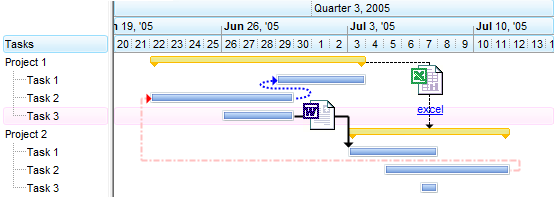
So instead using the get_Link or set_Link properties you can use these functions.
For instance, the following VB/NET sample changes the link's color:
With Exg2antt1.Items
    .set_LinkColor("L1", Color.Red)
End With
For instance, the following C# sample changes the link's color:
exg2antt1.Items.set_LinkColor("L1", Color.Red);
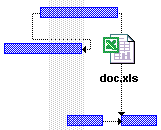
The following VB sample displays a text plus a picture on a link:
G2antt1.Items.Link("Link", exLinkText) = " <img>excel</img><br><br><b>doc.xls"