

In order to use the PutRes method the Source control must:
- specify the activity/bar's resources using the ItemBar(exBarResources) property
Bellow you can find:
- How to display the resources from the Source to the Target control ( exPutResLoad )
- How to display a histogram of using resources in the Target control
- How to update the Source from the Target once it has been updated ( exPutResSave )
The following sample shows the bar's allocation of resources: ( for instance the Task 1 uses the R1, Task 2 uses the R1 and R2, while Task 3 uses R2 on 60% and R3 on 39%, and so on )
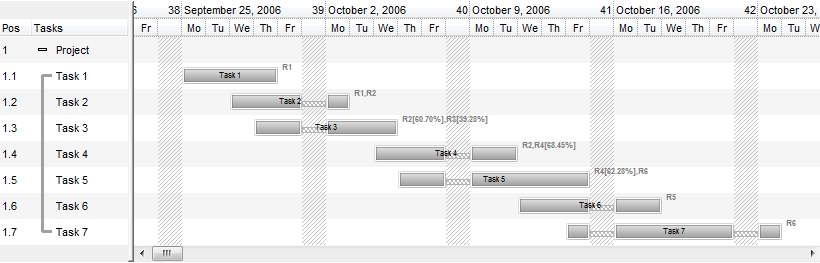
(source, picture 1)
while the next picture shows the resource usage being taken from the first picture ( for instance, the R1 is being used by Task 1 and Task 2, R2 is used by Task 2, Task 3 on 60% and Task 4, and so on ) :
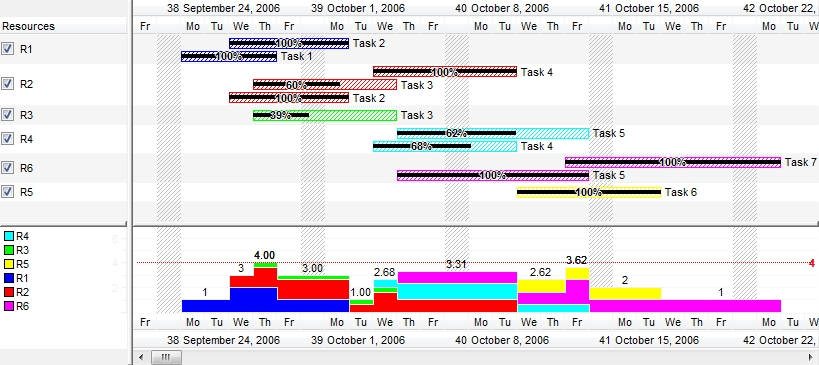
(target, picture 2)
The Source ( picture 1 ) is the original control that displays your activities / bars. Use the Source.PutRes( Target.ResHandle, exPutResSave ) to update the bar's resources in a Source control, from a Target control. IN a Source control, you can use the following properties to specify the usage of resources.
- exBarResources property (get/set) indicates the resources to be used by the current bar in the Source, as a string expression. The exBarResources property is a string expression that indicate the list of resources ( including its usage, or 100% if missing ). The resources are separated by , ( comma ) character, while the usage is specified as a double expression ( using the . dot character as a decimal separator ). For instance the "Resource1,Resource2,Resource3" indicates that the bar uses the Resource1,Resource2,Resource3, while "R1,R2[50%],R3[67.89%]" specifies that the bar uses the R1 on 100%, R2 on 50% and R3 on 67.89%.
You can use the exBarCaption to display the bar's resources using the <%=formula%> format, like in the following VB sample:
With G2antt1.Chart.Bars("Task")
    .Def(EXG2ANTTLibCtl.ItemBarPropertyEnum.exBarCaption) = "<%=%" & EXG2ANTTLibCtl.ItemBarPropertyEnum.exBarResources & "%>"
    .Def(EXG2ANTTLibCtl.ItemBarPropertyEnum.exBarHAlignCaption) = 18
End With
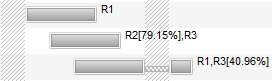
In other words, the sample allows you to display the bar's exBarResources property as shown bellow:
The set operation for the exBarResources property supports three formats, determined by the first character of the assigned value:
- If the first character is a plus sign (+), the rest of the expression specifies resources to be added to the current bar's resources.
For example, if the current exBarResources value is "R1,R2" and you set it to "+R3", the resource R3 is added, resulting in "R1,R2,R3"- If the first character is a minus sign (-), the rest of the expression specifies resources to be removed from the current bar's resources.
For example, if the current exBarResources value is "R1,R2" and you set it to "-R2", the resource R2 is removed, resulting in "R1"- If the first character is neither + nor -, the entire expression replaces the current exBarResources value.
For example, if the current value is "R1,R2" and you set it to "R3,R4", the new value becomes "R3,R4"
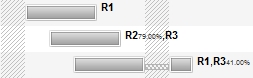
- exBarResourceFormat property (get/set) indicates the format or the expression to be used if you need to display the bar's resource in a different format, in Source, as a string expression. The expression supports the name keyword which indicates the name of the resource, and the percent keyword to get the usage percent a a double expression between 0 and 1. The expression supports all predefined functions listed here. Use the exBarResourcesFormat ( NOT exBarResourceFormat, whith no s ) to get the HTML value of the formatted string using the bar's resources. For instance, let's say we need to display the resource names in bold, and the usage percent in a smaller font and a different foreground color, so the Items.ItemBar(exBarResourceFormat) property could be "`<b>` + name + `</b><font ;5><fgcolor=404040>` + (percent = 1 ? `` : (round(100*percent) format ``) + `%` ) + `</fgcolor></font>`", and so the VB sample could show as:
With G2antt1.Chart.Bars("Task")
    .Def(exBarResourceFormat) = "`<b>` + name + `</b><font ;5><fgcolor=404040>` + (percent = 1 ? `` : (round(100*percent) format ``) + `%` ) + `</fgcolor></font>`"
    .Def(EXG2ANTTLibCtl.ItemBarPropertyEnum.exBarCaption) = "<%=%" & EXG2ANTTLibCtl.ItemBarPropertyEnum.exBarResourcesFormat & "%>"
    .Def(EXG2ANTTLibCtl.ItemBarPropertyEnum.exBarHAlignCaption) = 18
End With
In other words, the sample allows you to display the bar's exBarResources property as shown bellow:
- exBarResourcesFormat property (get only ) returns formatted expression of the exBarResources using the exBarResourceFormat ( no s, so it is exBarResourceFormat, not exBarResourcesFormat ).
- exBarResourcesNames property (get only ) returns the name of each resource to be used by the current bar, in the Source, as a string expression. This option returns no percent or usage of any resource. For instance, if the exBarResources property is "R3[67.89%],R4[23.23%]", the exBarResourcesNames property gets the "R3,R4".
- exBarResourcesUsages property (get only ) returns the usage ( double expression from 0 to 1 ) of each resource to be used by the current bar, in the Source, as a string expression. This option returns no name any resource. For instance, if the exBarResources property is "R3[67.89%],R4[23.23%]", the exBarResourcesUsages property gets the "0.6789,0.2323".
The Target ( picture 2 ) is the control that displays the Resources column, where all resources found are being added line by line, and its usage on items. Use the Target.PutRes(Source.ResHandle, exPutResLoad) to update the Target control from a Source control. IN a Target control, you can use the following properties to specify the usage of resources.
- exBarPercent property (get/set only ) specifies the usage of the resource in the current bar/activity. The following VB sample updates the exBarEffort ( so the histogram will be shown accordingly ) once the user resizes a bar:
Private Sub G2antt1_BarResizing(ByVal Item As EXG2ANTTLibCtl.HITEM, ByVal Key As Variant)
    With G2antt1.Items
        .ItemBar(Item, Key, EXG2ANTTLibCtl.ItemBarPropertyEnum.exBarEffort) = .ItemBar(Item, Key, EXG2ANTTLibCtl.ItemBarPropertyEnum.exBarPercent)
    End With
End Sub
Now, let's display the Resources of the Source into the Target control ( Target.PutRes Source.ResHandle, exPutResLoad )
First step is specifying the ItemBar(exBarResources) property in the Source control. If the Source control has no bars with the ItemBar(exBarResources) property, no resource will be displayed in the target control.
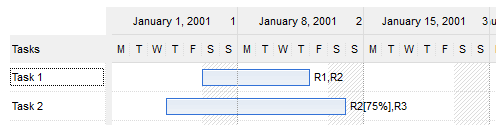
The following sample adds a column and two activities/bars, with allocated resources:
With Source
    .BeginUpdate
    With .Chart
        .FirstVisibleDate = #1/1/2001#
        With .Bars("Task")
            .Def(exBarHAlignCaption) = 18
            .Def(exBarCaption) = "<%=%49%>"
        End With
    End With
    .Columns.Add "Tasks"
    Dim h As Long
    With .Items
        h = .AddItem("Task 1")
        .AddBar h, "Task", #1/6/2001#, #1/12/2001#, "K1"
        .ItemBar(h, "K1", exBarResources) = "R1,R2"
        h = .AddItem("Task 2")
        .AddBar h, "Task", #1/4/2001#, #1/14/2001#, "K2"
        .ItemBar(h, "K2", exBarResources) = "R2[75%],R3"
    End With
    .EndUpdate
End With
and the Source should show as:
The second step is calling the PutRes method as follows:
Target.PutRes Source.ResHandle, exPutResLoad
and the Target should show as:
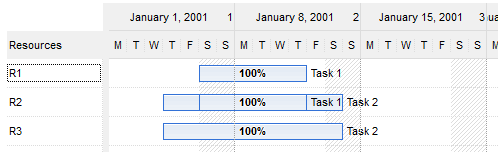
The PutRes(exPutResLoad) method updates the Target as follows:
- adds the "Resources" column ( nothing happens if the PutRes method was already called, or the Target control already contains a column with the Key "Resources" )
- adds a new item with the name of the resource for each resource found ( ItemBar(exBarResources) ) in the Source control ( R1, R2, ... )
- adds a new bar for each activity/bar in the Source control, that uses the specified resource, where the ItemBar(exBarPercent) and ItemBar(exBarEffort) properties indicate the usage of the resource ( double expression between 0 and 1 ). The ItemBar(exBarEffort) property should be updated with the ItemBar(exBarPercent), during the BarResizing event, in case you provide a histogram view for the Target control, as explained bellow.
With Target
    With .Chart
        .FirstVisibleDate = Source.Chart.FirstVisibleDate
        With .Bars.Add("Task%Progress")
            .OverlaidType = exOverlaidBarsStack Or exOverlaidBarsStackAutoArrange
            .Shortcut = "Task"
        End With
    End With
End With
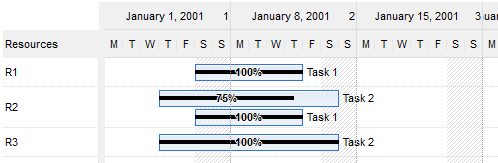
The code, defines the "Task" bar to display
"Progress", and to be stacked on the same row. This code, should
be called once, before calling the PutRes and so the Target should show
as:
- Bar.HistogramPattern or Bar.HistogramColor is specified. By default, none of these properties are set, so no bar is represented in the histogram
- ItemBar(exBarEffort) property specifies the effort to execute an unit in the task. By default, the ItemBar(exBarEffort) property is initialize with the ItemBar(exBarPercent) ( resource usage percent )
With Target
    With .Chart
        .FirstVisibleDate = Source.Chart.FirstVisibleDate
        With .Bars.Add("Task%Progress")
            .OverlaidType = exOverlaidBarsStack Or exOverlaidBarsStackAutoArrange
            .Shortcut = "Task"
            .HistogramPattern = exPatternShadow
            .HistogramCriticalColor = .HistogramColor
            .ShowHistogramValues = "1"
        End With
        .HistogramVisible = True
        .HistogramView = exHistogramCheckedItems
        .HistogramHeight = 164
    End With
    With .Columns.Add("Names")
        .Key = "Resources"
        .Def(exCellHasCheckBox) = True
    End With
End With
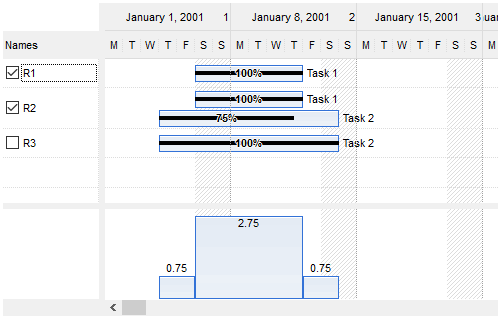
The code does the following:
- adds a column "Names", with the Key "Resources", that displays a check-box for each item, so next PutRes call won't add a new column
- change the bar's HistogramPattern so the "Task" will be displayed in the control's histogram
- display the control's histogram view
Private Sub Target_BarResizing(ByVal Item As EXG2ANTTLibCtl.HITEM, ByVal Key As Variant)
    With Target.Items
        .ItemBar(Item, Key, exBarEffort) = .ItemBar(Item, Key, exBarPercent)
    End With
End Sub
The third step is calling the PutRes method as follows:
and the Target should show as:Target.PutRes Source.ResHandle, exPutResLoad
With Target
    With .Chart
        .FirstVisibleDate = Source.Chart.FirstVisibleDate
        With .Bars.Add("Task%Progress")
            .OverlaidType = exOverlaidBarsStack Or exOverlaidBarsStackAutoArrange
            .Shortcut = "Task"
            .HistogramType = exHistOverAllocation Or exHistCumulative
            .HistogramCumulativeColor(1) = RGB(255, 255, 0)
            .HistogramColor = RGB(196, 196, 196)
            .HistogramPattern = exPatternShadow
            .ShowHistogramValues = "value > 100 ? 255 : 1"
        End With
        .HistogramVisible = True
        .HistogramView = exHistogramCheckedItems
        .HistogramHeight = 96
    End With
    With .Columns.Add("Names")
        .Key = "Resources"
        .Def(exCellHasCheckBox) = True
    End With
End With
The code does the following:
- adds a column "Names", with the Key "Resources", that displays a check-box for each item, so next PutRes call won't add a new column
- change the bar's HistogramPattern so the "Task" will be displayed in the control's histogram
- display the control's histogram view
The third step is updating the exBarEffort after PutRes call as follows:Target.PutRes Source.ResHandle, exPutResLoad
With Target.Items
    Dim Item As Variant
    For Each Item In Target.Items
        Dim Key As Variant
        Key = .FirstItemBar(Item)
        While Not IsEmpty(Key)
            .ItemBar(Item, Key, exBarEffort) = .ItemBar(Item, Key, exBarPercent) * .ItemBar(Item, Key, exBarDuration)
            Key = .NextItemBar(Item, Key)
        Wend
    Next
End With
The code enumerates all the bars in the Target control,
and changes the exBarEffort property to be exBarPecent of exBarDuration.
This code is required as for exHistOverAllocation type the work-load for a task is computed as
ItemBar(exBarEffort) / ItemBar(exBarDuration). The work-load for the task is the work effort / task duration. (i.e. If item.exBarEffort = 1 and
the bar's length is 10 days, then the work-load = 0.1 or 10%).
We also, should apply the change of exBarEffort when the
BarResizing event, such as:
Private Sub Target_BarResizing(ByVal Item As EXG2ANTTLibCtl.HITEM, ByVal Key As Variant)
    With Target.Items
        .ItemBar(Item, Key, exBarEffort) = .ItemBar(Item, Key, exBarPercent) * .ItemBar(Item, Key, exBarDuration)
    End With
End Sub
and the Target should show as:
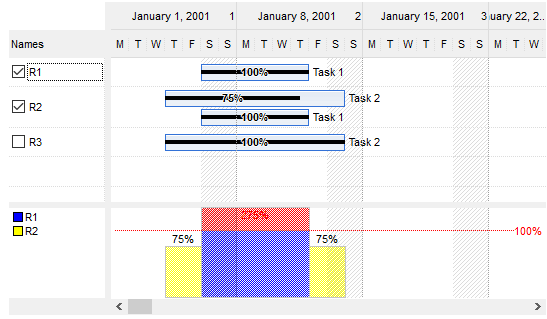
The PutRes(exPutResSave) method updates the Source control as follows:Source.PutRes Target.ResHandle, exPutResSave
- updates the activity/bar's Start / ItemBar(exBarStart) and End / ItemBar(exBarEnd) date-time, in the Source control, according to its associated bar in the Target control
- updates the ItemBar(exBarResources) property in the Source control, with the new resource usage being indicated by ItemBar(exBarPercent) property in the Target control.