

property Bar.ShowHistogramValues as String
Specifies the formula that returns the color to display the selected values in the histogram for specified type of bar.

 TypeDescription 
   String A String expression that specifies the color to display the values in the histogram.  
By default, the ShowHistogramValues property is empty. If the ShowHistogramValues property is empty or not valid, the values are not shows in the histogram. The easiest way to show the values in the histogram is just using ShowHistogramValues property on "1". The values in the histogram show a % character if the HistogramType property is exHistOverAllocation. The sum of the exBarEffort value of each bar indicates the value being shown in the histogram.  The value keyword in ShowHistogramValues property indicates the value in the histogram. For instance, "value>5?255:0" displays values greater than 5 with the color 255 ( red in RGB format ). The "16711680" specifies the color to be shown the values in the histogram ( blue in RGB format is RGB(0,0,255) in other words it is 16711680 ). The HistogramRulerLinesColor property indicates the color to show the rulers in the left side of the histogram. The HistogramValueFromPoint property gets the value in the histogram from the specified location.

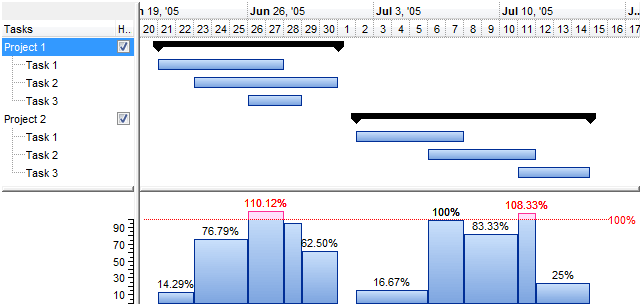
The following screen shows values in a exHistOverLoad histogram (ShowHistogramValues property is "value>100?255:1"):
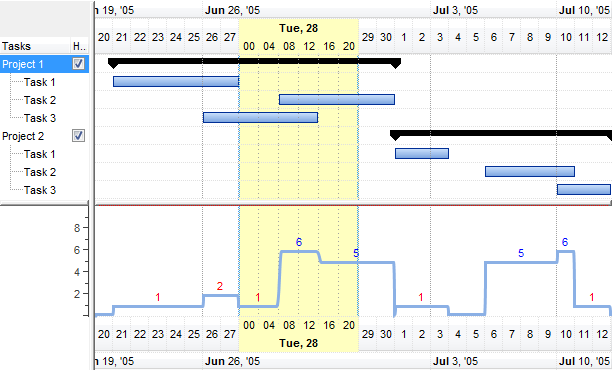
The following screen shows values in a exHistOverAllocation histogram ( ShowHistogramValues property is "value>=5?16711680:255"):
The supported binary arithmetic operators are:

The supported unary boolean operators are:

The supported binary boolean operators are:

The supported binary boolean operators, all these with the same priority 0, are :

The supported ternary operators, all these with the same priority 0, are :

"expression ? true_part : false_part"

, while it executes and returns the true_part if the expression is true, else it executes and returns the false_part. For instance, the "%0 = 1 ? 'One' : (%0 = 2 ? 'Two' : 'not found')" returns 'One' if the value is 1, 'Two' if the value is 2, and 'not found' for any other value. A n-ary equivalent operation is the case() statement, which is available in newer versions of the component.

The supported n-ary operators are (with priority 5):

"expression in (c1,c2,c3,...cn)"

, where the c1, c2, ... are constant elements. The constant elements could be numeric, date or string expressions. For instance the "value in (11,22,33,44,13)" is equivalent with "(expression = 11) or (expression = 22) or (expression = 33) or (expression = 44) or (expression = 13)". The in operator is not a time consuming as the equivalent or version is, so when you have large number of constant elements it is recommended using the in operator. Shortly, if the collection of elements has 1000 elements the in operator could take up to 8 operations in order to find if an element fits the set, else if the or statement is used, it could take up to 1000 operations to check, so by far, the in operator could save time on finding elements within a collection.

"expression switch (default,c1,c2,c3,...,cn)"

, where the c1, c2, ... are constant elements, and the default is a constant element being returned when the element is not found in the collection. The constant elements could be numeric, date or string expressions.  The equivalent syntax is "%0 = c 1 ? c 1 : ( %0 = c 2 ? c 2 : ( ... ? . : default) )". The switch operator is very similar with the in operator excepts that the first element in the switch is always returned by the statement if the element is not found,  while the returned value is the value itself instead -1. For instance, the "%0 switch ('not found',1,4,7,9,11)" gets 1, 4, 7, 9 or 11, or 'not found' for any other value. As the in operator the switch operator uses binary searches for fitting the element, so it is quicker that iif (immediate if operator) alterative.

"expression case ([default : default_expression ; ] c1 : expression1 ; c2 : expression2 ; c3 : expression3 ;....)"

If the default part is missing, the case() operator returns the value of the expression if it is not found in the collection of cases ( c1, c2, ...). For instance, if the value of expression is not any of c1, c2, .... the default_expression is executed and returned. If the value of the expression is c1, then the case() operator executes and returns the expression1. The default, c1, c2, c3, ... must be constant elements as numbers, dates or strings. For instance, the "date(shortdate(value)) case (default:0 ; #1/1/2002#:1 ; #2/1/2002#:1; #4/1/2002#:1; #5/1/2002#:1)" indicates that only #1/1/2002#, #2/1/2002#,  #4/1/2002# and  #5/1/2002# dates returns 1, since the others returns 0. For instance the following sample specifies the hour being non-working for specified dates: "date(shortdate(value)) case(default:0;#4/1/2009# : hour(value) >= 6 and hour(value) <= 12 ; #4/5/2009# : hour(value) >= 7 and hour(value) <= 10 or hour(value) in(15,16,18,22); #5/1/2009# : hour(value) <= 8)" statement indicates the working hours for dates as follows:

The in, switch and case() use binary search to look for elements so they are faster then using iif and or expressions.

Obviously, the priority of the operations inside the expression is determined by ( ) parenthesis and the priority for each operator. 

The supported conversion unary operators are:

Other known operators for numbers are:

Other known operators for strings are:

Other known operators for dates are:

The expression supports also immediate if ( similar with iif in visual basic, or ? : in C++ ) ie cond ? value_true : value_false, which means that once that cond is true the value_true is used, else the value_false is used. Also, it supports variables, up to 10 from 0 to 9. For instance, 0:="Abc" means that in the variable 0 is "Abc", and =:0 means retrieves the value of the variable 0. You can use variables to avoid computing several times the same thing.


Send comments on this topic.
© 1999-2012 Exontrol.COM, Software. All rights reserved.