

By default, the ExploreFromHere property is "C:\". The ExplorerFromHere property specifies the root folder(s) for the control. The ExpandFolders property retrieves or sets a value that indicates whether the control expands the folder objects. Use the IncludeFolders property to exclude folders from the current list.
Starting with the version 14.0, the control supports multiple root-folders. The ExploreFromHere property specifies multiple root-folders if they are separated by | or \r\n characters. If the ExploreFromHere entity includes a > character, the characters after indicates the HTML caption to be displayed instead of its default name. For instance: "C:\>" includes the C system driver as a root folder, rather than listing its content, "C:\>System <b>C</b>", includes the system C drive as a root folder with the name System C, c in bold, "C:\|E:\" specifies that the control includes C and E system drives, as root folders, "E:\Exontrol|::{20D04FE0-3AEA-1069-A2D8-08002B30309D}" specifies to include the E:\Exontrol folder and the My Computer system folder.
The following screen shots show the control ExploreFromHere property takes different values such as "C:\", "C:\>", "C:\><b>System (C:)</b>" or "C:\|D:\|E:\Exontrol"
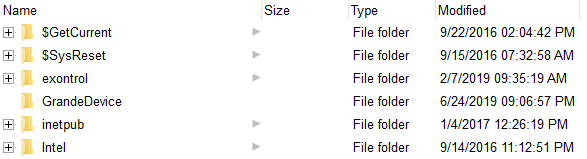 ExploreFromHere = "C:\"
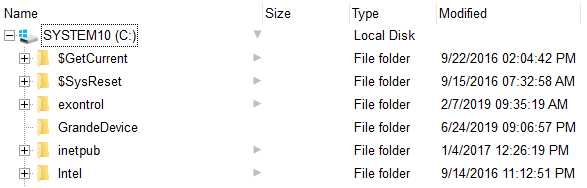 ExploreFromHere = "C:\>"
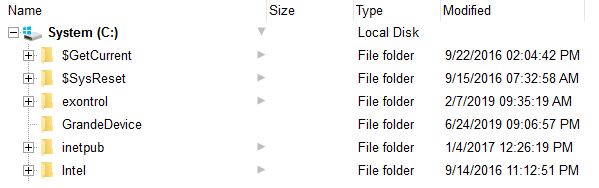 ExploreFromHere = "C:\><b>System (C:)</b>"
 ExploreFromHere = "C:\|D:\|E:\Exontrol"
The ExploreFromHere property changes the BrowseFolderPath property. The BrowseFolderPath property retrieves or sets the browsed folder path. The BrowseFolderPath property has no effect (returns empty string), if the control's ExploreFromHere property includes |, > or \r\n characters (shortly the BrowseFolderPath property has no effect if the control display multiple root-folders). Use the HasButtons property to hide or show the + buttons. Use the IncludeFilesInFolder property to include files when expanding a folder. Use the Expand method to programmatically expand a folder giving its path. Use the Add method to add rules to highlight the files and folders in the control. The RelativeName property gets the relative path for the file or folder, based on the ExploreFromHere property.
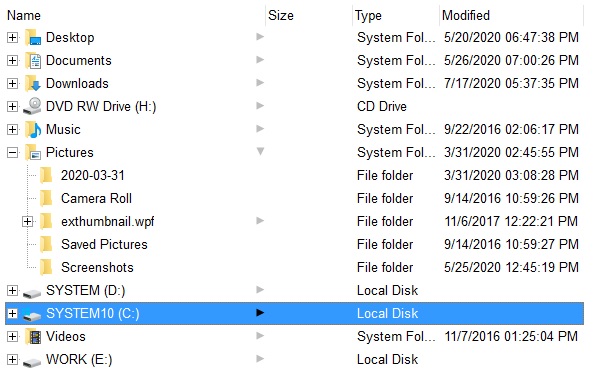
The following VB samples browses the "c:\temp" folder:
ExFileView1.ExploreFromHere = "c:\temp"
The following VB samples browses the "Desktop" folder:
ExFileView1.ExploreFromHere = "::{00021400-0000-0000-C000-000000000046}"
The following VB samples browses the "My Network Places" folder:
ExFileView1.ExploreFromHere = "::{208D2C60-3AEA-1069-A2D7-08002B30309D}"
The following VB samples browses the "My Computer" folder:
ExFileView1.ExploreFromHere = "::{20D04FE0-3AEA-1069-A2D8-08002B30309D}"
The following C++ samples browses the "Desktop" folder:
m_fileview.SetExploreFromHere( "::{00021400-0000-0000-C000-000000000046}" );
The following VB.NET samples browses the "Desktop" folder:
With AxExFileView1
    .ExploreFromHere = "::{00021400-0000-0000-C000-000000000046}"
End With
The following C# samples browses the "Desktop" folder:
axExFileView1.ExploreFromHere = "::{00021400-0000-0000-C000-000000000046}";
The following VFP samples browses the "Desktop" folder:
With thisform.ExFileView1
    .ExploreFromHere = "::{00021400-0000-0000-C000-000000000046}"
EndWith