

By default, the ExpandFolders property is False. If the ExpandFolders property is True, each folder that contains a subfolder, displays +/- button, that allows to expand or collapse the folder. You can use the ExpandFolder property to let ExFileView control simulates a folderview control. Use the IncludeFolders property to include folders in the current list. Use the HasButtons property to hide or show the + buttons. Use the IncludeFilesInFolder property to include files when expanding a folder. Use the Expand method to programmatically expand a folder giving its path. Use the ExpandOnDblClk property to expand or collapse a folder when user double clicks the folder. Use the ExploreFromHere property specifies the root folder for the control. The Folder property specifies whether a File object holds a file or a folder. The IncludeFolderFilter property specifies a wild characters expression that indicates the folders being included. The ExcludeFolderFilter property specifies a wild characters expression that indicates the folders being excluded. The Indent property retrieves or sets the amount, in pixels, that child items are indented relative to their parent items.
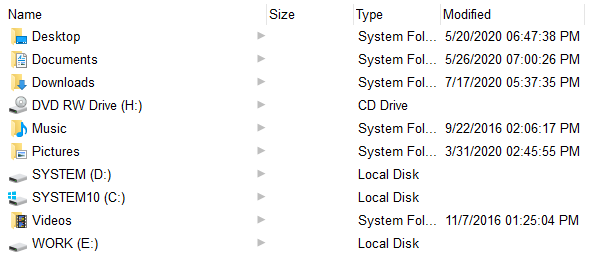 ExpandFolders = False
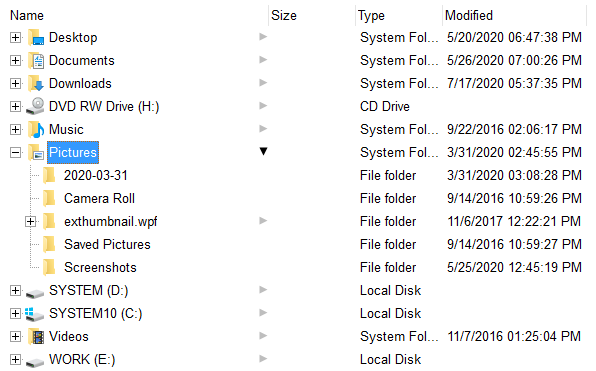 ExpandFolders = True
The File.Children property helps you to collect recursively all files/folders of specified object. The EnumR function displays the full name of each file/folder, and goes recursively to each subfolder. Use the Folder property to specify whether the File object hosts a file or a folder. The Children property returns a collection of File objects, if the ExpandFolders property is True.
Public Sub EnumR(ByVal f As EXFILEVIEWLibCtl.File)
    Debug.Print f.FullName
    For Each c In f.Children
        EnumR (c)
    Next
End Sub
The following VB sample expands the "c:\winnt" ( absolute path ) folder when the control is browsing the 'Desktop':
With ExFileView1
    .ExpandFolders = True
    .ExploreFromHere = "::{00021400-0000-0000-C000-000000000046}"
    .Expand "C:\WINNT"
End With
The following C++ sample expands the "c:\winnt" folder:
m_fileview.SetExpandFolders( TRUE );
m_fileview.SetExploreFromHere( "::{00021400-0000-0000-C000-000000000046}" );
m_fileview.Expand( "c:\\winnt" );
The following VB.NET sample expands the "c:\winnt" folder:
With AxExFileView1
    .ExpandFolders = True
    .ExploreFromHere = "::{00021400-0000-0000-C000-000000000046}"
    .Expand("C:\WINNT")
End With
The following C# sample expands the "c:\winnt" folder:
axExFileView1.ExpandFolders = true;
axExFileView1.ExploreFromHere = "::{00021400-0000-0000-C000-000000000046}";
axExFileView1.Expand("C:\\WINNT");
The following VFP sample expands the "c:\winnt" folder:
With thisform.ExFileView1
    .ExpandFolders = .t.
    .ExploreFromHere = "::{00021400-0000-0000-C000-000000000046}"
    .Expand("C:\WINNT")
EndWith