

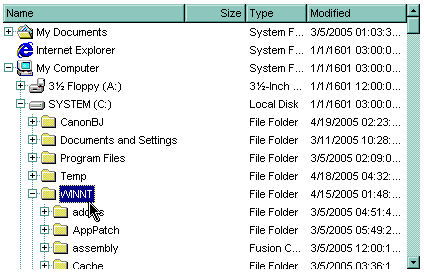
The following VB sample expands the "winnt\system32" ( relative path ) folder:
With ExFileView1
    .ExpandFolders = True
    .HasLinesAtRoot = True
    .Expand "WINNT\system32"
End With
The following VB sample expands the "c:\winnt" ( absolute path ) folder when the control is browsing the 'Desktop':
With ExFileView1
    .ExpandFolders = True
    .ExploreFromHere = "::{00021400-0000-0000-C000-000000000046}"
    .Expand "C:\WINNT"
End With
The following C++ sample expands the "c:\winnt" folder:
m_fileview.SetExpandFolders( TRUE );
m_fileview.SetExploreFromHere( "::{00021400-0000-0000-C000-000000000046}" );
m_fileview.Expand( "c:\\winnt" );
The following VB.NET sample expands the "c:\winnt" folder:
With AxExFileView1
    .ExpandFolders = True
    .ExploreFromHere = "::{00021400-0000-0000-C000-000000000046}"
    .Expand("C:\WINNT")
End With
The following C# sample expands the "c:\winnt" folder:
axExFileView1.ExpandFolders = true;
axExFileView1.ExploreFromHere = "::{00021400-0000-0000-C000-000000000046}";
axExFileView1.Expand("C:\\WINNT");
The following VFP sample expands the "c:\winnt" folder:
With thisform.ExFileView1
    .ExpandFolders = .t.
    .ExploreFromHere = "::{00021400-0000-0000-C000-000000000046}"
    .Expand("C:\WINNT")
EndWith