

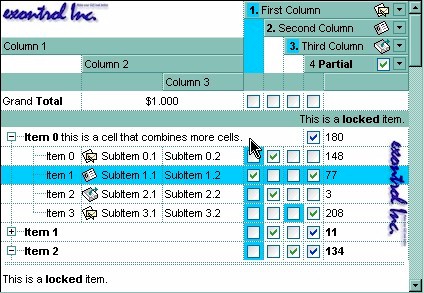
The following VB sample merges the first three cells in the focused item:
With Grid1.Items
    .CellMerge(.FocusItem, 0) = 1
    .CellMerge(.FocusItem, 0) = 2
End With
The following C++ sample merges the first three cells in the focused item:
#include "Items.h"
CItems items = m_grid.GetItems();
COleVariant vtItem( items.GetFocusItem() ), vtColumn( long( 0 ) );
items.SetCellMerge( vtItem, vtColumn, COleVariant( long(1) ) );
items.SetCellMerge( vtItem, vtColumn, COleVariant( long(2) ) );
The following VB.NET sample merges the first three cells in the focused item:
With AxGrid1.Items
    .CellMerge(.FocusItem, 0) = 1
    .CellMerge(.FocusItem, 0) = 2
End With
The following C# sample merges the first three cells in the focused item:
axGrid1.Items.set_CellMerge(axGrid1.Items.FocusItem, 0, 1);
axGrid1.Items.set_CellMerge(axGrid1.Items.FocusItem, 0, 2);
The following VFP sample merges the first three cells in the focused item:
with thisform.Grid1.Items
	.DefaultItem = .FocusItem
	.CellMerge(0,0) = 1
	.CellMerge(0,0) = 2
endwith
In other words, the sample shows how to display the first cell using the space occupied by three cells
The following VB sample unmerges the first three cells in the first root item:
-
With Grid1 With .Items .UnmergeCells .ItemCell(.RootItem(0), 0) End With End With -
With Grid1 With .Items Dim r As Long r = .RootItem(0) .UnmergeCells Array(.ItemCell(r, 0), .ItemCell(r, 1)) End With End With -
With Grid1
    .BeginUpdate
    With .Items
        .CellMerge(.RootItem(0), 0) = -1
        .CellMerge(.RootItem(0), 1) = -1
        .CellMerge(.RootItem(0), 2) = -1
    End With
    .EndUpdate
End With
The following VB sample merges the first three cells in the first root item:
 With Grid1
    With .Items
        .CellMerge(.RootItem(0), 0) = Array(1, 2)
    End With
End With
With Grid1 .BeginUpdate With .Items Dim r As Long r = .RootItem(0) .CellMerge(r, 0) = 1 .CellMerge(r, 0) = 2 End With .EndUpdate End WithWith Grid1 .BeginUpdate With .Items Dim r As Long r = .RootItem(0) .MergeCells .ItemCell(r, 0), .ItemCell(r, 1) .MergeCells .ItemCell(r, 0), .ItemCell(r, 2) End With .EndUpdate End WithWith Grid1 With .Items Dim r As Long r = .RootItem(0) .MergeCells .ItemCell(r, 0), Array(.ItemCell(r, 1), .ItemCell(r, 2)) End With End WithWith Grid1 With .Items Dim r As Long r = .RootItem(0) .MergeCells Array(.ItemCell(r, 0), .ItemCell(r, 1), .ItemCell(r, 2)) End With End With