

The CellValue property of the cell is being shown as:
- formatted using the FormatCell property, if it is valid
- formatted using the FormatColumn property, if it is valid
In other words, all cells applies the format of the FormatColumn property, excepts the cells with the FormatCell property being set. If the cell belongs to a column with the FireFormatColumn property on True, the Value parameter of the FormatColumn event shows the newly caption for the cell to be shown.
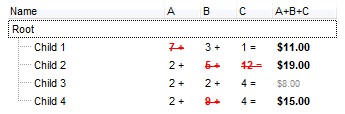
The value keyword in the FormatColumn property indicates the value being formatted.
The expression supports cell's identifiers as follows:
- %0, %1, %2, ...{any} specifies the value of the cell in the column with the index 0, 1 2, ... The CellValue property defines the cell's value. For example, "%0 format ``" formats the value in the cell at index 0 using the current regional settings, while "int(%1)" converts the value in the cell at index 1 to an integer.
- %C0, %C1, %C2, ...{string} specifies the caption of the cell, or the string the cell displays in the column with the index 0, 1 2, ... The CellCaption property gets the cell's formatted caption. The cell's displayed string may differ from its actual value. For example, if a cell displays HTML content, %0 returns the HTML format including the tags, while %C0 returns the cell's content as a plain string without HTML tags. For instance, "upper(%C1)" converts the caption of the cell at index 1 to uppercase, while "%C0 left 2" returns the leftmost two characters of the caption in the cell at index 0.
- %CD0, %CD1, %CD2, ...{any} specifies the cell's extra data in the column with the index 0, 1 2, ... The CellData property associates any extra/user data to a cell. For example, "%CD0 = your user data" specifies all cells in the column with index 0 whose CellData property is equal to your user data.
- %CS0, %CS1, %CS2, ...{number} specifies the cell's state in the column with the index 0, 1 2, ... The CellState property defines the state of a cell, indicating whether it is checked or unchecked. For example, "%CS0" identifies all checked items in the column with index 0, while "not %CS1" identifies all unchecked items in the column with index 1.
- %CT0, %CT1, %CT2, ... {boolean} returns true if the cell displays a total field; otherwise, it returns false. The exTotalField / exTotalColumn flag specifies whether the cell displays a total field. For instance, "%CT1" refers to all cells in the second column that display totals, while "not %CT1" refers to all cells in the second column that do not display totals.
- %CE0, %CE1, %CE2, ... {boolean} returns true if the cell is editable; otherwise, it returns false.. For example, "%CE0" refers to all editable cells in the first column, while "not %CE1" refers to all cells in the second column that are read-only.
- %CC0, %CC1, %CC2, ... {number} retrieve the number of child items (this keyword consistently returns identical results for all cells since it pertains to the item that hosts each cell). The ChildCount property returns the number of child items. For example, "%CC0" identifies all parent items, while "%CC0 = 0" identifies all leaf items.
- %CX0, %CX1, %CX2, ... {boolean} returns true if the item hosting the cell is expanded, or false if it is collapsed (this keyword consistently returns identical results for all cells since it pertains to the item that hosts each cell). The ExpandItem property specifically indicates whether the item is expanded or collapsed. For example, "%CX0" refers to all expanded items, while "not %CX0" identifies all collapsed items
Usage samples:
- "value format ``", formats the numeric value of the cell according to the "Number" settings specified in the "Regional and Language Options" of the Control Panel
- "currency(value)", displays the column using the current format for currency, e.g., 1000 gets displayed as $1,000.00
- "1.19 * (%0 + %1)", adds the values of the first and second columns if the cells contain numeric values, then multiplies the result by 1.19
- "date(value) format `MMM d, yyyy`", converts a date value into a formatted string like "Sep 2, 2023" using the specified format
- "longdate(date(value))", converts the value to a date and displays it in long format, e.g., #1/1/2001# shows as Monday, January 01, 2001
- "%CC0 and %CX0" returns true for items that are expanded and have children
- "'<b>' + ((0:=proper(value)) left 1) + '</b>' + (=:0 mid 2)", converts the name to proper case, capitalizing the first letter, bolds the first character, and leaves the rest unchanged. For example, "mihai filimon" becomes "Mihai Filimon".
- "len(value) ? ((0:=dbl(value)) < 10 ? '<fgcolor=808080><font ;7>' : '<b>') + currency(=:0)", displays cells with non-empty data in currency format, using different fonts and colors for values less than 10, and bold for values greater than 10.
- "((1:=int(0:= (value))) != 0 ? (=:1 + ' day(s)') : '') + (=:1 ? ' ' : '' ) + ((1:=int(0:=((=:0 - =:1 + 1/24/60/60/2)*24))) != 0 ? =:1 + ' hour(s)' : '' ) + (=:1 ? ' ' : '' ) + ((1:=round((=:0 - =:1)*60)) != 0 ? =:1 + ' min(s)' : '')", shows the value in days, hours, minutes, and seconds, where 1 represents one day, 0.5 represents 12 hours, and so on
This property supports auto-numbering (index, pos, ...) expressions as described here. This property/method supports predefined constants and operators/functions as described here.