

- If the AllowCreateBar property is exCreateBarAuto, the control
automatically adds a new bar to the item, with the key "newbar",
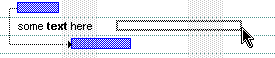
of "Task" type, so it looks like this:
 .
Use the ItemBar property to change the key
or the name or any other property of the newly created bar whose exBarKey
property is "newbar" and it's exBarName
is "Task". In this case, if the CreateBar event is not handled,
the user can't add more than a single bar to the selected item, as the
"newbar" is not unique, instead, if you handle the CreateBar
event, and assign a different key for the newly created bar, several bars
can be added to the same item. If the user clicks the empty /
non-items zone of the chart, the control may fire the AddItem
event for the newly added items so the newly bar will be shown in the
clicked area. In this case, the Item parameter indicates the handle of the
item that has been added at the last. In other words, the control automatically adds new items and creates the newly bar on the last added item, if the Chart.AllowCreateBar property is exCreateBarAuto.
.
Use the ItemBar property to change the key
or the name or any other property of the newly created bar whose exBarKey
property is "newbar" and it's exBarName
is "Task". In this case, if the CreateBar event is not handled,
the user can't add more than a single bar to the selected item, as the
"newbar" is not unique, instead, if you handle the CreateBar
event, and assign a different key for the newly created bar, several bars
can be added to the same item. If the user clicks the empty /
non-items zone of the chart, the control may fire the AddItem
event for the newly added items so the newly bar will be shown in the
clicked area. In this case, the Item parameter indicates the handle of the
item that has been added at the last. In other words, the control automatically adds new items and creates the newly bar on the last added item, if the Chart.AllowCreateBar property is exCreateBarAuto. - If the AllowCreateBar property is exCreateBarManual, you need to handle the CreateBar event to add new bars using the AddBar method. Samples, are shown bellow. If the Item parameter of the CreateBar event is negative, its absolute value indicates the number of items to be added from the last visible item, so it fits the clicked part of the chart. For instance, CreateBar(-3,Start,End) indicates that a 3 more items should be added so it covers the clicked zone.
Click here  to watch a movie on how you can create bars at runtime using the AllowCreateBar
property and CreateBar event.
to watch a movie on how you can create bars at runtime using the AllowCreateBar
property and CreateBar event.
private void CreateBar(object sender,int Item,DateTime DateStart,DateTime DateEnd)
{
}
Private Sub CreateBar(ByVal sender As System.Object,ByVal Item As Integer,ByVal DateStart As Date,ByVal DateEnd As Date) Handles CreateBar End Sub |
Syntax for CreateBar event, /COM version, on:
private void CreateBar(object sender, AxEXG2ANTTLib._IG2anttEvents_CreateBarEvent e)
{
}
void OnCreateBar(long Item,DATE DateStart,DATE DateEnd)
{
}
void __fastcall CreateBar(TObject *Sender,Exg2anttlib_tlb::HITEM Item,DATE DateStart,DATE DateEnd)
{
}
procedure CreateBar(ASender: TObject; Item : HITEM;DateStart : TDateTime;DateEnd : TDateTime); begin end; procedure CreateBar(sender: System.Object; e: AxEXG2ANTTLib._IG2anttEvents_CreateBarEvent); begin end; begin event CreateBar(long Item,datetime DateStart,datetime DateEnd) end event CreateBar Private Sub CreateBar(ByVal sender As System.Object, ByVal e As AxEXG2ANTTLib._IG2anttEvents_CreateBarEvent) Handles CreateBar End Sub Private Sub CreateBar(ByVal Item As EXG2ANTTLibCtl.HITEM,ByVal DateStart As Date,ByVal DateEnd As Date) End Sub Private Sub CreateBar(ByVal Item As Long,ByVal DateStart As Date,ByVal DateEnd As Date) End Sub LPARAMETERS Item,DateStart,DateEnd PROCEDURE OnCreateBar(oG2antt,Item,DateStart,DateEnd) RETURN |
Syntax for CreateBar event, /COM version (others), on:
<SCRIPT EVENT="CreateBar(Item,DateStart,DateEnd)" LANGUAGE="JScript"> </SCRIPT> <SCRIPT LANGUAGE="VBScript"> Function CreateBar(Item,DateStart,DateEnd) End Function </SCRIPT> Procedure OnComCreateBar HITEM llItem DateTime llDateStart DateTime llDateEnd Forward Send OnComCreateBar llItem llDateStart llDateEnd End_Procedure METHOD OCX_CreateBar(Item,DateStart,DateEnd) CLASS MainDialog RETURN NIL void onEvent_CreateBar(int _Item,date _DateStart,date _DateEnd)
{
}
function CreateBar as v (Item as OLE::Exontrol.G2antt.1::HITEM,DateStart as T,DateEnd as T) end function function nativeObject_CreateBar(Item,DateStart,DateEnd) return |
Newer versions of the component, allows you to use the CreateBar event when the user starts creating the bar on an empty/non-items part of the chart. The Item parameter of the event may be negative if the user used an empty part to create the bar. In this case, the absolute value of the Item parameter indicates the number of items to be added to it covers the clicked area like in the following VB sample:
Private Sub G2antt1_CreateBar(ByVal Item As EXG2ANTTLibCtl.HITEM, ByVal DateStart As Date, ByVal DateEnd As Date)
    With G2antt1
        .BeginUpdate
        With .Items
            If (Item < 0) Then
                Dim h As HITEM
                For i = 1 To -Item
                    h = .AddItem("")
                Next
                Item = h
            End If
            .AddBar Item, "Task", DateStart, DateEnd
        End With
        .EndUpdate
    End With
End Sub
The sample adds new items and a new bar when the AllowCreateBar property is exCreateBarManual. If the user clicks an empty zone ( Item < 0 ), the sample adds a number of items as its absolute value indicates, and lastly the new bar is added to the last or to the item from the cursor.
The similar sample in VB.NET could be such as:
Private Sub Exg2antt1_CreateBar(ByVal sender As System.Object, ByVal Item As System.Int32, ByVal DateStart As System.DateTime, ByVal DateEnd As System.DateTime) Handles Exg2antt1.CreateBar
    With Exg2antt1
        .BeginUpdate()
        With .Items
            If (Item < 0) Then
                Dim i, h As Integer
                For i = 1 To -Item
                    h = .AddItem("Item " & .ItemCount + 1)
                Next
                Item = h
            End If
            .set_SelectItem(Item, True)
            iBars = iBars + 1
            Dim s As String
            s = "T" & iBars
            .AddBar(Item, "Task", DateStart, DateEnd, s)
        End With
        .EndUpdate()
    End With
End Sub
If the AllowCreateBar property is exCreateBarAuto, the following samples change the key and the type of the bar being displayed as soon as the CreateBar event is called:
The following VB sample changes the key of the newly created bar "newbar", and the name of the bar being displayed as "Task" to "Progress":
Private Sub G2antt1_CreateBar(ByVal Item As EXG2ANTTLibCtl.HITEM, ByVal DateStart As Date, ByVal DateEnd As Date)
    With G2antt1.Items
        .ItemBar(Item, "newbar", exBarName) = "Progress"
        .ItemBar(Item, "newbar", exBarKey) = DateStart
    End With
End Sub
The following C# sample changes the key of the newly created bar "newbar", and the name of the bar being displayed as "Task" to "Progress":
private void axG2antt1_CreateBar(object sender, AxEXG2ANTTLib._IG2anttEvents_CreateBarEvent e)
{
    axG2antt1.Items.set_ItemBar(e.item, "newbar", EXG2ANTTLib.ItemBarPropertyEnum.exBarName, "Progress");
    axG2antt1.Items.set_ItemBar(e.item, "newbar", EXG2ANTTLib.ItemBarPropertyEnum.exBarKey, e.dateStart );
}
The following VB.NET sample changes the key of the newly created bar "newbar", and the name of the bar being displayed as "Task" to "Progress":
Private Sub AxG2antt1_CreateBar(ByVal sender As System.Object, ByVal e As AxEXG2ANTTLib._IG2anttEvents_CreateBarEvent) Handles AxG2antt1.CreateBar
    With AxG2antt1.Items
        .ItemBar(e.item, "newbar", EXG2ANTTLib.ItemBarPropertyEnum.exBarName) = "Progress"
        .ItemBar(e.item, "newbar", EXG2ANTTLib.ItemBarPropertyEnum.exBarKey) = e.dateStart
    End With
End Sub
The following C++ sample changes the key of the newly created bar "newbar", and the name of the bar being displayed as "Task" to "Progress":
void OnCreateBarG2antt1(long Item, DATE DateStart, DATE DateEnd)
{
	CItems items = m_g2antt.GetItems();
	items.SetItemBar( Item, COleVariant( _T("newbar") ), 0 /*exBarName*/, COleVariant( _T("Progress") ) );
	items.SetItemBar( Item, COleVariant( _T("newbar") ), 9 /*exBarKey*/, COleVariant( DateStart ) );
}
The following VFP sample changes the key of the newly created bar "newbar", and the name of the bar being displayed as "Task" to "Progress":
*** ActiveX Control Event ***
LPARAMETERS item, datestart, dateend

with thisform.G2antt1.Items
	.DefaultItem = item
	thisform.G2antt1.Template = "Items.ItemBar(0,`newbar`,0) = `Progress`"
	thisform.G2antt1.Template = "Items.ItemBar(0,`newbar`,9) = `" + dtos(datestart) + "`"
endwith
The Template property helps you to call any of the control's property using x-script.
If the AllowCreateBar property is exCreateBarManual, the following samples adds a new task bar, as soon as the CreateBar is called:
The following C# sample adds a new task, when the user releases the mouse:
private void axG2antt1_CreateBar(object sender, AxEXG2ANTTLib._IG2anttEvents_CreateBarEvent e)
{
	Random randomKey = new Random();
	axG2antt1.BeginUpdate();
	axG2antt1.Items.AddBar(e.item, "Task", e.dateStart, e.dateEnd, randomKey.Next(), "");
	axG2antt1.EndUpdate();
}
The following C++ sample adds a new task, when the user releases the mouse:
void OnCreateBarG2antt1(long Item, DATE DateStart, DATE DateEnd)
{
	m_g2antt.BeginUpdate();
	CItems items = m_g2antt.GetItems();
	items.AddBar( Item, COleVariant( "Task" ), COleVariant( DateStart ), COleVariant( DateEnd ), COleVariant( (long)rand() ), COleVariant( "" ) );
	m_g2antt.EndUpdate();
}
The following VB sample adds a new task, when the user releases the mouse:
Private Sub G2antt1_CreateBar(ByVal Item As EXG2ANTTLibCtl.HITEM, ByVal DateStart As Date, ByVal DateEnd As Date)
    With G2antt1
        .BeginUpdate
        With .Items
            .AddBar Item, "Task", DateStart, DateEnd, Rnd
        End With
        .EndUpdate
    End With
End Sub
The following VFP sample adds a new task, when the user releases the mouse:
*** ActiveX Control Event ***
LPARAMETERS item, datestart, dateend

with thisform.G2antt1
	.BeginUpdate
	with .Items
		.AddBar( item, "Task", datestart, dateend, RAND() )
	endwith
	.EndUpdate
endwith
The following VB.NET sample adds a new task, when the user releases the mouse:
Private Sub AxG2antt1_CreateBar(ByVal sender As Object, ByVal e As AxEXG2ANTTLib._IG2anttEvents_CreateBarEvent) Handles AxG2antt1.CreateBar
    With AxG2antt1
        .BeginUpdate()
        With .Items
            .AddBar(e.item, "Task", e.dateStart, e.dateEnd, Rnd())
        End With
        .EndUpdate()
    End With
End Sub