

The AddLink event may occur only if the AllowLinkBars property is True. The LinkKey parameter indicates the key of the newly added link. Use the RemoveLink method to remove the link, if you don't need certain links to be added. The FirstLink property retrieves the key of the first link in the chart. Use the NextLink property to retrieve the key of the next link, in the chart. Use these properties to enumerate the link in the control. Use the CellValue property to access the cell's value.
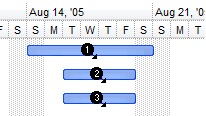
In the following screen shot shows the bars before linking and grouping:
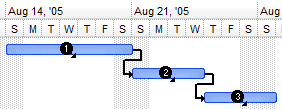
In the following screen shot shows the bars after linking and grouping, as the bar 1 is linked to bar 2, and bar 2 to 3.
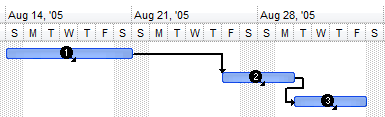
In the following screen shot shows the bars once the bar 2 is moved to the right:
private void AddLink(object sender,string LinkKey)
{
}
Private Sub AddLink(ByVal sender As System.Object,ByVal LinkKey As String) Handles AddLink End Sub |
Syntax for AddLink event, /COM version, on:
private void AddLink(object sender, AxEXG2ANTTLib._IG2anttEvents_AddLinkEvent e)
{
}
void OnAddLink(LPCTSTR LinkKey)
{
}
void __fastcall AddLink(TObject *Sender,BSTR LinkKey)
{
}
procedure AddLink(ASender: TObject; LinkKey : WideString); begin end; procedure AddLink(sender: System.Object; e: AxEXG2ANTTLib._IG2anttEvents_AddLinkEvent); begin end; begin event AddLink(string LinkKey) end event AddLink Private Sub AddLink(ByVal sender As System.Object, ByVal e As AxEXG2ANTTLib._IG2anttEvents_AddLinkEvent) Handles AddLink End Sub Private Sub AddLink(ByVal LinkKey As String) End Sub Private Sub AddLink(ByVal LinkKey As String) End Sub LPARAMETERS LinkKey PROCEDURE OnAddLink(oG2antt,LinkKey) RETURN |
Syntax for AddLink event, /COM version (others), on:
<SCRIPT EVENT="AddLink(LinkKey)" LANGUAGE="JScript"> </SCRIPT> <SCRIPT LANGUAGE="VBScript"> Function AddLink(LinkKey) End Function </SCRIPT> Procedure OnComAddLink String llLinkKey Forward Send OnComAddLink llLinkKey End_Procedure METHOD OCX_AddLink(LinkKey) CLASS MainDialog RETURN NIL void onEvent_AddLink(str _LinkKey)
{
}
function AddLink as v (LinkKey as C) end function function nativeObject_AddLink(LinkKey) return |
The following VB sample groups the linked bars:
Private Sub G2antt1_AddLink(ByVal LinkKey As String)
    With G2antt1.Items
        .Link(LinkKey, exLinkGroupBars) = GroupBarsOptionsEnum.exPreserveBarLength + GroupBarsOptionsEnum.exFlexibleInterval + GroupBarsOptionsEnum.exIgnoreOriginalInterval
    End With
End Sub
The following VB sample changes the style of the link if certain condition is met ( in this sample, the cell on the first column is called "Root" ):
Private Sub G2antt1_AddLink(ByVal LinkKey As String)
    With G2antt1.Items
        If .CellValue(.Link(LinkKey, exLinkStartItem), 0) = "Root" Then
            .Link(LinkKey, exLinkStyle) = exLinkSolid
            .Link(LinkKey, exLinkWidth) = 2
            .Link(LinkKey, exLinkColor) = RGB(255, 0, 0)
        End If
    End With
End Sub