

The column's filter button is displayed on the column's caption. The DisplayFilterPattern property determines whether the column's filter window includes the pattern field. Use the DisplayFilterDate property to include a date selector to the column's drop down filter window. Use the FilterBarDropDownHeight to specify the height of the drop down filter window. Use the FilterBarDropDownWidth property to specify the width of the drop down filter window. Use the FilterBarHeight property to specify the height of the filter bar header. Use the FilterList property to specify the list of items being included in the column's drop down filter list. Use the Background(exHeaderFilterBarButton) property to change the visual appearance for the drop down filter button. Use the FilterInclude property to specify whether the child items should be included to the list when the user applies the filter. Use the FilterCriteria property to specify the filter criteria using OR, AND or NOT operators. Use the CustomFilter property to define you custom filters. Use the ShowFilter method to show programmatically the column's drop down filter window. The FilterBarPromptVisible property specifies whether the filter prompt is visible or hidden. The filter prompt feature allows you to filter the items as you type while the filter bar is visible on the bottom part of the list area. The Filter prompt feature allows at runtime filtering data on hidden columns too.
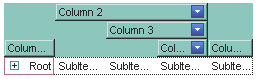
The following VB sample changes the visual appearance for the "drop
down" filter button. The sample applies the skin " "
to the "drop down" filter buttons:
"
to the "drop down" filter buttons:
With Tree1
    With .VisualAppearance
        .Add &H1, App.Path + "\fbardd.ebn"
    End With
    .Background(exHeaderFilterBarButton) = &H1000000
End With
The following C++ sample changes the visual appearance for the "drop down" filter button:
#include "Appearance.h"
m_tree.GetVisualAppearance().Add( 0x01, COleVariant(_T("D:\\Temp\\ExTree.Help\\fbardd.ebn")) );
m_tree.SetBackground( 0 /*exHeaderFilterBarButton*/, 0x1000000 );
The following VB.NET sample changes the visual appearance for the "drop down" filter button:
With AxTree1
    With .VisualAppearance
        .Add(&H1, "D:\Temp\ExTree.Help\fbardd.ebn")
    End With
    .set_Background(EXTREELib.BackgroundPartEnum.exHeaderFilterBarButton, &H1000000)
End With
The following C# sample changes the visual appearance for the "drop down" filter button:
axTree1.VisualAppearance.Add(0x1, "D:\\Temp\\ExTree.Help\\fbardd.ebn");
axTree1.set_Background(EXTREELib.BackgroundPartEnum.exHeaderFilterBarButton, 0x1000000);
The following VFP sample changes the visual appearance for the "drop down" filter button:
With thisform.Tree1
    With .VisualAppearance
        .Add(1, "D:\Temp\ExTree.Help\fbardd.ebn")
    EndWith
    .Object.Background(0) = 16777216
EndWith
The 16777216 value is the 0x1000000 value in hexadecimal.