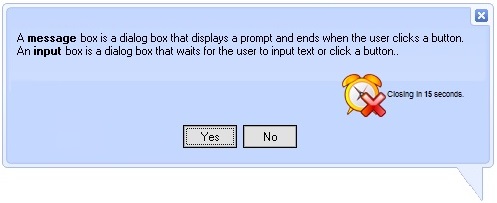
The ExSkinBox control provides fully skinnable message and input boxes, enhancing the look and feel of your dialogs. A message box is a dialog that displays a prompt and closes when the user clicks a button, while an input box waits for user text input or a button click - both now customizable to seamlessly match your application's style.
Features include:
1. Core Functionalities
- MsgBox and InputBox implementation
- AutoClose support
- Ability to center the message box relative to your window/dialog
- Ability to specify the position where the message box appears
2. Customization and Appearance
- Ability to apply custom skins to the message box
- Ability to load skins using BASE64 encoded format
- Ability to display custom images using BASE64 encoded format
- HTML formatting support for the message box's prompt, title, and buttons
3. User Interface Options
- Ability to define captions for standard buttons like Abort, Retry, Ignore, etc.
- Ability to define the font used to display the message box content
The object supports the following properties and methods:
| | Name | Description | |
| | AutoClose | Specifies the time in seconds to automatically close the message box. | |
| | Button | Specifies the caption for the specified button. | |
| | EBNhWND | Specifies the handle of the eXButton's control that controls the visual appearance for the message box's buttons. | |
| | FitTitle | Specifies whether the MessageBox or InputBox ensures that its title/caption fits the dialog's title. | |
| | FitToScreen | Specifies whether the MessageBox or InputBox ensures that it fits the screen ( current monitor ). | |
| | Font | Retrieves or sets the control's font. | |
| | FormatAnchor | Specifies the visual effect for anchor elements in HTML captions. | |
| | HTMLPicture | Adds or replaces a picture in HTML captions. | |
| | Image | Specifies the image being displayed for a specified style. | |
| | Images | Sets at runtime the control's image list. The Handle should be a handle to an Images List Control. | |
| | ImageSize | Retrieves or sets the size of icons the control displays.. | |
| | Input | Displays a prompt in a dialog box, waits for the user to input text or click a button, and then returns a string containing the contents of the text box. | |
| | Load | Loads a skin file to be used. | |
| | MinHeight | Specifies the minimum height of the message box. | |
| | MinWidth | Specifies the minimum width of the message box. | |
| | Out | Displays a message in a dialog box, waits for the user to click a button, and then returns an integer indicating which button the user clicked. | |
| | ReplaceIcon | Adds a new icon, replaces an icon or clears the control's image list. | |
| | Version | Retrieves the control's version. | |

