

The control supports ActiveX hosting, so
you can insert any ActiveX component. The ControlID must be formatted in one of the following ways:- A ProgID such as "Exontrol.ComboBox"
- A CLSID such as "{8E27C92B-1264-101C-8A2F-040224009C02}"
- A reference to an Active document such as "c:\temp\myfile.doc", or "c:\temp\picture.gif"
- A fragment of HTML such as "MSHTML:<HTML><BODY>This is a line of text</BODY></HTML>"
- A fragment of XML
The look and feel of the inner ActiveX control depends on the identifier you are using, and the version of the library that implements the ActiveX control, so you need to consult the documentation of the inner ActiveX control you are inserting inside the exRecord control. Unfortunately, You need to contact the vendor for particular ActiveX controls, because we can't provide documentation for any ActiveX control you might use. We can provide documentation only for our components.
Use the UserEditor method to create an inner ActiveX control.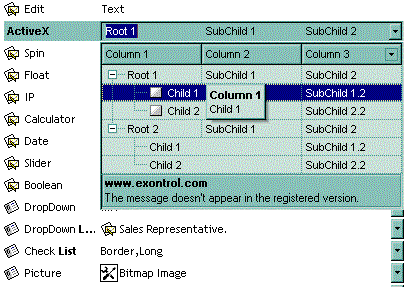
The following VB sample adds an Exontrol.ComboBox control and displays the events being fired by inner ActiveX control:
Option Explicit

Private Function isInstalled(ByVal s As String) As Boolean
On Error GoTo Error
    CreateObject (s)
    isInstalled = True
    Exit Function
Error:
    isInstalled = False
End Function

Private Sub Form_Load()
    With Record1
        .BeginUpdate
            With .Add("ActiveX", UserEditorType)
                .Position = 2
                Dim progID As String
                progID = "Exontrol.ComboBox"
                If Not (isInstalled(progID)) Then
                    .Value = """" & progID & """ is not installed."
                    .ToolTip = .Value
                    .ForeColor = vbRed
                Else
                    .UserEditor progID, ""
                    .LabelBackColor = SystemColorConstants.vbMenuBar
                    ' Accesses the inside ActiveX control, in our case an ExComboBox control. https://www.exontrol.com/excombobox.jsp
                    With .UserEditorObject()
                        .BeginUpdate
                            .BackColorEdit = SystemColorConstants.vbMenuBar
                            .IntegralHeight = True
                            .ColumnAutoResize = True
                            .LinesAtRoot = True
                            .MinHeightList = 164
                            .MinWidthList = 264
                            .MarkSearchColumn = False
                            .FilterBarDropDownHeight = -150
                            .DrawGridLines = True
                            .Alignment = 0
                            With .Columns
                                .Add "Column 1"
                                .Add "Column 2"
                                With .Add("Column 3")
                                    .DisplayFilterButton = True
                                End With
                            End With
                            With .Items
                                Dim h, h1
                                h = .AddItem(Array("Root 1", "SubChild 1", "SubChild 2"))
                                h1 = .InsertItem(h, , Array("Child 1", "SubChild 1.1", "SubChild 1.2"))
                                .CellMerge(h1, 0) = 1
                                .CellHasCheckBox(h1, 0) = True
                                h1 = .InsertItem(h, , Array("Child 2", "SubChild 2.1", "SubChild 2.2"))
                                .CellMerge(h1, 0) = 1
                                .CellHasCheckBox(h1, 0) = True
                                .ExpandItem(h) = True
                                h = .AddItem(Array("Root 2", "SubChild 1", "SubChild 2"))
                                h1 = .InsertItem(h, , Array("Child 1", "SubChild 1.1", "SubChild 1.2"))
                                .CellMerge(h1, 0) = 1
                                h1 = .InsertItem(h, , Array("Child 2", "SubChild 2.1", "SubChild 2.2"))
                                .CellMerge(h1, 0) = 1
                                .ExpandItem(h) = True
                            End With
                            .Value = "Root 1"
                        .EndUpdate
                    End With
                End If
            End With
        .EndUpdate
    End With
End Sub

Private Sub Record1_UserEditorOleEvent(ByVal Object As Object, ByVal Ev As EXRECORDLibCtl.IOleEvent, ByVal Ed As EXRECORDLibCtl.IEditor)
On Error Resume Next
    Debug.Print "Event name: " & Ev.Name
    If (Ev.CountParam = 0) Then
       Debug.Print vbTab & "The event has no arguments."
    Else
       Debug.Print "The event has the following arguments:"
       Dim i As Long
       For i = 0 To Ev.CountParam - 1
          Debug.Print vbTab & Ev(i).Name; " = " & Ev(i).Value
       Next
    End If
End Sub
The following VC sample adds an Exontrol.ComboBox control and displays the events being fired by inner ActiveX control:
#import "c:\winnt\system32\ExComboBox.dll"
#import "c:\winnt\system32\ExRecord.dll"

CString strObject( "Exontrol.ComboBox" );
COleVariant vtMissing; vtMissing.vt = VT_ERROR;
m_record.BeginUpdate();
m_record.SetLabelSize( 110 );
CEditor editor = m_record.Add( COleVariant( "ActiveX" ), EXRECORDLib::UserEditorType, vtMissing );
editor.SetPosition( 2 );
if ( !isInstalled( strObject.AllocSysString() ) )
{
	CString strFormat;
	strFormat.Format( "\"%s\" is not installed.", (LPCSTR)strObject );
	editor.SetValue( COleVariant( strFormat ) );
	editor.SetForeColor( RGB( 255, 0, 0 ) );
}
else
{
	// Creates the exComboBox control. https://www.exontrol.com/excombobox.jsp
	editor.UserEditor( strObject, "" );
	if ( EXCOMBOBOXLib::IComboBoxPtr spComboBox = editor.GetUserEditorObject() )
	{
		spComboBox->BeginUpdate();
		spComboBox->BackColorEdit = GetSysColor( COLOR_MENU );
		spComboBox->IntegralHeight = true;
		spComboBox->ColumnAutoResize = true;
		spComboBox->LinesAtRoot = EXCOMBOBOXLib::exLinesAtRoot;
		spComboBox->MinHeightList = 164;
		spComboBox->MinWidthList = 264;
		spComboBox->MarkSearchColumn = false;
		spComboBox->DrawGridLines = EXCOMBOBOXLib::exAllLines;
		spComboBox->FilterBarDropDownHeight = -150;
		spComboBox->Alignment = EXCOMBOBOXLib::RightAlignment;
		EXCOMBOBOXLib::IColumnsPtr spColumns = spComboBox->Columns;
		spColumns->Add("Column 1");
        spColumns->Add("Column 2");
        EXCOMBOBOXLib::IColumnPtr spColumn = spColumns->Add("Column 3");
		spColumn->DisplayFilterButton = true;
		EXCOMBOBOXLib::IItemsPtr spItems = spComboBox->Items;
		long h = spItems->AddItem( v( "Root 1" ) );
		spItems->CellCaption[v(h)][v((long)1)] = v("SubChild 1");
		spItems->CellCaption[v(h)][v((long)2)] = v("SubChild 2");
		long h1 = spItems->InsertItem( h, vtMissing, v( "Child 1" ) );
		spItems->CellCaption[v(h1)][v((long)1)] = v("SubChild 1.1");
		spItems->CellCaption[v(h1)][v((long)2)] = v("SubChild 1.2");
		spItems->CellHasCheckBox[v(h1)][v((long)0)] = true;
		spItems->CellMerge[v(h1)][v((long)0)] = v((long)1);
		h1 = spItems->InsertItem( h, vtMissing, v( "Child 2" ) );
		spItems->CellCaption[v(h1)][v((long)1)] = v("SubChild 2.1");
		spItems->CellCaption[v(h1)][v((long)2)] = v("SubChild 2.2");
		spItems->CellHasCheckBox[v(h1)][v((long)0)] = true;
		spItems->CellMerge[v(h1)][v((long)0)] = v((long)1);
		spItems->put_ExpandItem( h, TRUE );

		h = spItems->AddItem( v( "Root 2" ) );
		spItems->CellCaption[v(h)][v((long)1)] = v("SubChild 1");
		spItems->CellCaption[v(h)][v((long)2)] = v("SubChild 2");
		h1 = spItems->InsertItem( h, vtMissing, v( "Child 1" ) );
		spItems->CellCaption[v(h1)][v((long)1)] = v("SubChild 1.1");
		spItems->CellCaption[v(h1)][v((long)2)] = v("SubChild 1.2");
		spItems->CellHasCheckBox[v(h1)][v((long)0)] = true;
		spItems->CellMerge[v(h1)][v((long)0)] = v((long)1);
		h1 = spItems->InsertItem( h, vtMissing, v( "Child 2" ) );
		spItems->CellCaption[v(h1)][v((long)1)] = v("SubChild 2.1");
		spItems->CellCaption[v(h1)][v((long)2)] = v("SubChild 2.2");
		spItems->CellHasCheckBox[v(h1)][v((long)0)] = true;
		spItems->CellMerge[v(h1)][v((long)0)] = v((long)1);
		spItems->put_ExpandItem( h, TRUE );

		spComboBox->Value = "Root 1";
		spComboBox->EndUpdate();

	}
}
m_record.EndUpdate();

static CString V2S( VARIANT* pv, LPCTSTR szDefault = _T("") )
{
	if ( pv )
	{
		if ( pv->vt == VT_ERROR )
			return szDefault;

		COleVariant vt;
		vt.ChangeType( VT_BSTR, pv );
		return V_BSTR( &vt );
	}
	return szDefault;
}

void OnUserEditorOleEventRecord1(LPDISPATCH Object, LPDISPATCH Ev, LPDISPATCH Ed)
{
	EXRECORDLib::IOleEventPtr spEvent = Ev;
	CString strOutput = "Event name: ";
	strOutput += spEvent->Name;
	strOutput += "\r\n";
	if ( spEvent->CountParam == 0 )
	{
		strOutput += "\tThe event has no arguments.";
	}
	else
	{
		strOutput += "\tThe event has no arguments.\r\n";
		for ( long i = 0; i < spEvent->CountParam; i++ )
		{
			strOutput += spEvent->GetParam( v(i) )->Name;
			strOutput += " = ";
			strOutput += V2S( &spEvent->GetParam( v(i) )->Value);
			strOutput += "\r\n";
		}

	}
	OutputDebugString( strOutput );
}
In C++, the #import "path-to-ExRecord.dll" adds a new EXRECORDLib namespace that includes definition for OleEvent and OleEventParam classes.