

The control provides an image list window, that's displayed at design time. Use the ShowImageList property to hide the image list window, at design time. At design time, the user can add new icons to the control's Images collection, by dragging icon files, exe files, etc, to the images list window. At runtime, the user can use the Images and ReplaceIcon method to change the Images collection. Use the Image property to assign a picture to a group. Use the Image property to assign a picture to an item. Use the SmallIcons property to specify the size of the icons being displayed. Use the <img> HTML tag to insert icons inside the cell's caption, if the CaptionFormat property is exHTML. For instance, the "some image <img>1</img> other image <img>2</img> rest of text", displays combined text and icons in the item's caption.
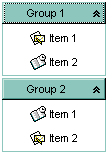
The following VB sample uses the Microsoft Image List control:
ExplorerBar1.Images ImageList1.hImageList
The following VB sample loads a collection of icons from a BASE64 encoded string:
With ExplorerBar1
    Dim s As String
    s = "gBJJgBAIEAAGAEGCAAhb/hz/EIAh8Tf5CJo2AEZjQAjEZFEaIEaEEaAIAkcbk0olUrlktl0vmExmUzmk1m03nE5nU7nk9n0/oFBoVDolFo1HpFJpVLplNp1PqFRqVTqlVq1XrFZrVbrldr1fsFhsVjslls1ntFptVrtltt1vuFxuVzul1u13vF5vV7vl9v1/wGBvqAQEZwmCpmEwrAxlVh9dxjAiUOyb/AGHp2YjWPx9kx+KAGR0ON0VIzmU0+WluUomY1OV0eS0Wa1uF0Gd1G51VX1+g0Wzw++xuO3dG0WP3+k5WS2+U2k65uqyml3UZ6tM1+f4PbxeN7Xd2XDmedjfT8Wb4uw3GW8ky13V5HL2OXw/Z52F9229+wyf0/TCvs9jWJ/AL/Pm+LJQRAzkskmj2v48r0tA6L1QGmTjvM8MNPnCkCwYlrQP7BUQurCb9wLBz4Pu8DYQwy0XQ47iYtelEBvw9EBRzA0RQtED8Q8+TgQA6sPw+lkKR46TLRNIcdOFBsephAsntgzDMRhGEaJfLTrRW/kVSc+sopXLEgvlDswPm0sttZEsZSTA0SR0nDesPMrmPxK75RRNkdQfOUKznNMQvHIkzTxJsWvOnTr0bJcZPW+b+zpL0izPPNMS7P0xpdPixTrRNQTU+Sa0dL8wv/Lqg0tDcPytH7ro059SzTAsHqpUVbQynNI17Ns5qPVlRzww0bpXV6fV09KuO/QKWzXAlBWAqVhOBYtrvpbFZp5Liy27BTTV+yF"
    s = s + "FphZDEJtT1zp7bd1XasiLB8ld4o8kCRJIACSpRfNKWXd1uH+eaHn8P55necB/kmf5+A+eBnnAH5AH+fADnAB5gAeQAfngAJwACYABkAB5wNCAL8AG2WSozlJAX2AbDJKkoD3xfGWABmWXY8koHgBkGGNDiwE4efwAHhnx8B+y2Fn4HOBn+YJ/6QPaHnGiaAg="
    .BeginUpdate
    .Images s
    With .Groups
        With .Add("Group 1")
            .AddItem "Item 1", 1
            .AddItem "Item 2", 2
        End With
        With .Add("Group 2")
            .AddItem "Item 1", 2
            .AddItem "Item 2", 1
        End With
    End With
    .EndUpdate
End With
The following C++ sample loads a collection of icons from a BASE64 encoded string:
#include "Item.h"
#include "Group.h"
#include "Groups.h"
COleVariant vtMissing; V_VT( &vtMissing ) = VT_ERROR;
CString s("gBJJgBAIEAAGAEGCAAhb/hz/EIAh8Tf5CJo2AEZjQAjEZFEaIEaEEaAIAkcbk0olUrlktl0vmExmUzmk1m03nE5nU7nk9n0/oFBoVDolFo1HpFJpVLplNp1PqFRqVTqlVq1XrFZrVbrldr1fsFhsVjslls1ntFptVrtltt1vuFxuVzul1u13vF5vV7vl9v1/wGBvqAQEZwmCpmEwrAxlVh9dxjAiUOyb/AGHp2YjWPx9kx+KAGR0ON0VIzmU0+WluUomY1OV0eS0Wa1uF0Gd1G51VX1+g0Wzw++xuO3dG0WP3+k5WS2+U2k65uqyml3UZ6tM1+f4PbxeN7Xd2XDmedjfT8Wb4uw3GW8ky13V5HL2OXw/Z52F9229+wyf0/TCvs9jWJ/AL/Pm+LJQRAzkskmj2v48r0tA6L1QGmTjvM8MNPnCkCwYlrQP7BUQurCb9wLBz4Pu8DYQwy0XQ47iYtelEBvw9EBRzA0RQtED8Q8+TgQA6sPw+lkKR46TLRNIcdOFBsephAsntgzDMRhGEaJfLTrRW/kVSc+sopXLEgvlDswPm0sttZEsZSTA0SR0nDesPMrmPxK75RRNkdQfOUKznNMQvHIkzTxJsWvOnTr0bJcZPW+b+zpL0izPPNMS7P0xpdPixTrRNQTU+Sa0dL8wv/Lqg0tDcPytH7ro059SzTAsHqpUVbQynNI17Ns5qPVlRzww0bpXV6fV09KuO/QKWzXAlBWAqVhOBYtrvpbFZp5Liy27BTTV+yF");
s = s + "FphZDEJtT1zp7bd1XasiLB8ld4o8kCRJIACSpRfNKWXd1uH+eaHn8P55necB/kmf5+A+eBnnAH5AH+fADnAB5gAeQAfngAJwACYABkAB5wNCAL8AG2WSozlJAX2AbDJKkoD3xfGWABmWXY8koHgBkGGNDiwE4efwAHhnx8B+y2Fn4HOBn+YJ/6QPaHnGiaAg=";
m_explorerbar.BeginUpdate();
CGroups groups = m_explorerbar.GetGroups();
m_explorerbar.Images(COleVariant(s));
CGroup group1 = groups.Add( "Group 1" );
group1.AddItem( "Item 1", COleVariant(long(1)) );
group1.AddItem( "Item 2", COleVariant(long(2)) );
CGroup group2 = groups.Add( "Group 2" );
group2.AddItem( "Item 1", COleVariant(long(3)) );
group2.AddItem( "Item 2", COleVariant(long(4)) );
m_explorerbar.EndUpdate();
The following VB.NET sample loads a collection of icons from a BASE64 encoded string:
With AxExplorerBar1
    Dim s As String = "gBJJgBAIEAAGAEGCAAhb/hz/EIAh8Tf5CJo2AEZjQAjEZFEaIEaEEaAIAkcbk0olUrlktl0vmExmUzmk1m03nE5nU7nk9n0/oFBoVDolFo1HpFJpVLplNp1PqFRqVTqlVq1XrFZrVbrldr1fsFhsVjslls1ntFptVrtltt1vuFxuVzul1u13vF5vV7vl9v1/wGBvqAQEZwmCpmEwrAxlVh9dxjAiUOyb/AGHp2YjWPx9kx+KAGR0ON0VIzmU0+WluUomY1OV0eS0Wa1uF0Gd1G51VX1+g0Wzw++xuO3dG0WP3+k5WS2+U2k65uqyml3UZ6tM1+f4PbxeN7Xd2XDmedjfT8Wb4uw3GW8ky13V5HL2OXw/Z52F9229+wyf0/TCvs9jWJ/AL/Pm+LJQRAzkskmj2v48r0tA6L1QGmTjvM8MNPnCkCwYlrQP7BUQurCb9wLBz4Pu8DYQwy0XQ47iYtelEBvw9EBRzA0RQtED8Q8+TgQA6sPw+lkKR46TLRNIcdOFBsephAsntgzDMRhGEaJfLTrRW/kVSc+sopXLEgvlDswPm0sttZEsZSTA0SR0nDesPMrmPxK75RRNkdQfOUKznNMQvHIkzTxJsWvOnTr0bJcZPW+b+zpL0izPPNMS7P0xpdPixTrRNQTU+Sa0dL8wv/Lqg0tDcPytH7ro059SzTAsHqpUVbQynNI17Ns5qPVlRzww0bpXV6fV09KuO/QKWzXAlBWAqVhOBYtrvpbFZp5Liy27BTTV+yF"
    s = s + "FphZDEJtT1zp7bd1XasiLB8ld4o8kCRJIACSpRfNKWXd1uH+eaHn8P55necB/kmf5+A+eBnnAH5AH+fADnAB5gAeQAfngAJwACYABkAB5wNCAL8AG2WSozlJAX2AbDJKkoD3xfGWABmWXY8koHgBkGGNDiwE4efwAHhnx8B+y2Fn4HOBn+YJ/6QPaHnGiaAg="
    .BeginUpdate()
    .Images(s)
    With .Groups
        With .Add("Group 1")
            .AddItem("Item 1", 1)
            .AddItem("Item 2", 2)
        End With
        With .Add("Group 2")
            .AddItem("Item 1", 3)
            .AddItem("Item 2", 4)
        End With
    End With
    .EndUpdate()
End With
The following C# sample loads a collection of icons from a BASE64 encoded string:
String s= "gBJJgBAIEAAGAEGCAAhb/hz/EIAh8Tf5CJo2AEZjQAjEZFEaIEaEEaAIAkcbk0olUrlktl0vmExmUzmk1m03nE5nU7nk9n0/oFBoVDolFo1HpFJpVLplNp1PqFRqVTqlVq1XrFZrVbrldr1fsFhsVjslls1ntFptVrtltt1vuFxuVzul1u13vF5vV7vl9v1/wGBvqAQEZwmCpmEwrAxlVh9dxjAiUOyb/AGHp2YjWPx9kx+KAGR0ON0VIzmU0+WluUomY1OV0eS0Wa1uF0Gd1G51VX1+g0Wzw++xuO3dG0WP3+k5WS2+U2k65uqyml3UZ6tM1+f4PbxeN7Xd2XDmedjfT8Wb4uw3GW8ky13V5HL2OXw/Z52F9229+wyf0/TCvs9jWJ/AL/Pm+LJQRAzkskmj2v48r0tA6L1QGmTjvM8MNPnCkCwYlrQP7BUQurCb9wLBz4Pu8DYQwy0XQ47iYtelEBvw9EBRzA0RQtED8Q8+TgQA6sPw+lkKR46TLRNIcdOFBsephAsntgzDMRhGEaJfLTrRW/kVSc+sopXLEgvlDswPm0sttZEsZSTA0SR0nDesPMrmPxK75RRNkdQfOUKznNMQvHIkzTxJsWvOnTr0bJcZPW+b+zpL0izPPNMS7P0xpdPixTrRNQTU+Sa0dL8wv/Lqg0tDcPytH7ro059SzTAsHqpUVbQynNI17Ns5qPVlRzww0bpXV6fV09KuO/QKWzXAlBWAqVhOBYtrvpbFZp5Liy27BTTV+yF";
s = s + "FphZDEJtT1zp7bd1XasiLB8ld4o8kCRJIACSpRfNKWXd1uH+eaHn8P55necB/kmf5+A+eBnnAH5AH+fADnAB5gAeQAfngAJwACYABkAB5wNCAL8AG2WSozlJAX2AbDJKkoD3xfGWABmWXY8koHgBkGGNDiwE4efwAHhnx8B+y2Fn4HOBn+YJ/6QPaHnGiaAg=";
axExplorerBar1.BeginUpdate();
axExplorerBar1.Images(s);
EXPLORERBARLib.Group group1 = axExplorerBar1.Groups.Add("Group 1");
group1.AddItem("Item 1", 1);
group1.AddItem("Item 2", 2);
EXPLORERBARLib.Group group2 = axExplorerBar1.Groups.Add("Group 2");
group2.AddItem("Item 1", 3);
group2.AddItem("Item 2", 4);
axExplorerBar1.EndUpdate();
The following VFP sample loads a collection of icons from a BASE64 encoded string:
With thisform.ExplorerBar1
	local s
    .BeginUpdate()
   	s = "gBJJgBAIEAAJAEGCAAhb/hz/EIAh8Tf5CJo2AEZjQAjEZFEaIEaGEaAIAEEbjMjlErlktl0vmExmUzmk1m03nE5nU7nk9n0/oFBoVDolFo1HpFJpVLplNp1PqFRqVTqlVq1XrFZrVbrldr1fsFhsVjslls1ntFptVrtltt1vuFxuVzul1u13vF5vV7vl9v1/wGBwWDwm"
	s = s + "Fw2HxGJxWLxmNx2PyGRyWTymVy2XzGZzWbzmdz2f0Gh0Wj0ml02npqAQEZ1WojWq1bA2VWh9e2TAiUO3L/AGtp++jW12tl2uwAG34+z5FJ4W65u8l26ou+5+75O45HA6er43D53f6FY6vG5HZ1vk2e08NH5G18vK+G47u67U7+fQ3XL8EZ/dN6rivPALYtnAEBuw9KaO"
	s = s + "Gjb8wQ4L1us7zeQUmbqP29z4uu3rWv++jVwo7kKus3MNRA1cOQk6SgRPEkMwu3EXRY97cJrCcRQXB7jPvCEUpm9sGQPIEMx1FcZJc40RxhI79xzEMVxpC0OwM60fN5KkhQEmTqpRFMPQdFEvxZJEeSND0iQw80TP3IsipbHUxPw3kmTTMD0RnMaYxXOrrN830rStLSYU"
	s = s + "A/koxFKE6Q3O6WT9M8MSHQ0MuXQLpSXLE3xZJUwJy8bW0W+UPT7DEnUlMEa0xHdM0fI8EzVRlPTnKcGp2/tZzjLEIwzEdNUJNdG0/X1B1JRKX1EsdN1fY1IQwm1aULQ8S0GoVeSDIs+TK/rXy6nEV23YSpWRbkq1jJ84WbcsaqLaVk081lspXaqf3AsUC1Ol1IxVVFMq"
	s = s + "pdLzXZfsNX8+qfUEs2Bxg5lJwerN7Jld7LWIz2Atc0qLB8lmKo8kCRJIACSo2QGO11hOJM2hx5oefw/nmd5wH+SZ/n4D54GecAfkAf58AOcAHmAB5AB+eAAnAAJgAGQAHnA44Aw8AbsaUjOnY+jQBtYkqSgPjmOajq+p6GkoHgBouYuPnYE5ofwAHhsR8B+3mYH4HOUH"
	s = s + "+YJ/7YPaHnGiaAg="
    With .Groups
        With .Add("Group 1")
            .AddItem("Item 1",1)
            .AddItem("Item 2",2)
        EndWith
        With .Add("Group 2")
            .AddItem("Item 1",3)
            .AddItem("Item 2",4)
        EndWith
    EndWith
    .EndUpdate()
EndWith
The following Template sample loads a collection of icons from a BASE64 encoded string:
BeginUpdate
Images("gBJJgBAIEAAJAEGCAAhb/hz/EIAh8Tf5CJo2AEZjQAjEZFEaIEaGEaAIAEEbjMjlErlktl0vmExmUzmk1m03nE5nU7nk9n0/oFBoVDolFo1HpFJpVLplNp1PqFRqVTqlVq1XrFZrVbrldr1fsFhsVjslls1ntFptVrtltt1vuFxuVzul1u13vF5vV7vl9v1/wGBwWDwmFw2HxGJxWLxmNx2PyGRyWTymVy2XzGZzWbzmdz2f0Gh0Wj0ml02npqAQEZ1WojWq1bA2VWh9e2TAiUO3L/AGtp++jW12tl2uwAG34+z5FJ4W65u8l26ou+5+75O45HA6er43D53f6FY6vG5HZ1vk2e08NH5G18vK+G47u67U7+fQ3XL8EZ/dN6rivPALYtnAEBuw9KaOGjb8wQ4L1us7zeQUmbqP29z4uu3rWv++jVwo7kKus3MNRA1cOQk6SgRPEkMwu3EXRY97cJrCcRQXB7jPvCEUpm9sGQPIEMx1FcZJc40RxhI79xzEMVxpC0OwM60fN5KkhQEmTqpRFMPQdFEvxZJEeSND0iQw80TP3IsipbHUxPw3kmTTMD0RnMaYxXOrrN830rStLSYUA/koxFKE6Q3O6WT9M8MSHQ0MuXQLpSXLE3xZJUwJy8bW0W+UPT7DEnUlMEa0xHdM0fI8EzVRlPTnKcGp2/tZzjLEIwzEdNUJNdG0/X1B1JRKX1EsdN1fY1IQwm1aULQ8S0GoVeSDIs+TK/rXy6nEV23YSpWRbkq1jJ84WbcsaqLaVk081lspXaqf3AsUC1Ol1IxVVFMqpdLzXZfsNX8+qfUEs2Bxg5lJwerN7Jld7LWIz2Atc0qLB8lmKo8kCRJIACSo2QGO11hOJM2hx5oefw/nmd5wH+SZ/n4D54GecAfkAf58AOcAHmAB5AB+eAAnAAJgAGQAHnA44Aw8AbsaUjOnY+jQBtYkqSgPjmOajq+p6GkoHgBouYuPnYE5ofwAHhsR8B+3mYH4HOUH+YJ/7YPaHnGiaAg=")
Groups
{
	"Group 1"
	{
		AddItem("Item 1",1)
		AddItem("Item 2",2)
	}
	"Group 2"
	{
		AddItem("Item 1",3)
		AddItem("Item 2",4)
	}
}
EndUpdate