

Use the BackColor property to specify the node's background color. Use the BackColorNode property to define the default background color for nodes. Use the ClearBackColor method to clear the node's background color. Use the BackColor property to specify the control's background. Use the SelColor property to change the visual appearance for the selected node. The Background property specifies a background color or a visual appearance for specific parts in the control. Use the BorderColor property to assign a different color for the node's border. The BackgroundExt property provides unlimited options to add more colors, patterns, text, icons, pictures, frames to any node. Use the Padding property of the Node to define the padding for specified node.
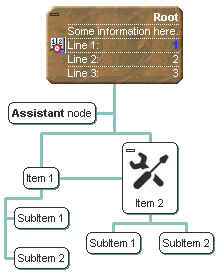
The
following VB sample changes the visual appearance for the root node. The
sample uses the " "
skin.
"
skin.
With ChartView1
    .VisualAppearance.Add 3, "D:\Temp\ExOrgChart.Help\button.ebn"
    With .Root
        .ForeColor = RGB(255, 255, 255)
        .BackColor = &H3000000
    End With
End With
The following C++ sample changes the visual appearance for the root node:
#include "Appearance.h"
#include "Node.h"
m_chartview.GetVisualAppearance().Add( 3, COleVariant("D:\\Temp\\ExOrgChart.Help\\button.ebn") );
CNode node = m_chartview.GetRoot();
node.SetForeColor( RGB(255,255,255) );
node.SetBackColor( 0x3000000 );
The following VB.NET sample changes the visual appearance for the root node:
With AxChartView1
    .VisualAppearance.Add(3, "D:\Temp\ExOrgChart.Help\button.ebn")
    With .Root
        .ForeColor = RGB(255, 255, 255)
        .BackColor = &H3000000
    End With
End With
The following C# sample changes the visual appearance for the root node:
axChartView1.VisualAppearance.Add(3, "D:\\Temp\\ExOrgChart.Help\\button.ebn");
EXORGCHARTLib.Node node = axChartView1.Root;
node.ForeColor = ToUInt32(Color.FromArgb(255, 255, 255));
node.BackColor = 0x3000000;
where the ToUInt32 function converts a Color expression to an OLE_COLOR expression:
private UInt32 ToUInt32(Color c)
{
	long i;
	i = c.R;
	i = i + 256 * c.G;
	i = i + 256 * 256 * c.B;
	return Convert.ToUInt32(i);
}
The following VFP sample changes the visual appearance for the root node:
With thisform.ChartView1
    .VisualAppearance.Add(3, "D:\Temp\ExOrgChart.Help\button.ebn")
    with .Root
    	.ForeColor = RGB(255,255,255)
    	.BackColor = 50331648
    endwith
EndWith
where the 33554432 in hexa is 0x2000000.
The following VB sample changes the background and foreground color for the selected node:
Private Sub ChartView1_Select(ByVal OldNode As EXORGCHARTLibCtl.INode, ByVal NewNode As EXORGCHARTLibCtl.INode)
    If Not (OldNode Is Nothing) Then
        With OldNode
            .ClearBackColor
            .ClearForeColor
        End With
    End If
    With NewNode
        .ForeColor = vbWhite
        .BackColor = vbBlue
    End With
End Sub
The following C++ sample changes the background and foreground color for the selected node:
void OnSelectChartview1(LPDISPATCH OldNode, LPDISPATCH NewNode)
{
	CNode oldNode( OldNode ); oldNode.m_bAutoRelease = FALSE;
	CNode newNode( NewNode ); newNode.m_bAutoRelease = FALSE;

	if ( oldNode.m_lpDispatch != NULL )
	{
		oldNode.ClearBackColor();
		oldNode.ClearForeColor();
	}
	newNode.SetBackColor( RGB(0,0,128) );
	newNode.SetForeColor( RGB(255,255,255) );
}
The following VB.NET sample changes the background and foreground color for the selected node:
Private Sub AxChartView1_SelectEvent(ByVal sender As System.Object, ByVal e As AxEXORGCHARTLib._IChartViewEvents_SelectEvent) Handles AxChartView1.SelectEvent
    If Not (e.oldNode Is Nothing) Then
        With e.oldNode
            .ClearBackColor()
            .ClearForeColor()
        End With
    End If
    With e.newNode
        .ForeColor = ToUInt32(Color.White)
        .BackColor = ToUInt32(Color.Blue)
    End With
End Sub
where the ToUInt32 function converts a Color expression to OLE_COLOR,
Shared Function ToUInt32(ByVal c As Color) As UInt32
    Dim i As Long
    i = c.R
    i = i + 256 * c.G
    i = i + 256 * 256 * c.B
    ToUInt32 = Convert.ToUInt32(i)
End Function
The following C# sample changes the background and foreground color for the selected node:
private void axChartView1_SelectEvent(object sender, AxEXORGCHARTLib._IChartViewEvents_SelectEvent e)
{
	if ( e.oldNode != null )
	{
		e.oldNode.ClearBackColor();
		e.oldNode.ClearForeColor();
	}
	e.newNode.BackColor = ToUInt32(Color.Blue);
	e.newNode.ForeColor = ToUInt32(Color.White);
}
where the ToUInt32 function converts a Color expression to OLE_COLOR,
private UInt32 ToUInt32(Color c)
{
	long i;
	i = c.R;
	i = i + 256 * c.G;
	i = i + 256 * 256 * c.B;
	return Convert.ToUInt32(i);
}
The following VFP sample changes the background and foreground color for the selected node:
*** ActiveX Control Event ***
LPARAMETERS oldnode, newnode

If !isnull(oldnode)
    With oldnode
        .ClearBackColor
        .ClearForeColor
    EndWith
EndIf
With newnode
    .ForeColor = RGB(255,255,255)
    .BackColor = RGB(0,0,128)
EndWith