

The PutItems method loads items from a safe array. The PutItems method may raise one of the following exceptions:
- The array dimension exceeds 2 (In simpler terms, a two-dimensional array (or 2D array) is like a table with rows and columns. If an array exceeds 2 dimensions, it means it has three or more dimensions, such as a 3D array (which can be thought of as a collection of tables) or even higher dimensions) You need to provide a one-dimensional or two-dimensional array
- The number of columns does not match the array size (either the control has no columns or the number of columns is too small). You need to add more columns (Add property).
- The element type of the array is not valid (the type of the array is either unknown or not supported) You need to provide a valid type, which must be one of the following: Variant, String, Integer, Long, Double, Float, or Date.
The PutItems method performs:
- Insertion Order: The data is inserted into the system in the same order as it is provided by the Items parameter. This means that the sequence of rows in the Items parameter directly affects how the data is inserted.
- Sorting Requirement: To ensure correct insertion, it's crucial that the data is sorted by the IDColumn (when the Parent parameter is of "parent;IDColumn;ParentIDColumn" format). This sorting ensures that parent rows are inserted before their corresponding child rows.
- Parent-Child Relationship: The sorting ensures that when a row refers to a parent row using the ParentIDColumn value (when the Parent parameter is of "parent;IDColumn;ParentIDColumn" format). The parent row is already present in the control. This allows the current row to be inserted as a child of the parent row without encountering errors or inconsistencies.
In essence, by sorting the data appropriately, you establish a clear hierarchy where parent rows are inserted before child rows, maintaining the integrity of the parent-child relationships within the dataset.
For instance, let's say we have the following data:
| EmployeeID | EmployeeName | DepartmentID | ParentID |
| 1 | John | 101 | |
| 2 | Alice | 102 | 1 |
| 3 | Bob | 101 | 1 |
| 4 | Sarah | 102 | 1 |
| 5 | Emma | 101 | 2 |
| 6 | Mike | 102 | 2 |
Each row represents an employee.
- EmployeeID uniquely identifies each employee (represents the column with the index 0)
- EmployeeName denotes the name of the employee (represents the column with the index 1)
- DepartmentID indicates the department to which the employee belongs (represents the column with the index 2)
- ParentID establishes the relationship between employees (represents the column with the index 3), where it references the EmployeeID of the parent employee. An empty value indicates the absence of a parent, typically representing the head of the department.
Having this data organized into a two-dimensional array, the statement PutItems d loads it as a flat table:
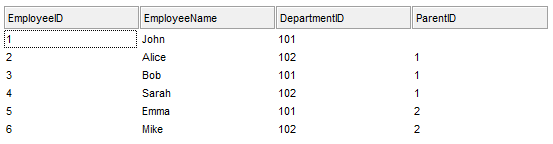
whereas PutItems d, ";0;3" loads it as a tree structure:

where d is an array as defined next:
Dim d(3, 5) As Variant
d(0, 0) = "1": d(1, 0) = "John": d(2, 0) = "101": d(3, 0) = ""
d(0, 1) = "2": d(1, 1) = "Alice": d(2, 1) = "102": d(3, 1) = "1"
d(0, 2) = "3": d(1, 2) = "Bob": d(2, 2) = "101": d(3, 2) = "1"
d(0, 3) = "4": d(1, 3) = "Sarah": d(2, 3) = "102": d(3, 3) = "1"
d(0, 4) = "5": d(1, 4) = "Emma": d(2, 4) = "101": d(3, 4) = "2"
d(0, 5) = "6": d(1, 5) = "Mike": d(2, 5) = "102": d(3, 5) = "2"
Use the GetItems method to get a safe array with the items in the control. The PutItems method fires AddItem event for each item added to Items collection. Use the Items property to access the items collection. Use the ConditionalFormats method to apply formats to a cell or range of cells, and have that formatting change depending on the value of the cell or the value of a formula.
The following VB6 sample loads a flat array to a single column control:
With Grid1
    .BeginUpdate
    .Columns.Add "Column 1"
    .PutItems Array("Item 1", "Item 2", "Item 3")
    .EndUpdate
End With
The following VB.NET (.NET version) sample loads a flat array to a single column control:
 With Exgrid1
    .BeginUpdate()
    .Columns.Add("Column 1")
    .PutItems(New String() {"Item 1", "Item 2", "Item 3"})
    .EndUpdate()
End With
The result is shown in the following picture:

The following VB6 sample loads a hierarchy to a single column control:
With Grid1
    .BeginUpdate
        .LinesAtRoot = exLinesAtRoot
        .Columns.Add ""
        .PutItems Array("Root 1", Array("Child 1.1", Array("Sub Child 1.1.1", "Sub Child 1.1.2"), "Child 1.2"), "Root 2", Array("Child 2.1", "Child 2.2"))
    .EndUpdate
End With
The following VB.NET (.NET version) sample loads a hierarchy to a single column control:
With Exgrid1
    .BeginUpdate()
    .LinesAtRoot = exontrol.EXGRIDLib.LinesAtRootEnum.exLinesAtRoot
    .Columns.Add("")
    .PutItems(New Object() {"Root 1", New Object() {"Child 1.1", New String() {"Sub Child 1.1.1", "Sub Child 1.1.2"}, "Child 1.2"}, "Root 2", New String() {"Child 2.1", "Child 2.2"}})
    .EndUpdate()
End With
The result is shown in the following picture:

The following VB6 sample loads a list of items, in a three columns control ( as shown in the following picture ):
Dim v(2, 2) As String
v(0, 0) = "One": v(0, 1) = "Two": v(0, 2) = "Three"
v(1, 0) = "One": v(1, 1) = "Two": v(1, 2) = "Three"
v(2, 0) = "One": v(2, 1) = "Two": v(2, 2) = "Three"

With Grid1
    .BeginUpdate
    .Columns.Add "Column 1"
    .Columns.Add "Column 2"
    .Columns.Add "Column 3"

    .PutItems v
    .EndUpdate
End With

The following VB6 sample loads a list of items, in a three columns control ( as shown in the following picture ):
Dim v(2, 2) As String
v(0, 0) = "One": v(0, 1) = "Two": v(0, 2) = "Three"
v(1, 0) = "One": v(1, 1) = "Two": v(1, 2) = "Three"
v(2, 0) = "One": v(2, 1) = "Two": v(2, 2) = "Three"

With Grid1
    .BeginUpdate
    .Columns.Add "Column 1"
    .Columns.Add "Column 2"
    .Columns.Add "Column 3"

    .Items.AddItem "Root"

    .PutItems v, .Items.FirstVisibleItem
    .EndUpdate
End With

The following VB sample loads the collection of records from an ADO recordset:
Dim rs As Object
Const dwProvider = "Microsoft.Jet.OLEDB.4.0" ' OLE Data provider
Const nCursorType = 3 ' adOpenStatic
Const nLockType = 3 ' adLockOptimistic
Const nOptions = 2 ' adCmdTable
Const strDatabase = "D:\Program Files\Microsoft Visual Studio\VB98\NWIND.MDB"

'Creates an recordset and opens the "Employees" table, from NWIND database
Set rs = CreateObject("ADODB.Recordset")
rs.Open "Employees", "Provider=" & dwProvider & ";Data Source= " & strDatabase, nCursorType, nLockType, nOptions
With Grid1
    .BeginUpdate

        .ColumnAutoResize = False
        .MarkSearchColumn = False
        .DrawGridLines = True
        ' Adds a column for each field found
        With .Columns
            Dim f As Object
            For Each f In rs.Fields
                .Add f.Name
            Next
        End With

        ' Loads the collection of records
        .PutItems rs.GetRows()

        'Changes the editor of the "Photo" column
        .Columns("Photo").Editor.EditType = PictureType
     .EndUpdate
End With
The following C++ sample loads records from an ADO recordset, using the PutItems method:
#include "Items.h"
#include "Columns.h"
#include "Column.h"


#pragma warning( disable : 4146 )
#import <msado15.dll> rename ( "EOF", "adoEOF" )
using namespace ADODB;


_RecordsetPtr spRecordset;
if ( SUCCEEDED( spRecordset.CreateInstance( "ADODB.Recordset") ) )
{
	// Builds the connection string.
	CString strTableName = "Employees", strConnection = "Provider=Microsoft.Jet.OLEDB.4.0;Data Source=";
	CString strPath = "D:\\Program Files\\Microsoft Visual Studio\\VB98\\NWIND.MDB";
	strConnection += strPath;
	try
	{
		// Loads the table
		if ( SUCCEEDED( spRecordset->Open(_variant_t( (LPCTSTR)strTableName ), _variant_t((LPCTSTR)strConnection), adOpenStatic, adLockPessimistic, NULL ) ) )
		{
			m_grid.BeginUpdate();
			m_grid.SetColumnAutoResize( FALSE );
			CColumns columns = m_grid.GetColumns();
			for ( long i = 0; i < spRecordset->Fields->Count; i++ )
				columns.Add( spRecordset->Fields->GetItem(i)->Name );
			COleVariant vtMissing; V_VT( &vtMissing ) = VT_ERROR;
			m_grid.PutItems( &spRecordset->GetRows(-1), vtMissing );
			m_grid.EndUpdate();
		}
	}
	catch ( _com_error& e )
	{
		AfxMessageBox( e.Description() );
	}
}
The sample uses the #import statement to import ADODB recordset's type library. The sample enumerates the fields in the recordset and adds a new column for each field found. Also, the sample uses the GetRows method of the ADODB recordset to retrieves multiple records of a Recordset object into a safe array. Please consult the ADODB documentation for the GetRows property specification.