|
373
|
Shifts horizontally or vertically the axis-line relative to their original positions
With Graph1
	.BeginUpdate
	.ValueSize = 48
	With .CategoryAxis
		.Categories = "China,India,United States,Indonesia,Pakistan,Brazil,Nigeria,Bangladesh,Russia,Mexico"
		.Offset = 4
	End With
	With .Series.Add("1410,1390,331,276,225,213,211,166,145,130")
		.ShowValue = exValue
		.ValueFormat = "`<fgcolor white>` + category"
		.ValuePoint = ",,,,,,,black,white"
	End With
	.EndUpdate
End With
|
|
372
|
Shifts horizontally or vertically the title relative to their original positions

With Graph1
	.BeginUpdate
	.ValueSize = 48
	With .CategoryAxis
		.Categories = "China,India,United States,Indonesia,Pakistan,Brazil,Nigeria,Bangladesh,Russia,Mexico"
		.OffsetTitle = "0,-44"
		.Title = "<b><font ;22>Population"
		.Format = "`<fgcolor white><font ;>` + value"
	End With
	With .Series.Add("1410,1390,331,276,225,213,211,166,145,130")
		.ShowValue = exValue
		.ValueFormat = "`<fgcolor white>` + category"
		.ValuePoint = ",,,,,,,black,white"
	End With
	.EndUpdate
End With
|
|
371
|
How can I display the original value, which is used as the base for calculating the stacked value

With Graph1
	.BeginUpdate
	.AutoFit = True
	.CategoryAxis.Categories = "Stanzen,Biegen,Beschichten,Vormontage"
	.ValuePoint = ",,,,,,,black,gray"
	.ToolTipFormat = "``"
	With .Series
		.Def(exSerieStack) = "A"
		.Def(exSerieShowValue) = 4
		.Def(exSerieValueFormat) = "base = `-1.#QNAN` ? `` : (` <fgcolor white>` + base + ` `)"
		.Add("3").Color = "RGB(91,148,201)"
		.Add("5").Color = "RGB(238,127,48)"
		.Add("2").Color = "RGB(167,167,167)"
		.Add(",3").Color = "RGB(255,195,13)"
		.Add(",2").Color = "RGB(69,116,208)"
		.Add(",,8").Color = "RGB(112,173,70)"
		.Add(",,3").Color = "RGB(34,96,143)"
		.Add(",,,4").Color = "RGB(158,72,13)"
		.Add(",,,4").Color = "RGB(99,99,99)"
		.Add(",,,2").Color = "RGB(152,115,0)"
	End With
	.EndUpdate
End With
|
|
370
|
How can I show the original value when hovering over a stacked segment, which is used as the base for calculating the stacked value

With Graph1
	.BeginUpdate
	.AutoFit = True
	.CategoryAxis.Categories = "Stanzen,Biegen,Beschichten,Vormontage"
	.ToolTipFormat = "base"
	.ValuePoint = ",transparent,transparent"
	With .Series
		.Def(exSerieStack) = "A"
		.Def(exSerieShowValue) = 257
		.Add("3").Color = "RGB(91,148,201)"
		.Add("5").Color = "RGB(238,127,48)"
		.Add("2").Color = "RGB(167,167,167)"
		.Add(",3").Color = "RGB(255,195,13)"
		.Add(",2").Color = "RGB(69,116,208)"
		.Add(",,8").Color = "RGB(112,173,70)"
		.Add(",,3").Color = "RGB(34,96,143)"
		.Add(",,,4").Color = "RGB(158,72,13)"
		.Add(",,,4").Color = "RGB(99,99,99)"
		.Add(",,,2").Color = "RGB(152,115,0)"
	End With
	.EndUpdate
End With
|
|
369
|
Using exHitTestRect without showing the value-points
With Graph1
	.BeginUpdate
	.AutoFit = True
	.AllowMoveValue = exLeftClick
	.ValueAxis.Format = "value/1000000"
	With .ValueAxes.Add("2nd")
		.Align = exAlignRight
		.MajorGridLines.Width = 0
		.Title = "GDP"
	End With
	With .Series.Add("Tokyo(37833000), Delhi(30290000), Shanghai(27058000), São Paulo(22043000), Mumbai(20668000), Beijing(20384000), Karachi(2000000" & _
	"0), Dhaka(17072000), Istanbul(15029000), Los Angeles(13131000)")
		.ShowValue = ShowValueEnum.exHitTestRect Or ShowValueEnum.exPoint
		.ValuePoint = "0"
	End With
	With .Series.Add("Tokyo(2100), Delhi(320), Shanghai(700), São Paulo(430), Mumbai(370), Beijing(1400), Karachi(78), Dhaka(95), Istanbul(500), Los " & _
	"Angeles(1040)")
		.ShowValue = &Hfffffe78 Or ShowValueEnum.exHitTestRect Or ShowValueEnum.exHideIfEmpty Or ShowValueEnum.exValue Or ShowValueEnum.exLine Or ShowValueEnum.exPoint
		.Type = "line"
		.Axis = "2nd"
	End With
	.EndUpdate
End With
|
|
368
|
Customize the serie's value-points appearance
With Graph1
	.BeginUpdate
	.AutoFit = True
	.ValueAxis.Format = "value/1000000"
	With .ValueAxes.Add("2nd")
		.Align = exAlignRight
		.MajorGridLines.Width = 0
		.Title = "GDP"
	End With
	With .Series.Add("Tokyo(37833000), Delhi(30290000), Shanghai(27058000), São Paulo(22043000), Mumbai(20668000), Beijing(20384000), Karachi(2000000" & _
	"0), Dhaka(17072000), Istanbul(15029000), Los Angeles(13131000)")
		.ShowValue = exPoint
		.ValuePoint = "12,white,black,1"
	End With
	With .Series.Add("Tokyo(2100), Delhi(320), Shanghai(700), São Paulo(430), Mumbai(370), Beijing(1400), Karachi(78), Dhaka(95), Istanbul(500), Los " & _
	"Angeles(1040)")
		.ShowValue = &Hfffffe78 Or ShowValueEnum.exHitTestRect Or ShowValueEnum.exHideIfEmpty Or ShowValueEnum.exValue Or ShowValueEnum.exLine Or ShowValueEnum.exPoint
		.Type = "line"
		.Axis = "2nd"
	End With
	.EndUpdate
End With
|
|
367
|
CursorFromPoint, Returns a string with information from the specified cursor position, items separated by new lines (\r\n), in the following order: x, y, and valueCategory, indicating the X-axis position, Y-axis value, and value in the cursor's category under the pointer
' MouseMove event - Occurs when the user moves the mouse.
Private Sub Graph1_MouseMove(Button As Integer, Shift As Integer, X As Single, Y As Single)
	With Graph1
		Debug.Print( .CursorFromPoint(-1,-1) )
	End With
End Sub

With Graph1
	.BeginUpdate
	.AutoFit = True
	.ValuePoint = "1,transparent,transparent"
	.CategoryAxis.Categories = "Stanzen,Biegen,Beschichten,Vormontage"
	With .Series
		With .Add("10,222,31,43")
			.Color = "blue"
			.ShowValue = ShowValueEnum.exHitTestRect Or ShowValueEnum.exPoint
		End With
	End With
	.EndUpdate
End With
|
|
366
|
ValueFromPoint, returns information from the specified cursor position as a string, with items separated by new lines (\r\n), in the following order: value, inner-values, inner-value index / inner-values count, percent, index-serie, index-category, representing the value, serie, and category under the pointer. Calling ValueFromPoint(-1, -1) returns the same information from the current pointer position
' MouseMove event - Occurs when the user moves the mouse.
Private Sub Graph1_MouseMove(Button As Integer, Shift As Integer, X As Single, Y As Single)
	With Graph1
		Debug.Print( .ValueFromPoint(-1,-1) )
	End With
End Sub

With Graph1
	.BeginUpdate
	.AutoFit = True
	.ValuePoint = "1,transparent,transparent"
	.CategoryAxis.Categories = "Stanzen,Biegen,Beschichten,Vormontage"
	With .Series
		With .Add("10,222,31,43")
			.Color = "blue"
			.ShowValue = ShowValueEnum.exHitTestRect Or ShowValueEnum.exPoint
		End With
	End With
	.EndUpdate
End With
|
|
365
|
Add a line

With Graph1
	.BeginUpdate
	.AutoFit = True
	.ValueAxis.Mark = "red[axis,chart](747)"
	.CategoryAxis.Categories = "Asia,Africa,Europe,North America,Antarctica,South America,Australia/Oceania"
	With .Series
		With .Add("4600,1300,747,579,0,422,42")
			.Name = "Population"
			.Misc(exLineSize) = 3
		End With
	End With
	.EndUpdate
End With
|
|
364
|
Define the title

With Graph1
	.BeginUpdate
	.AutoFit = True
	With .ValueAxis
		.Angle = "-90,-90"
		.Title = "<b>mil"
		.Format = "value ? value format `0` : ``"
	End With
	.CategoryAxis.Categories = "Asia,Africa,Europe,North America,Antarctica,South America,Australia/Oceania"
	With .CategoryAxes.Add("")
		.Title = "<b><font ;15>Population"
		.Align = exAlignLeft
	End With
	With .Series
		With .Add("4600,1300,747,579,0,422,42")
			.Name = "Population"
			.Misc(exLineSize) = 3
		End With
	End With
	.EndUpdate
End With
|
|
363
|
Can I specify a custom tooltip for each data

With Graph1
	.BeginUpdate
	.AutoFit = True
	.Legend.Visible = True
	.CategoryAxis.Categories = "Planning,Design,Development,Testing,Deployment"
	.ToolTipFormat = "proper(user)"
	With .Series
		.Def(exSerieStack) = "A"
		.Def(exSerieShowValue) = 257
		With .Add("4")
			.Color = "RGB(91,148,201)"
			.UserData = "Initial planning phase"
		End With
		With .Add("6")
			.Color = "RGB(238,127,48)"
			.UserData = "Design stage progress"
		End With
		With .Add("3")
			.Color = "RGB(167,167,167)"
			.UserData = "Prototype implementation"
		End With
		With .Add(",5")
			.Color = "RGB(255,195,13)"
			.UserData = "Unit testing coverage"
		End With
		With .Add(",3")
			.Color = "RGB(69,116,208)"
			.UserData = "System integration"
		End With
		With .Add(",,7")
			.Color = "RGB(112,173,70)"
			.UserData = "Beta release performance"
		End With
		With .Add(",,4")
			.Color = "RGB(34,96,143)"
			.UserData = "Bug fixing and QA"
		End With
		With .Add(",,,3")
			.Color = "RGB(158,72,13)"
			.UserData = "Deployment preparation"
		End With
		With .Add(",,,5")
			.Color = "RGB(99,99,99)"
			.UserData = "Post-deployment checks"
		End With
		With .Add(",,,,2")
			.Color = "RGB(152,115,0)"
			.UserData = "Maintenance updates"
		End With
	End With
	.EndUpdate
End With
|
|
362
|
UserData, specifies additional data associated with the serie
With Graph1
	.BeginUpdate
	.AutoFit = True
	With .CategoryAxis
		.Categories = "Germany,France,Japan,Canada,Australia,Mexico"
		.MajorGridLines.Color = "lightgray"
	End With
	With .Series.Add("1600,1450,1250,900,800,750")
		.Color = "lightgreen"
		.UserData = "this is just an extra data associated with the current serie"
	End With
	Debug.Print( .Series.Item(0).UserData )
	.EndUpdate
End With
|
|
361
|
Can I display multiple charts, one using a logarithmic scale and another using a linear scale, within the same view

With Graph1
	.BeginUpdate
	sFormat = "(value and value < 1) ? (value format `%.1E` replace `-00` with `-`) : (value format `0`)"
	.AutoFit = True
	.Misc(exEpsilon) = 0.0000000000001
	.MultiColorSerie = False
	With .CategoryAxis
		.Categories = "12:54:28,12:54:44,13:03:53,13:03:58,13:05:00,13:06:12"
		.Format = "`<bgcolor white>` + value"
	End With
	With .ValueAxis
		.Type = exLogarithmic
		.Format = sFormat
		.CursorFormat = sFormat
	End With
	With .ValueAxes.Add("linear")
		.Type = exLinear
		.Align = exAlignRight
		.Format = "`<fgcolor teal>` + value"
	End With
	With .Series.Add("3.14E-09,2.59E-11,4.25E-12,4.20E-13,5.10E-09,6.25E-09")
		.Type = "line"
		.CursorFormat = sFormat
		.Color = "black"
		.Misc(exLineSize) = 2
	End With
	With .Series.Add("10,20,30,40,30,15")
		.Axis = "linear"
	End With
	.Cursor.Visible = True
	.EndUpdate
End With
|
|
360
|
Your graph currently can't display values smaller than E-9. Is it possible to shown down to E-13

With Graph1
	.BeginUpdate
	sFormat = "(value and value < 1) ? (value format `%.1E` replace `-00` with ``) : (value format `0`)"
	.AutoFit = True
	.Misc(exEpsilon) = 0.0000000000001
	.MultiColorSerie = False
	.CategoryAxis.Format = "`<bgcolor white>` + value"
	With .ValueAxis
		.Type = exLogarithmic
		.Format = sFormat
		.CursorFormat = sFormat
	End With
	With .Series.Add("12:54:28(3.14E-09),12:54:44(2.59E-11),13:03:53(4.25E-12),13:03:58(4.20E-13),13:05:00(5.10E-09),13:06:12(6.25E-09)")
		.Type = "line"
		.CursorFormat = sFormat
	End With
	.Cursor.Visible = True
	.EndUpdate
End With
|
|
359
|
Can I drag and drop the entire column to move the data instead of dragging the individual value point (for a single series)
' MoveValue event - Notifies the application when a user performs a drag-and-drop operation to move a category, series, or data value.
Private Sub Graph1_MoveValue()
	With Graph1
		Debug.Print( .Series.Item(0).Data )
	End With
End Sub

With Graph1
	.BeginUpdate
	.AutoFit = True
	.AllowMoveValue = &H700 Or AllowKeysEnum.exLeftClick
	.ValuePoint = "1,transparent,transparent"
	.CategoryAxis.Categories = "Stanzen,Biegen,Beschichten,Vormontage"
	With .Series
		With .Add("1,2,3,4")
			.Color = "blue"
			.ShowValue = ShowValueEnum.exHitTestRect Or ShowValueEnum.exPoint
		End With
	End With
	.EndUpdate
End With
|
|
358
|
Hide the value-points (method 2, no tooltip)
With Graph1
	.BeginUpdate
	.AutoFit = True
	With .CategoryAxis
		.Categories = "Germany,France,Japan,Canada,Australia,Mexico"
		.MajorGridLines.Color = "lightgray"
	End With
	With .Series.Add("1600,1450,1250,900,800,750")
		.ShowValue = ShowValueEnum.exHitTestRect Or ShowValueEnum.exPoint
	End With
	.ValuePoint = "0"
	.EndUpdate
End With
|
|
357
|
Hide the value-points (method 1)
With Graph1
	.BeginUpdate
	.AutoFit = True
	With .CategoryAxis
		.Categories = "Germany,France,Japan,Canada,Australia,Mexico"
		.MajorGridLines.Color = "lightgray"
	End With
	With .Series.Add("1600,1450,1250,900,800,750")
		.ShowValue = ShowValueEnum.exHitTestRect Or ShowValueEnum.exPoint
	End With
	.ValuePoint = "1,transparent,transparent"
	.EndUpdate
End With
|
|
356
|
Can the tooltip be displayed when the pointer hovers over the entire column, rather than only over the individual value-point
With Graph1
	.BeginUpdate
	.AutoFit = True
	With .CategoryAxis
		.Categories = "China,India,United States,Indonesia,Pakistan,Brazil"
		.MajorGridLines.Color = "lightgray"
	End With
	With .Series.Add("1410,1390,331,276,225,213")
		.ShowValue = ShowValueEnum.exHitTestRect Or ShowValueEnum.exPoint
	End With
	.EndUpdate
End With
|
|
355
|
Add markers to the graph by selecting specific points and attaching custom text annotations to them. These annotations are applied only to chosen points in the series, not to all points
With Graph1
	.BeginUpdate
	.AutoFit = True
	With .CategoryAxis
		.Categories = "China,India,United States,Indonesia,Pakistan,Brazil"
		.MajorGridLines.Color = "lightgray"
	End With
	With .Series.Add("1410,1390,331,276,225,213")
		.ShowValue = &Hfffffe78 Or ShowValueEnum.exHitTestRect Or ShowValueEnum.exHideIfEmpty Or ShowValueEnum.exValue Or ShowValueEnum.exLine Or ShowValueEnum.exPoint
		.ValueFormat = "index = 0 ? (category + `:` + value) : ``"
	End With
	.EndUpdate
End With
|
|
354
|
Can I move the data by drag and drop (single serie)
' MoveValue event - Notifies the application when a user performs a drag-and-drop operation to move a category, series, or data value.
Private Sub Graph1_MoveValue()
	With Graph1
		Debug.Print( .Series.Item(0).Data )
	End With
End Sub

With Graph1
	.BeginUpdate
	.AutoFit = True
	.AllowMoveValue = &H700 Or AllowKeysEnum.exLeftClick
	.ValuePoint = "12,white,black"
	.CategoryAxis.Categories = "Stanzen,Biegen,Beschichten,Vormontage"
	With .Series
		.Def(exSerieShowValue) = 1
		.Add("1,2,3,4").Color = "blue"
	End With
	.EndUpdate
End With
|
|
353
|
Can I move the data by drag and drop (multiple stacked-series)
' MoveValue event - Notifies the application when a user performs a drag-and-drop operation to move a category, series, or data value.
Private Sub Graph1_MoveValue()
	With Graph1
		Debug.Print( .Series.ItemByPos(0).Data )
		Debug.Print( .Series.ItemByPos(1).Data )
	End With
End Sub

With Graph1
	.BeginUpdate
	.AutoFit = True
	.AllowMoveValue = &H700 Or AllowKeysEnum.exLeftClick
	.ValuePoint = "12,white,black"
	.CategoryAxis.Categories = "Stanzen,Biegen,Beschichten,Vormontage"
	With .Series
		.Def(exSerieStack) = "A"
		.Def(exSerieShowValue) = 1
		.Add("3").Color = 13210715
		.Add("5").Color = 3178478
		.Add("2").Color = 10987431
		.Add(",3").Color = 902143
		.Add(",2").Color = 13661253
		.Add(",,8").Color = 4631920
		.Add(",,3").Color = 9396258
		.Add(",,,4").Color = 870558
		.Add(",,,4").Color = 6513507
		.Add(",,,2").Color = 29592
	End With
	.EndUpdate
End With
|
|
352
|
Defines the default value assigned to a particular property when a new series is created
With Graph1
	.BeginUpdate
	.AutoFit = True
	.Legend.Visible = True
	.CategoryAxis.Categories = "Stanzen,Biegen,Beschichten,Vormontage"
	With .Series
		.Def(exSerieStack) = "A"
		.Add("3").Color = "RGB(91,148,201)"
		.Add("5").Color = "RGB(238,127,48)"
		.Add("2").Color = "RGB(167,167,167)"
		.Add(",3").Color = "RGB(255,195,13)"
		.Add(",2").Color = "RGB(69,116,208)"
		.Add(",,8").Color = "RGB(112,173,70)"
		.Add(",,3").Color = "RGB(34,96,143)"
		.Add(",,,4").Color = "RGB(158,72,13)"
		.Add(",,,4").Color = "RGB(99,99,99)"
		.Add(",,,2").Color = "RGB(152,115,0)"
	End With
	.EndUpdate
End With
|
|
351
|
Is it possible to reorder just the series by drag and drop
With Graph1
	.BeginUpdate
	.AutoFit = True
	.AllowMoveValue = &H300 Or AllowKeysEnum.exLeftClick
	.CategoryAxis.MajorGridLines.Color = "lightgray"
	With .Series
		With .Add("Electronics(350),Clothing(200),Books(150)",2001)
			.Stack = "A"
			.ShowValue = exPoint
		End With
		With .Add("Electronics(500),Clothing(150),Books(180)",2002)
			.Stack = "A"
			.ShowValue = exPoint
		End With
	End With
	.ValuePoint = "16,white,black"
	.Legend.Visible = True
	.EndUpdate
End With
|
|
350
|
Is it possible to reorder just the values/categories by drag and drop (method 2)
With Graph1
	.BeginUpdate
	.AutoFit = True
	.AllowMoveValue = exLeftClick
	.CategoryAxis.MajorGridLines.Color = "lightgray"
	With .Series
		With .Add("Electronics(350),Clothing(200),Books(150)",2001)
			.Stack = "A"
			.ShowValue = exPoint
		End With
		With .Add("Electronics(500),Clothing(150),Books(180)",2002)
			.Stack = "A"
			.ShowValue = exPoint
		End With
	End With
	.ValuePoint = "16,white,black"
	.Legend.Visible = True
	.EndUpdate
End With
|
|
349
|
Is it possible to reorder just the values/categories by drag and drop (method 1)
With Graph1
	.BeginUpdate
	.AutoFit = True
	.AllowMoveValue = exLeftClick
	.CategoryAxis.MajorGridLines.Color = "lightgray"
	With .Series
		With .Add("Electronics(350),Clothing(200),Books(150)",2001)
			.Stack = "A"
		End With
		With .Add("Electronics(500),Clothing(150),Books(180)",2002)
			.Stack = "A"
			.ShowValue = exPoint
		End With
	End With
	.ValuePoint = "16,white,black"
	.Legend.Visible = True
	.EndUpdate
End With
|
|
348
|
Is it possible to reorder the series and values/categories by drag and drop
With Graph1
	.BeginUpdate
	.AutoFit = True
	.AllowMoveValue = &H200 Or AllowKeysEnum.exLeftClick
	.CategoryAxis.MajorGridLines.Color = "lightgray"
	With .Series
		With .Add("Electronics(350),Clothing(200),Books(150)",2001)
			.Stack = "A"
			.ShowValue = exPoint
		End With
		With .Add("Electronics(500),Clothing(150),Books(180)",2002)
			.Stack = "A"
			.ShowValue = exPoint
		End With
	End With
	.ValuePoint = "16,white,black"
	.Legend.Visible = True
	.EndUpdate
End With
|
|
347
|
Is it possible to reorder the values by drag and drop
With Graph1
	.BeginUpdate
	.AutoFit = True
	.ValueAxis.Format = "value/100000"
	With .Series.Add("Tokyo(37833000), Delhi(30290000), Shanghai(27058000), São Paulo(22043000), Mumbai(20668000), Beijing(20384000), Karachi(2000000" & _
	"0), Dhaka(17072000), Istanbul(15029000), Los Angeles(13131000)")
		.ShowValue = exPoint
	End With
	.ValuePoint = "12,white,black"
	.AllowMoveValue = exLeftClick
	.EndUpdate
End With
|
|
346
|
Reorder multiple values
With Graph1
	.BeginUpdate
	.AutoFit = True
	.MultiColorSerie = False
	.Series.Add "1960(1.4),1980(11.2),2000(33.5),2010(65.8),2020(84.7)","GDP"
	.Order = ",4,,3"
	.EndUpdate
End With
|
|
345
|
Move a value to an earlier or later position
With Graph1
	.BeginUpdate
	.AutoFit = True
	.MultiColorSerie = False
	.Series.Add "1960(1.4),1980(11.2),2000(33.5),2010(65.8),2020(84.7)","GDP"
	.Order = ",,3"
	.EndUpdate
End With
|
|
344
|
Place one value at a specified position
With Graph1
	.BeginUpdate
	.AutoFit = True
	.MultiColorSerie = False
	.Series.Add "1960(1.4),1980(11.2),2000(33.5),2010(65.8),2020(84.7)","GDP"
	.Order = "3"
	.EndUpdate
End With
|
|
343
|
Configure the Y-axis so that it always displays exactly 5 labels (fixed-ticks), regardless of the data range
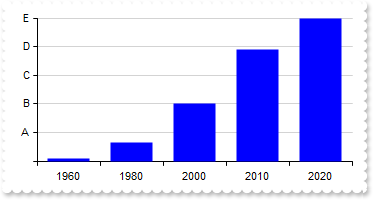
With Graph1
	.BeginUpdate
	.AutoFit = True
	.MultiColorSerie = False
	With .ValueAxis
		.AsPercent = True
		.MajorUnit = 0.2
		.Format = "value*5 array (``,`A`,`B`,`C`,`D`,`E`)"
	End With
	.Series.Add "1960(1.4),1980(11.2),2000(33.5),2010(65.8),2020(84.7)","GDP"
	.EndUpdate
End With
|
|
342
|
Define the style(solid, dash, dot, dash-dot, dash-dot-dot) of the line to show the serie
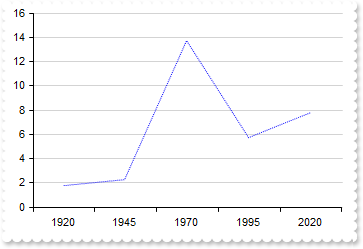
With Graph1
	.BeginUpdate
	.AutoFit = True
	With .Series.Add("1920(1.8),1945(2.3),1970(13.7),1995(5.7),2020(7.8)","Population")
		.Type = "Line"
		.Misc(exLineStyle) = 2
	End With
	.EndUpdate
End With
|
|
341
|
I'm using the logarithmic scale, but it's not displaying any values. How can I adjust the settings to show very small values
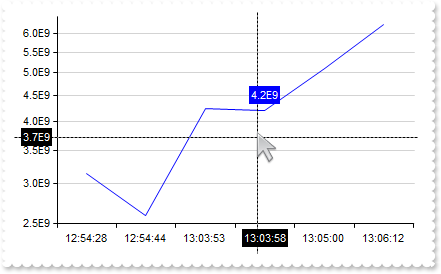
With Graph1
	.BeginUpdate
	sFormat = "(value and value < 1) ? (value format `%.1E` replace `-00` with ``) : (value format `0`)"
	.AutoFit = True
	.Misc(exEpsilon) = 0.000000001
	.MultiColorSerie = False
	.CategoryAxis.Format = "`<bgcolor white>` + value"
	With .ValueAxis
		.Type = exLogarithmic
		.Format = sFormat
		.CursorFormat = sFormat
	End With
	With .Series.Add("12:54:28(3.14E-09),12:54:44(2.59E-09),13:03:53(4.25E-09),13:03:58(4.20E-09),13:05:00(5.10E-09),13:06:12(6.25E-09)")
		.Type = "line"
		.CursorFormat = sFormat
	End With
	.Cursor.Visible = True
	.EndUpdate
End With
|
|
340
|
My data contains no values below 1. How can I prevent the logarithmic value axis from displaying the range between 0 and 1

With Graph1
	.BeginUpdate
	.AutoFit = True
	.MultiColorSerie = False
	.ValuePoint = ",,,,,,,black,transparent"
	.CategoryAxis.Format = "`<bgcolor white>` + value"
	With .ValueAxis
		.Type = exLogarithmic
		.Min = 1
		.Format = "value format `0`"
	End With
	With .Series.Add("Small village(8),Hamlet(14),Small town(22),Medium town(39),Growing town(2118),Small city(6523),Large city(31245),Capital city(4" & _
	"31245),Mega city(65431245)")
		.ShowValue = exValue
		.ValueFormat = "`<fgcolor white> ` + (value format `0`) + ` `"
	End With
	.EndUpdate
End With
|
|
339
|
Display logarithmic scale
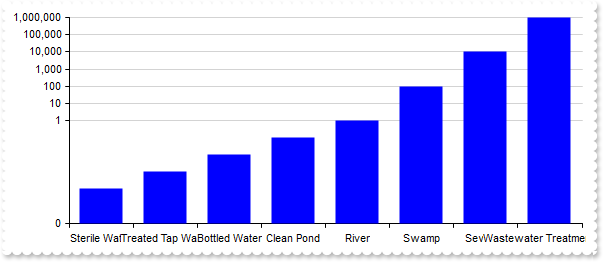
With Graph1
	.BeginUpdate
	.AutoFit = True
	.MultiColorSerie = False
	.CategoryAxis.Format = "`<bgcolor white>` + value"
	With .ValueAxis
		.Type = exLogarithmic
		.Format = "value format `0`"
	End With
	.Series.Add("Sterile Water(0.0001),Treated Tap Water(0.001),Bottled Water(0.01),Clean Pond(0.1),River(1),Swamp(100),Sewage(10000),Wastewater" & _
	" Treatment Inlet(1000000)").CursorFormat = "value < 1 ? value : (value format `0`) "
	.Cursor.Visible = True
	.EndUpdate
End With
|
|
338
|
Can the values be shown in scientific notation (e.g., 1E+4, 5E-10) rather than full decimal form
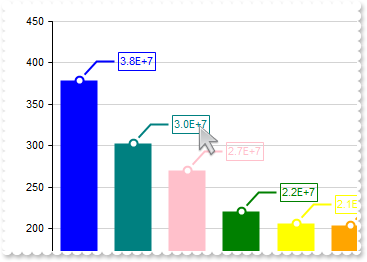
With Graph1
	.BeginUpdate
	.AutoFit = True
	.ValueAxis.Format = "value/100000"
	With .Series.Add("Tokyo(37833000), Delhi(30290000), Shanghai(27058000), São Paulo(22043000), Mumbai(20668000), Beijing(20384000), Karachi(2000000" & _
	"0), Dhaka(17072000), Istanbul(15029000), Los Angeles(13131000)")
		.ShowValue = &Hfffffe78 Or ShowValueEnum.exHitTestRect Or ShowValueEnum.exHideIfEmpty Or ShowValueEnum.exValue Or ShowValueEnum.exLine Or ShowValueEnum.exPoint
		.ValueFormat = "value format `%.1E` replace `+00` with `+`"
	End With
	.EndUpdate
End With
|
|
337
|
Highlight the value on both the chart and the axis
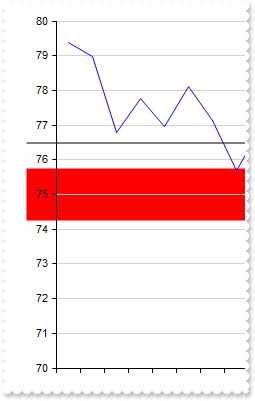
With Graph1
	.BeginUpdate
	.Import "C:\Program Files\Exontrol\ExGraph\Sample\Data/aapl.txt"
	.SerieType = "line"
	.Series.Add("open").Data = "AAPL (open)"
	.ValueAxis.Mark = "red[axis,chart](74.25-75.75),black[axis,chart](76.5)"
	.Refresh
	.EndUpdate
End With
|
|
336
|
Highlight the categories on both the chart and the axis
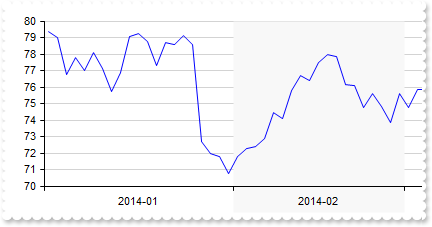
With Graph1
	.BeginUpdate
	.Import "C:\Program Files\Exontrol\ExGraph\Sample\Data/aapl.txt"
	.SerieType = "line"
	.ValueSize = 6
	.Series.Add("open").Data = "AAPL (open)"
	With .CategoryAxes.Add("0")
		.Format = "value left 7"
		.Split = True
		.Mark = "#F8F8F8[axis,chart](label = `2014-02`)"
	End With
	.Refresh
	.EndUpdate
End With
|
|
335
|
Highlight values on axis only
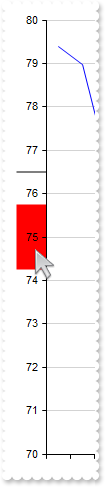
With Graph1
	.BeginUpdate
	.Import "C:\Program Files\Exontrol\ExGraph\Sample\Data/aapl.txt"
	.SerieType = "line"
	.Series.Add("open").Data = "AAPL (open)"
	.ValueAxis.Mark = "red[axis](74.25-75.75),black[axis](76.5)"
	.Refresh
	.EndUpdate
End With
|
|
334
|
Highlight the categories on axis only

With Graph1
	.BeginUpdate
	.Import "C:\Program Files\Exontrol\ExGraph\Sample\Data/aapl.txt"
	.SerieType = "line"
	.ValueSize = 6
	.Series.Add("open").Data = "AAPL (open)"
	With .CategoryAxes.Add("0")
		.Format = "value left 7"
		.Split = True
		.Mark = "#F8F8F8[axis](label = `2014-02`)"
	End With
	.Refresh
	.EndUpdate
End With
|
|
333
|
Highlight values

With Graph1
	.BeginUpdate
	.Import "C:\Program Files\Exontrol\ExGraph\Sample\Data/aapl.txt"
	.SerieType = "line"
	.Series.Add("open").Data = "AAPL (open)"
	.ValueAxis.Mark = "red(74.25-75.75),black[chart,axis](76.5)"
	.Refresh
	.EndUpdate
End With
|
|
332
|
Highlight the categories using an expression
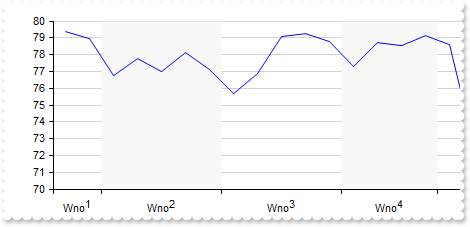
With Graph1
	.BeginUpdate
	.Import "C:\Program Files\Exontrol\ExGraph\Sample\Data/aapl.txt"
	.SerieType = "line"
	.Series.Add("open").Data = "AAPL (open)"
	With .CategoryAxes.Add("0")
		.Format = "`Wno<off-4>` + week(date(value left 10))"
		.Split = True
		.Mark = "#F8F8F8(index in (1,3))"
	End With
	.Refresh
	.EndUpdate
End With
|
|
331
|
Highlight the categories using an expression

With Graph1
	.BeginUpdate
	.Import "C:\Program Files\Exontrol\ExGraph\Sample\Data/aapl.txt"
	.SerieType = "line"
	.ValueSize = 6
	.Series.Add("open").Data = "AAPL (open)"
	With .CategoryAxes.Add("0")
		.Format = "value left 7"
		.Split = True
		.Mark = "#F8F8F8(label = `2014-02`)"
	End With
	.Refresh
	.EndUpdate
End With
|
|
330
|
Highlight the categories based on the index

With Graph1
	.BeginUpdate
	.Import "C:\Program Files\Exontrol\ExGraph\Sample\Data/aapl.txt"
	.SerieType = "line"
	.Series.Add("open").Data = "AAPL (open)"
	With .CategoryAxes.Add("0")
		.Format = "`Wno<off-4>` + week(date(value left 10))"
		.Split = True
		.Mark = "#F8F8F8(2)"
	End With
	.Refresh
	.EndUpdate
End With
|
|
329
|
IdemmM {string}, specifies the name of another value-axis to synchronize min, max, and major-unit values from when scrolling. If omitted or the value-axis with the given name is not found, these values are synchronized with the default value-axis

With Graph1
	.BeginUpdate
	.Import "C:\Program Files\Exontrol\ExGraph\Sample\Data/aapl.txt"
	With .Series.Add("open")
		.Data = "AAPL (open)"
		.Type = "line"
	End With
	With .ValueAxes
		.Add "1st"
		With .Add("2nd")
			.Align = exAlignRight
			.IdemmM = "1st"
		End With
		With .Add("3rd")
			.Format = "120 + value * 2.5"
			.MajorGridLines.Color = "transparent"
		End With
	End With
	.EndUpdate
End With
|
|
328
|
Adds multiple value-axes
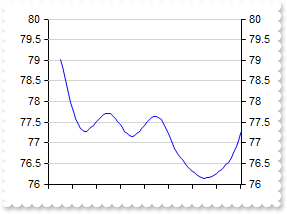
With Graph1
	.BeginUpdate
	.Import "C:\Program Files\Exontrol\ExGraph\Sample\Data/aapl.txt"
	With .Series.Add("open")
		.Data = "AAPL (close)"
		.Type = "line"
		.Style = exSpline
	End With
	With .ValueAxes
		.Add "1st"
		.Add("2nd").Align = exAlignRight
	End With
	.EndUpdate
End With
|
|
327
|
Split the chart in weeks
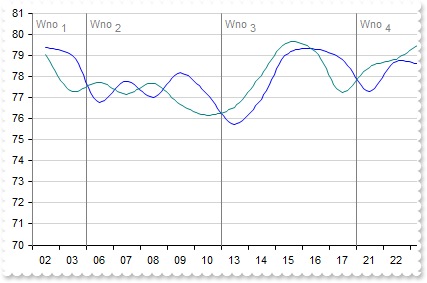
With Graph1
	.BeginUpdate
	.ValueSize = 18
	.Import "C:\Program Files\Exontrol\ExGraph\Sample\Data/aapl.txt"
	With .Series.Add("open")
		.Data = "AAPL (open)"
		.Type = "line"
		.Style = exSpline
	End With
	With .CategoryAxes.Add("0")
		.Format = "value mid 9 left 2"
		With .ChartGridLines
			.Format = "`<fgcolor gray>Wno <off 4>` + week(date(value left 10))"
			.Color = "gray"
			.Align = exTextAlignLeft
		End With
	End With
	.EndUpdate
End With
|
|
326
|
Resets the series, category axes and value axes without affecting the control's data
' Click event - Occurs when the user presses and then releases the left mouse button over the control.
Private Sub Graph1_Click()
	With Graph1
		.Reset
	End With
End Sub

With Graph1
	.BeginUpdate
	.ValueSize = 18
	.Import "C:\Program Files\Exontrol\ExGraph\Sample\Data/aapl.txt"
	.SerieType = "line"
	With .Series.Add()
		.Name = "aapl"
		.Data = "AAPL (open),AAPL (high),AAPL (low),AAPL (close)"
	End With
	With .CategoryAxes.Add("0")
		.Format = "value mid 9 left 2"
	End With
	With .CategoryAxes.Add("0")
		.Format = "value left 7"
		.Split = True
	End With
	.EndUpdate
End With
|
|
325
|
Define the representation method for the data in all series where the type property is not specified, determining how these series are visually displayed
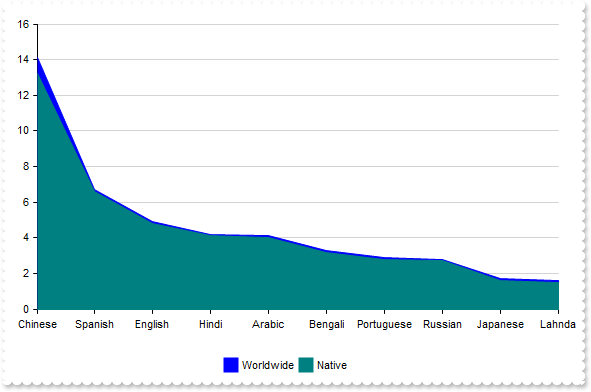
With Graph1
	.BeginUpdate
	.Pad = 18
	.AutoFit = True
	.SerieType = "rangeArea"
	With .Series
		.Add "Chinese(14.1),Spanish(6.7),English(4.9),Hindi(4.2),Arabic(4.1),Bengali(3.3),Portuguese(2.9),Russian(2.8),Japanese(1.7),Lahnda(1" & _
	".6)","Worldwide"
		.Add "Chinese(13.2),Spanish(6.6),English(4.8),Hindi(4.1),Arabic(4.0),Bengali(3.2),Portuguese(2.8),Russian(2.7),Japanese(1.6),Lahnda(1" & _
	".5)","Native"
	End With
	.Legend.Visible = True
	.EndUpdate
End With
|
|
324
|
How can I prevent the labels from rotating around the chart when using the radarColumn type

With Graph1
	.BeginUpdate
	.Pad = 18
	.AutoFit = True
	.SerieType = "radarCol"
	.Misc(exRadialRotateLabels) = False
	With .Series
		.Add "Chinese(14.1),Spanish(6.7),English(4.9),Hindi(4.2),Arabic(4.1),Bengali(3.3),Portuguese(2.9),Russian(2.8),Japanese(1.7),Lahnda(1" & _
	".6)","Worldwide"
		.Add "Chinese(13.2),Spanish(6.6),English(4.8),Hindi(4.1),Arabic(4.0),Bengali(3.2),Portuguese(2.8),Russian(2.7),Japanese(1.6),Lahnda(1" & _
	".5)","Native"
	End With
	.Legend.Visible = True
	.EndUpdate
End With
|
|
323
|
Disable stacking for all series at once
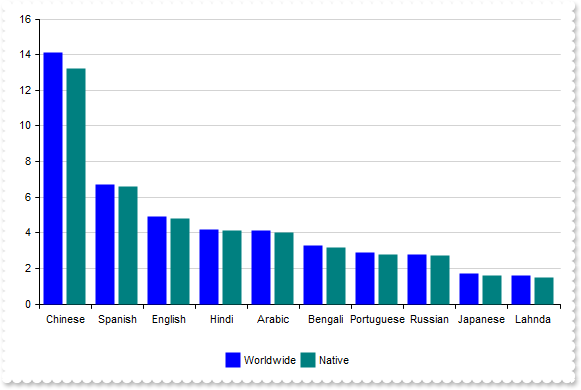
With Graph1
	.BeginUpdate
	.Pad = 18
	.AutoFit = True
	.AllowStack = False
	With .Series
		.Add("Chinese(14.1),Spanish(6.7),English(4.9),Hindi(4.2),Arabic(4.1),Bengali(3.3),Portuguese(2.9),Russian(2.8),Japanese(1.7),Lahnda(1" & _
	".6)","Worldwide").Stack = "group"
		.Add("Chinese(13.2),Spanish(6.6),English(4.8),Hindi(4.1),Arabic(4.0),Bengali(3.2),Portuguese(2.8),Russian(2.7),Japanese(1.6),Lahnda(1" & _
	".5)","Native").Stack = "group"
	End With
	.Legend.Visible = True
	.EndUpdate
End With
|
|
322
|
How can I stack more than three data series across multiple columns
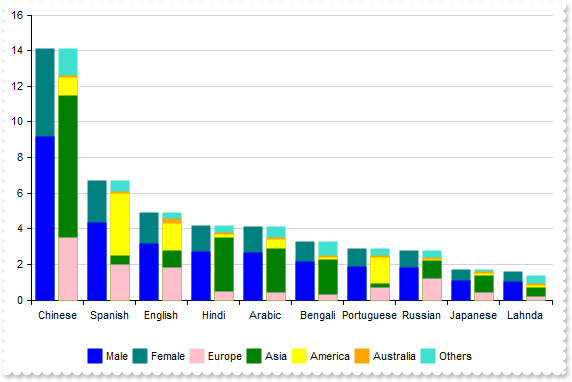
With Graph1
	.BeginUpdate
	.Pad = 18
	.AutoFit = True
	With .Series
		.Add("Chinese(9.165),Spanish(4.355),English(3.185),Hindi(2.73),Arabic(2.665),Bengali(2.145),Portuguese(1.885),Russian(1.82),Japanese(" & _
	"1.105),Lahnda(1.04)","Male").Stack = "G1"
		.Add("Chinese(4.935),Spanish(2.345),English(1.715),Hindi(1.47),Arabic(1.435),Bengali(1.155),Portuguese(1.015),Russian(0.98),Japanese(" & _
	"0.595),Lahnda(0.56)","Female").Stack = "G1"
		.Add("Chinese(3.5),Spanish(2.0),English(1.8),Hindi(0.5),Arabic(0.4),Bengali(0.3),Portuguese(0.7),Russian(1.2),Japanese(0.4),Lahnda(0." & _
	"2)","Europe").Stack = "G2"
		.Add("Chinese(8.0),Spanish(0.5),English(1.0),Hindi(3.0),Arabic(2.5),Bengali(2.0),Portuguese(0.2),Russian(1.0),Japanese(1.0),Lahnda(0." & _
	"5)","Asia").Stack = "G2"
		.Add("Chinese(1.0),Spanish(3.5),English(1.5),Hindi(0.2),Arabic(0.5),Bengali(0.1),Portuguese(1.5),Russian(0.1),Japanese(0.1),Lahnda(0." & _
	"1)","America").Stack = "G2"
		.Add("Chinese(0.1),Spanish(0.1),English(0.3),Hindi(0.1),Arabic(0.1),Bengali(0.1),Portuguese(0.1),Russian(0.1),Japanese(0.1),Lahnda(0." & _
	"1)","Australia").Stack = "G2"
		.Add("Chinese(1.5),Spanish(0.6),English(0.3),Hindi(0.4),Arabic(0.6),Bengali(0.8),Portuguese(0.4),Russian(0.4),Japanese(0.1),Lahnda(0." & _
	"5)","Others").Stack = "G2"
	End With
	.Legend.Visible = True
	.EndUpdate
End With
|
|
321
|
How can I stack data more than three series
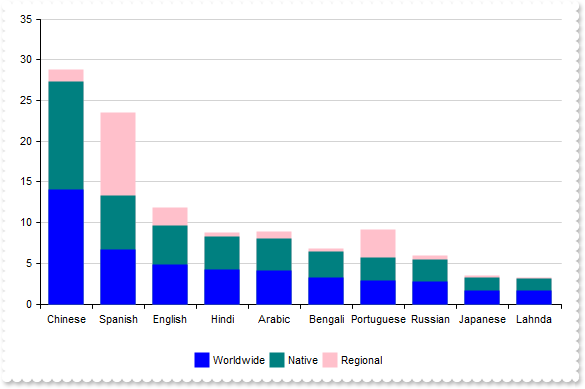
With Graph1
	.BeginUpdate
	.Pad = 18
	.AutoFit = True
	With .Series
		.Add("Chinese(14.1),Spanish(6.7),English(4.9),Hindi(4.2),Arabic(4.1),Bengali(3.3),Portuguese(2.9),Russian(2.8),Japanese(1.7),Lahnda(1" & _
	".6)","Worldwide").Stack = "group"
		.Add("Chinese(13.2),Spanish(6.6),English(4.8),Hindi(4.1),Arabic(4.0),Bengali(3.2),Portuguese(2.8),Russian(2.7),Japanese(1.6),Lahnda(1" & _
	".5)","Native").Stack = "group"
		.Add("Chinese(1.5),Spanish(10.2),English(2.1),Hindi(0.5),Arabic(0.8),Bengali(0.3),Portuguese(3.5),Russian(0.4),Japanese(0.2),Lahnda(0" & _
	".1)","Regional").Stack = "group"
	End With
	.Legend.Visible = True
	.EndUpdate
End With
|
|
320
|
I use the legend, but clicking a series mostly rearranges them instead of hiding it
With Graph1
	.BeginUpdate
	.AutoFit = True
	.Misc(exNewLayoutOnVisibleChange) = False
	.Series.Add "50,150,150,300","A1"
	.Series.Add "180,40,60,160","A2"
	.Legend.Visible = True
	.EndUpdate
End With
|
|
319
|
Adjusts the column/bar size so that the entire chart fits within the client rectangle
With Graph1
	.BeginUpdate
	.CategoryAxis.Categories = "Asia,Africa,Europe,North America,Antarctica,South America,Australia/Oceania"
	.Series.Add "4600,1300,747,579,0,422,42"
	.ValueAutoFit
	.EndUpdate
End With
|
|
318
|
The categories overlap, making the text unreadable
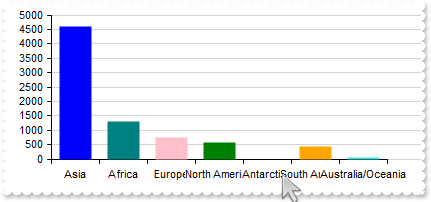
With Graph1
	.BeginUpdate
	.ValueSize = 32
	With .CategoryAxis
		.Categories = "Asia,Africa,Europe,North America,Antarctica,South America,Australia/Oceania"
		.Format = "`<bgcolor white>` + value"
	End With
	.Series.Add "4600,1300,747,579,0,422,42"
	.EndUpdate
End With
|
|
317
|
Represents a single serie with single color (prevent multiple colors for single-serie)
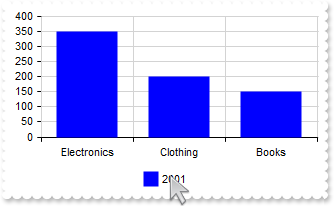
With Graph1
	.BeginUpdate
	.AutoFit = True
	.MultiColorSerie = False
	.CategoryAxis.MajorGridLines.Color = "lightgray"
	.Series.Add "Electronics(350),Clothing(200),Books(150)",2001
	.Legend.Visible = True
	.EndUpdate
End With
|
|
316
|
How can I replace or add an icon at runtime
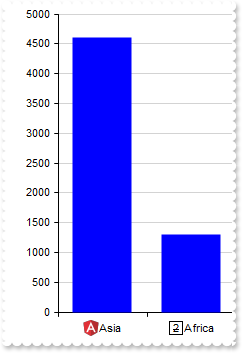
With Graph1
	.BeginUpdate
	.ReplaceIcon "gAAAABgYACEHgUJFEEAAWhUJCEJEEJggEhMCYEXjUbjkJQECj8gj8hAEjkshYEpk8kf8ClsulsvAExmcvf83js5nU7nkCeEcn8boMaocXosCB9Hn09pkzcEuoL/fE+O" & _
	"kYB0gB9YhIHrddgVcr9aktZADAD8+P8CgIA=="
	.ReplaceIcon "C:\images\favicon.ico",0
	.AutoFit = True
	.Series.Add "<img>1</img>Asia(4600),<img>2</img>Africa(1300),<img>3</img>Europe(747),<img>4</img>North America(579),<img>5</img>South Americ" & _
	"a(433),<img>6</img>Australia/Oceania(42)"
	.SeriesColors = "blue"
	.EndUpdate
End With
|
|
315
|
No grid lines are shown even I set the Color and Format properties of ChartGridLines/OverviewGridLines
With Graph1
	.Series.Add "100,200,200,400","S1"
	.Series.Add "210,20,20,120","S2"
	With .CategoryAxes.Add("A,B,C,D","1st").ChartGridLines
		.Color = "red"
		.Format = "value"
	End With
	.CategoryAxes.Add "E,F","2nd"
	.Refresh
End With
|
|
314
|
Occasionally, the margins of the axes may not align perfectly with the view
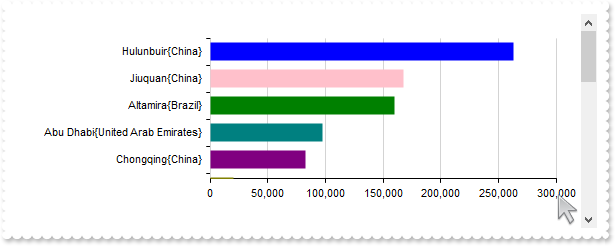
With Graph1
	.BeginUpdate
	.ValueSize = 18
	.Pad = 24
	.ValueAxis.Format = "value format `0`"
	With .Series.Add("Hulunbuir{China}(263068),Abu Dhabi{United Arab Emirates}(97200),Jiuquan{China}(167996),Altamira{Brazil}(159891),Brasília{Brazil" & _
	"}(5784),Mumbai{India}(603.4),Delhi{India}(1484),Chongqing{China}(82400),Hulunbuir{China}(263068),Sao Paulo{Brazil}(1522),Linfen{" & _
	"China}(20527),Santiago{Chile}(641),Mexico City{Mexico}(1485),Belo Horizonte{Brazil}(313),Hangzhou{China}(16817),Nairobi{Kenya}(6" & _
	"96),Berlin{Germany}(891.68),Montreal{Canada}(431.5),Cordoba{Argentina}(576),Manaus{Brazil}(11401),Astana{Kazakhstan}(810),Goiâni" & _
	"a{Brazil}(741),Cali{Colombia}(564),Sao Paulo{Brazil}(1522),Goiania{Brazil}(781)")
		.Type = "Col"
		.Vertical = True
	End With
	.Sort = "0:D"
	.EndUpdate
End With
|
|
313
|
"candlestick" explained, an [open,high,low,close] chart
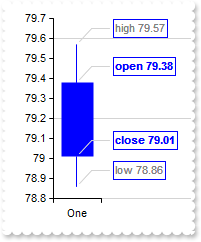
With Graph1
	.BeginUpdate
	.ValueSize = 32
	.ValuePoint = "0,,,,lightgray,1"
	.ValueAxis.MajorGridLines.Step = 4
	With .Series.Add("One(79.38 79.57 78.86 79.01)")
		.Type = "candlestick"
		.ShowValue = ShowValueEnum.exValue Or ShowValueEnum.exLine Or ShowValueEnum.exPoint
		.ValueFormat = "(inner array (`<b>open`,`<fgcolor gray>high`,`<fgcolor gray>low`,`<b>close`)) + ` ` + value"
	End With
	.EndUpdate
End With
|
|
312
|
"candlestick", a candlestick chart (also called Japanese candlestick chart or K-line) is a style of financial chart used to describe price movements of a security, derivative, or currency. While similar in appearance to a bar chart, each candleStick represents four important pieces of information for that day: open and close in the thick body, and high and low in the "candle wick". Being densely packed with information, it tends to represent trading patterns over short periods of time, often a few days or a few trading sessions. (data requires array of array of four-numbers, such as [[open, high, low and close]], supports vertical field, scrollable)
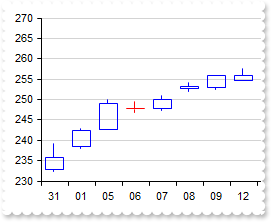
With Graph1
	.BeginUpdate
	.ValueSize = 18
	With .CategoryAxis
		.Categories = "Date"
		.Format = "value mid 9 left 2"
	End With
	.Data = "C:\Program Files\Exontrol\ExGraph\Sample\Data/msft.csv"
	.Series.Add("Open,High,Low,Close","msft").Type = "candlestick"
	.EndUpdate
End With
|
|
311
|
"ohlc" explained, an [open,high,low,close] chart

With Graph1
	.BeginUpdate
	.ValueSize = 32
	.ValuePoint = "0,,,,lightgray,1"
	.ValueAxis.MajorGridLines.Step = 4
	With .Series.Add("One(79.38 79.57 78.86 79.01)")
		.Type = "ohlc"
		.ShowValue = ShowValueEnum.exValue Or ShowValueEnum.exLine Or ShowValueEnum.exPoint
		.ValueFormat = "(inner array (`<b>open`,`<fgcolor gray>high`,`<fgcolor gray>low`,`<b>close`)) + ` ` + value"
	End With
	.EndUpdate
End With
|
|
310
|
"ohlc", an open-high-low-close chart (also OHLC) is a type of chart typically used to illustrate movements in the price of a financial instrument over time. Each vertical line on the chart shows the price range (the highest and lowest prices) over one unit of time, e.g., one day or one hour. Tick marks project from each side of the line indicating the opening price (e.g., for a daily bar chart this would be the starting price for that day) on the left, and the closing price for that time period on the right. The bars may be shown in different hues depending on whether prices rose or fell in that period. (data requires array of array of four-numbers, such as [[open, high, low and close]], supports vertical field, scrollable)
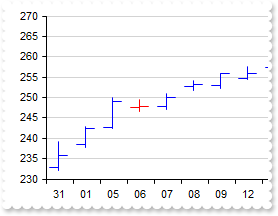
With Graph1
	.BeginUpdate
	.ValueSize = 18
	With .CategoryAxis
		.Categories = "Date"
		.Format = "value mid 9 left 2"
	End With
	.Data = "C:\Program Files\Exontrol\ExGraph\Sample\Data/msft.csv"
	.Series.Add("Open,High,Low,Close","msft").Type = "ohlc"
	.EndUpdate
End With
|
|
309
|
"bubble", a bubble chart or bubble plot is a type of chart that displays three dimensions of data (a bubble chart is an extension of the scatter plot used to look at relationships between three numeric variables.). Each entity with its triplet (v1, v2, v3) of associated data is plotted as a disk that expresses two of the vi values through the disk's xy location and the third through its size. Bubble charts can facilitate the understanding of social, economical, medical, and other scientific relationships. (data requires array of array of three-numbers, such as [[x, y, size]], supports vertical field, non-scrollable)
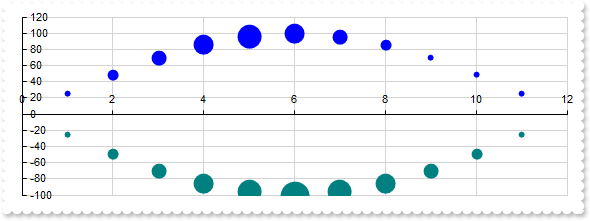
With Graph1
	.BeginUpdate
	.Pad = 18
	With .Series.Add("1 25 1,2 49 2,3 70 3,4 86 4,5 96 5,6 100 4,7 96 3,8 86 2,9 70 1,10 49 1,11 25 1","Bell<b>1")
		.Type = "bubble"
		.Misc(exScatterPlotSize) = 32
	End With
	With .Series.Add("1 -25 1,2 -49 2,3 -70 3,4 -86 4,5 -96 5,6 -100 6,7 -96 5,8 -86 4,9 -70 3,10 -49 2,11 -25 1","Bell<b>2")
		.Type = "bubble"
		.Misc(exScatterPlotSize) = 32
	End With
	.EndUpdate
End With
|
|
308
|
"scatter", a scatter plot (also called a scatterplot, scatter graph, scatter chart, scattergram, or scatter diagram) is a type of plot or mathematical diagram using Cartesian coordinates to display values for typically two variables for a set of data. (data requires array of array of two-numbers, such as [[x, y]], supports vertical field, non-scrollable)
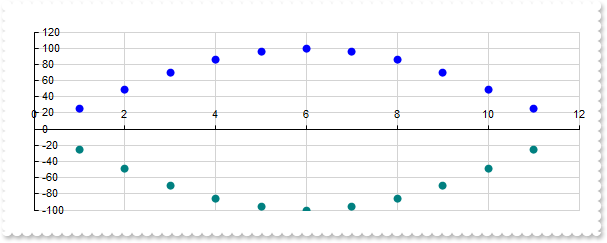
With Graph1
	.BeginUpdate
	.Pad = 18
	.Series.Add("1 25,2 49,3 70,4 86,5 96,6 100,7 96,8 86,9 70,10 49,11 25","Bell<b>1").Type = "scatter"
	.Series.Add("1 -25,2 -49,3 -70,4 -86,5 -96,6 -100,7 -96,8 -86,9 -70,10 -49,11 -25","Bell<b>2").Type = "scatter"
	.EndUpdate
End With
|
|
307
|
"scatterline", curved
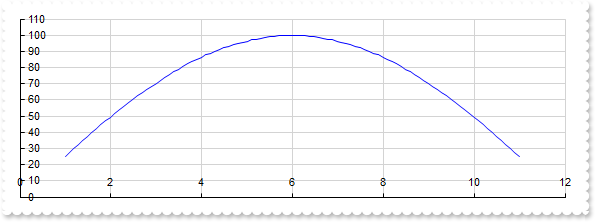
With Graph1
	.BeginUpdate
	.Pad = 18
	With .Series.Add("1 25,2 49,3 70,4 86,5 96,6 100,7 96,8 86,9 70,10 49,11 25","Bell")
		.Type = "scatterline"
		.Style = exSpline
	End With
	.EndUpdate
End With
|
|
306
|
"scatterline", a scatter line chart is similar with "scatter" type, excepts that lines are shown between scatter plots. (data requires array of array of two-numbers, such as [[x, y]], supports vertical field, non-scrollable)
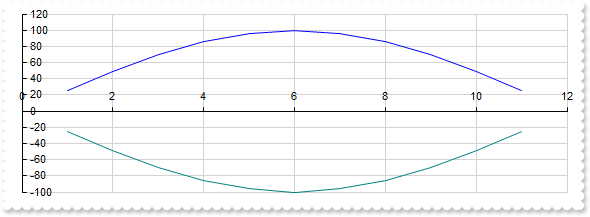
With Graph1
	.BeginUpdate
	.Pad = 18
	.Series.Add("1 25,2 49,3 70,4 86,5 96,6 100,7 96,8 86,9 70,10 49,11 25","Bell<b>1").Type = "scatterline"
	.Series.Add("1 -25,2 -49,3 -70,4 -86,5 -96,6 -100,7 -96,8 -86,9 -70,10 -49,11 -25","Bell<b>2").Type = "scatterline"
	.EndUpdate
End With
|
|
305
|
"scatterarea", curved
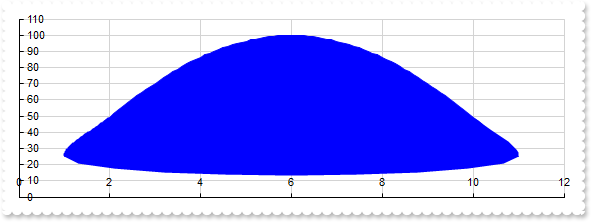
With Graph1
	.BeginUpdate
	.Pad = 18
	With .Series.Add("1 25,2 49,3 70,4 86,5 96,6 100,7 96,8 86,9 70,10 49,11 25","Bell")
		.Type = "scatterarea"
		.Style = exSpline
	End With
	.EndUpdate
End With
|
|
304
|
"scatterarea", a scatter area chart is similar with "scatterLine" type, excepts that scatter plots zone is filled. (data requires array of array of two-numbers, such as [[x, y]], supports vertical field, non-scrollable)
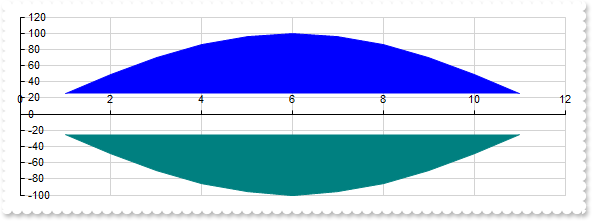
With Graph1
	.BeginUpdate
	.Pad = 18
	.Series.Add("1 25,2 49,3 70,4 86,5 96,6 100,7 96,8 86,9 70,10 49,11 25","Bell<b>1").Type = "scatterarea"
	.Series.Add("1 -25,2 -49,3 -70,4 -86,5 -96,6 -100,7 -96,8 -86,9 -70,10 -49,11 -25","Bell<b>2").Type = "scatterarea"
	.EndUpdate
End With
|
|
303
|
"polarscatter", shows the serie as non-connected data points (data requires array of array of two-numbers, such as [[angle, value]], non-scrollable)
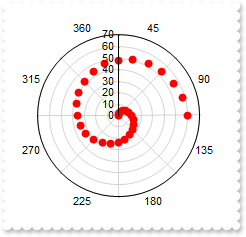
With Graph1
	.BeginUpdate
	.Misc(exRadialRotateLabels) = False
	With .CategoryAxis
		.Categories = "45,90,135,180,225,270,315,360"
		.MajorGridLines.Color = "lightgray"
	End With
	With .Series.Add("0 0,15 2,30 4,45 6,60 8,75 10,90 12,105 14,120 16,135 18,150 20,165 22,180 24,195 26,210 28,225 30,240 32,255 34,270 36,285 38," & _
	"300 40,315 42,330 44,345 46,360 48,15 50,30 52,45 54,60 56,75 58,90 60","Spiral")
		.Type = "polarscatter"
		.Color = "red"
	End With
	.EndUpdate
End With
|
|
302
|
"polarline", represents data points connected with straight line segments (data requires array of array of two-numbers, such as [[angle, value]], non-scrollable)
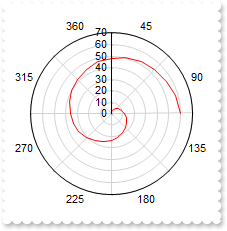
With Graph1
	.BeginUpdate
	.Misc(exRadialRotateLabels) = False
	With .CategoryAxis
		.Categories = "45,90,135,180,225,270,315,360"
		.MajorGridLines.Color = "lightgray"
	End With
	With .Series.Add("0 0,15 2,30 4,45 6,60 8,75 10,90 12,105 14,120 16,135 18,150 20,165 22,180 24,195 26,210 28,225 30,240 32,255 34,270 36,285 38," & _
	"300 40,315 42,330 44,345 46,360 48,15 50,30 52,45 54,60 56,75 58,90 60","Spiral")
		.Type = "polarLine"
		.Color = "red"
	End With
	.EndUpdate
End With
|
|
301
|
"polararea", represents data points connected with straight line segments that enclose a filled area together with the chart pole (data requires array of array of two-numbers, such as [[angle, value]], non-scrollable)
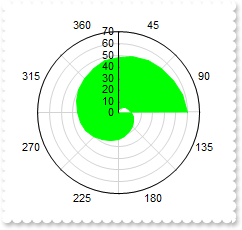
With Graph1
	.BeginUpdate
	.Misc(exRadialRotateLabels) = False
	With .CategoryAxis
		.Categories = "45,90,135,180,225,270,315,360"
		.MajorGridLines.Color = "lightgray"
	End With
	With .Series.Add("0 0,15 2,30 4,45 6,60 8,75 10,90 12,105 14,120 16,135 18,150 20,165 22,180 24,195 26,210 28,225 30,240 32,255 34,270 36,285 38," & _
	"300 40,315 42,330 44,345 46,360 48,15 50,30 52,45 54,60 56,75 58,90 60","Spiral")
		.Type = "polarArea"
		.Color = "lime"
	End With
	.EndUpdate
End With
|