|
53
|
How can I prevent the control from filtering while the user is typing in the filter prompt, and apply the filter only when the Enter key is pressed
with thisform.G2Host1
	with .Host
		.BeginUpdate
		.ColumnAutoResize = .T.
		.ContinueColumnScroll = 0
		.FocusColumnIndex = 1
		.MarkSearchColumn = .F.
		.SearchColumnIndex = 1
		.FilterBarPromptVisible = 16385 && FilterBarVisibleEnum.exFilterBarPromptOnEnter Or FilterBarVisibleEnum.exFilterBarPromptVisible
		.FilterBarPrompt = "<i><fgcolor=808080>Type filter and press Enter…</fgcolor></i>"
		.FilterBarPromptType = 3
		with .Items
			.AddItem("Nancy Davolio")
			.AddItem("Andrew Fuller")
			.AddItem("Janet Leverling")
			.AddItem("Margaret Peacock")
			.AddItem("Steven Buchanan")
			.AddItem("Michael Suyama")
			.AddItem("Robert King")
			.AddItem("Laura Callahan")
			.AddItem("Anne Dodsworth")
		endwith
		.EndUpdate
	endwith
endwith
|
|
52
|
Print and Print Preview
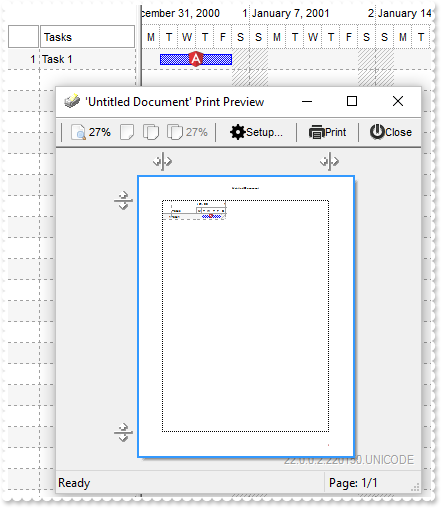
with thisform.G2Host1
	.HostReadOnly = 0
	with .Host
		.BeginUpdate
		var_s = "gAAAABgYACEHgUJFEEAAWhUJCEJEEJggEhMCYEXjUbjkJQECj8gj8hAEjkshYEpk8kf8ClsulsvAExmcvf83js5nU7nkCeEcn8boMaocXosCB9Hn09pkzcEuoL/fE+Ok"
		var_s = var_s + "YB0gB9YhIHrddgVcr9aktZADAD8+P8CgIA=="
		.ReplaceIcon(var_s)
		.ReplaceIcon("C:\images\favicon.ico",0)
		with .Chart
			.FirstVisibleDate = {^2001-1-1}
			.PaneWidth(0) = 128
			.LevelCount = 2
		endwith
		with .Items
			h = .AddItem("Task 1")
			.AddBar(h,"Task",{^2001-1-2},{^2001-1-6},"K1")
			.DefaultItem = h
			.ItemBar(0,"K1",3) = "<img>1</img>"
		endwith
		.EndUpdate
	endwith
	with CreateObject("Exontrol.Print")
		.PrintExt = thisform.G2Host1.Host.Object
		.Preview
	endwith
endwith
|
|
51
|
How can I replace or add an icon at runtime
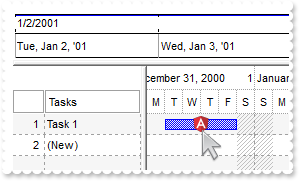
with thisform.G2Host1
	with .Host
		.BeginUpdate
		var_s = "gAAAABgYACEHgUJFEEAAWhUJCEJEEJggEhMCYEXjUbjkJQECj8gj8hAEjkshYEpk8kf8ClsulsvAExmcvf83js5nU7nkCeEcn8boMaocXosCB9Hn09pkzcEuoL/fE+Ok"
		var_s = var_s + "YB0gB9YhIHrddgVcr9aktZADAD8+P8CgIA=="
		.ReplaceIcon(var_s)
		.ReplaceIcon("C:\images\favicon.ico",0)
		with .Chart
			.FirstVisibleDate = {^2001-1-1}
			.PaneWidth(0) = 128
			.LevelCount = 2
		endwith
		with .Items
			h = .AddItem("Task 1")
			.AddBar(h,"Task",{^2001-1-2},{^2001-1-6},"K1")
			.DefaultItem = h
			.ItemBar(0,"K1",3) = "<img>1</img>"
		endwith
		.EndUpdate
	endwith
endwith
|
|
50
|
How do I get the start/end of the bar once the BarResize/BarResizing event occurs
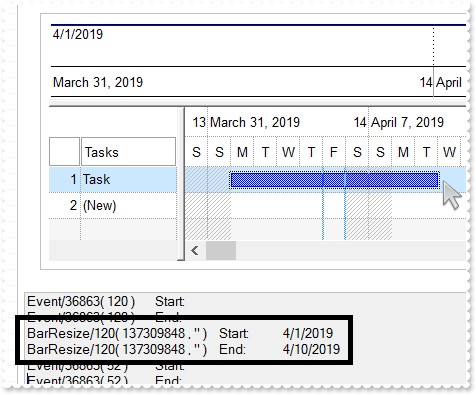
*** HostEvent event - Notifies the application once the host fires an event. ***
LPARAMETERS EventID
	with thisform.G2Host1
		h = .HostEventParam(0)
		key = .HostEventParam(1)
		DEBUGOUT( .HostEventParam(-2) )
		DEBUGOUT( "Start:" )
		DEBUGOUT( .Host.Items.ItemBar(h,key,1) )
		DEBUGOUT( .HostEventParam(-2) )
		DEBUGOUT( "End:" )
		DEBUGOUT( .Host.Items.ItemBar(h,key,2) )
	endwith

with thisform.G2Host1
	with .Host.Chart
		.PaneWidth(0) = 128
		.FirstVisibleDate = {^2019-3-30}
	endwith
	with .Host.Items
		.AddBar(.AddItem("Task"),"Task",{^2019-4-1},{^2019-4-14})
	endwith
endwith
|
|
49
|
How do I get the bar/task from the cursor
*** HostEvent event - Notifies the application once the host fires an event. ***
LPARAMETERS EventID
	with thisform.G2Host1
		DEBUGOUT( "Event:" )
		DEBUGOUT( .HostEventParam(-2) )
		with .Host
			i = .ItemFromPoint(-1,-1,c,h)
			DEBUGOUT( "Cell:" )
			DEBUGOUT( .Items.CellCaption(i,c) )
			with .Chart
				b = .BarFromPoint(-1,1)
				DEBUGOUT( "Bar:" )
				DEBUGOUT( thisform.G2Host1.Host.Items.ItemBar(i,b,0) )
			endwith
		endwith
	endwith
|
|
48
|
How do I get the cell from the cursor
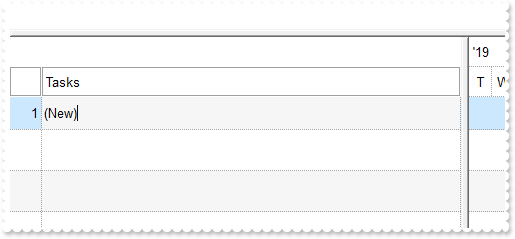
*** HostEvent event - Notifies the application once the host fires an event. ***
LPARAMETERS EventID
	with thisform.G2Host1
		DEBUGOUT( "Event:" )
		DEBUGOUT( .HostEventParam(-2) )
		with .Host
			i = .ItemFromPoint(-1,-1,c,h)
			DEBUGOUT( "Cell:" )
			DEBUGOUT( .Items.CellCaption(i,c) )
		endwith
	endwith
|
|
47
|
How can I highlights cells based on its value
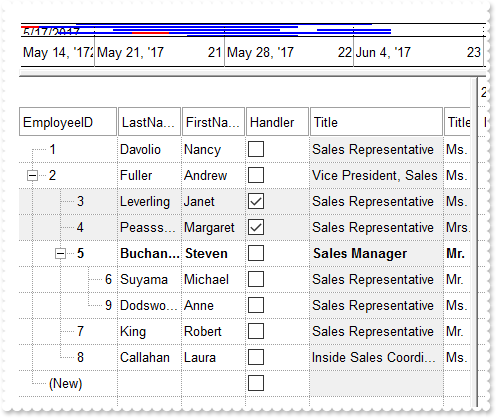
with thisform.G2Host1
	.Object.DataSource("Items") = "C:\Program Files\Exontrol\ExG2Host\Sample\Access\sample.accdb"
	.Object.DataMember("Items") = "Employees"
	.Object.DataField(0) = "Items"
	.Object.DataField(1) = "EmployeeID"
	.Object.DataField(2) = "ReportsTo"
	.Object.DataSource("Tasks") = .DataSource("Items")
	.Object.DataMember("Tasks") = "EmployeeDetails"
	.Object.DataField(7) = "Tasks"
	.Object.DataField(8) = "EmployeeID"
	.Object.DataField(9) = "DateStart"
	.Object.DataField(10) = "DateEnd"
	.Object.DataField(14) = "TaskID"
	.Object.DataField(12) = "Color"
	.Object.DataField(13) = "TaskName"
	with .Host
		.BeginUpdate
		.BackColorAlternate = RGB(0,0,0)
		with .Columns.Item("Title")
			.Def(4) = 15790320
			.Width = .AutoWidth
		endwith
		with .ConditionalFormats
			.Add("lower(%4) contains `manager`").Bold = .T.
			.Add("%3").BackColor = RGB(240,240,240)
		endwith
		.Items.ExpandItem(0) = .T.
		with .Columns.Item("EmployeeID")
			.Width = .AutoWidth
		endwith
		.EndUpdate
	endwith
endwith
|
|
46
|
How do I programatically hide a column
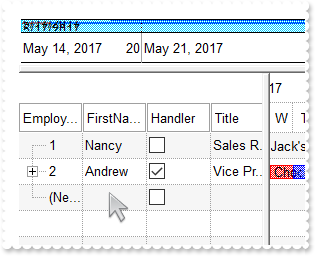
with thisform.G2Host1
	.Object.DataSource("Items") = "C:\Program Files\Exontrol\ExG2Host\Sample\Access\sample.accdb"
	.Object.DataMember("Items") = "Employees"
	.Object.DataField(0) = "Items"
	.Object.DataField(1) = "EmployeeID"
	.Object.DataField(2) = "ReportsTo"
	.Object.DataSource("Tasks") = .DataSource("Items")
	.Object.DataMember("Tasks") = "EmployeeDetails"
	.Object.DataField(7) = "Tasks"
	.Object.DataField(8) = "EmployeeID"
	.Object.DataField(9) = "DateStart"
	.Object.DataField(10) = "DateEnd"
	.Object.DataField(14) = "TaskID"
	.Object.DataField(12) = "Color"
	.Object.DataField(13) = "TaskName"
	.Host.Columns.Item("LastName").Visible = .F.
endwith
|
|
45
|
Is it possible to get the information from the control when we click on the bar/item
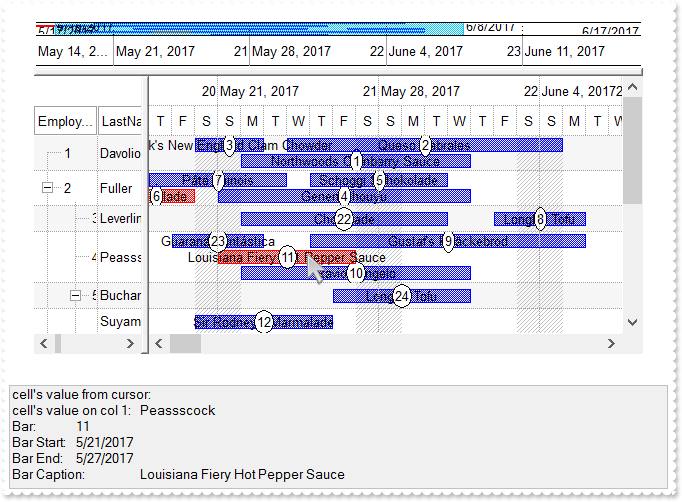
*** HostEvent event - Notifies the application once the host fires an event. ***
LPARAMETERS EventID
	with thisform.G2Host1
		DEBUGOUT( .HostEventParam(-2) )
		with .Host
			i = .ItemFromPoint(-1,-1,c,hit)
			DEBUGOUT( "cell's value from cursor: " )
			DEBUGOUT( .Items.CellValue(i,c) )
			DEBUGOUT( "cell's value on col 1: " )
			DEBUGOUT( .Items.CellValue(i,1) )
			b = .Chart.BarFromPoint(-1,-1)
			DEBUGOUT( "Bar:" )
			DEBUGOUT( b )
			DEBUGOUT( "Bar Start:" )
			DEBUGOUT( .Items.ItemBar(i,b,1) )
			DEBUGOUT( "Bar End:" )
			DEBUGOUT( .Items.ItemBar(i,b,2) )
			DEBUGOUT( "Bar Caption:" )
			DEBUGOUT( .Items.ItemBar(i,b,3) )
		endwith
	endwith

with thisform.G2Host1
	with .Host
		.Debug = .T.
		with .Chart.Bars.Item("Task")
			.OverlaidType = 515 && OverlaidBarsTypeEnum.exOverlaidBarsStackAutoArrange Or OverlaidBarsTypeEnum.exOverlaidBarsStack
			.OverlaidGroup = "Task,Progress"
		endwith
	endwith
	.Object.DataSource("Items") = "C:\Program Files\Exontrol\ExG2Host\Sample\Access\sample.accdb"
	.Object.DataMember("Items") = "Employees"
	.Object.DataField(0) = "Items"
	.Object.DataField(1) = "EmployeeID"
	.Object.DataField(2) = "ReportsTo"
	.Object.DataSource("Tasks") = .DataSource("Items")
	.Object.DataMember("Tasks") = "EmployeeDetails"
	.Object.DataField(7) = "Tasks"
	.Object.DataField(8) = "EmployeeID"
	.Object.DataField(9) = "DateStart"
	.Object.DataField(10) = "DateEnd"
	.Object.DataField(14) = "TaskID"
	.Object.DataField(12) = "Color"
	.Object.DataField(13) = "TaskName"
	.Host.Items.ExpandItem(0) = .T.
	with .Host.Chart
		.PaneWidth(0) = 128
		.ScrollTo({^2017-5-27},1)
	endwith
endwith
|
|
44
|
How do I get the bar from the cursor
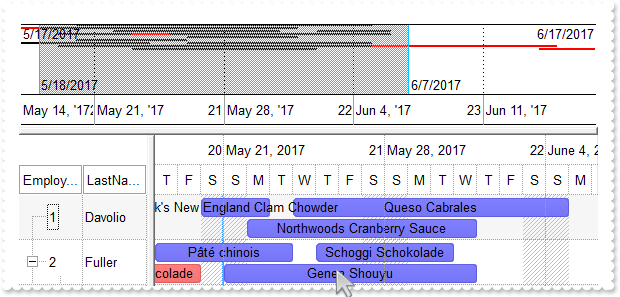
*** HostEvent event - Notifies the application once the host fires an event. ***
LPARAMETERS EventID
	with thisform.G2Host1
		DEBUGOUT( .HostEventParam(-2) )
		DEBUGOUT( .Host.Chart.BarFromPoint(-1,-1) )
	endwith

with thisform.G2Host1
	with .Host
		.VisualAppearance.Add(1,"C:\Program Files\Exontrol\ExG2Host\Sample\EBN\Assorted\wbs-ass.ebn")
		with .Chart.Bars.Item("Task")
			.Height = 15
			.Color = 0x1ff0000
			.OverlaidType = 515 && OverlaidBarsTypeEnum.exOverlaidBarsStackAutoArrange Or OverlaidBarsTypeEnum.exOverlaidBarsStack
			.OverlaidGroup = "Task,Progress"
		endwith
	endwith
	.Object.DataSource("Items") = "C:\Program Files\Exontrol\ExG2Host\Sample\Access\sample.accdb"
	.Object.DataMember("Items") = "Employees"
	.Object.DataField(0) = "Items"
	.Object.DataField(1) = "EmployeeID"
	.Object.DataField(2) = "ReportsTo"
	.Object.DataSource("Tasks") = .DataSource("Items")
	.Object.DataMember("Tasks") = "EmployeeDetails"
	.Object.DataField(7) = "Tasks"
	.Object.DataField(8) = "EmployeeID"
	.Object.DataField(9) = "DateStart"
	.Object.DataField(10) = "DateEnd"
	.Object.DataField(14) = "TaskID"
	.Object.DataField(12) = "Color"
	.Object.DataField(13) = "TaskName"
	.Host.Items.ExpandItem(0) = .T.
	with .Host.Chart
		.PaneWidth(0) = 128
		.ScrollTo({^2017-5-27},1)
	endwith
endwith
|
|
43
|
How do I add Start/End columns
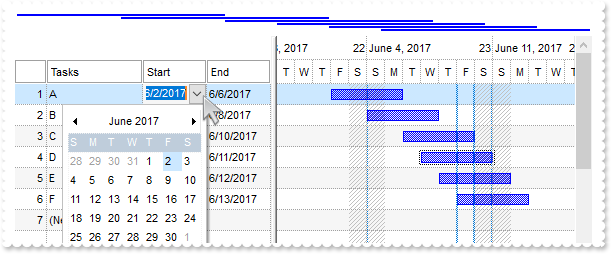
*** HostEvent event - Notifies the application once the host fires an event. ***
LPARAMETERS EventID
	with thisform.G2Host1
		DEBUGOUT( .HostEventParam(-2) )
	endwith

with thisform.G2Host1
	.HostReadOnly = 255 && HostReadOnlyEnum.exHostReadWrite Or HostReadOnlyEnum.exHostAllowAddEmptyItem
	with .Host
		.SingleSel = .F.
		.OnResizeControl = 1
		.ScrollBars = 2058 && ScrollBarsEnum.exVScrollEmptySpace Or ScrollBarsEnum.exDisableNoVertical
		with .Columns.Add("Start")
			.AllowSizing = .F.
			.Def(18) = 1
			.Editor.EditType = 7
		endwith
		with .Columns.Add("End")
			.AllowSizing = .F.
			.Def(18) = 2
			.Editor.EditType = 7
		endwith
		.Items.AllowCellValueToItemBar = .T.
		with .Chart
			.AllowCreateBar = 1
			.PaneWidth(0) = 256
			.Bars.Item("Task").OverlaidType = 515 && OverlaidBarsTypeEnum.exOverlaidBarsStackAutoArrange Or OverlaidBarsTypeEnum.exOverlaidBarsStack
		endwith
	endwith
endwith
|
|
42
|
How do I hide the left/items/columns part of the control
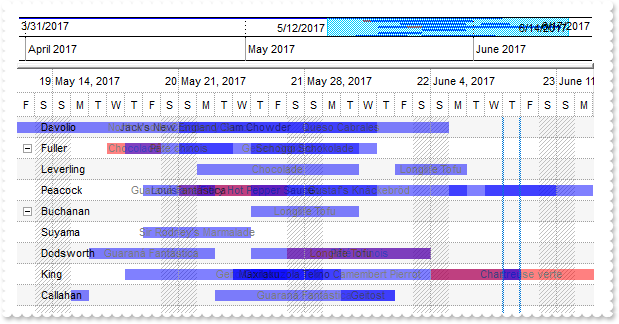
*** Error event - Fired when an internal error occurs. ***
LPARAMETERS Error, Description
	with thisform.G2Host1
		DEBUGOUT( Error )
		DEBUGOUT( Description )
	endwith

with thisform.G2Host1
	with .Host.Chart.Bars.Item("Task")
		.Pattern = 1
		.Color = RGB(0,0,255)
		.Def(19) = 50
	endwith
	.Object.DataSource("Items") = "C:\Program Files\Exontrol\ExG2Host\Sample\Access\sample.accdb"
	.Object.DataMember("Items") = "Employees"
	.Object.DataField(0) = "Items"
	.Object.DataField(1) = "EmployeeID"
	.Object.DataField(2) = "ReportsTo"
	.Object.DataSource("Tasks") = .DataSource("Items")
	.Object.DataMember("Tasks") = "EmployeeDetails"
	.Object.DataField(7) = "Tasks"
	.Object.DataField(8) = "EmployeeID"
	.Object.DataField(9) = "DateStart"
	.Object.DataField(10) = "DateEnd"
	.Object.DataField(14) = "TaskID"
	.Object.DataField(12) = "Color"
	.Object.DataField(13) = "TaskName"
	.Host.Items.ExpandItem(0) = .T.
	.HostReadOnly = 255 && HostReadOnlyEnum.exHostReadWrite Or HostReadOnlyEnum.exHostAllowAddEmptyItem
	with .Host
		.OnResizeControl = 129 && OnResizeControlEnum.exDisableSplitter Or OnResizeControlEnum.exResizeChart
		with .Chart
			.ColumnsFormatLevel = "1"
			.PaneWidth(0) = 0
			.ScrollTo({^2017-5-27},1)
		endwith
	endwith
endwith
|
|
41
|
How do I hide the right/chart/tasks part of the control
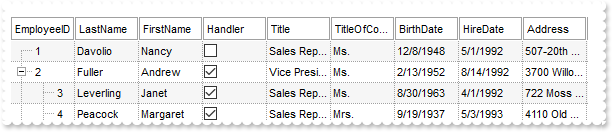
*** Error event - Fired when an internal error occurs. ***
LPARAMETERS Error, Description
	with thisform.G2Host1
		DEBUGOUT( Error )
		DEBUGOUT( Description )
	endwith

with thisform.G2Host1
	with .Host.Chart.Bars.Item("Task")
		.Pattern = 1
		.Color = RGB(0,0,255)
		.Def(19) = 50
	endwith
	.Object.DataSource("Items") = "C:\Program Files\Exontrol\ExG2Host\Sample\Access\sample.accdb"
	.Object.DataMember("Items") = "Employees"
	.Object.DataField(0) = "Items"
	.Object.DataField(1) = "EmployeeID"
	.Object.DataField(2) = "ReportsTo"
	.Object.DataSource("Tasks") = .DataSource("Items")
	.Object.DataMember("Tasks") = "EmployeeDetails"
	.Object.DataField(7) = "Tasks"
	.Object.DataField(8) = "EmployeeID"
	.Object.DataField(9) = "DateStart"
	.Object.DataField(10) = "DateEnd"
	.Object.DataField(14) = "TaskID"
	.Object.DataField(12) = "Color"
	.Object.DataField(13) = "TaskName"
	.Host.Items.ExpandItem(0) = .T.
	with .Host
		with .Chart
			.PaneWidth(1) = 0
			.OverviewVisible = 0
		endwith
	endwith
endwith
|
|
40
|
How do hide the top/overview part of the control
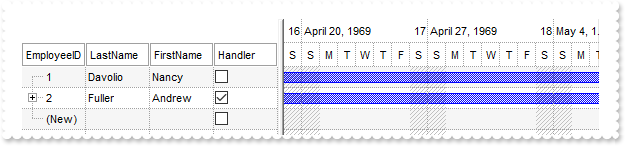
*** Error event - Fired when an internal error occurs. ***
LPARAMETERS Error, Description
	with thisform.G2Host1
		DEBUGOUT( Error )
		DEBUGOUT( Description )
	endwith

with thisform.G2Host1
	.Object.DataSource("Items") = "C:\Program Files\Exontrol\ExG2Host\Sample\Access\sample.accdb"
	.Object.DataMember("Items") = "Employees"
	.Object.DataField(0) = "Items"
	.Object.DataField(1) = "EmployeeID"
	.Object.DataField(2) = "ReportsTo"
	.Object.DataField(7) = .DataField(0)
	.Object.DataField(9) = "BirthDate"
	.Object.DataField(10) = "HireDate"
	with .Host
		with .Chart
			.OverviewVisible = 0
			.PaneWidth(0) = 256
			.ScrollTo({^1969-4-27},1)
		endwith
	endwith
endwith
|
|
39
|
How do I resize the panels
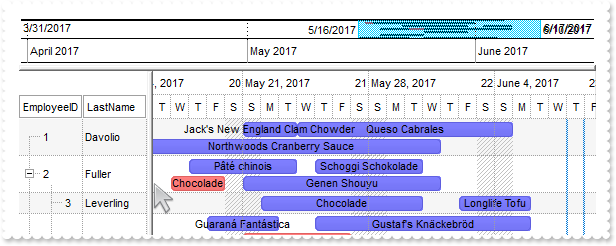
*** Error event - Fired when an internal error occurs. ***
LPARAMETERS Error, Description
	with thisform.G2Host1
		DEBUGOUT( Error )
		DEBUGOUT( Description )
	endwith

with thisform.G2Host1
	with .Host
		.VisualAppearance.Add(1,"C:\Program Files\Exontrol\ExG2Host\Sample\EBN\Assorted\wbs-ass.ebn")
		with .Chart.Bars.Item("Task")
			.Height = 15
			.Color = 0x1ff0000
			.OverlaidType = 515 && OverlaidBarsTypeEnum.exOverlaidBarsStackAutoArrange Or OverlaidBarsTypeEnum.exOverlaidBarsStack
			.OverlaidGroup = "Task,Progress"
		endwith
	endwith
	.Object.DataSource("Items") = "C:\Program Files\Exontrol\ExG2Host\Sample\Access\sample.accdb"
	.Object.DataMember("Items") = "Employees"
	.Object.DataField(0) = "Items"
	.Object.DataField(1) = "EmployeeID"
	.Object.DataField(2) = "ReportsTo"
	.Object.DataSource("Tasks") = .DataSource("Items")
	.Object.DataMember("Tasks") = "EmployeeDetails"
	.Object.DataField(7) = "Tasks"
	.Object.DataField(8) = "EmployeeID"
	.Object.DataField(9) = "DateStart"
	.Object.DataField(10) = "DateEnd"
	.Object.DataField(14) = "TaskID"
	.Object.DataField(12) = "Color"
	.Object.DataField(13) = "TaskName"
	.Host.Items.ExpandItem(0) = .T.
	with .Host.Chart
		.PaneWidth(0) = 128
		.ScrollTo({^2017-5-27},1)
	endwith
endwith
|
|
38
|
How do I lock the first column
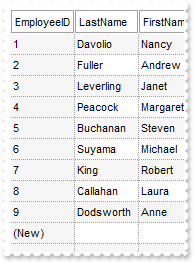
*** Error event - Fired when an internal error occurs. ***
LPARAMETERS Error, Description
	with thisform.G2Host1
		DEBUGOUT( Error )
		DEBUGOUT( Description )
	endwith

with thisform.G2Host1
	.Object.DataSource("Items") = "C:\Program Files\Exontrol\ExG2Host\Sample\Access\sample.accdb"
	.Object.DataMember("Items") = "Employees"
	.Object.DataField(0) = "Items"
	with .Host
		.CountLockedColumns = 1
		.BackColorLock = .BackColorAlternate
	endwith
endwith
|
|
37
|
How do I specify a different color for the tasks ( EBN color )
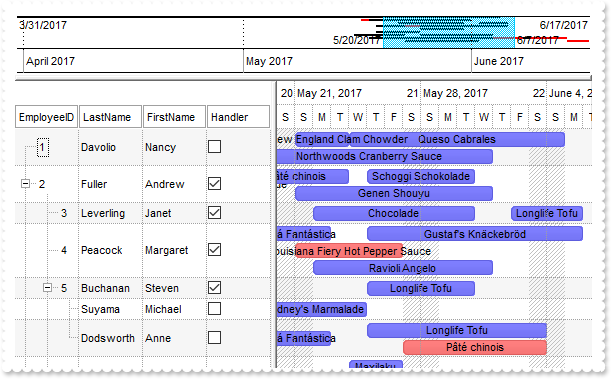
*** Error event - Fired when an internal error occurs. ***
LPARAMETERS Error, Description
	with thisform.G2Host1
		DEBUGOUT( Error )
		DEBUGOUT( Description )
	endwith

with thisform.G2Host1
	with .Host
		.VisualAppearance.Add(1,"C:\Program Files\Exontrol\ExG2Host\Sample\EBN\Assorted\wbs-ass.ebn")
		with .Chart.Bars.Item("Task")
			.Height = 15
			.Color = 0x1ff0000
			.OverlaidType = 515 && OverlaidBarsTypeEnum.exOverlaidBarsStackAutoArrange Or OverlaidBarsTypeEnum.exOverlaidBarsStack
			.OverlaidGroup = "Task,Progress"
		endwith
	endwith
	.Object.DataSource("Items") = "C:\Program Files\Exontrol\ExG2Host\Sample\Access\sample.accdb"
	.Object.DataMember("Items") = "Employees"
	.Object.DataField(0) = "Items"
	.Object.DataField(1) = "EmployeeID"
	.Object.DataField(2) = "ReportsTo"
	.Object.DataSource("Tasks") = .DataSource("Items")
	.Object.DataMember("Tasks") = "EmployeeDetails"
	.Object.DataField(7) = "Tasks"
	.Object.DataField(8) = "EmployeeID"
	.Object.DataField(9) = "DateStart"
	.Object.DataField(10) = "DateEnd"
	.Object.DataField(14) = "TaskID"
	.Object.DataField(12) = "Color"
	.Object.DataField(13) = "TaskName"
	.Host.Items.ExpandItem(0) = .T.
	.Host.Chart.PaneWidth(0) = 256
	.Host.Chart.ScrollTo({^2017-5-27},1)
endwith
|
|
36
|
How do I specify a different color for the tasks ( solid color, transparent )
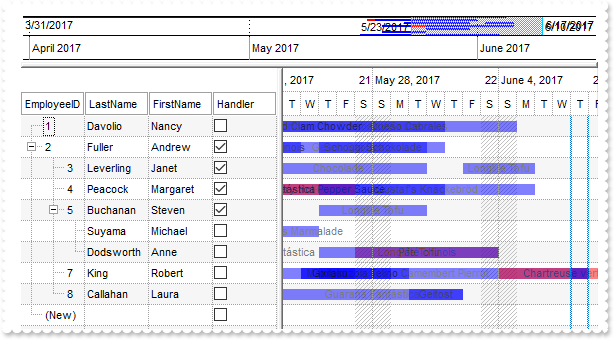
*** Error event - Fired when an internal error occurs. ***
LPARAMETERS Error, Description
	with thisform.G2Host1
		DEBUGOUT( Error )
		DEBUGOUT( Description )
	endwith

with thisform.G2Host1
	with .Host.Chart.Bars.Item("Task")
		.Pattern = 1
		.Color = RGB(0,0,255)
		.Def(19) = 50
	endwith
	.Object.DataSource("Items") = "C:\Program Files\Exontrol\ExG2Host\Sample\Access\sample.accdb"
	.Object.DataMember("Items") = "Employees"
	.Object.DataField(0) = "Items"
	.Object.DataField(1) = "EmployeeID"
	.Object.DataField(2) = "ReportsTo"
	.Object.DataSource("Tasks") = .DataSource("Items")
	.Object.DataMember("Tasks") = "EmployeeDetails"
	.Object.DataField(7) = "Tasks"
	.Object.DataField(8) = "EmployeeID"
	.Object.DataField(9) = "DateStart"
	.Object.DataField(10) = "DateEnd"
	.Object.DataField(14) = "TaskID"
	.Object.DataField(12) = "Color"
	.Object.DataField(13) = "TaskName"
	.Host.Items.ExpandItem(0) = .T.
	.Host.Chart.PaneWidth(0) = 256
	.Host.Chart.ScrollTo({^2017-5-27},1)
endwith
|
|
35
|
GroupBy
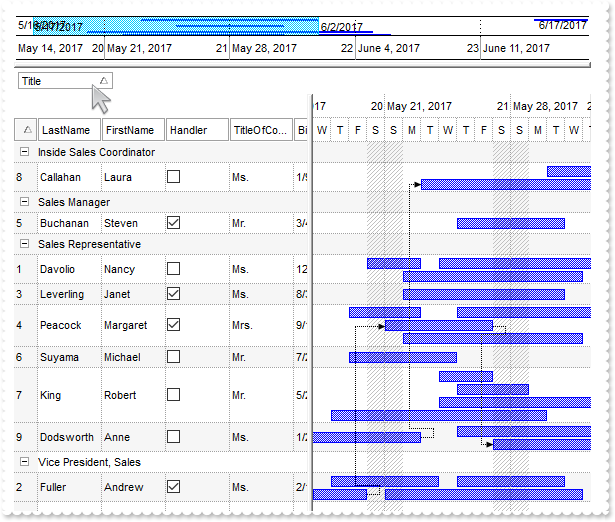
*** Error event - Fired when an internal error occurs. ***
LPARAMETERS Error, Description
	with thisform.G2Host1
		DEBUGOUT( Error )
		DEBUGOUT( Description )
	endwith

with thisform.G2Host1
	.Object.DataSource("Items") = "C:\Program Files\Exontrol\ExG2Host\Sample\Access\sample.accdb"
	.Object.DataMember("Items") = "Employees"
	.Object.DataField(0) = "Items"
	.Object.DataField(1) = "EmployeeID"
	.Object.DataSource("Tasks") = .DataSource("Items")
	.Object.DataMember("Tasks") = "EmployeeDetails"
	.Object.DataField(7) = "Tasks"
	.Object.DataField(8) = "EmployeeID"
	.Object.DataField(9) = "DateStart"
	.Object.DataField(10) = "DateEnd"
	.Object.DataField(14) = "TaskID"
	.Object.DataSource("Links") = .DataSource("Items")
	.Object.DataMember("Links") = "EmployeeLinks"
	.Object.DataField(15) = "Links"
	.Object.DataField(16) = "Start"
	.Object.DataField(17) = "End"
	with .Host
		.AllowGroupBy = .T.
		.SortBarVisible = .T.
		.BackColorSortBar = thisform.G2Host1.Host.BackColor
		.BackColorSortBarCaption = .BackColorSortBar
		.SortBarCaption = "<sha ;;0><fgcolor=FF0000>Drag a <b>column</b> header here to sort by that column."
		with .Chart.Bars.Item("Task")
			.OverlaidType = 515 && OverlaidBarsTypeEnum.exOverlaidBarsStackAutoArrange Or OverlaidBarsTypeEnum.exOverlaidBarsStack
			.OverlaidGroup = "Task,Progress"
		endwith
		.Items.ExpandItem(0) = .T.
		.CountLockedColumns = 1
		.BackColorLock = .BackColorAlternate
		with .Columns.Item("EmployeeID")
			.AllowGroupBy = .F.
			.Def(7) = thisform.G2Host1.Host.BackColorAlternate
		endwith
		.Columns.Item("Title").SortOrder = 1
	endwith
	.Host.Chart.ScrollTo({^2017-5-27},1)
endwith
|
|
34
|
How can I hide a column
*** Error event - Fired when an internal error occurs. ***
LPARAMETERS Error, Description
	with thisform.G2Host1
		DEBUGOUT( Error )
		DEBUGOUT( Description )
	endwith

with thisform.G2Host1
	.Object.DataSource("Items") = "C:\Program Files\Exontrol\ExG2Host\Sample\Access\sample.accdb"
	.Object.DataMember("Items") = "Employees"
	.Object.DataField(0) = "Items"
	.Object.DataField(1) = "EmployeeID"
	.Host.Columns.Item(0).Visible = .F.
endwith
|
|
33
|
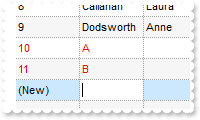
Can row errors being highligted until the user correct them, not to clear them as soon a change occurs
*** Error event - Fired when an internal error occurs. ***
LPARAMETERS Error, Description
	with thisform.G2Host1
		DEBUGOUT( Error )
		DEBUGOUT( Description )
	endwith

with thisform.G2Host1
	.Object.DataSource("Items") = "C:\Program Files\Exontrol\ExG2Host\Sample\Access\sample.accdb"
	.Object.DataMember("Items") = "Employees"
	.Object.DataField(0) = "Items"
	.Object.DataField(1) = "EmployeeID"
	.Object.HostDef(7) = .F.
endwith
|
|
32
|
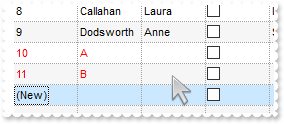
No error is highligthed
*** Error event - Fired when an internal error occurs. ***
LPARAMETERS Error, Description
	with thisform.G2Host1
		DEBUGOUT( Error )
		DEBUGOUT( Description )
	endwith

with thisform.G2Host1
	.Object.DataSource("Items") = "C:\Program Files\Exontrol\ExG2Host\Sample\Access\sample.accdb"
	.Object.DataMember("Items") = "Employees"
	.Object.DataField(0) = "Items"
	.Object.DataField(1) = "EmployeeID"
endwith
|
|
31
|
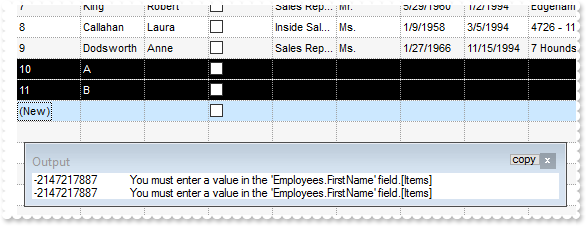
I've noticed that rows with errors are shown in red. Is it possible to change the colors
*** Error event - Fired when an internal error occurs. ***
LPARAMETERS Error, Description
	with thisform.G2Host1
		DEBUGOUT( Error )
		DEBUGOUT( Description )
	endwith

with thisform.G2Host1
	.Object.DataSource("Items") = "C:\Program Files\Exontrol\ExG2Host\Sample\Access\sample.accdb"
	.Object.DataMember("Items") = "Employees"
	.Object.DataField(0) = "Items"
	.Object.DataField(1) = "EmployeeID"
	.Object.HostDef(6) = 0
	.Object.HostDef(5) = 16777215
endwith
|
|
30
|
Is it possible to rename the (New) to something else
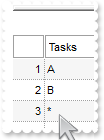
with thisform.G2Host1
	.Object.HostDef(1) = "*"
	with .Host
		.BeginUpdate
		.Items.AddItem("A")
		.Items.AddItem("B")
		.EndUpdate
	endwith
	.Refresh
endwith
|
|
29
|
How can I hide the (New) item (sample 2)
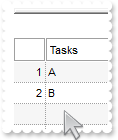
with thisform.G2Host1
	.HostReadOnly = 240 && HostReadOnlyEnum.exHostAllowUpdate Or HostReadOnlyEnum.exHostAllowDelete
	with .Host
		.BeginUpdate
		.Items.AddItem("A")
		.Items.AddItem("B")
		.EndUpdate
	endwith
endwith
|
|
28
|
How can I hide the (New) item (sample 1)
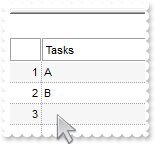
with thisform.G2Host1
	.Object.HostDef(1) = ""
	with .Host
		.BeginUpdate
		.Items.AddItem("A")
		.Items.AddItem("B")
		.EndUpdate
	endwith
	.Refresh
endwith
|
|
27
|
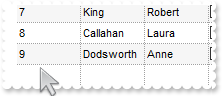
Read-Only
*** Error event - Fired when an internal error occurs. ***
LPARAMETERS Error, Description
	with thisform.G2Host1
		DEBUGOUT( Error )
		DEBUGOUT( Description )
	endwith

with thisform.G2Host1
	.Object.DataSource("Items") = "C:\Program Files\Exontrol\ExG2Host\Sample\Access\sample.accdb"
	.Object.DataMember("Items") = "Employees"
	.Object.DataField(0) = "Items"
	.HostReadOnly = 0
endwith
|
|
26
|
How can I prevent user create new /delete tasks ( only move or resize then )
*** Error event - Fired when an internal error occurs. ***
LPARAMETERS Error, Description
	with thisform.G2Host1
		DEBUGOUT( Error )
		DEBUGOUT( Description )
	endwith

with thisform.G2Host1
	.Object.DataSource("Items") = "C:\Program Files\Exontrol\ExG2Host\Sample\Access\sample.accdb"
	.Object.DataMember("Items") = "Employees"
	.Object.DataField(0) = "Items"
	.Object.DataField(1) = "EmployeeID"
	.Object.DataSource("Tasks") = .DataSource("Items")
	.Object.DataMember("Tasks") = "EmployeeDetails"
	.Object.DataField(7) = "Tasks"
	.Object.DataField(8) = "EmployeeID"
	.Object.DataField(9) = "DateStart"
	.Object.DataField(10) = "DateEnd"
	.Object.DataField(14) = "TaskID"
	.Object.DataSource("Links") = .DataSource("Items")
	.Object.DataMember("Links") = "EmployeeLinks"
	.Object.DataField(15) = "Links"
	.Object.DataField(16) = "Start"
	.Object.DataField(17) = "End"
	with .Host.Chart.Bars.Item("Task")
		.OverlaidType = 515 && OverlaidBarsTypeEnum.exOverlaidBarsStackAutoArrange Or OverlaidBarsTypeEnum.exOverlaidBarsStack
		.OverlaidGroup = "Task,Progress"
	endwith
	.Host.Items.ExpandItem(0) = .T.
	.HostReadOnly = 128
	.Host.Chart.ScrollTo({^2017-5-27},1)
endwith
|
|
25
|
How do I get the row/item/task/link from the cursor
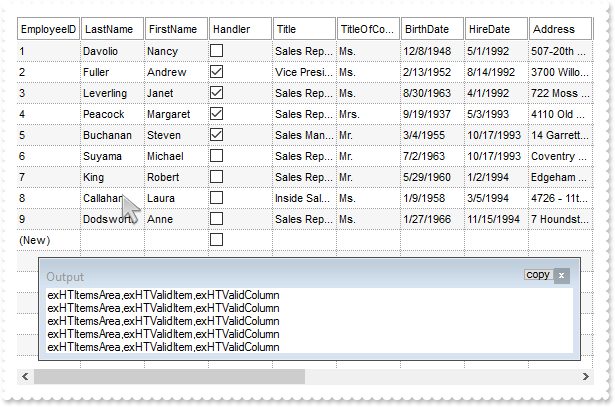
*** Error event - Fired when an internal error occurs. ***
LPARAMETERS Error, Description
	with thisform.G2Host1
		DEBUGOUT( Error )
		DEBUGOUT( Description )
	endwith

*** HostEvent event - Notifies the application once the host fires an event. ***
LPARAMETERS EventID
	with thisform.G2Host1
		DEBUGOUT( .HostContext.ToString )
	endwith

with thisform.G2Host1
	.Object.DataSource("Items") = "C:\Program Files\Exontrol\ExG2Host\Sample\Access\sample.accdb"
	.Object.DataMember("Items") = "Employees"
	.Object.DataField(0) = "Items"
	.HostReadOnly = 141 && HostReadOnlyEnum.exHostAllowUpdate Or HostReadOnlyEnum.exHostAllowAddNew
endwith
|
|
24
|
Disable Delete
*** Error event - Fired when an internal error occurs. ***
LPARAMETERS Error, Description
	with thisform.G2Host1
		DEBUGOUT( Error )
		DEBUGOUT( Description )
	endwith

with thisform.G2Host1
	.Object.DataSource("Items") = "C:\Program Files\Exontrol\ExG2Host\Sample\Access\sample.accdb"
	.Object.DataMember("Items") = "Employees"
	.Object.DataField(0) = "Items"
	.HostReadOnly = 141 && HostReadOnlyEnum.exHostAllowUpdate Or HostReadOnlyEnum.exHostAllowAddNew
endwith
|
|
23
|
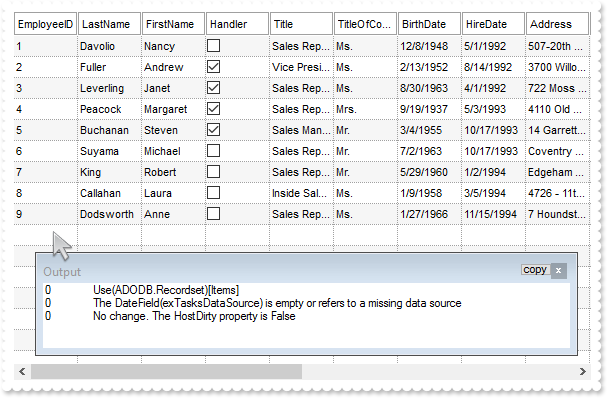
Disable AddNew
*** Error event - Fired when an internal error occurs. ***
LPARAMETERS Error, Description
	with thisform.G2Host1
		DEBUGOUT( Error )
		DEBUGOUT( Description )
	endwith

with thisform.G2Host1
	.Object.DataSource("Items") = "C:\Program Files\Exontrol\ExG2Host\Sample\Access\sample.accdb"
	.Object.DataMember("Items") = "Employees"
	.Object.DataField(0) = "Items"
	.HostReadOnly = 240 && HostReadOnlyEnum.exHostAllowUpdate Or HostReadOnlyEnum.exHostAllowDelete
endwith
|
|
22
|
ACCDB sample ( file )
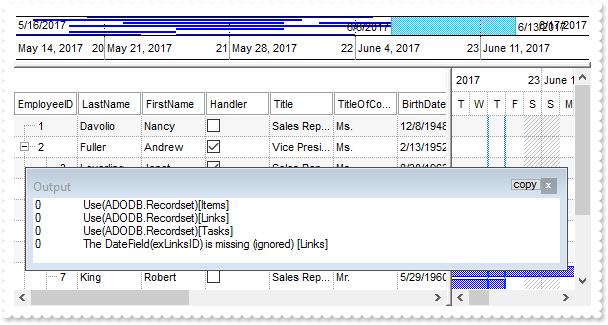
*** Error event - Fired when an internal error occurs. ***
LPARAMETERS Error, Description
	with thisform.G2Host1
		DEBUGOUT( Error )
		DEBUGOUT( Description )
	endwith

with thisform.G2Host1
	.Object.DataSource("Items") = "C:\Program Files\Exontrol\ExG2Host\Sample\Access\sample.accdb"
	.Object.DataMember("Items") = "Employees"
	.Object.DataField(0) = "Items"
	.Object.DataField(1) = "EmployeeID"
	.Object.DataField(2) = "ReportsTo"
	.Object.DataSource("Tasks") = .DataSource("Items")
	.Object.DataMember("Tasks") = "EmployeeDetails"
	.Object.DataField(7) = "Tasks"
	.Object.DataField(8) = "EmployeeID"
	.Object.DataField(9) = "DateStart"
	.Object.DataField(10) = "DateEnd"
	.Object.DataField(14) = "TaskID"
	.Object.DataSource("Links") = .DataSource("Items")
	.Object.DataMember("Links") = "EmployeeLinks"
	.Object.DataField(15) = "Links"
	.Object.DataField(16) = "Start"
	.Object.DataField(17) = "End"
	with .Host.Chart.Bars.Item("Task")
		.OverlaidType = 515 && OverlaidBarsTypeEnum.exOverlaidBarsStackAutoArrange Or OverlaidBarsTypeEnum.exOverlaidBarsStack
		.OverlaidGroup = "Task,Progress"
	endwith
	.Host.Items.ExpandItem(0) = .T.
	.Host.Chart.ScrollTo({^2017-5-27},1)
endwith
|
|
21
|
MDB sample ( file )
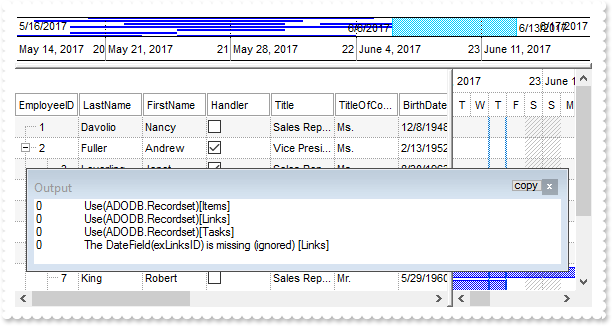
*** Error event - Fired when an internal error occurs. ***
LPARAMETERS Error, Description
	with thisform.G2Host1
		DEBUGOUT( Error )
		DEBUGOUT( Description )
	endwith

with thisform.G2Host1
	.Object.DataSource("Items") = "C:\Program Files\Exontrol\ExG2Host\Sample\sample.mdb"
	.Object.DataMember("Items") = "Employees"
	.Object.DataField(0) = "Items"
	.Object.DataField(1) = "EmployeeID"
	.Object.DataField(2) = "ReportsTo"
	.Object.DataSource("Tasks") = .DataSource("Items")
	.Object.DataMember("Tasks") = "EmployeeDetails"
	.Object.DataField(7) = "Tasks"
	.Object.DataField(8) = "EmployeeID"
	.Object.DataField(9) = "DateStart"
	.Object.DataField(10) = "DateEnd"
	.Object.DataField(14) = "TaskID"
	.Object.DataSource("Links") = .DataSource("Items")
	.Object.DataMember("Links") = "EmployeeLinks"
	.Object.DataField(15) = "Links"
	.Object.DataField(16) = "Start"
	.Object.DataField(17) = "End"
	with .Host.Chart.Bars.Item("Task")
		.OverlaidType = 515 && OverlaidBarsTypeEnum.exOverlaidBarsStackAutoArrange Or OverlaidBarsTypeEnum.exOverlaidBarsStack
		.OverlaidGroup = "Task,Progress"
	endwith
	.Host.Items.ExpandItem(0) = .T.
	.Host.Chart.ScrollTo({^2017-5-27},1)
endwith
|
|
20
|
DBF sample ( file )
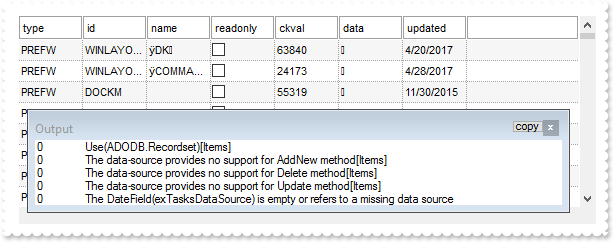
*** Error event - Fired when an internal error occurs. ***
LPARAMETERS Error, Description
	with thisform.G2Host1
		DEBUGOUT( Error )
		DEBUGOUT( Description )
	endwith

with thisform.G2Host1
	.Object.DataSource("Items") = "C:\Program Files\Exontrol\ExG2Host\Sample\sample.dbf"
	.Object.DataField(0) = "Items"
endwith
|
|
19
|
DAO sample ( object, DAO.DBEngine.120, multiple tasks, multiple tables )
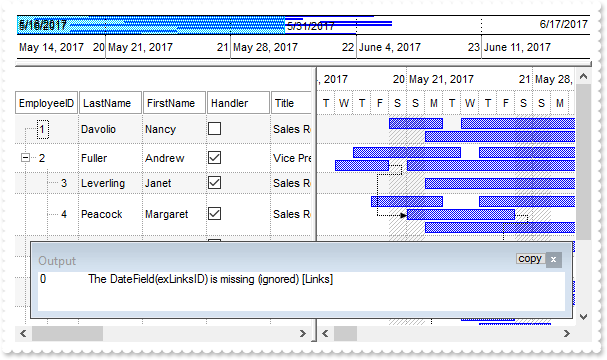
*** Error event - Fired when an internal error occurs. ***
LPARAMETERS Error, Description
	with thisform.G2Host1
		DEBUGOUT( Error )
		DEBUGOUT( Description )
	endwith

with thisform.G2Host1
	with CreateObject("DAO.DBEngine.120")
		with .OpenDatabase("C:\Program Files\Exontrol\ExG2Host\Sample\Access\sample.accdb")
			rsEmployees = .OpenRecordset("Employees")
			rsTasks = .OpenRecordset("EmployeeDetails")
			rsLinks = .OpenRecordset("EmployeeLinks")
		endwith
	endwith
	.Object.DataSource("Items") = rsEmployees
	.Object.DataMember("Items") = "Employees"
	.Object.DataField(0) = "Items"
	.Object.DataField(1) = "EmployeeID"
	.Object.DataField(2) = "ReportsTo"
	.Object.DataSource("Tasks") = rsTasks
	.Object.DataField(7) = "Tasks"
	.Object.DataField(8) = "EmployeeID"
	.Object.DataField(9) = "DateStart"
	.Object.DataField(10) = "DateEnd"
	.Object.DataField(14) = "TaskID"
	.Object.DataSource("Links") = rsLinks
	.Object.DataField(15) = "Links"
	.Object.DataField(16) = "Start"
	.Object.DataField(17) = "End"
	with .Host.Chart.Bars.Item("Task")
		.OverlaidType = 515 && OverlaidBarsTypeEnum.exOverlaidBarsStackAutoArrange Or OverlaidBarsTypeEnum.exOverlaidBarsStack
		.OverlaidGroup = "Task,Progress"
	endwith
	.Host.Items.ExpandItem(0) = .T.
	.Host.Chart.ScrollTo({^2017-5-27},1)
endwith
|
|
18
|
DAO sample ( file, multiple tasks, multiple tables )
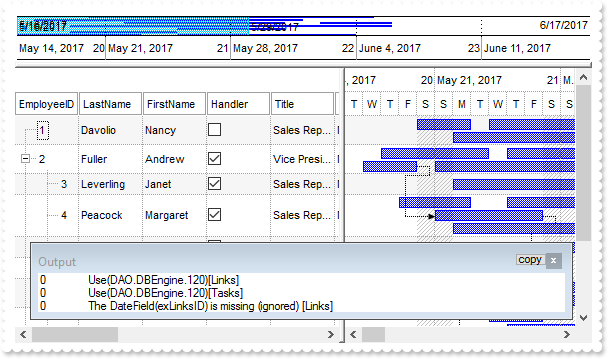
*** Error event - Fired when an internal error occurs. ***
LPARAMETERS Error, Description
	with thisform.G2Host1
		DEBUGOUT( Error )
		DEBUGOUT( Description )
	endwith

with thisform.G2Host1
	.Object.DataTechnology("Items") = "DAO.DBEngine.120;DAO.DBEngine.36"
	.Object.DataSource("Items") = "C:\Program Files\Exontrol\ExG2Host\Sample\Access\sample.accdb"
	.Object.DataMember("Items") = "Employees"
	.Object.DataField(0) = "Items"
	.Object.DataField(1) = "EmployeeID"
	.Object.DataField(2) = "ReportsTo"
	.Object.DataTechnology("Tasks") = "DAO.DBEngine.120;DAO.DBEngine.36"
	.Object.DataSource("Tasks") = .DataSource("Items")
	.Object.DataMember("Tasks") = "EmployeeDetails"
	.Object.DataField(7) = "Tasks"
	.Object.DataField(8) = "EmployeeID"
	.Object.DataField(9) = "DateStart"
	.Object.DataField(10) = "DateEnd"
	.Object.DataField(14) = "TaskID"
	.Object.DataTechnology("Links") = "DAO.DBEngine.120;DAO.DBEngine.36"
	.Object.DataSource("Links") = .DataSource("Items")
	.Object.DataMember("Links") = "EmployeeLinks"
	.Object.DataField(15) = "Links"
	.Object.DataField(16) = "Start"
	.Object.DataField(17) = "End"
	with .Host.Chart.Bars.Item("Task")
		.OverlaidType = 515 && OverlaidBarsTypeEnum.exOverlaidBarsStackAutoArrange Or OverlaidBarsTypeEnum.exOverlaidBarsStack
		.OverlaidGroup = "Task,Progress"
	endwith
	.Host.Items.ExpandItem(0) = .T.
	.Host.Chart.ScrollTo({^2017-5-27},1)
endwith
|
|
17
|
DAO sample ( object, DAO.DBEngine.120, single task, single table )
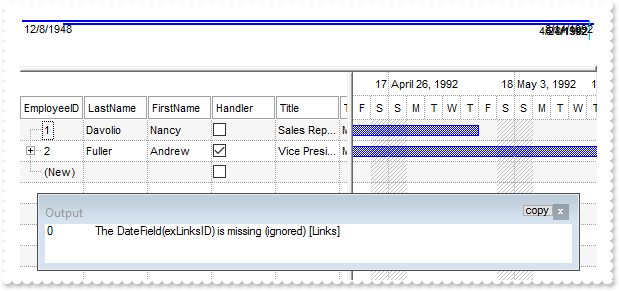
*** Error event - Fired when an internal error occurs. ***
LPARAMETERS Error, Description
	with thisform.G2Host1
		DEBUGOUT( Error )
		DEBUGOUT( Description )
	endwith

with thisform.G2Host1
	with CreateObject("DAO.DBEngine.120")
		with .OpenDatabase("C:\Program Files\Exontrol\ExG2Host\Sample\Access\sample.accdb")
			rsEmployees = .OpenRecordset("Employees")
			rsLinks = .OpenRecordset("EmployeeLinks")
		endwith
	endwith
	.Object.DataSource("Items") = rsEmployees
	.Object.DataField(0) = "Items"
	.Object.DataField(1) = "EmployeeID"
	.Object.DataField(2) = "ReportsTo"
	.Object.DataField(7) = .DataField(0)
	.Object.DataField(9) = "BirthDate"
	.Object.DataField(10) = "HireDate"
	.Object.DataSource("Links") = rsLinks
	.Object.DataField(15) = "Links"
	.Object.DataField(16) = "Start"
	.Object.DataField(17) = "End"
endwith
|
|
16
|
DAO sample ( file, single task, single table )
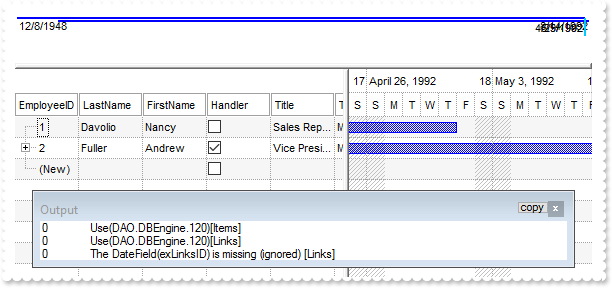
*** Error event - Fired when an internal error occurs. ***
LPARAMETERS Error, Description
	with thisform.G2Host1
		DEBUGOUT( Error )
		DEBUGOUT( Description )
	endwith

with thisform.G2Host1
	.Object.DataTechnology("Items") = "DAO.DBEngine.120;DAO.DBEngine.36"
	.Object.DataSource("Items") = "C:\Program Files\Exontrol\ExG2Host\Sample\Access\sample.accdb"
	.Object.DataMember("Items") = "Employees"
	.Object.DataField(0) = "Items"
	.Object.DataField(1) = "EmployeeID"
	.Object.DataField(2) = "ReportsTo"
	.Object.DataField(7) = .DataField(0)
	.Object.DataField(9) = "BirthDate"
	.Object.DataField(10) = "HireDate"
	.Object.DataTechnology("Links") = "DAO.DBEngine.120;DAO.DBEngine.36"
	.Object.DataSource("Links") = .DataSource("Items")
	.Object.DataMember("Links") = "EmployeeLinks"
	.Object.DataField(15) = "Links"
	.Object.DataField(16) = "Start"
	.Object.DataField(17) = "End"
endwith
|
|
15
|
DAO sample ( tree recordset )
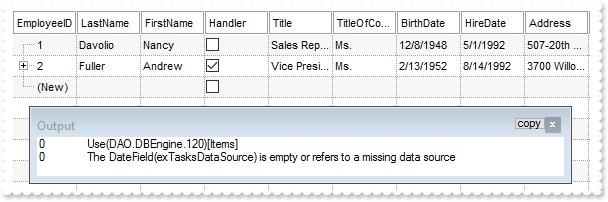
*** Error event - Fired when an internal error occurs. ***
LPARAMETERS Error, Description
	with thisform.G2Host1
		DEBUGOUT( Error )
		DEBUGOUT( Description )
	endwith

with thisform.G2Host1
	.Object.DataTechnology("Items") = "DAO.DBEngine.120;DAO.DBEngine.36"
	.Object.DataSource("Items") = "C:\Program Files\Exontrol\ExG2Host\Sample\Access\sample.accdb"
	.Object.DataMember("Items") = "Employees"
	.Object.DataField(0) = "Items"
	.Object.DataField(1) = "EmployeeID"
	.Object.DataField(2) = "ReportsTo"
endwith
|
|
14
|
DAO sample ( flat recordset )
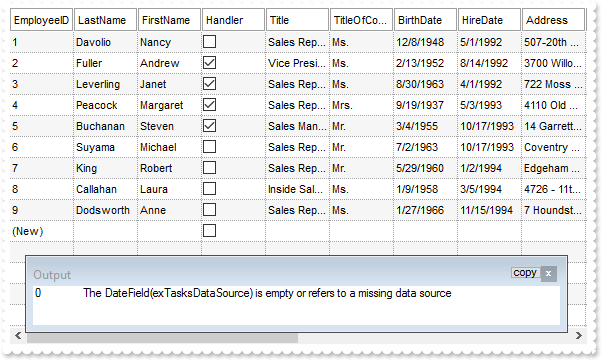
*** Error event - Fired when an internal error occurs. ***
LPARAMETERS Error, Description
	with thisform.G2Host1
		DEBUGOUT( Error )
		DEBUGOUT( Description )
	endwith

with thisform.G2Host1
	with CreateObject("DAO.DBEngine.120")
		with .OpenDatabase("C:\Program Files\Exontrol\ExG2Host\Sample\Access\sample.accdb")
			rsEmployees = .OpenRecordset("Employees")
		endwith
	endwith
	.Object.DataSource("Items") = rsEmployees
	.Object.DataField(0) = "Items"
endwith
|
|
13
|
DAO sample ( flat )
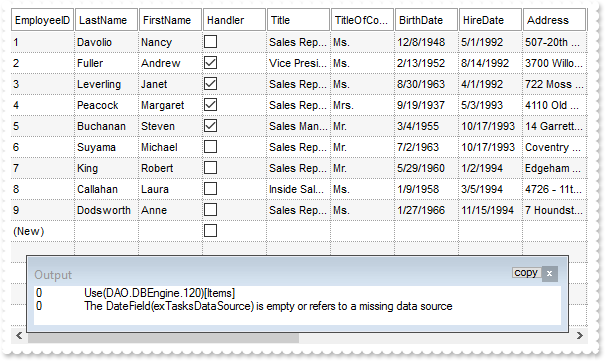
*** Error event - Fired when an internal error occurs. ***
LPARAMETERS Error, Description
	with thisform.G2Host1
		DEBUGOUT( Error )
		DEBUGOUT( Description )
	endwith

with thisform.G2Host1
	.Object.DataTechnology("Items") = "DAO.DBEngine.120;DAO.DBEngine.36"
	.Object.DataSource("Items") = "C:\Program Files\Exontrol\ExG2Host\Sample\Access\sample.accdb"
	.Object.DataMember("Items") = "Employees"
	.Object.DataField(0) = "Items"
endwith
|
|
12
|
ADO sample ( object, ADODB.Recordset, multiple tasks )
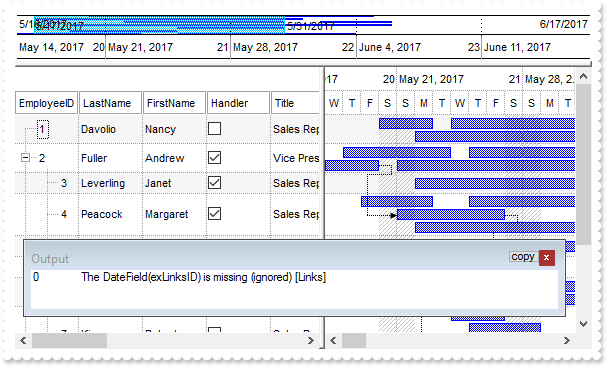
*** Error event - Fired when an internal error occurs. ***
LPARAMETERS Error, Description
	with thisform.G2Host1
		DEBUGOUT( Error )
		DEBUGOUT( Description )
	endwith

with thisform.G2Host1
	rsEmployees = CreateObject("ADODB.Recordset")
	rsEmployees.Open("Employees","Provider=Microsoft.ACE.OLEDB.12.0;Data Source=C:\Program Files\Exontrol\ExG2Host\Sample\Access\sample.accdb",3,3)
	.Object.DataSource("Items") = rsEmployees
	.Object.DataField(0) = "Items"
	.Object.DataField(1) = "EmployeeID"
	.Object.DataField(2) = "ReportsTo"
	rsTasks = CreateObject("ADODB.Recordset")
	rsTasks.Open("EmployeeDetails","Provider=Microsoft.ACE.OLEDB.12.0;Data Source=C:\Program Files\Exontrol\ExG2Host\Sample\Access\sample.accdb",3,3)
	.Object.DataSource("Tasks") = rstasks
	.Object.DataField(7) = "Tasks"
	.Object.DataField(8) = "EmployeeID"
	.Object.DataField(9) = "DateStart"
	.Object.DataField(10) = "DateEnd"
	.Object.DataField(14) = "TaskID"
	rsLinks = CreateObject("ADODB.Recordset")
	rsLinks.Open("EmployeeLinks","Provider=Microsoft.ACE.OLEDB.12.0;Data Source=C:\Program Files\Exontrol\ExG2Host\Sample\Access\sample.accdb",3,3)
	.Object.DataSource("Links") = rsLinks
	.Object.DataField(15) = "Links"
	.Object.DataField(16) = "Start"
	.Object.DataField(17) = "End"
	with .Host.Chart.Bars.Item("Task")
		.OverlaidType = 515 && OverlaidBarsTypeEnum.exOverlaidBarsStackAutoArrange Or OverlaidBarsTypeEnum.exOverlaidBarsStack
		.OverlaidGroup = "Task,Progress"
	endwith
	.Host.Items.ExpandItem(0) = .T.
	.Host.Chart.ScrollTo({^2017-5-27},1)
endwith
|
|
11
|
ADO sample ( file, multiple tasks, multiple tables )
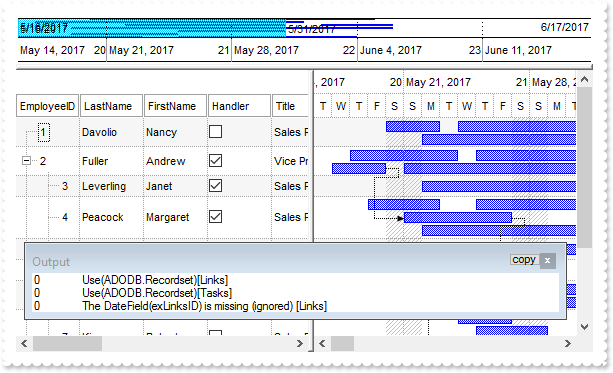
*** Error event - Fired when an internal error occurs. ***
LPARAMETERS Error, Description
	with thisform.G2Host1
		DEBUGOUT( Error )
		DEBUGOUT( Description )
	endwith

with thisform.G2Host1
	.Object.DataTechnology("Items") = "ADODB.Recordset;ADOR.Recordset"
	.Object.DataSource("Items") = "C:\Program Files\Exontrol\ExG2Host\Sample\Access\sample.accdb"
	.Object.DataMember("Items") = "Employees"
	.Object.DataField(0) = "Items"
	.Object.DataField(1) = "EmployeeID"
	.Object.DataField(2) = "ReportsTo"
	.Object.DataTechnology("Tasks") = "ADODB.Recordset;ADOR.Recordset"
	.Object.DataSource("Tasks") = .DataSource("Items")
	.Object.DataMember("Tasks") = "EmployeeDetails"
	.Object.DataField(7) = "Tasks"
	.Object.DataField(8) = "EmployeeID"
	.Object.DataField(9) = "DateStart"
	.Object.DataField(10) = "DateEnd"
	.Object.DataField(14) = "TaskID"
	.Object.DataTechnology("Links") = "ADODB.Recordset;ADOR.Recordset"
	.Object.DataSource("Links") = .DataSource("Items")
	.Object.DataMember("Links") = "EmployeeLinks"
	.Object.DataField(15) = "Links"
	.Object.DataField(16) = "Start"
	.Object.DataField(17) = "End"
	with .Host.Chart.Bars.Item("Task")
		.OverlaidType = 515 && OverlaidBarsTypeEnum.exOverlaidBarsStackAutoArrange Or OverlaidBarsTypeEnum.exOverlaidBarsStack
		.OverlaidGroup = "Task,Progress"
	endwith
	.Host.Items.ExpandItem(0) = .T.
	.Host.Chart.ScrollTo({^2017-5-27},1)
endwith
|
|
10
|
ADO sample ( object, ADODB.Recordset, single task, single table )
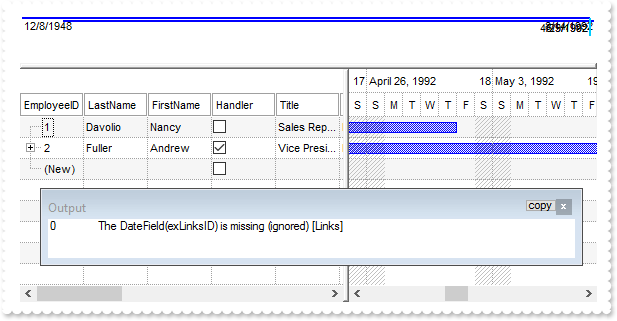
*** Error event - Fired when an internal error occurs. ***
LPARAMETERS Error, Description
	with thisform.G2Host1
		DEBUGOUT( Error )
		DEBUGOUT( Description )
	endwith

with thisform.G2Host1
	rsEmployees = CreateObject("ADODB.Recordset")
	rsEmployees.Open("Employees","Provider=Microsoft.ACE.OLEDB.12.0;Data Source=C:\Program Files\Exontrol\ExG2Host\Sample\Access\sample.accdb",3,3)
	.Object.DataSource("Items") = rsEmployees
	.Object.DataField(0) = "Items"
	.Object.DataField(1) = "EmployeeID"
	.Object.DataField(2) = "ReportsTo"
	.Object.DataField(7) = .DataField(0)
	.Object.DataField(9) = "BirthDate"
	.Object.DataField(10) = "HireDate"
	rsLinks = CreateObject("ADODB.Recordset")
	rsLinks.Open("EmployeeLinks","Provider=Microsoft.ACE.OLEDB.12.0;Data Source=C:\Program Files\Exontrol\ExG2Host\Sample\Access\sample.accdb",3,3)
	.Object.DataSource("Links") = rsLinks
	.Object.DataField(15) = "Links"
	.Object.DataField(16) = "Start"
	.Object.DataField(17) = "End"
endwith
|
|
9
|
ADO sample ( file, single task, single table )
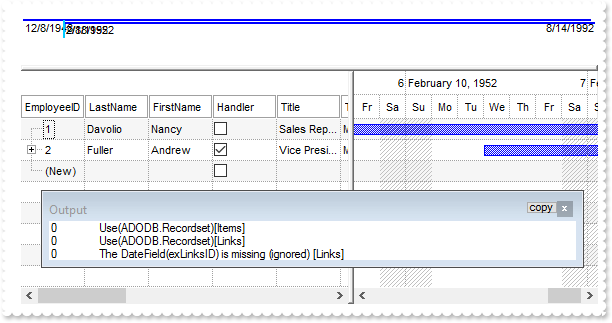
*** Error event - Fired when an internal error occurs. ***
LPARAMETERS Error, Description
	with thisform.G2Host1
		DEBUGOUT( Error )
		DEBUGOUT( Description )
	endwith

with thisform.G2Host1
	.Object.DataTechnology("Items") = "ADODB.Recordset;ADOR.Recordset"
	.Object.DataSource("Items") = "C:\Program Files\Exontrol\ExG2Host\Sample\Access\sample.accdb"
	.Object.DataMember("Items") = "Employees"
	.Object.DataField(0) = "Items"
	.Object.DataField(1) = "EmployeeID"
	.Object.DataField(2) = "ReportsTo"
	.Object.DataField(7) = .DataField(0)
	.Object.DataField(9) = "BirthDate"
	.Object.DataField(10) = "HireDate"
	.Object.DataTechnology("Links") = "ADODB.Recordset;ADOR.Recordset"
	.Object.DataSource("Links") = .DataSource("Items")
	.Object.DataMember("Links") = "EmployeeLinks"
	.Object.DataField(15) = "Links"
	.Object.DataField(16) = "Start"
	.Object.DataField(17) = "End"
endwith
|
|
8
|
ADO sample ( tree recordset )
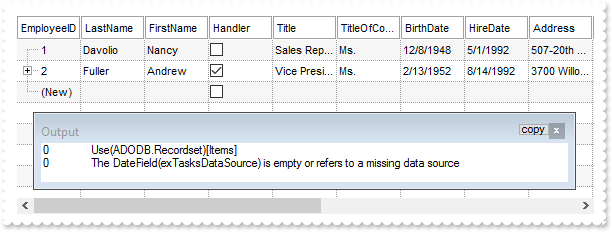
*** Error event - Fired when an internal error occurs. ***
LPARAMETERS Error, Description
	with thisform.G2Host1
		DEBUGOUT( Error )
		DEBUGOUT( Description )
	endwith

with thisform.G2Host1
	.Object.DataTechnology("Items") = "ADODB.Recordset;ADOR.Recordset"
	.Object.DataSource("Items") = "C:\Program Files\Exontrol\ExG2Host\Sample\Access\sample.accdb"
	.Object.DataMember("Items") = "Employees"
	.Object.DataField(0) = "Items"
	.Object.DataField(1) = "EmployeeID"
	.Object.DataField(2) = "ReportsTo"
endwith
|
|
7
|
ADO sample ( flat recordset )
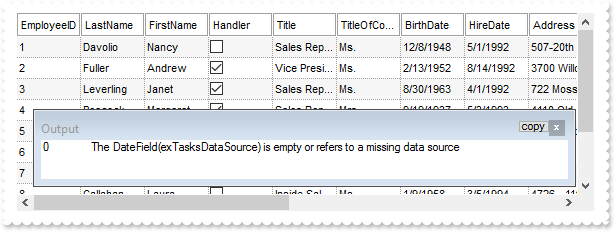
*** Error event - Fired when an internal error occurs. ***
LPARAMETERS Error, Description
	with thisform.G2Host1
		DEBUGOUT( Error )
		DEBUGOUT( Description )
	endwith

with thisform.G2Host1
	rsEmployees = CreateObject("ADODB.Recordset")
	rsEmployees.Open("Employees","Provider=Microsoft.ACE.OLEDB.12.0;Data Source=C:\Program Files\Exontrol\ExG2Host\Sample\Access\sample.accdb",3,3)
	.Object.DataSource("Items") = rsEmployees
	.Object.DataField(0) = "Items"
endwith
|
|
6
|
ADO sample ( flat table )
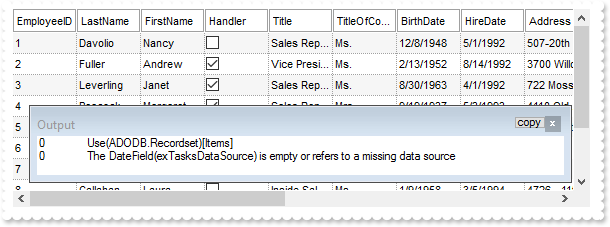
*** Error event - Fired when an internal error occurs. ***
LPARAMETERS Error, Description
	with thisform.G2Host1
		DEBUGOUT( Error )
		DEBUGOUT( Description )
	endwith

with thisform.G2Host1
	.Object.DataTechnology("Items") = "ADODB.Recordset;ADOR.Recordset"
	.Object.DataSource("Items") = "C:\Program Files\Exontrol\ExG2Host\Sample\Access\sample.accdb"
	.Object.DataMember("Items") = "Employees"
	.Object.DataField(0) = "Items"
endwith
|
|
5
|
XML sample ( object, MSXML.DOMDocument )
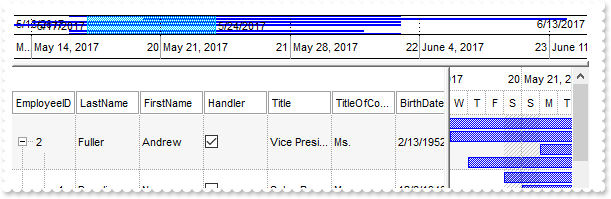
*** Error event - Fired when an internal error occurs. ***
LPARAMETERS Error, Description
	with thisform.G2Host1
		DEBUGOUT( Error )
		DEBUGOUT( Description )
	endwith

with thisform.G2Host1
	xml = CreateObject("MSXML.DOMDocument")
	xml.async = .F.
	xml.load("C:\Program Files\Exontrol\ExG2Host\Sample\sample.xml")
	.Object.DataSource("Items") = xml
	.Object.DataField(0) = "Items"
	with .Host
		.LinesAtRoot = -1
		.SingleSel = .F.
		.AutoDrag = 3
	endwith
endwith
|
|
4
|
XML sample ( file tree )
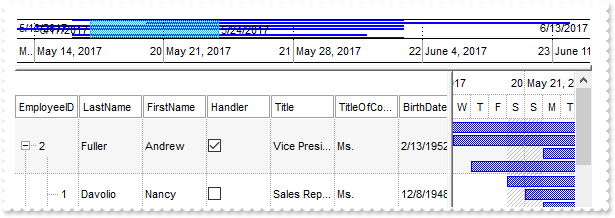
*** Error event - Fired when an internal error occurs. ***
LPARAMETERS Error, Description
	with thisform.G2Host1
		DEBUGOUT( Error )
		DEBUGOUT( Description )
	endwith

with thisform.G2Host1
	.Object.DataTechnology("Items") = "MSXML.DOMDocument"
	.Object.DataSource("Items") = "C:\Program Files\Exontrol\ExG2Host\Sample\sample.xml"
	.Object.DataField(0) = "Items"
	with .Host
		.LinesAtRoot = -1
		.SingleSel = .F.
		.AutoDrag = 3
	endwith
endwith
|
|
3
|
How can I let user create new items/bars when clicking the empty area of the control
*** HostEvent event - Notifies the application once the host fires an event. ***
LPARAMETERS EventID
	with thisform.G2Host1
		DEBUGOUT( .HostEventParam(-2) )
	endwith

with thisform.G2Host1
	.HostReadOnly = 255 && HostReadOnlyEnum.exHostReadWrite Or HostReadOnlyEnum.exHostAllowAddEmptyItem
	with .Host
		.ScrollBars = 2058 && ScrollBarsEnum.exVScrollEmptySpace Or ScrollBarsEnum.exDisableNoVertical
		with .Chart
			.PaneWidth(0) = 128
			.AllowCreateBar = 1
		endwith
	endwith
endwith
|
|
2
|
How do I handle events of the host
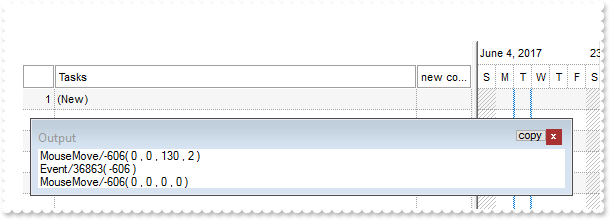
*** HostEvent event - Notifies the application once the host fires an event. ***
LPARAMETERS EventID
	with thisform.G2Host1
		DEBUGOUT( .HostEventParam(-2) )
	endwith

with thisform.G2Host1
	with .Host
		.BeginUpdate
		.Columns.Add("new column")
		.EndUpdate
	endwith
endwith
|
|
1
|
How can I get the version of the host/exg2antt control
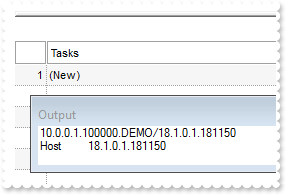
with thisform.G2Host1
	DEBUGOUT( .Version )
	DEBUGOUT( "Host" )
	DEBUGOUT( .Host.Version )
endwith
|