

The following screen shot shows few options to move, limit or resize bars:
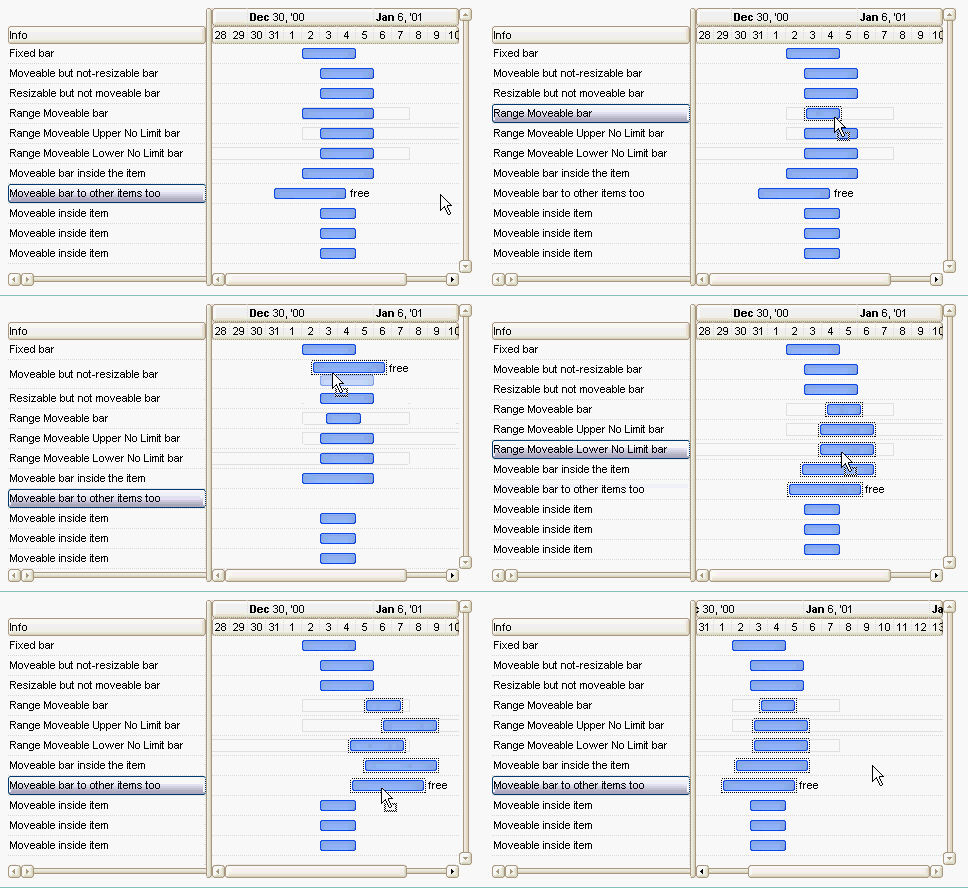
The screen show was generate using the following x-script template ( the visual appearance code was excluded ):
BeginUpdate

ScrollBySingleLine = True
DrawGridLines = -1
DefaultItemHeight = 19
GridLineColor = RGB(220, 220, 220)
Chart
{
	FirstVisibleDate = #1/1/2001#
	ScrollRange(0) = #12/28/2000#
	ScrollRange(1) = #1/12/2001#
	DrawDateTicker = False
	NonworkingDays = 0
	DrawGridLines = -1
	ResizeUnitScale = 65536 ' exHour
	AllowCreateBar = False
	PaneWidth(0) = 128
	LevelCount = 2
	Level(0).DrawGridLines = False
	AllowLinkBars = False
	Bars("Task").OverlaidType = 515	' exOverlaidBarsStack + exOverlaidBarsStackAutoArrange
}
Columns.Add("Info")
Items
{
	Dim h
	h = AddItem("Fixed bar")
	AddBar( h, "Task", #1/2/2001#, #1/5/2001#, "F" )
	ItemBar(h,"F", 10) = False	' exBarCanResize
	ItemBar(h,"F", 11) = False	' exBarCanMove
	ItemBar(h,"F",6) = "This bar is fixed, so the uer can move or resize it"	'exBarToolTip
	h = AddItem("Moveable but not-resizable bar")
	AddBar( h, "Task", #1/3/2001#, #1/6/2001#, "F" )
	ItemBar(h,"F",6) = "This bar is moveable inside the item, but the user can't resize it."	'exBarToolTip
	ItemBar(h,"F", 10) = False	' exBarCanResize
	h = AddItem("Resizable but not moveable bar")
	AddBar( h, "Task", #1/3/2001#, #1/6/2001#, "F" )
	ItemBar(h,"F",6) = "This bar is resizable but the user can't move it."	'exBarToolTip
	ItemBar(h,"F", 11) = False	' exBarCanMove
	h = AddItem("Range Moveable bar")
	AddBar( h, "Task", #1/2/2001#, #1/6/2001#, "F" )
	ItemBar(h,"F",6) = "This bar can be moved inside the displayed range."	'exBarToolTip
	ItemBar(h,"F",22) = #1/2/2001#	' exBarMinStart
	ItemBar(h,"F",25) = #1/8/2001#	' exBarMaxEnd
	ItemBar(h,"F",26) = 32		' exBarShowRange
	ItemBar(h,"F",27) = 90		' exBarShowRangeTransparent
	h = AddItem("Range Moveable Upper No Limit bar")
	AddBar( h, "Task", #1/3/2001#, #1/6/2001#, "F" )
	ItemBar(h,"F",6) = "This bar can be moved inside the displayed range."	'exBarToolTip
	ItemBar(h,"F",22) = #1/2/2001#	' exBarMinStart
	ItemBar(h,"F",26) = 32		' exBarShowRange
	ItemBar(h,"F",27) = 90		' exBarShowRangeTransparent
	h = AddItem("Range Moveable Lower No Limit bar")
	AddBar( h, "Task", #1/3/2001#, #1/6/2001#, "F" )
	ItemBar(h,"F",6) = "This bar can be moved inside the displayed range."	'exBarToolTip
	ItemBar(h,"F",25) = #1/8/2001#	' exBarMaxEnd
	ItemBar(h,"F",26) = 32		' exBarShowRange
	ItemBar(h,"F",27) = 90		' exBarShowRangeTransparent
	h = AddItem("Moveable bar inside the item")
	AddBar( h, "Task", #1/2/2001#, #1/6/2001#, "F" )
	ItemBar(h,"F",6) = "This bar can be moved/resized anywhere inside the item."	'exBarToolTip
	h = AddItem("Moveable bar to other items too")
	AddBar( h, "Task", #1/2/2001#, #1/6/2001#, "FA" )
	ItemBar(h,"FA",6) = "This bar can be moved to other items too. Click the bar and move it to other items too."	'exBarToolTip
	ItemBar(h,"FA",3) = "free"	'exBarCaption
	ItemBar(h,"FA",4) = 18	'exBarHAlignCaption
	ItemBar(h,"FA",28) = True	'exBarCanMoveToAnother
	h = AddItem("Moveable inside item")
	AddBar( h, "Task", #1/3/2001#, #1/5/2001#, "F1" )
	h = AddItem("Moveable inside item")
	AddBar( h, "Task", #1/3/2001#, #1/5/2001#, "F1" )
	h = AddItem("Moveable inside item")
	AddBar( h, "Task", #1/3/2001#, #1/5/2001#, "F1" )
}
EndUpdate()
Syntax for BarParentChange event, /NET version, on:
private void BarParentChange(object sender,int Item,object Key,int NewItem,ref bool Cancel)
{
}
Private Sub BarParentChange(ByVal sender As System.Object,ByVal Item As Integer,ByVal Key As Object,ByVal NewItem As Integer,ByRef Cancel As Boolean) Handles BarParentChange End Sub |
Syntax for BarParentChange event, /COM version, on:
private void BarParentChange(object sender, AxEXG2ANTTLib._IG2anttEvents_BarParentChangeEvent e)
{
}
void OnBarParentChange(long Item,VARIANT Key,long NewItem,BOOL FAR* Cancel)
{
}
void __fastcall BarParentChange(TObject *Sender,Exg2anttlib_tlb::HITEM Item,Variant Key,Exg2anttlib_tlb::HITEM NewItem,VARIANT_BOOL * Cancel)
{
}
procedure BarParentChange(ASender: TObject; Item : HITEM;Key : OleVariant;NewItem : HITEM;var Cancel : WordBool); begin end; procedure BarParentChange(sender: System.Object; e: AxEXG2ANTTLib._IG2anttEvents_BarParentChangeEvent); begin end; begin event BarParentChange(long Item,any Key,long NewItem,boolean Cancel) end event BarParentChange Private Sub BarParentChange(ByVal sender As System.Object, ByVal e As AxEXG2ANTTLib._IG2anttEvents_BarParentChangeEvent) Handles BarParentChange End Sub Private Sub BarParentChange(ByVal Item As EXG2ANTTLibCtl.HITEM,ByVal Key As Variant,ByVal NewItem As EXG2ANTTLibCtl.HITEM,Cancel As Boolean) End Sub Private Sub BarParentChange(ByVal Item As Long,ByVal Key As Variant,ByVal NewItem As Long,Cancel As Boolean) End Sub LPARAMETERS Item,Key,NewItem,Cancel PROCEDURE OnBarParentChange(oG2antt,Item,Key,NewItem,Cancel) RETURN |
Syntax for BarParentChange event, /COM version (others), on:
<SCRIPT EVENT="BarParentChange(Item,Key,NewItem,Cancel)" LANGUAGE="JScript"> </SCRIPT> <SCRIPT LANGUAGE="VBScript"> Function BarParentChange(Item,Key,NewItem,Cancel) End Function </SCRIPT> Procedure OnComBarParentChange HITEM llItem Variant llKey HITEM llNewItem Boolean llCancel Forward Send OnComBarParentChange llItem llKey llNewItem llCancel End_Procedure METHOD OCX_BarParentChange(Item,Key,NewItem,Cancel) CLASS MainDialog RETURN NIL void onEvent_BarParentChange(int _Item,COMVariant _Key,int _NewItem,COMVariant /*bool*/ _Cancel)
{
}
function BarParentChange as v (Item as OLE::Exontrol.G2antt.1::HITEM,Key as A,NewItem as OLE::Exontrol.G2antt.1::HITEM,Cancel as L) end function function nativeObject_BarParentChange(Item,Key,NewItem,Cancel) return |
The following VB/NET sample shows how to simulate a drop event, in other words how you can get notification once the user drops a bar to another parent ( the sample displays the caption of the new parent, once the user drops the bar to a new parent ):
Dim iMoving As Long = 0
Dim bMoving As Object = Nothing

Private Sub Exg2antt1_BarParentChange(ByVal sender As Object, ByVal Item As Integer, ByVal Key As Object, ByVal NewItem As Integer, ByRef Cancel As Boolean) Handles Exg2antt1.BarParentChange
    iMoving = NewItem
    bMoving = Key
End Sub

Private Sub Exg2antt1_ChartEndChanging(ByVal sender As System.Object, ByVal Operation As exontrol.EXG2ANTTLib.BarOperationEnum) Handles Exg2antt1.ChartEndChanging
    If (Operation = exontrol.EXG2ANTTLib.BarOperationEnum.exMoveBar) Then
        If (iMoving <> 0) Then
            If Not (bMoving Is Nothing) Then
                MessageBox.Show(Exg2antt1.Items.get_CellCaption(Exg2antt1.Items.get_BarParent(iMoving, bMoving), 0)).ToString()
            End If
        End If
        iMoving = 0
        bMoving = Nothing
    End If
End Sub
The following VB sample prevents moving the bar to selectable items only ( SelectableItem property ):
Private Sub G2antt1_BarParentChange(ByVal Item As EXG2ANTTLibCtl.HITEM, ByVal Key As Variant, ByVal NewItem As EXG2ANTTLibCtl.HITEM, Cancel As Boolean)
    With G2antt1.Items
        Cancel = Not .SelectableItem(NewItem)
    End With
End Sub
The following VB.NET sample prevents moving the bar to selectable items only ( SelectableItem property ):
Private Sub AxG2antt1_BarParentChange(ByVal sender As System.Object, ByVal e As AxEXG2ANTTLib._IG2anttEvents_BarParentChangeEvent) Handles AxG2antt1.BarParentChange
    With AxG2antt1.Items
        e.cancel = Not .SelectableItem(e.newItem)
    End With
End Sub
The following C# sample prevents moving the bar to selectable items only ( SelectableItem property ):
private void axG2antt1_BarParentChange(object sender, AxEXG2ANTTLib._IG2anttEvents_BarParentChangeEvent e)
{
    e.cancel = !axG2antt1.Items.get_SelectableItem(e.newItem);
}
The following C++ sample prevents moving the bar to selectable items only ( SelectableItem property ):
#include "Items.h"
void OnBarParentChangeG2antt1(long Item, const VARIANT FAR& Key, long NewItem, BOOL FAR* Cancel)
{
	*Cancel = !m_g2antt.GetItems().GetSelectableItem( NewItem );
}
The following VFP sample prevents moving the bar to selectable items only ( SelectableItem property ):
*** ActiveX Control Event ***
LPARAMETERS item, key, newitem, cancel

cancel = !thisform.G2antt1.Items.SelectableItem(newitem)