

By default, the items in a drop down editor are collapsed. Use the ExpandItem to expand a specified item. Use the ExpandAll method to expand all items in the editor. Use the InsertItem method to insert a child item to your built-in editor. Use the AddItem method to add new predefined values. Use the AddButton method to add a button to the editor. Use the DropDownAutoWidth property on False, when inserting predefined values as child items.
The following screen show shows a simple hierarchy into a built-in DropDownList editor:
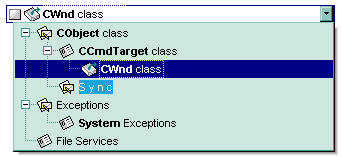
The following VB sample adds a simple hierarchy to a DropDownList built-in editor:
Dim h1 As HITEM
With G2antt1
    .BeginUpdate
    .Images ("gBJJgBggAAwAAgACEKAD/hz/EMNh8TIRNGwAjEZAEXjAojJAjIgjIBAEijUlk8plUrlktl0vmExmUzmk1m03nE5nU7nk9n0/oFBoVDolFo1HpFJpVLplNp1PqFRqVTqlVq1XrFZrVbrldr1fsFhsVjslls1ntFptVrtltt1vuFxuVzul1u13vF5vV7vl9v1/wGBwWDh+Dw1bwuJh0Sf8txeHyFXx+Ryk9wsnxbAzUpycYxWNiWMyujleXjOm0+gjKA1gA1iA0Wf0mz2WY1WwjWywuvz2N1GzyO11ON3mXxe6xfFzvAwXI1UY3mh5292PJ1vMw3T7Hbo3T73L7nhl3f5/i8034Xn9Xr9nt91Cio+lXyjsfkMjAEkk/69Hg97UpSeZ3pSeBnpScAHwO/iMmBBaMQalJAQc10JvylUJkAD8Dh+lJ8Q4k5/D+zjygAgI")
    .Images ("gBJJgBggAAwAAgACEKAD/hz/EMNh8TIRNGwAjEZAEXjAojJAjIgjIBAEijUlk8plUrlktl0vmExmUzmk1m03nE5nU7nk9n0/oFBoVDolFo1HpFJpVLplNp1PqFRqVTqlVq1XrFZrVbrldr1fsFhsVjslls1ntFptVrtltt1vuFxuVzul1u13vF5vV7vl9v1/wGBwV/YGFAGFYGDxVbxGHw2NxuLyVKyGPy2JxsPiT/yedn+RjOVzGGzWlh2bz2pl+gjGsx2jxOaQGz1Gmzma1Wq2aAk+uzOn2wA3fC2nB3OSxvDjXJ2m/znD4Oa13Hxei4m85ek4Hb5+06Hc6nh1uX1+o7G18HT8XrjXR0/n8/G9nzl/uznq+n5mXy/X9/z/wBAKaIqHyVQKjqPpCkYAJIk8Gpu3EBJS06TnmziTnBC6NHAH6UmAB8PAGlJAQejMSJVESUxSjRAAOlJwRck58RAk5/Ro9pPwnDSMoCA=")
    .Images ("gBJJgBggAAkGAAQhIAf8Nf4hhkOiRCJo2AEXjAAi0XFEYIEYhUXAIAEEZi8hk0plUrlktl0vmExmUzmk1m03nE5nU7lqAnwAYFBnlDolFo1HpFJmkOAE+QFAoVBYFQqdKq1XrFZrU2plMp1UsFfr9Srdls1ntEzrsNiL/ps/sU/sleuVRoVpvF5vVDtduulPudswNuslju1VveJxWLk19ttvwFCpmDsGToVxp+MzWbs2Ov+Vtk/t8XymUx2c1GppOOw1Ty1T0WismmtlM1W33FEz+zw9hzOxzOetm54nFoe8qfIsGF3/B2vDjGi43T6k45XXy/Nnva6vd7007HJ7MX4Hk7nS7/p9Utskz8vr+Hxono+X1+33/HGig+lX8jiPJAjCRpGjLMpwph/D+lJ+A+lJ8AOlJ4QIjJwJUxECpnCaMgGlUOJMYAEwilR+BylJ/j3Ey3JMgIA=")
    .Images ("gBJJgBggAAwAAgACEKAD/hz/EMNh8TIRNGwAjEZAEXjAojJAjIgjIBAEijUlk8plUrlktl0vmExmUzmk1m03nE5nU7nk9n0/oFBoVDolFo1HpFJpVLplNp1PqFRqVTqlVq1XrFZrVbrldr1fsFhsVjslls1ntFptVrtltt1vuFxuVzul1u13vF5vV7vl9v1/wGBwWDjUPACAxGExVRwzAx0Sf4AxzAyWPxCAxeZouTyGdzmfx+cy+a0k5xuP0+Uw8ZzGVymc0uxmmcw2pjGt2G4x+y3ks2kO12ey2J3MY2G95GF4G/yO24u343D1vJ3m14HW5vX5eh7mv3fU2XMw+J0flxPY4PH8Gl0Xn7XZ+HjzGj23r5H09+d/Hx/f29b0OU+LQNU/0CwNA8EQSm6Kh8lUGo6j6QpGACSJPCqbsNBSVuAk5+Mik54B+lJwAfEYDxNFCTmBE8VAGlJgRdFsXxijRwRojJ4RujB8xKk8OI0gIA==")
    .Columns.Add "Column 1"
    .ColumnAutoResize = True
    .HeaderVisible = False
    With .Items
        h1 = .InsertItem(, , "Child 1") ' Inserts a child itme
        .CellValueFormat(h1, 0) = exHTML
        .CellHasCheckBox(h1, 0) = True   ' Associates a check box to a cell
        .CellValue(h1, 0) = 3            ' Sets the cell's value
        .CellImage(h1, 0) = 1            ' Associates an image to a cell
        With .CellEditor(h1, 0)
            .EditType = DropDownListType
            .DropDownAutoWidth = False
            .AddItem 1, "CObject class", 1
            .AddItem 2, "CCmdTarget class", 2, 1
            .AddItem 3, "CWnd class", 3, 2
            .AddItem 6, "S y n c", 1, 1
            .AddItem 4, "Exceptions", 1
            .AddItem 7, "System Exceptions", 2, 4
            .AddItem 5, "File Services", 2
            .ExpandAll
        End With
    End With
    .EndUpdate
End With
The following VB samples adds a simple hierarchy to a PickEditType buil-in editor:
With G2antt1.Items
    With .CellEditor(.FirstVisibleItem, 0)
        .EditType = EXG2ANTTLibCtl.PickEditType
        .AddItem 0, "Organization"
        .InsertItem 1, "UN", , 0
        .InsertItem 2, "ONU", , 0
        .ExpandItem(0) = True
    End With
End With
The following C++ sample adds a simple hierarchy to a PickEditType built-in editor:
#include "Items.h"
#include "Editor.h"
COleVariant vtMissing; V_VT( &vtMissing) = VT_ERROR;
CItems items = m_g2antt.GetItems();
CEditor editor = items.GetCellEditor( COleVariant( items.GetFirstVisibleItem() ), COleVariant( long(0) ) );
editor.SetEditType( 14 /*PickEditType*/ );
editor.AddItem( 0, "Organization", vtMissing );
editor.InsertItem( 1, "UN", vtMissing, COleVariant( long(0) ) );
editor.InsertItem( 2, "ONU", vtMissing, COleVariant( long(0) ) );
editor.SetExpandItem( COleVariant(long(0)), TRUE);
The following VB.NET sample adds a simple hierarchy to a DropDownListType built-in editor:
With AxG2antt1.Items
    With .CellEditor(.FirstVisibleItem, 0)
        .EditType = EXG2ANTTLib.EditTypeEnum.DropDownListType
        .AddItem(0, "Organization")
        .InsertItem(1, "UN", , 0)
        .InsertItem(2, "ONU", , 0)
        .ExpandItem(0) = True
    End With
End With
The following C# sample adds a simple hierarchy to a DropDownListType built-in editor:
EXG2ANTTLib.Items items = axG2antt1.Items;
EXG2ANTTLib.Editor editor = items.get_CellEditor(items.FirstVisibleItem, 0);
editor.EditType = EXG2ANTTLib.EditTypeEnum.DropDownListType;
editor.AddItem(0, "Organization", null);
editor.InsertItem(1, "UN",null,  0);
editor.InsertItem(2, "ONU",null, 0);
editor.set_ExpandItem(0, true);
The following VFP sample adds a simple hierarchy to a DropDownType built-in editor:
with thisform.G2antt1.Items
	With .CellEditor(.FirstVisibleItem, 0)
		.EditType = 14 && PickEdiType
        .AddItem(0, "Organization")
        .InsertItem(1, "UN", , 0)
        .InsertItem(2, "ONU", , 0)
        .ExpandItem(0) = .t.
	EndWith
endwith