

The following VB sample shows in bold all till : character, shows in gray till ; and let the rest unchanged:
With Edit1
        .AddWild "<b>*</b>:*"
        .AddWild "<b>*</b>;<fgcolor=808080>*</fgcolor>:*"
End With
and shows as:
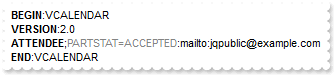 instead
of:
instead
of: 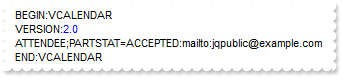
For instance the following VB sample underlines all ' ' ( space character ) in the text:
With Edit1
        .AddWild ("<u> </u>")
End With
and shows as:
 instead
of:
instead
of: 
Note that if you are adding a keyword like:
With Edit1
        .AddKeyword ("<u>a</u>")
End With
only 'a' characters that is a separated word will be underlined. The wild characters expression may contain '*' that means any string of characters and '?' that means a single character.
and it shows as:
 instead
of:
instead
of:
For instance the following sample shows in bold all expressions that starts with '<' and ends with the '>' and it has at least once character inside.
With Edit1
        .AddWild ("<fgcolor=0000FF><?*></fgcolor>")
End With
like shown in the following picture:
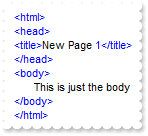 instead
of:
instead
of: 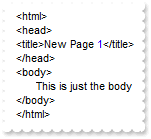
Note that if you are adding an expression that starts with '<' and ends with '>' the expression will be highlighted even there is no character between them:
With Edit1
        .AddExpression "<b><</b>", "<b> </b>", "<b>></b>"
End With
If you want to highlight only the part between '<' and '>' then you should use a sample like follows:
With Edit1
        .AddExpression "<", "<b> </b>", ">"
End With
The following C++ sample underlines all ' ' ( space character ) in the text:
m_edit.AddWild("<u> </u>");
The following VB.NET sample underlines all ' ' ( space character ) in the text:
With AxEdit1
    .AddWild("<u> </u>")
End With
The following C# sample underlines all ' ' ( space character ) in the text:
axEdit1.AddWild("<u> </u>");
The following VFP sample underlines all ' ' ( space character ) in the text:
With thisform.Edit1
	.AddWild("<u> </u>")
endwith