

Use the CellOwnerDraw property to paint yourself the cell. The CellOwnerDraw property specifies whether the user is responsible for painting the cell. By default, the CellOwnerDraw property is nothing, and so the control does the painting. Using the notification interfaces is faster than using events. For instance, let's say that we need cells where for some values we need to get displayed other things. Use the Def(exCellOwneDraw) property to assign an owner draw object for the entire column. Use the AdjustSearchColumn property to specify whether a hidden column displays data in the control's label area.
How can I paint myself the control's label area? The idea is to let the control having an owner draw hidden column that's displayed in the control's label area.
You need the followings:
- Style property is DropDownList ( required )
- SingleEdit property is True
- ColumnAutoResize property is True
- AdjustSearchColumn property is False
- A hidden column ( use the Visible property to hide a column )
- SearchColumnIndex property should point to the hidden columns
So, a VB sample may look as follows:
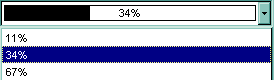
Implements EXCOMBOBOXLibCtl.IOwnerDrawHandler

Private Type RECT
        Left As Long
        Top As Long
        Right As Long
        Bottom As Long
End Type

Private Const OPAQUE = 2
Private Const WHITE_BRUSH = 0
Private Const BLACK_BRUSH = 4
Private Const DT_CENTER = &H1
Private Const DT_VCENTER = &H4
Private Declare Function FillRect Lib "user32" (ByVal hdc As Long, lpRect As RECT, ByVal hBrush As Long) As Long
Private Declare Function FrameRect Lib "user32" (ByVal hdc As Long, lpRect As RECT, ByVal hBrush As Long) As Long
Private Declare Function GetStockObject Lib "gdi32" (ByVal nIndex As Long) As Long
Private Declare Function DrawText Lib "user32" Alias "DrawTextA" (ByVal hdc As Long, ByVal lpStr As String, ByVal nCount As Long, lpRect As RECT, ByVal wFormat As Long) As Long
Private Declare Function SetBkMode Lib "gdi32" (ByVal hdc As Long, ByVal nBkMode As Long) As Long

Private Sub Form_Load()
    Dim iHidden As Long
    With ComboBox1
        .BeginUpdate
        .BackColor = vbWhite
        .BackColorEdit = .BackColor
        .Style = DropDownList
        .SingleEdit = True
        .ColumnAutoResize = True
        .AdjustSearchColumn = False
        .MarkSearchColumn = False
        .HeaderVisible = False
        .Columns.Add "Column"
        With .Columns.Add("")
            .Visible = False
            ComboBox1.SearchColumnIndex = .Index
        End With
        iHidden = .SearchColumnIndex
        With .Items
            Set .CellOwnerDraw(.AddItem(Array("11%", 0.11)), iHidden) = Me
            Set .CellOwnerDraw(.AddItem(Array("34%", 0.34)), iHidden) = Me
            Set .CellOwnerDraw(.AddItem(Array("67%", 0.67)), iHidden) = Me
            .SelectItem(.ItemByIndex(0)) = True
        End With
        .EndUpdate
    End With
End Sub

Private Sub IOwnerDrawHandler_DrawCell(ByVal hdc As Long, ByVal Left As Long, ByVal Top As Long, ByVal Right As Long, ByVal Bottom As Long, ByVal Item As Long, ByVal Column As Long, ByVal Source As Object)
    Dim r As RECT, rP As RECT, rT As RECT
    With r
        r.Left = Left + 2
        r.Right = Right - 2
        r.Top = Top
        r.Bottom = Bottom - 1
    End With
    rP = r
    rT = r
    Dim d As Double
    d = Source.Items.CellCaption(Item, Column)
    rP.Right = (rP.Right - rP.Left) * d + rP.Left

    FillRect hdc, rP, GetStockObject(BLACK_BRUSH)
    FrameRect hdc, r, GetStockObject(BLACK_BRUSH)

    Dim strText As String
    strText = Source.Items.CellCaption(Item, Column - 1)
    SetBkMode hdc, OPAQUE
    rT.Top = rT.Top + 1
    DrawText hdc, strText, Len(strText), rT, DT_VCENTER Or DT_CENTER

End Sub