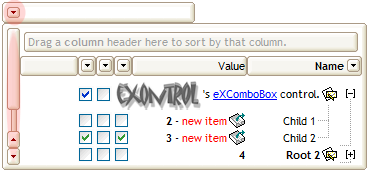
Changing the RightToLeft property on True does the following:
- displays the vertical scroll bar on the left side of the control
- flips the order of the columns ( Position property )
- change the column's alignment to right, if the column is not centered ( Alignment property, HeaderAlignment property, HeaderImageAlignment property )
- reverse the order of the drawing parts in the cells ( Def(exCellDrawPartsOrder) property to "caption,picture,icons,icon,check" )
- aligns the locked columns to the right ( CountLockedColumns property )
- aligns the control's group-by bar / sort bar to the right ( SortBarVisible property )
The following screen shot shows the control when RightToLeft property is True ( the red ares mark the new position for elements like drop down, vertical scroll bar, hierarchy lines ):
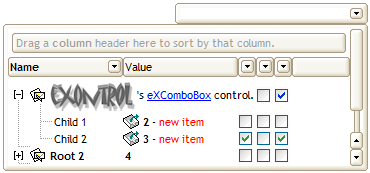
(By default) Changing the RightToLeft property on False does the following:
- displays the vertical scroll bar on the right side of the control
- flips the order of the columns ( Position property )
- change the column's alignment to left, if the column is not centered ( Alignment property, HeaderAlignment property, HeaderImageAlignment property )
- reverse the order of the drawing parts in the cells ( Def(exCellDrawPartsOrder) property to "check,icon,icons,picture,caption" )
- aligns the locked columns to the left ( CountLockedColumns property )
- aligns the control's group-by bar / sort bar to the left ( SortBarVisible property )
The following screen shot shows the control when RightToLeft property is False ( by default ):