

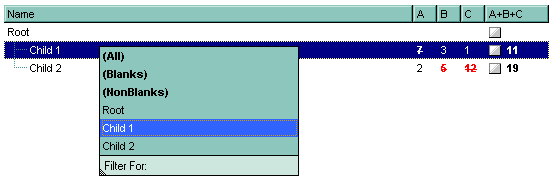
For instance, the following VB sample displays the column's drop down filter window when the user right clicks the control:
Private Sub ComboBox1_MouseUp(Button As Integer, Shift As Integer, X As Single, Y As Single)
    If (Button = 2) Then
        With ComboBox1.Columns
            With .Item(ComboBox1.ColumnFromPoint(-1, 0))
                .ShowFilter "-1,-1,200,200"
            End With
        End With
    End If
End Sub
The following VB.NET sample displays the column's drop down filter window when the user right clicks the control:
Private Sub AxComboBox1_MouseUpEvent(ByVal sender As Object, ByVal e As AxEXCOMBOBOXLib._IComboBoxEvents_MouseUpEvent) Handles AxComboBox1.MouseUpEvent
    If (e.button = 2) Then
        With AxComboBox1.Columns
            With .Item(AxComboBox1.get_ColumnFromPoint(-1, 0))
                .ShowFilter("-1,-1,200,200")
            End With
        End With
    End If
End Sub
The following C# sample displays the column's drop down filter window when the user right clicks the control:
private void axComboBox1_MouseUpEvent(object sender, AxEXCOMBOBOXLib._IComboBoxEvents_MouseUpEvent e)
{
    if (e.button == 2)
    {
        EXCOMBOBOXLib.Column c = axComboBox1.Columns[axComboBox1.get_ColumnFromPoint(-1, 0)];
        c.ShowFilter("-1,-1,200,200");
    }
}
The following C++ sample displays the column's drop down filter window when the user right clicks the control:
void OnMouseUpComboBox1(short Button, short Shift, long X, long Y)
{
	m_combobox.GetColumns().GetItem( COleVariant( m_combobox.GetColumnFromPoint( -1, 0 ) ) ).ShowFilter( COleVariant( "-1,-1,200,200" ) );
}
The following VFP sample displays the column's drop down filter window when the user right clicks the control:
*** ActiveX Control Event ***
LPARAMETERS button, shift, x, y

if ( button = 2 ) then
	With thisform.ComboBox1.Columns
	    With .Item(thisform.ComboBox1.ColumnFromPoint(-1, 0))
	        .ShowFilter("-1,-1,200,200")
	    EndWith
	EndWith
endif