|
199
|
How can I remove all non-working days
with thisform.Calendar1
	.NonworkingDays = 0
	.ClearNonworkingDates
endwith
|
|
198
|
How can I define additional working days recursively (last day of each month is non-working)
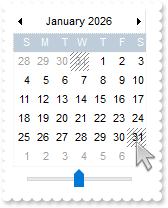
with thisform.Calendar1
	.Date = {^2026-1-1}
	.NonworkingDays = 0
	.ShowMonthSelector = .F.
	.MaxMonthX = 1
	.MaxMonthY = 1
	.NonworkingDaysColor = RGB(128,128,128)
	.NonworkingDaysPattern = 6
	.AddNonworkingDate("day(value) in (28,29,30,31) and (month(value + 1) != month(value))")
endwith
|
|
197
|
Is it possible to define additional working days recursively
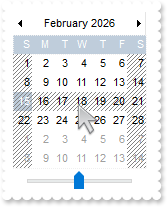
with thisform.Calendar1
	.Date = {^2026-2-1}
	.ShowMonthSelector = .F.
	.MaxMonthX = 1
	.MaxMonthY = 1
	.NonworkingDaysColor = RGB(128,128,128)
	.NonworkingDaysPattern = 6
	.AddNonworkingDate("week(value) = 8")
endwith
|
|
196
|
Can I specify extra working days
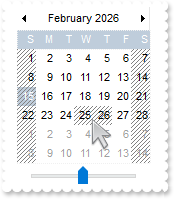
with thisform.Calendar1
	.Date = {^2026-2-1}
	.MaxMonthX = 1
	.MaxMonthY = 1
	.ShowMonthSelector = .F.
	.NonworkingDaysColor = RGB(128,128,128)
	.NonworkingDaysPattern = 6
	.AddNonworkingDate({^2026-2-25})
	.AddNonworkingDate({^2026-2-26})
endwith
|
|
195
|
Prevents selecting January 1 and 2 of any year while allowing all other dates
with thisform.Calendar1
	.SingleSel = .F.
	.Selectable = "not((value format `MMdd`) in (`0101`,`0102`))"
endwith
|
|
194
|
Disables selection for January 1 and 2, 2001; all other dates are selectable
with thisform.Calendar1
	.SingleSel = .F.
	.Date = {^2001-1-1}
	.Selectable = "not(value in (#1/1/2001#,#1/2/2001#))"
endwith
|
|
193
|
Specifies that only dates with no event associated are selectable
with thisform.Calendar1
	.SingleSel = .F.
	.Selectable = "not(isevent)"
	.Events.Add(thisform.Calendar1.Date).Comment = "This is a text that shows up when the cursor hovers the date"
endwith
|
|
192
|
Prevents selecting Saturdays and Sundays in July
with thisform.Calendar1
	.SingleSel = .F.
	.Selectable = "not(month(value) = 1 and weekday(value) in (0,6))"
endwith
|
|
191
|
Prevents selecting dates in July
with thisform.Calendar1
	.SingleSel = .F.
	.Selectable = "not(month(value) = 7)"
endwith
|
|
190
|
Allows selection of all dates except Saturdays and Sundays
with thisform.Calendar1
	.SingleSel = .F.
	.Selectable = "not(weekday(value) in (0,6))"
endwith
|
|
189
|
How can I replace or add an icon at runtime
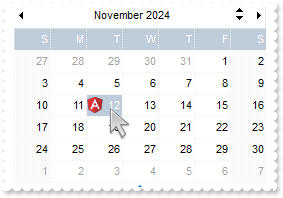
with thisform.Calendar1
	.BeginUpdate
	.FixedCellWidth = 36
	.FixedCellHeight = 22
	var_s = "gAAAABgYACEHgUJFEEAAWhUJCEJEEJggEhMCYEXjUbjkJQECj8gj8hAEjkshYEpk8kf8ClsulsvAExmcvf83js5nU7nkCeEcn8boMaocXosCB9Hn09pkzcEuoL/fE+Ok"
	var_s = var_s + "YB0gB9YhIHrddgVcr9aktZADAD8+P8CgIA=="
	.ReplaceIcon(var_s)
	.ReplaceIcon("C:\images\favicon.ico",0)
	.DrawGridLine = 1
	.AutoSize = .F.
	.MaxMonthX = 1
	.MaxMonthY = 1
	.Events.Add(thisform.Calendar1.Date).Image = 1
	.EndUpdate
endwith
|
|
188
|
Display a custom tooltip
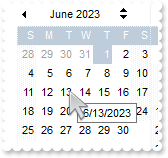
*** MouseMove event - Occurs when the user moves the mouse. ***
LPARAMETERS Button, Shift, X, Y
	with thisform.Calendar1
		.ShowToolTip(.DateFromPoint(-1,-1),"",Null,"+8","+8")
	endwith
|
|
187
|
Shows the tooltip of the object moved relative to its default position
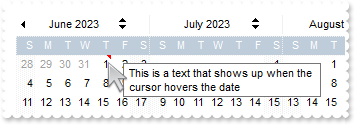
*** MouseMove event - Occurs when the user moves the mouse. ***
LPARAMETERS Button, Shift, X, Y
	with thisform.Calendar1
		.ShowToolTip("<null>","<null>",Null,"+8","+8")
	endwith

with thisform.Calendar1
	.Events.Add(thisform.Calendar1.Date).Comment = "This is a text that shows up when the cursor hovers the date"
	.HideSelection = .T.
endwith
|
|
186
|
How do I change the color to display the marked-dates (EBN-color)
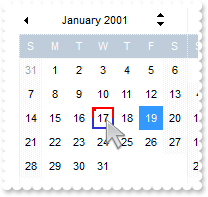
with thisform.Calendar1
	.BeginUpdate
	.Date = {^2001-1-17}
	.SelDate = {^2001-1-19}
	.AutoSize = 0
	.FixedCellWidth = 24
	.FixedCellHeight = 24
	.AlignmentDay = 1
	var_s = "gBFLBCJwBAEHhEJAAEhABE8GACAADACAxRDgMQBQKAAzQFAYbBlBaERiGQYIJhUAIIRZGMIlVBJNw1DCNIDAWCQCgkNA1STAcLySAAchhEAZAIhGQHfiGNoqRDMczxNB"
	var_s = var_s + "gARZE6QILkaYJAjuNgyTjAdC0NIkTBrIKQBomCTKMhqSI4UpVM6RCKoSx6GSuZ5GUYKegmY5lVpVVIxPZNGwHE6WJThGTpQiOWYDC4LTS2bS4AT7JabZ5nej4JoKb5EW"
	var_s = var_s + "zGN63fhMfSdKChYhqTDcLjrCZfWDXFoABY9RTJHrGb6tPAKMwOcQ2VLZQxyBKmKZHLSQMwzOwMbx2ZpkXZbF4XVbmX4TUyIdQyLSpMy3CaVXbTGw5VqWPZrXDLAAvG5d"
	var_s = var_s + "ieEY6jacx5hsfh+G4K4ThudY1hOPgsCYX5lkQVg5DMXg+nqWgGkKDAsgKUYXj4CZxBKfJ9BoLoPE8e5pGkGgTi2IBAlAECAg"
	.VisualAppearance.Add(1,var_s)
	.Object.Background(187) = 0x1000000
	.Events.Add(thisform.Calendar1.Date).Marker = .T.
	.EndUpdate
endwith
|
|
185
|
How do I change the color to display the marked-dates (solid-color)
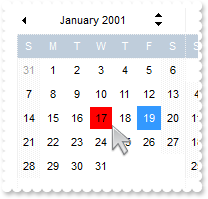
with thisform.Calendar1
	.BeginUpdate
	.Date = {^2001-1-17}
	.SelDate = {^2001-1-19}
	.AutoSize = 0
	.FixedCellWidth = 24
	.FixedCellHeight = 24
	.AlignmentDay = 1
	.Object.Background(187) = 0x7f0000ff
	.Events.Add(thisform.Calendar1.Date).Marker = .T.
	.EndUpdate
endwith
|
|
184
|
How do I change the color to display the marked-dates (line-color)
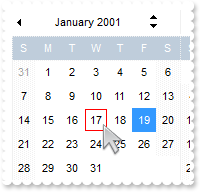
with thisform.Calendar1
	.BeginUpdate
	.Date = {^2001-1-17}
	.SelDate = {^2001-1-19}
	.AutoSize = 0
	.FixedCellWidth = 24
	.FixedCellHeight = 24
	.AlignmentDay = 1
	.Object.Background(187) = RGB(255,0,0)
	.Events.Add(thisform.Calendar1.Date).Marker = .T.
	.EndUpdate
endwith
|
|
183
|
ImageSize property on 32 (specifies the size of the control' icons)
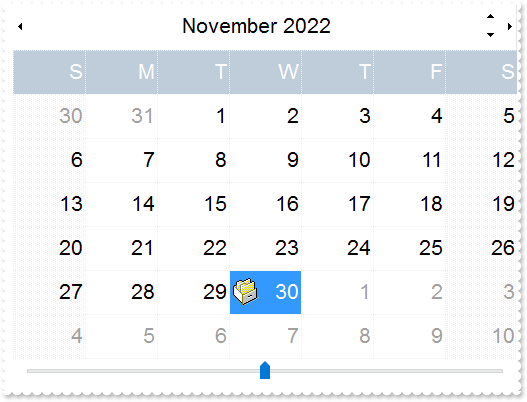
with thisform.Calendar1
	.BeginUpdate
	.ImageSize = 32
	.Font.Size = 16
	.FixedCellWidth = 72
	.FixedCellHeight = 44
	var_s = "gBJJgBAIDAAEg4AEEKAD/hz/EMNh8TIRNGwAjEZAEXjAojKAjMLjABhkaABAk0plUrlktl0vmExmUzmk1m03nE5nU7nk9miAoE+oVDolFo1HpFJpU5h8Sf9OqFNqUOqN"
	var_s = var_s + "UqdPq9VrFWrlbr1QpdhAFAkFis1ntFptVrtkrpszrNvmVxqk3uVtm1kmF3sdBvF/wGBmV+j9BYGHwWJulfxdax2NyFdx2JlV6l9Nw7AAGZymdz2Cy2GxErvWcz9ivlwy"
	var_s = var_s + "V21cuxugwktzGIzmvwtl0+53U5y0a0Wazmmyu/3dCyOMyXHx/J5nIr9q3uyqnBxFN3G46ma4vb7mD2Ng4nZze00fDkHC7t7us2rOX5tguetpHRlmz4HVqnXk1PjHO+CM"
	var_s = var_s + "Po9MBMC+j2vC8j7wS8cFNI4kBo05UIvfCT/NsnsApU+0Fqg/T+oy/kPxC0sEQfErKQK96+w28UWRI8UGvO8sTLS9r2PWmsMJTDTask3CsIbIEQRA3shOXEEAO/GclJ9F"
	var_s = var_s + "EKrrA8FRbKMXRIlb0JxCkjS1LMswhCcvuel0cv26cSMa8Ufx+2sQwhEUoSXOCjSbLcnxjKc7sdKUVyq28NtVI71P9P7JxtQEapjQ6fzfM8zPfNE2PhIsLL63E40slk5y"
	var_s = var_s + "7N89LcyU9SvMb3SdUc6VJLj5VLVLfO/PS9KzNFHUa/0XyBD0dxlS9cxhMlTRSoNXypPErWDPyfNS+MwprRNO0FD8wVVZ1AI08URwVRjtJ1WCn21QkkUrXVLVPQS/XIkF"
	var_s = var_s + "gTxT9iONZ9xVTdq+L1eKg3kkF6Upe68XtfV51/MtrVjBlwYFL1ev8y1/P6/lyzzYl02wntj0RVFmS1Qa+M5as93QxEUW9e993rfmQ2+vy65M/mL1lhl/2bj2ByVduMtN"
	var_s = var_s + "hCJT9hdz41nN14Ld12Z9UjfI/oUAaGseiw6+uFLLhcVabJOS5RqOE0BHlZ5VnEr5fOMs3st+aa/bbRzrJGV51Y0b0DbqaWXZD90hIsPbjWu52+6Wyadpe66hhO+P/Xio"
	var_s = var_s + "W5rD8ZbrUZuVg6n1dsE/cXmewu1m9PVwnd35/nueXho/NaJzmjc61W76esuT77eG8pTquy9TwWH8LEzG8RDfFalx3Gcfvna9rvG/cptGLd9tuI6TZOP5Fiqi99vea+X4"
	var_s = var_s + "VRcBq/JZZtVQ9cwSs5lsXE372+a9z7PbfB3VVqHyvMctLto8uob6eV0m/cD6MN2v+T33t6sBut42vdv2bJ8a997x2maFJfK+qArbGJPEKE+1qTflMsIdW/GCJX17KcT6"
	var_s = var_s + "/czr/X+u1g29B7j/4BQfWkkx4zIHisjhPCmE0K4SwtXM+d4BvHRwNZOoBph9IJvPek9d40FoMJxf691jj2ywQQcHEWET4XJwkTszlVqm2GokewxtBT1DpQjRxDN0rUVD"
	var_s = var_s + "NKdC3lb6tzNOwh6upMSSYfv4YBCl/bsn9PxiFCEo7SI6Obc9HeOrnY8x4jtHtdpN4GRbaorhsbu18Pph5CiHymI0RpSXGJ/z2oUOxYxG858AyiI+bfJtuTcG5yelBJyT"
	var_s = var_s + "8okhqFd4a5yxL0rvulYtKCsZiWxWkc1s1cRoxxwhA31DLE0mR9l9HqX8fJgTDmFMVH0MIsRzVYnwnMi1dyzmhLt2kS2pxIiU62Wj5ptQGlSYFakLonTUJNLKaM5Wzlff"
	var_s = var_s + "EkuFkk5wTrhVO2eE7G6lJhxFFYUZ55zmn0WuBCD4pzhirFCKkbomsOoIYmZx5p90LoYWGPdD5g0QmJRKYxbZ6zYoVQ2jVGylSak7KSkFH6RSjpHKFuU+YMyNo5SulkC6"
	var_s = var_s + "I0vonTCitMXPoEpVS2H5FQfEqp2R1opIgAEkJISYARTCukOhmPNI5Ex/wzGHUsicMwA1LHgQ90Y/KpoQHAD+pB/R4NzIaMAB9Xaw1gqaAOsh/A/ptIkWUfhGK1kZH8Rg"
	var_s = var_s + "H5GqvgArqRmt4AAPrTroRofBGADkqr6Rmu4D7CEaHARiwpJrEEZsXXwlVjyMWRsaRqwdkLGNBABZmytmyMnaINZqyVpLR2ftKAAAdd6h2osbaskdiq4EZtgSmyNcbVWR"
	var_s = var_s + "JNXe3AA7REar3b0stlAAXBtoRmvJGLjEYAHUWsFcwCD/rnaop9aEICMAPdK5hT6xpeuzdOtAgKuJeGfdq6ggEbkTvAP+p9UCHXrvKkcgIA=="
	.Images(var_s)
	.DrawGridLine = 1
	.AutoSize = .F.
	.MaxMonthX = 1
	.MaxMonthY = 1
	.Events.Add(thisform.Calendar1.Date).Image = 1
	.EndUpdate
endwith
|
|
182
|
ImageSize property on 16 (default) (specifies the size of the control' icons)
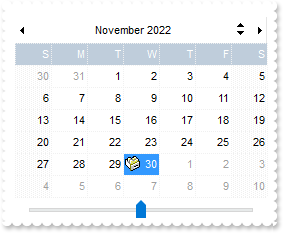
with thisform.Calendar1
	.BeginUpdate
	.ImageSize = 16
	.FixedCellWidth = 36
	.FixedCellHeight = 22
	var_s = "gBJJgBAIDAAEg4ACEKAD/hz/EMNh8TIRNGwAjEZAEXjAojJAjMLjABAAgjUYkUnlUrlktl0vmExmUzmk1m03nE5nU7nkrQCAntBoVDolFo1HoM/ADAplLptImdMYFOqd"
	var_s = var_s + "SqlXq1QrVbrlGpVWsFNrNdnNjsk7pQAtNroFnt0sh8Yr9iulTuNxs1Eu8OiT/vsnsNVutXlk/oGGtVKxGLxWNtsZtN8iUYuNvy0Zvd+xNYwdwvl4p870GCqc8vOeuVtt"
	var_s = var_s + "mp1knyOayWVy+WzN/ze1wOElenm+12WUz/Bv2/3UyyWrzeutux2GSyGP2dQ33C1ur3GD3M4zUNzHdlWjq/E3nGzVpjWv4HA7fRy/Tv2IrN8rPW6nZ3ve7mUlfu20Z8ac"
	var_s = var_s + "vQyb+vY9jasYoDwMm+LytVBDqKG3z8O3Cb8P+mkAuY9cCQ2uL4KaxDKvkp8RNLEjqugnrwQo/UWPzFyeQw5sNLZFENrI4kOqU66pw8uzmOKvTqNqjULJvGL1JO48GtTG"
	var_s = var_s + "sbLdEL3scxLlyiw8dQeoUVxdLTtyKmUjwGlslRPJsnK1HbAKbKCrsQo8uQk/CeP44iaR/ATnTNPLvyxPU+z9P9AUDQVBowiofJXQ6Oo+kKMpIkjztE4TKn4P6JowfgPn"
	var_s = var_s + "wD5/nAjB8AOeAPo0eAA1IAFH07UhAIMpYAVIYFHqBUhwVjV1S1EtQAHxW65V0AZwAeuQAnwB5gAPYViEDVhwAHTQBkCjB4gOhwDmCyhH0sACAg=="
	.Images(var_s)
	.DrawGridLine = 1
	.AutoSize = .F.
	.MaxMonthX = 1
	.MaxMonthY = 1
	.Events.Add(thisform.Calendar1.Date).Image = 1
	.EndUpdate
endwith
|
|
181
|
Is it possible to view all events the control fires
*** Event event - Notifies the application once the control fires an event. ***
LPARAMETERS EventID
	with thisform.Calendar1
		DEBUGOUT( .EventParam(-2) )
	endwith
|
|
180
|
Recurrence: Every Monday (using 'value' format)
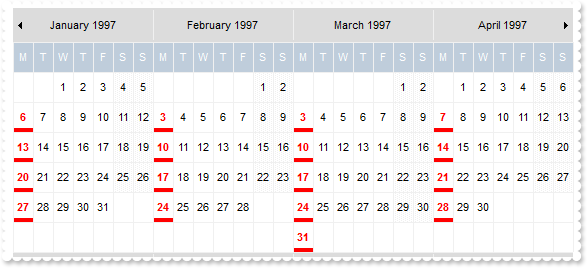
with thisform.Calendar1
	.BeginUpdate
	.ShowMonthSelector = .F.
	.MaxMonthX = 4
	.MinMonthX = 4
	.MinMonthY = 3
	.MaxMonthY = 3
	.AlignmentDay = 1
	.AutoSize = 1
	.FirstDay = 2
	.ShowNonMonthDays = .F.
	.Object.Background(8) = RGB(220,220,220)
	.DrawGridLine = 0
	.Date = {^1997-1-1}
	with .Events.Add({^1997-9-29})
		.Repetitive = "weekday(value) = 1"
		.Bold = .T.
		.ForeColor = RGB(255,0,0)
		.BackgroundExt = "bottom[4,back=RGB(255,0,0)]"
	endwith
	.EndUpdate
endwith
|
|
179
|
Recurrence: The 2nd to last weekday of the month
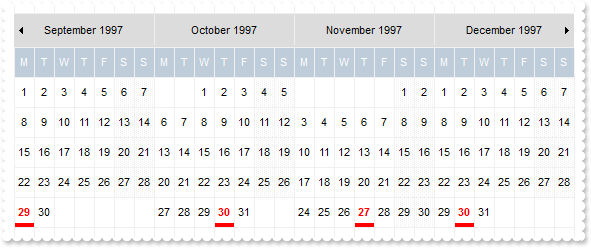
with thisform.Calendar1
	.BeginUpdate
	.ShowMonthSelector = .F.
	.MaxMonthX = 4
	.MinMonthX = 4
	.MinMonthY = 3
	.MaxMonthY = 3
	.AlignmentDay = 1
	.AutoSize = 1
	.FirstDay = 2
	.ShowNonMonthDays = .F.
	.Object.Background(8) = RGB(220,220,220)
	.DrawGridLine = 0
	.Date = {^1997-1-1}
	with .Events.Add({^1997-9-29})
		.Repetitive = "FREQ=MONTHLY;BYDAY=MO,TU,WE,TH,FR;BYSETPOS=-2"
		.Bold = .T.
		.ForeColor = RGB(255,0,0)
		.BackgroundExt = "bottom[4,back=RGB(255,0,0)]"
	endwith
	.EndUpdate
endwith
|
|
178
|
Recurrence: The 3rd instance into the month of one of Tuesday, Wednesday or Thursday, for the next 3 months
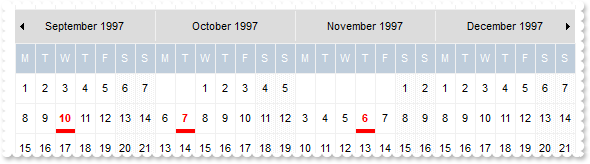
with thisform.Calendar1
	.BeginUpdate
	.ShowMonthSelector = .F.
	.MaxMonthX = 4
	.MinMonthX = 4
	.MinMonthY = 3
	.MaxMonthY = 3
	.AlignmentDay = 1
	.AutoSize = 1
	.FirstDay = 2
	.ShowNonMonthDays = .F.
	.Object.Background(8) = RGB(220,220,220)
	.DrawGridLine = 0
	.Date = {^1997-1-1}
	with .Events.Add({^1997-9-4})
		.Repetitive = "FREQ=MONTHLY;COUNT=3;BYDAY=TU,WE,TH;BYSETPOS=3"
		.Bold = .T.
		.ForeColor = RGB(255,0,0)
		.BackgroundExt = "bottom[4,back=RGB(255,0,0)]"
	endwith
	.EndUpdate
endwith
|
|
177
|
Recurrence: The last work day of the month
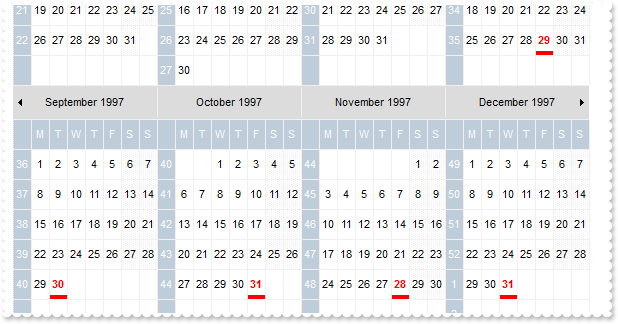
with thisform.Calendar1
	.BeginUpdate
	.ShowMonthSelector = .F.
	.MaxMonthX = 4
	.MinMonthX = 4
	.MinMonthY = 3
	.MaxMonthY = 3
	.AlignmentDay = 1
	.AutoSize = 1
	.FirstDay = 2
	.ShowNonMonthDays = .F.
	.Object.Background(8) = RGB(220,220,220)
	.DrawGridLine = 0
	.ShowWeeks = .T.
	.Date = {^1997-1-1}
	with .Events.Add({^1997-8-5})
		.Repetitive = "FREQ=MONTHLY;BYDAY=MO,TU,WE,TH,FR;BYSETPOS=-1"
		.Bold = .T.
		.ForeColor = RGB(255,0,0)
		.BackgroundExt = "bottom[4,back=RGB(255,0,0)]"
	endwith
	.EndUpdate
endwith
|
|
176
|
Recurrence: An example where the days generated makes a difference because of WKST (Sample 2)
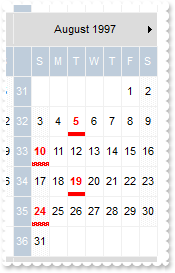
with thisform.Calendar1
	.BeginUpdate
	.ShowMonthSelector = .F.
	.MaxMonthX = 4
	.MinMonthX = 4
	.MinMonthY = 3
	.MaxMonthY = 3
	.AlignmentDay = 1
	.AutoSize = 1
	.FirstDay = 1
	.ShowNonMonthDays = .F.
	.Object.Background(8) = RGB(220,220,220)
	.DrawGridLine = 0
	.ShowWeeks = .T.
	.Date = {^1997-1-1}
	with .Events.Add({^1997-8-5})
		.Repetitive = "FREQ=WEEKLY;INTERVAL=2;COUNT=4;BYDAY=TU,SU"
		.Bold = .T.
		.ForeColor = RGB(255,0,0)
		.BackgroundExt = "bottom[4,back=RGB(255,0,0)]"
	endwith
	.EndUpdate
endwith
|
|
175
|
Recurrence: An example where the days generated makes a difference because of WKST (Sample 1)
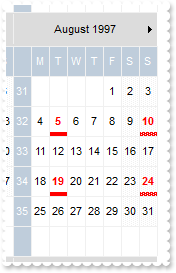
with thisform.Calendar1
	.BeginUpdate
	.ShowMonthSelector = .F.
	.MaxMonthX = 4
	.MinMonthX = 4
	.MinMonthY = 3
	.MaxMonthY = 3
	.AlignmentDay = 1
	.AutoSize = 1
	.FirstDay = 2
	.ShowNonMonthDays = .F.
	.Object.Background(8) = RGB(220,220,220)
	.DrawGridLine = 0
	.ShowWeeks = .T.
	.Date = {^1997-1-1}
	with .Events.Add({^1997-8-5})
		.Repetitive = "FREQ=WEEKLY;INTERVAL=2;COUNT=4;BYDAY=TU,SU"
		.Bold = .T.
		.ForeColor = RGB(255,0,0)
		.BackgroundExt = "bottom[4,back=RGB(255,0,0)]"
	endwith
	.EndUpdate
endwith
|
|
174
|
Recurrence: Every four years, the first Tuesday after a Monday in November, forever (U.S. Presidential Election day)
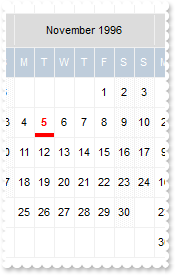
with thisform.Calendar1
	.BeginUpdate
	.ShowMonthSelector = .F.
	.MaxMonthX = 4
	.MinMonthX = 4
	.MinMonthY = 3
	.MaxMonthY = 3
	.AlignmentDay = 1
	.AutoSize = 1
	.FirstDay = 2
	.ShowNonMonthDays = .F.
	.Object.Background(8) = RGB(220,220,220)
	.DrawGridLine = 0
	.Date = {^1996-1-1}
	with .Events.Add({^1996-11-5})
		.Repetitive = "FREQ=YEARLY;INTERVAL=4;BYMONTH=11;BYDAY=TU;BYMONTHDAY=2,3,4,5,6,7,8"
		.Bold = .T.
		.ForeColor = RGB(255,0,0)
		.BackgroundExt = "bottom[4,back=RGB(255,0,0)]"
	endwith
	.EndUpdate
endwith
|
|
173
|
Recurrence: The first Saturday that follows the first Sunday of the month, forever
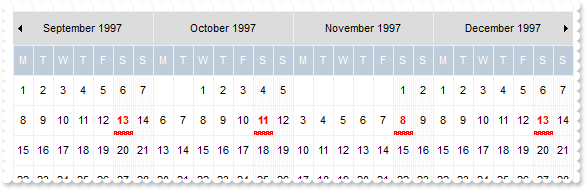
with thisform.Calendar1
	.BeginUpdate
	.ShowMonthSelector = .F.
	.MaxMonthX = 4
	.MinMonthX = 4
	.MinMonthY = 3
	.MaxMonthY = 3
	.AlignmentDay = 1
	.AutoSize = 1
	.FirstDay = 2
	.ShowNonMonthDays = .F.
	.Object.Background(8) = RGB(220,220,220)
	.DrawGridLine = 0
	.Date = {^1997-1-1}
	with .Events.Add({^1997-9-13})
		.Bold = .T.
		.ForeColor = RGB(255,0,0)
		.Repetitive = "FREQ=MONTHLY;BYDAY=SA;BYMONTHDAY=7,8,9,10,11,12,13"
		.BackgroundExt = "bottom[4,back=RGB(255,0,0)]"
	endwith
	.EndUpdate
endwith
|
|
172
|
Recurrence: Every Friday the 13th, forever
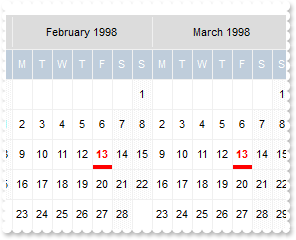
with thisform.Calendar1
	.BeginUpdate
	.ShowMonthSelector = .F.
	.MaxMonthX = 4
	.MinMonthX = 4
	.MinMonthY = 3
	.MaxMonthY = 3
	.AlignmentDay = 1
	.AutoSize = 1
	.FirstDay = 2
	.ShowNonMonthDays = .F.
	.Object.Background(8) = RGB(220,220,220)
	.DrawGridLine = 0
	.Date = {^1997-1-1}
	with .Events.Add({^1997-9-2})
		.Repetitive = "FREQ=MONTHLY;BYDAY=FR;BYMONTHDAY=13"
		.Bold = .T.
		.ForeColor = RGB(255,0,0)
		.BackgroundExt = "bottom[4,back=RGB(255,0,0)]"
	endwith
	.EndUpdate
endwith
|
|
171
|
Recurrence: Every Thursday, but only during June, July, and August, forever
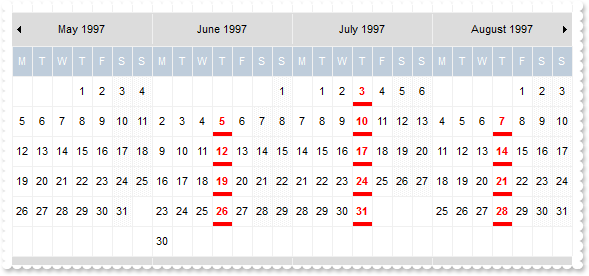
with thisform.Calendar1
	.BeginUpdate
	.ShowMonthSelector = .F.
	.MaxMonthX = 4
	.MinMonthX = 4
	.MinMonthY = 3
	.MaxMonthY = 3
	.AlignmentDay = 1
	.AutoSize = 1
	.FirstDay = 2
	.ShowNonMonthDays = .F.
	.Object.Background(8) = RGB(220,220,220)
	.DrawGridLine = 0
	.Date = {^1997-1-1}
	with .Events.Add({^1997-6-5})
		.Repetitive = "FREQ=YEARLY;BYDAY=TH;BYMONTH=6,7,8"
		.Bold = .T.
		.ForeColor = RGB(255,0,0)
		.BackgroundExt = "bottom[4,back=RGB(255,0,0)]"
	endwith
	.EndUpdate
endwith
|
|
170
|
Recurrence: Every Thursday in March, forever
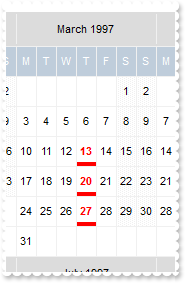
with thisform.Calendar1
	.BeginUpdate
	.ShowMonthSelector = .F.
	.MaxMonthX = 4
	.MinMonthX = 4
	.MinMonthY = 3
	.MaxMonthY = 3
	.AlignmentDay = 1
	.AutoSize = 1
	.FirstDay = 2
	.ShowNonMonthDays = .F.
	.Object.Background(8) = RGB(220,220,220)
	.DrawGridLine = 0
	.Date = {^1997-1-1}
	with .Events.Add({^1997-3-13})
		.Repetitive = "FREQ=YEARLY;BYMONTH=3;BYDAY=TH"
		.Bold = .T.
		.ForeColor = RGB(255,0,0)
		.BackgroundExt = "bottom[4,back=RGB(255,0,0)]"
	endwith
	.EndUpdate
endwith
|
|
169
|
Recurrence: Monday of week number 20 (where the default start of the week is Monday), forever
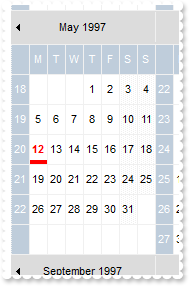
with thisform.Calendar1
	.BeginUpdate
	.ShowMonthSelector = .F.
	.MaxMonthX = 4
	.MinMonthX = 4
	.MinMonthY = 3
	.MaxMonthY = 3
	.AlignmentDay = 1
	.AutoSize = 1
	.FirstDay = 2
	.ShowNonMonthDays = .F.
	.Object.Background(8) = RGB(220,220,220)
	.DrawGridLine = 0
	.ShowWeeks = .T.
	.Date = {^1997-1-1}
	with .Events.Add({^1997-5-12})
		.Repetitive = "FREQ=YEARLY;BYWEEKNO=20;BYDAY=MO"
		.Bold = .T.
		.ForeColor = RGB(255,0,0)
		.BackgroundExt = "bottom[4,back=RGB(255,0,0)]"
	endwith
	.EndUpdate
endwith
|
|
168
|
Recurrence: Every 20th Monday of the year, forever
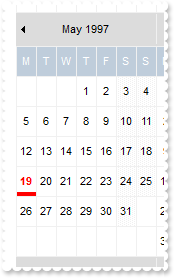
with thisform.Calendar1
	.BeginUpdate
	.ShowMonthSelector = .F.
	.MaxMonthX = 4
	.MinMonthX = 4
	.MinMonthY = 3
	.MaxMonthY = 3
	.AlignmentDay = 1
	.AutoSize = 1
	.FirstDay = 2
	.ShowNonMonthDays = .F.
	.Object.Background(8) = RGB(220,220,220)
	.DrawGridLine = 0
	.Date = {^1997-1-1}
	with .Events.Add({^1997-1-1})
		.Repetitive = "FREQ=YEARLY;BYDAY=20MO"
		.Bold = .T.
		.ForeColor = RGB(255,0,0)
		.BackgroundExt = "bottom[4,back=RGB(255,0,0)]"
	endwith
	.EndUpdate
endwith
|
|
167
|
Recurrence: Every 3rd year on the 1st, 100th and 200th day for 10 occurrences
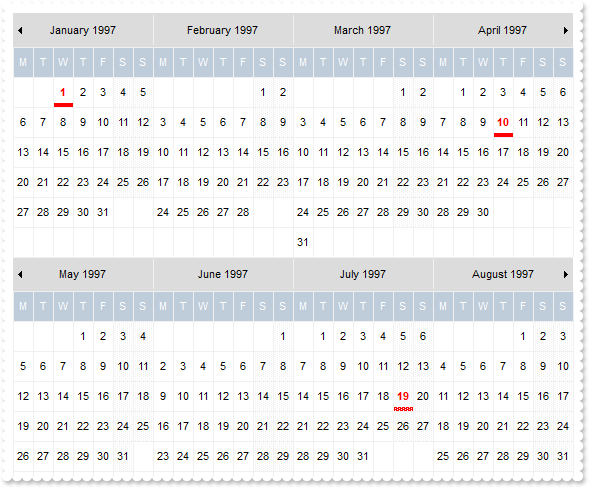
with thisform.Calendar1
	.BeginUpdate
	.ShowMonthSelector = .F.
	.MaxMonthX = 4
	.MinMonthX = 4
	.MinMonthY = 3
	.MaxMonthY = 3
	.AlignmentDay = 1
	.AutoSize = 1
	.FirstDay = 2
	.ShowNonMonthDays = .F.
	.Object.Background(8) = RGB(220,220,220)
	.DrawGridLine = 0
	.Date = {^1997-1-1}
	with .Events.Add({^1997-1-1})
		.Repetitive = "FREQ=YEARLY;INTERVAL=3;COUNT=10;BYYEARDAY=1,100,200"
		.Bold = .T.
		.ForeColor = RGB(255,0,0)
		.BackgroundExt = "bottom[4,back=RGB(255,0,0)]"
	endwith
	.EndUpdate
endwith
|
|
166
|
Recurrence: Every other year on January, February, and March for 10 occurrences
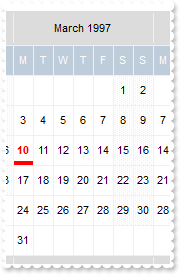
with thisform.Calendar1
	.BeginUpdate
	.ShowMonthSelector = .F.
	.MaxMonthX = 4
	.MinMonthX = 4
	.MinMonthY = 3
	.MaxMonthY = 3
	.AlignmentDay = 1
	.AutoSize = 1
	.FirstDay = 2
	.ShowNonMonthDays = .F.
	.Object.Background(8) = RGB(220,220,220)
	.DrawGridLine = 0
	.Date = {^1997-1-1}
	with .Events.Add({^1997-3-10})
		.Repetitive = "FREQ=YEARLY;INTERVAL=2;COUNT=10;BYMONTH=1,2,3"
		.Bold = .T.
		.ForeColor = RGB(255,0,0)
		.BackgroundExt = "bottom[4,back=RGB(255,0,0)]"
	endwith
	.EndUpdate
endwith
|
|
165
|
Recurrence: Yearly in June and July for 10 occurrences
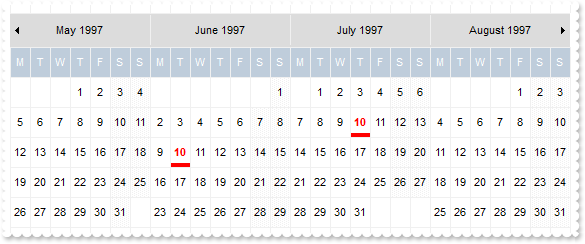
with thisform.Calendar1
	.BeginUpdate
	.ShowMonthSelector = .F.
	.MaxMonthX = 4
	.MinMonthX = 4
	.MinMonthY = 3
	.MaxMonthY = 3
	.AlignmentDay = 1
	.AutoSize = 1
	.FirstDay = 2
	.ShowNonMonthDays = .F.
	.Object.Background(8) = RGB(220,220,220)
	.DrawGridLine = 0
	.Date = {^1997-1-1}
	with .Events.Add({^1997-6-10})
		.Repetitive = "FREQ=YEARLY;COUNT=10;BYMONTH=6,7"
		.Bold = .T.
		.ForeColor = RGB(255,0,0)
		.BackgroundExt = "bottom[4,back=RGB(255,0,0)]"
	endwith
	.EndUpdate
endwith
|
|
164
|
Recurrence: Every Tuesday, every other month
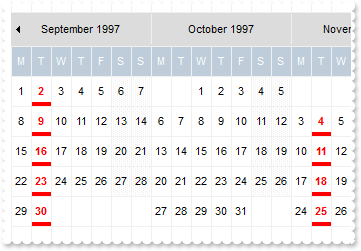
with thisform.Calendar1
	.BeginUpdate
	.ShowMonthSelector = .F.
	.MaxMonthX = 4
	.MinMonthX = 4
	.MinMonthY = 3
	.MaxMonthY = 3
	.AlignmentDay = 1
	.AutoSize = 1
	.FirstDay = 2
	.ShowNonMonthDays = .F.
	.Object.Background(8) = RGB(220,220,220)
	.DrawGridLine = 0
	.Date = {^1997-1-1}
	with .Events.Add({^1997-9-2})
		.Repetitive = "FREQ=MONTHLY;INTERVAL=2;BYDAY=TU"
		.Bold = .T.
		.ForeColor = RGB(255,0,0)
		.BackgroundExt = "bottom[4,back=RGB(255,0,0)]"
	endwith
	.EndUpdate
endwith
|
|
163
|
Recurrence: Every 18 months on the 10th thru 15th of the month for 10 occurrences
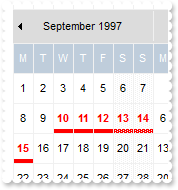
with thisform.Calendar1
	.BeginUpdate
	.ShowMonthSelector = .F.
	.MaxMonthX = 4
	.MinMonthX = 4
	.MinMonthY = 3
	.MaxMonthY = 3
	.AlignmentDay = 1
	.AutoSize = 1
	.FirstDay = 2
	.ShowNonMonthDays = .F.
	.Object.Background(8) = RGB(220,220,220)
	.DrawGridLine = 0
	.Date = {^1997-1-1}
	with .Events.Add({^1997-9-10})
		.Repetitive = "FREQ=MONTHLY;INTERVAL=18;COUNT=10;BYMONTHDAY=10,11,12,13,14,15"
		.Bold = .T.
		.ForeColor = RGB(255,0,0)
		.BackgroundExt = "bottom[4,back=RGB(255,0,0)]"
	endwith
	.EndUpdate
endwith
|
|
162
|
Recurrence: Monthly on the first and last day of the month for 10 occurrences
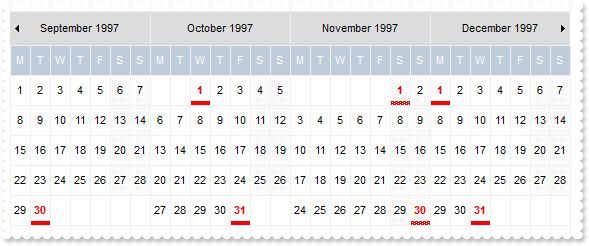
with thisform.Calendar1
	.BeginUpdate
	.ShowMonthSelector = .F.
	.MaxMonthX = 4
	.MinMonthX = 4
	.MinMonthY = 3
	.MaxMonthY = 3
	.AlignmentDay = 1
	.AutoSize = 1
	.FirstDay = 2
	.ShowNonMonthDays = .F.
	.Object.Background(8) = RGB(220,220,220)
	.DrawGridLine = 0
	.Date = {^1997-1-1}
	with .Events.Add({^1997-9-3})
		.Repetitive = "FREQ=MONTHLY;COUNT=10;BYMONTHDAY=1,-1"
		.Bold = .T.
		.ForeColor = RGB(255,0,0)
		.BackgroundExt = "bottom[4,back=RGB(255,0,0)]"
	endwith
	.EndUpdate
endwith
|
|
161
|
Recurrence: Monthly on the 2nd and 15th of the month for 10 occurrences
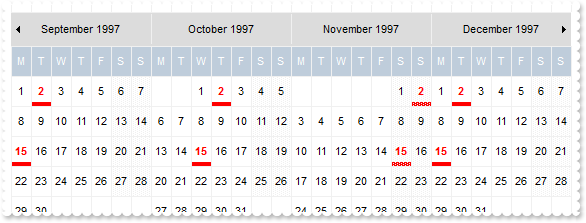
with thisform.Calendar1
	.BeginUpdate
	.ShowMonthSelector = .F.
	.MaxMonthX = 4
	.MinMonthX = 4
	.MinMonthY = 3
	.MaxMonthY = 3
	.AlignmentDay = 1
	.AutoSize = 1
	.FirstDay = 2
	.ShowNonMonthDays = .F.
	.Object.Background(8) = RGB(220,220,220)
	.DrawGridLine = 0
	.Date = {^1997-1-1}
	with .Events.Add({^1997-9-2})
		.Repetitive = "FREQ=MONTHLY;COUNT=10;BYMONTHDAY=2,15"
		.Bold = .T.
		.ForeColor = RGB(255,0,0)
		.BackgroundExt = "bottom[4,back=RGB(255,0,0)]"
	endwith
	.EndUpdate
endwith
|
|
160
|
Recurrence: Monthly on the third to the last day of the month, forever
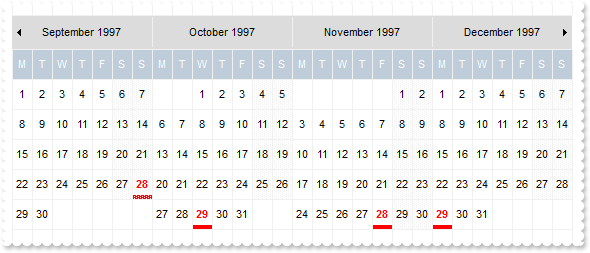
with thisform.Calendar1
	.BeginUpdate
	.ShowMonthSelector = .F.
	.MaxMonthX = 4
	.MinMonthX = 4
	.MinMonthY = 3
	.MaxMonthY = 3
	.AlignmentDay = 1
	.AutoSize = 1
	.FirstDay = 2
	.ShowNonMonthDays = .F.
	.Object.Background(8) = RGB(220,220,220)
	.DrawGridLine = 0
	.Date = {^1997-1-1}
	with .Events.Add({^1997-9-28})
		.Repetitive = "FREQ=MONTHLY;BYMONTHDAY=-3"
		.Bold = .T.
		.ForeColor = RGB(255,0,0)
		.BackgroundExt = "bottom[4,back=RGB(255,0,0)]"
	endwith
	.EndUpdate
endwith
|
|
159
|
Recurrence: Monthly on the second to last Monday of the month for 6 months
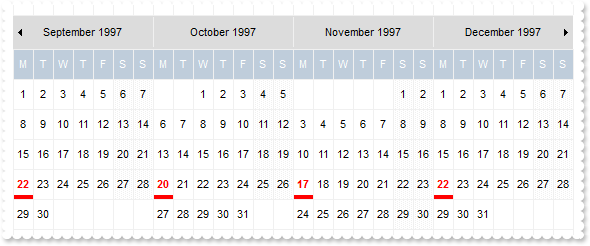
with thisform.Calendar1
	.BeginUpdate
	.ShowMonthSelector = .F.
	.MaxMonthX = 4
	.MinMonthX = 4
	.MinMonthY = 3
	.MaxMonthY = 3
	.AlignmentDay = 1
	.AutoSize = 1
	.FirstDay = 2
	.ShowNonMonthDays = .F.
	.Object.Background(8) = RGB(220,220,220)
	.DrawGridLine = 0
	.Date = {^1997-1-1}
	with .Events.Add({^1997-9-22})
		.Repetitive = "FREQ=MONTHLY;COUNT=6;BYDAY=-2MO"
		.Bold = .T.
		.ForeColor = RGB(255,0,0)
		.BackgroundExt = "bottom[4,back=RGB(255,0,0)]"
	endwith
	.EndUpdate
endwith
|
|
158
|
Recurrence: Every other month on the 1st and last Sunday of the month for 10 occurrences
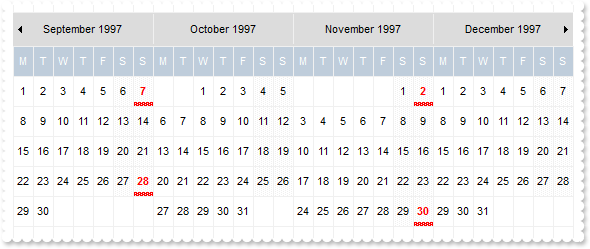
with thisform.Calendar1
	.BeginUpdate
	.ShowMonthSelector = .F.
	.MaxMonthX = 4
	.MinMonthX = 4
	.MinMonthY = 3
	.MaxMonthY = 3
	.AlignmentDay = 1
	.AutoSize = 1
	.FirstDay = 2
	.ShowNonMonthDays = .F.
	.Object.Background(8) = RGB(220,220,220)
	.DrawGridLine = 0
	.Date = {^1997-1-1}
	with .Events.Add({^1997-9-7})
		.Repetitive = "FREQ=MONTHLY;INTERVAL=2;COUNT=10;BYDAY=1SU,-1SU"
		.Bold = .T.
		.ForeColor = RGB(255,0,0)
		.BackgroundExt = "bottom[4,back=RGB(255,0,0)]"
	endwith
	.EndUpdate
endwith
|
|
157
|
Recurrence: Monthly on the 1st Friday until December 24, 1997
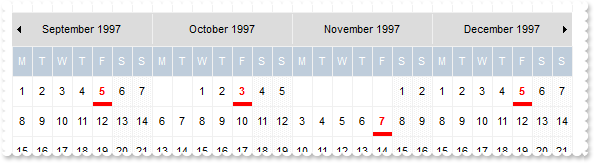
with thisform.Calendar1
	.BeginUpdate
	.ShowMonthSelector = .F.
	.MaxMonthX = 4
	.MinMonthX = 4
	.MinMonthY = 3
	.MaxMonthY = 3
	.AlignmentDay = 1
	.AutoSize = 1
	.FirstDay = 2
	.ShowNonMonthDays = .F.
	.Object.Background(8) = RGB(220,220,220)
	.DrawGridLine = 0
	.Date = {^1997-1-1}
	with .Events.Add({^1997-9-5})
		.Repetitive = "FREQ=MONTHLY;UNTIL=19971224T000000Z;BYDAY=1FR"
		.Bold = .T.
		.ForeColor = RGB(255,0,0)
		.BackgroundExt = "bottom[4,back=RGB(255,0,0)]"
	endwith
	.EndUpdate
endwith
|
|
156
|
Recurrence: Monthly on the 1st Friday for ten occurrences
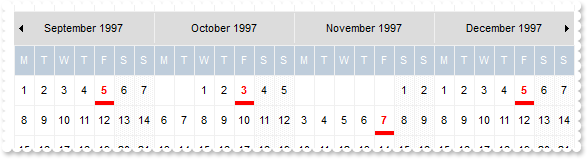
with thisform.Calendar1
	.BeginUpdate
	.ShowMonthSelector = .F.
	.MaxMonthX = 4
	.MinMonthX = 4
	.MinMonthY = 3
	.MaxMonthY = 3
	.AlignmentDay = 1
	.AutoSize = 1
	.FirstDay = 2
	.ShowNonMonthDays = .F.
	.Object.Background(8) = RGB(220,220,220)
	.DrawGridLine = 0
	.Date = {^1997-1-1}
	with .Events.Add({^1997-9-5})
		.Repetitive = "FREQ=MONTHLY;COUNT=10;BYDAY=1FR"
		.Bold = .T.
		.ForeColor = RGB(255,0,0)
		.BackgroundExt = "bottom[4,back=RGB(255,0,0)]"
	endwith
	.EndUpdate
endwith
|
|
155
|
Recurrence: Every other week on Tuesday and Thursday, for 8 occurrences
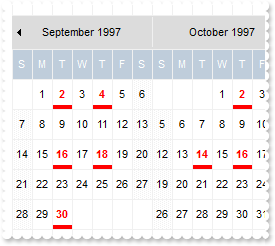
with thisform.Calendar1
	.BeginUpdate
	.ShowMonthSelector = .F.
	.MaxMonthX = 4
	.MinMonthX = 4
	.MinMonthY = 3
	.MaxMonthY = 3
	.AlignmentDay = 1
	.AutoSize = 1
	.FirstDay = 1
	.ShowNonMonthDays = .F.
	.Object.Background(8) = RGB(220,220,220)
	.DrawGridLine = 0
	.Date = {^1997-1-1}
	with .Events.Add({^1997-9-2})
		.Repetitive = "FREQ=WEEKLY;INTERVAL=2;COUNT=8;WKST=SU;BYDAY=TU,TH"
		.Bold = .T.
		.ForeColor = RGB(255,0,0)
		.BackgroundExt = "bottom[4,back=RGB(255,0,0)]"
	endwith
	.EndUpdate
endwith
|
|
154
|
Recurrence: Every other week on Monday, Wednesday and Friday until December 24, 1997, but starting on Tuesday, September 2, 1997
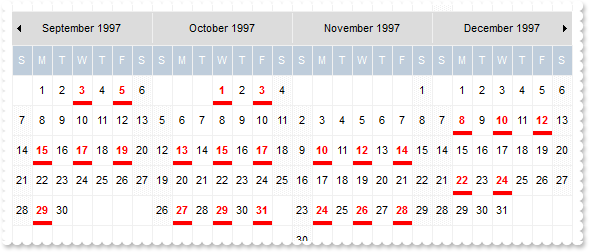
with thisform.Calendar1
	.BeginUpdate
	.ShowMonthSelector = .F.
	.MaxMonthX = 4
	.MinMonthX = 4
	.MinMonthY = 3
	.MaxMonthY = 3
	.AlignmentDay = 1
	.AutoSize = 1
	.FirstDay = 1
	.ShowNonMonthDays = .F.
	.Object.Background(8) = RGB(220,220,220)
	.DrawGridLine = 0
	.Date = {^1997-1-1}
	with .Events.Add({^1997-9-2})
		.Repetitive = "FREQ=WEEKLY;INTERVAL=2;UNTIL=19971224T000000Z;WKST=SU;BYDAY=MO,WE,FR"
		.Bold = .T.
		.ForeColor = RGB(255,0,0)
		.BackgroundExt = "bottom[4,back=RGB(255,0,0)]"
	endwith
	.EndUpdate
endwith
|
|
153
|
Recurrence: Weekly on Tuesday and Thursday for 5 weeks
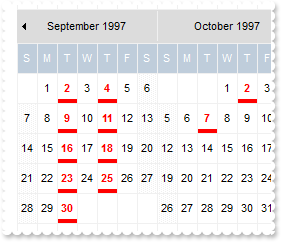
with thisform.Calendar1
	.BeginUpdate
	.ShowMonthSelector = .F.
	.MaxMonthX = 4
	.MinMonthX = 4
	.MinMonthY = 3
	.MaxMonthY = 3
	.AlignmentDay = 1
	.AutoSize = 1
	.FirstDay = 1
	.ShowNonMonthDays = .F.
	.Object.Background(8) = RGB(220,220,220)
	.DrawGridLine = 0
	.Date = {^1997-1-1}
	with .Events.Add({^1997-9-2})
		.Repetitive = "FREQ=WEEKLY;UNTIL=19971007T000000Z;WKST=SU;BYDAY=TU,TH"
		.Bold = .T.
		.ForeColor = RGB(255,0,0)
		.BackgroundExt = "bottom[4,back=RGB(255,0,0)]"
	endwith
	.EndUpdate
endwith
|
|
152
|
Recurrence: Weekly on Tuesday and Thursday for 5 weeks
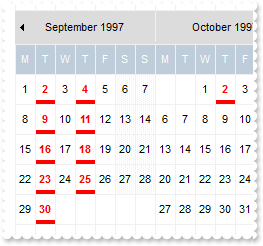
with thisform.Calendar1
	.BeginUpdate
	.ShowMonthSelector = .F.
	.MaxMonthX = 4
	.MinMonthX = 4
	.MinMonthY = 3
	.MaxMonthY = 3
	.AlignmentDay = 1
	.AutoSize = 1
	.FirstDay = 2
	.ShowNonMonthDays = .F.
	.Object.Background(8) = RGB(220,220,220)
	.DrawGridLine = 0
	.Date = {^1997-1-1}
	with .Events.Add({^1997-9-2})
		.Repetitive = "FREQ=WEEKLY;COUNT=10;WKST=SU;BYDAY=TU,TH"
		.Bold = .T.
		.ForeColor = RGB(255,0,0)
		.BackgroundExt = "bottom[4,back=RGB(255,0,0)]"
	endwith
	.EndUpdate
endwith
|
|
151
|
Recurrence: Every other day - forever
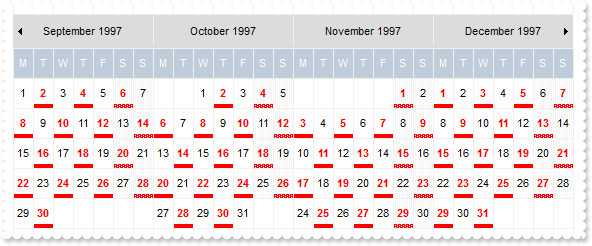
with thisform.Calendar1
	.BeginUpdate
	.ShowMonthSelector = .F.
	.MaxMonthX = 4
	.MinMonthX = 4
	.MinMonthY = 3
	.MaxMonthY = 3
	.AlignmentDay = 1
	.AutoSize = 1
	.FirstDay = 2
	.ShowNonMonthDays = .F.
	.Object.Background(8) = RGB(220,220,220)
	.DrawGridLine = 0
	.Date = {^1997-1-1}
	with .Events.Add({^1997-9-2})
		.Repetitive = "FREQ=DAILY;INTERVAL=2"
		.Bold = .T.
		.ForeColor = RGB(255,0,0)
		.BackgroundExt = "bottom[4,back=RGB(255,0,0)]"
	endwith
	.EndUpdate
endwith
|
|
150
|
Recurrence: Daily until December 24, 1997
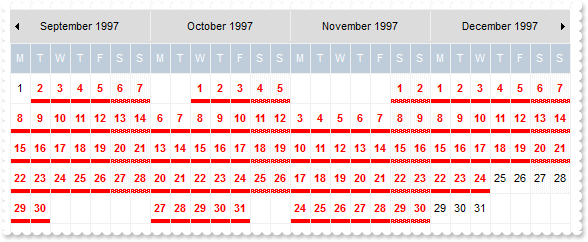
with thisform.Calendar1
	.BeginUpdate
	.ShowMonthSelector = .F.
	.MaxMonthX = 4
	.MinMonthX = 4
	.MinMonthY = 3
	.MaxMonthY = 3
	.AlignmentDay = 1
	.AutoSize = 1
	.FirstDay = 2
	.ShowNonMonthDays = .F.
	.Object.Background(8) = RGB(220,220,220)
	.DrawGridLine = 0
	.Date = {^1997-1-1}
	with .Events.Add({^1997-9-2})
		.Repetitive = "FREQ=DAILY;UNTIL=19971224T000000Z"
		.Bold = .T.
		.ForeColor = RGB(255,0,0)
		.BackgroundExt = "bottom[4,back=RGB(255,0,0)]"
	endwith
	.EndUpdate
endwith
|
|
149
|
Recurrence: Daily for 10 occurrences
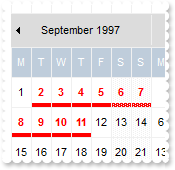
with thisform.Calendar1
	.BeginUpdate
	.ShowMonthSelector = .F.
	.MaxMonthX = 4
	.MinMonthX = 4
	.MinMonthY = 3
	.MaxMonthY = 3
	.AlignmentDay = 1
	.AutoSize = 1
	.FirstDay = 2
	.ShowNonMonthDays = .F.
	.Object.Background(8) = RGB(220,220,220)
	.DrawGridLine = 0
	.Date = {^1997-1-1}
	with .Events.Add({^1997-9-2})
		.Repetitive = "FREQ=DAILY;COUNT=10"
		.Bold = .T.
		.ForeColor = RGB(255,0,0)
		.BackgroundExt = "bottom[4,back=RGB(255,0,0)]"
	endwith
	.EndUpdate
endwith
|
|
148
|
How can I show a single month
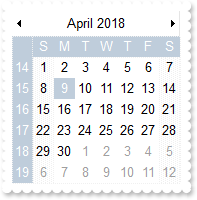
with thisform.Calendar1
	.BeginUpdate
	.MaxMonthX = 1
	.MaxMonthY = 1
	.ShowTodayButton = .F.
	.ShowMonthSelector = .F.
	.ShowYearScroll = .F.
	.AlignmentDay = 1
	.ShowWeeks = .T.
	.EndUpdate
endwith
|
|
147
|
How can I display the week-number in ISO8601 format
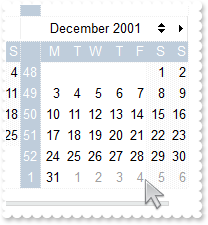
with thisform.Calendar1
	.BeginUpdate
	.FirstDay = 2
	.DisplayWeekNumberAs = 0
	.Date = {^2001-1-1}
	.MinMonthX = 3
	.MaxMonthX = .MinMonthX
	.MinMonthY = 4
	.MaxMonthY = .MinMonthY
	.ShowWeeks = .T.
	.EndUpdate
endwith
|
|
146
|
Can I include the month's number in the date header
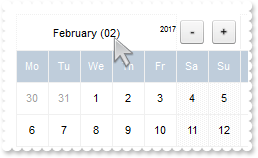
with thisform.Calendar1
	.BeginUpdate
	.Appearance = 0
	.Object.Background(8) = .BackColor
	.FirstDay = 2
	.DrawGridLine = 0
	.WeekDays = "Su Mo Tu We Th Fr Sa"
	.MarkToday = .T.
	.AutoSize = 0
	.AlignmentDay = 1
	.FixedCellHeight = 32
	.FixedCellWidth = 32
	var_s = "1,("+chr(34)+""+chr(34)+"[b=0],("+chr(34)+""+chr(34)+"[b=0]/24;2[b=0][bg=0x01000000]/"+chr(34)+""+chr(34)+"[b=0]):24,"+chr(34)+""+chr(34)+"[b=0]):32,("+chr(34)+""+chr(34)+"[b=0],("+chr(34)+""+chr(34)+"[b=0]/24;3[b=0][bg=0x01000000]/"+chr(34)+""+chr(34)+"[b=0]):24,"+chr(34)+""+chr(34)+"[b"
	var_s = var_s + "=0]):32"
	.DateHeaderFormat = var_s
	.Object.DateHeaderField(1) = "`<c><%month%> (` + (dateF(value) left 2) + `) <r><off -6><font ;6><%year%>`"
	with .VisualAppearance
		var_s1 = "gBFLBCJwBAEHhEJAAEhABFgDg6AADACAxSDEMQBQKAAzQFAYbhgHCGAAGQaBUgmFgAQhFcZQSKUOQTDKMIziYBYfgkMIgSbJUgDGAkRRdDSOYIkWA5AiKEYoThCIxzTJ"
		var_s1 = var_s1 + "8aw3CKbYRAKCXfoUAJFP7Fc6ABJMBx3EyhZ89NDYEwTIKBahoehqIheEQyDSJNb2DCIahhMSEbKtCooDhGFpUWzLdxTJJVawHJoABjkS45PjEAJ+SBPUZVRRlFyfO7BK"
		var_s1 = var_s1 + "SjMKKXgkG4zABWVa1bC1FzxQ6mKykKQLQADDIDVZAeL3JTNCS5IyLLDtO77EqmZ5la7cUgRDj4AY7Ua+MzubBZaovOqDYzAey7TDWLRXFDNIzzTgQAyHHrETZHGqwJxM"
		var_s1 = var_s1 + "AEapYGqYpVi2HwzDuQ5oHKIQgggSSUGMOgdE4RhYDwJBVAwIQTH2UYhjQJBRAmZxuCEHZ3icJp5EgKxgAIVgCCQSQSEIBQkCAYhCAIJYKmKNIuFcTBIESPYEk6GBUm+B"
		var_s1 = var_s1 + "ZOmOPgZgWYRTiYEwvEwaIEAAK4KnKOJrgmTpDjCbYJmKSI2CoOxihOLglCuAACioNg8COA4gmcOZOiidg+g+Dh4moOA8CMYokNmCoyiycQ8E8A4iE6D4OjOMgng8ZJji"
		var_s1 = var_s1 + "ITA8CSEouEcKwKkkLJyhQIoIkYU9LjORhcCsAAIACLQ8iaSJ6FKC5jJoaobA8KYoACCRKnmMJzhuDpZnSboMCKGJ4nMPIPDmYAACwKIDk6CoLCeU40m6I5oliMoKDyaI"
		var_s1 = var_s1 + "CokLIpgoThviOKJoGYf4KmUKhMjMLJLCAAojCyaYoiYGoGmqM46CkOwPEoKonAACxKlSdItmiWBeBeDgrioNo3D0KxSlAAAtgsUpYnUPRPEoco8hCa+T40SxbBRj5tEs"
		var_s1 = var_s1 + "HJ1i6JhbGYS4ug8awelQLZAAKZI5C4DxrhYQ9ehmUppWiA48nAPRuFKYpiAAC47laZQ9iuKZSgOPotkuFI7C6C4gACPJAm8eQOhOQZoikDp3kCS5AACPoEk8fBGnqQgp"
		var_s1 = var_s1 + "DOSppD2TxjlyPZD6CfwekQTx5lKP5ImseZTCAL5MAMAAAkoTADmMLpIjISp+HSS4PgyMAADBzAHDSIoPCOUpWjObIKE8NJOHKIwPEaTprBsHpdjWLB9AieQ+DQYwQAAM"
		var_s1 = var_s1 + "R1EOZxWi+bx7HcWQ8msfRYnnDZQACRwxgwc5rGaMZPE0ZxqjWNZtgyRwAAyTZEnuXJzEyAx2kQcxNkye5cEy3cYAcANrGAIH4OAhx3gNGGPAfgIR8jBA4McBMARVhnH4"
		var_s1 = var_s1 + "HQOYmxuCpF2MsecEQVBvGQCcIQug6itGQBoARAQ="
		.Add(1,var_s1)
	endwith
	.EndUpdate
endwith
|
|
145
|
How can I display the previously/next month in the date header
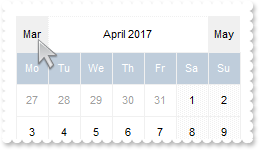
with thisform.Calendar1
	.BeginUpdate
	.Appearance = 0
	.Object.Background(8) = .BackColor
	.FirstDay = 2
	.MaxMonthX = 1
	.MaxMonthY = 1
	.DrawGridLine = 0
	.WeekDays = "Su Mo Tu We Th Fr Sa"
	.MarkToday = .T.
	.AutoSize = 0
	.AlignmentDay = 1
	.FixedCellHeight = 32
	.FixedCellWidth = 32
	.DateHeaderFormat = "2[b=0][bg=RGB(240,240,240)]:32,1,3[b=0][bg=RGB(240,240,240)]:32"
	var_s = "`<c>` + ( ( ((0:=((month(value) - 1) - 1) ) < 0 ? 11 : =:0 ) array `January February March April May June July August September "
	var_s = var_s + "October November December` split ` ` ) left 3 ) "
	.Object.DateHeaderField(2) = var_s
	var_s1 = "`<c>` + ( ( ((0:=((month(value) - 1) + 1) ) = 12 ? 0 : =:0 ) array `January February March April May June July August September "
	var_s1 = var_s1 + "October November December` split ` ` ) left 3 ) "
	.Object.DateHeaderField(3) = var_s1
	.EndUpdate
endwith
|
|
144
|
How can I display the year to a different position
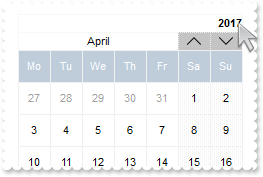
with thisform.Calendar1
	.BeginUpdate
	.Appearance = 0
	.Object.Background(8) = .BackColor
	.FirstDay = 2
	.MaxMonthX = 1
	.MaxMonthY = 1
	.DrawGridLine = 0
	.WeekDays = "Su Mo Tu We Th Fr Sa"
	.MarkToday = .T.
	.AutoSize = 0
	.AlignmentDay = 1
	.FixedCellHeight = 32
	.FixedCellWidth = 32
	.DateHeaderFormat = "6/(1,2[bg=RGB(196,196,196)]:32,3[bg=RGB(196,196,196)]:32)"
	var_s = "gCJKBOI4NBQaBQAhQNJJIIhShQACERCAIA0RD7zf5hiJZJJEIJUPDaMZkUAQGAOP4DRShOgvHIGQA0U5CbKzOIZYRIICzCaUX4PS4hRgEGg/QaKJLhGSESIIZoMfAMMI"
	var_s = var_s + "kKQzJxDDBJaCMaoQSABVhAXgQRBLRFdNhIB4QY4PfyUJB7AYAFo+DIWOb7LDdiIAJJFJxEVxCMCCgIA="
	.Object.HTMLPicture("up") = var_s
	var_s1 = "gCJKBOI4NBQaBQAhQNJJIIhShQACERCAIA0RD7zf5hiIEM5BJpBhSxR4LfhhAsRKZJIhBKg4J7tRjJBIAEAMAjzWIJba0E5rWQcWaBAoFR7oK4HewRZCMPiMUDLXRoS4"
	var_s1 = var_s1 + "PfjCQJrEhdaJ5ET4YIvTgOJ5kFSTKpkFaTKLEFqTGxyFgTIyuMgCeJaPwDSIKEhlCT5ZoWFT4iIAJJFJxEVxCMCCgIA="
	.Object.HTMLPicture("down") = var_s1
	.Object.DateHeaderField(2) = "<c><img>up</img>"
	.Object.DateHeaderField(3) = "<c><img>down</img>"
	.Object.DateHeaderField(1) = "<c><%month%>"
	.Object.DateHeaderField(6) = "<r><b><%year%>" && HeaderFieldEnum.exHeaderPrevYear Or HeaderFieldEnum.exHeaderPrevMonth
	.EndUpdate
endwith
|
|
143
|
Can I display some extra text/caption on the month's header
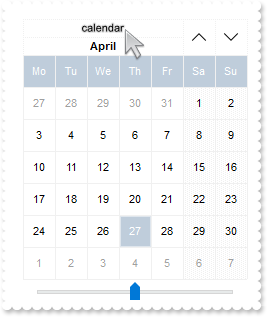
with thisform.Calendar1
	.BeginUpdate
	.Appearance = 0
	.Object.Background(8) = .BackColor
	.FirstDay = 2
	.MaxMonthX = 1
	.MaxMonthY = 1
	.DrawGridLine = 0
	.WeekDays = "Su Mo Tu We Th Fr Sa"
	.MarkToday = .T.
	.AutoSize = 0
	.AlignmentDay = 1
	.FixedCellHeight = 32
	.FixedCellWidth = 32
	.DateHeaderFormat = "("+chr(34)+"<sha ;;0>calendar"+chr(34)+"[a=17]/1),2:32,3:32"
	var_s = "gCJKBOI4NBQaBQAhQNJJIIhShQACERCAIA0RD7zf5hiJZJJEIJUPDaMZkUAQGAOP4DRShOgvHIGQA0U5CbKzOIZYRIICzCaUX4PS4hRgEGg/QaKJLhGSESIIZoMfAMMI"
	var_s = var_s + "kKQzJxDDBJaCMaoQSABVhAXgQRBLRFdNhIB4QY4PfyUJB7AYAFo+DIWOb7LDdiIAJJFJxEVxCMCCgIA="
	.Object.HTMLPicture("up") = var_s
	var_s1 = "gCJKBOI4NBQaBQAhQNJJIIhShQACERCAIA0RD7zf5hiIEM5BJpBhSxR4LfhhAsRKZJIhBKg4J7tRjJBIAEAMAjzWIJba0E5rWQcWaBAoFR7oK4HewRZCMPiMUDLXRoS4"
	var_s1 = var_s1 + "PfjCQJrEhdaJ5ET4YIvTgOJ5kFSTKpkFaTKLEFqTGxyFgTIyuMgCeJaPwDSIKEhlCT5ZoWFT4iIAJJFJxEVxCMCCgIA="
	.Object.HTMLPicture("down") = var_s1
	.Object.DateHeaderField(2) = "<c><img>up</img>"
	.Object.DateHeaderField(3) = "<c><img>down</img>"
	.Object.DateHeaderField(1) = "<c><b><%month%>"
	.EndUpdate
endwith
|
|
142
|
How can I display no year on th month's header
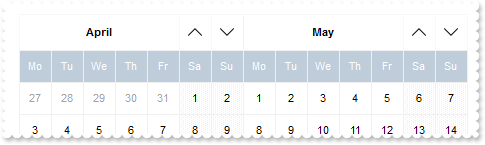
with thisform.Calendar1
	.BeginUpdate
	.Appearance = 0
	.Object.Background(8) = .BackColor
	.FirstDay = 2
	.MaxMonthX = 2
	.MaxMonthY = 2
	.DrawGridLine = 0
	.WeekDays = "Su Mo Tu We Th Fr Sa"
	.MarkToday = .T.
	.AutoSize = 0
	.AlignmentDay = 1
	.FixedCellHeight = 32
	.FixedCellWidth = 32
	.DateHeaderFormat = "1,2:32,3:32"
	var_s = "gCJKBOI4NBQaBQAhQNJJIIhShQACERCAIA0RD7zf5hiJZJJEIJUPDaMZkUAQGAOP4DRShOgvHIGQA0U5CbKzOIZYRIICzCaUX4PS4hRgEGg/QaKJLhGSESIIZoMfAMMI"
	var_s = var_s + "kKQzJxDDBJaCMaoQSABVhAXgQRBLRFdNhIB4QY4PfyUJB7AYAFo+DIWOb7LDdiIAJJFJxEVxCMCCgIA="
	.Object.HTMLPicture("up") = var_s
	var_s1 = "gCJKBOI4NBQaBQAhQNJJIIhShQACERCAIA0RD7zf5hiIEM5BJpBhSxR4LfhhAsRKZJIhBKg4J7tRjJBIAEAMAjzWIJba0E5rWQcWaBAoFR7oK4HewRZCMPiMUDLXRoS4"
	var_s1 = var_s1 + "PfjCQJrEhdaJ5ET4YIvTgOJ5kFSTKpkFaTKLEFqTGxyFgTIyuMgCeJaPwDSIKEhlCT5ZoWFT4iIAJJFJxEVxCMCCgIA="
	.Object.HTMLPicture("down") = var_s1
	.Object.DateHeaderField(2) = "<c><img>up</img>"
	.Object.DateHeaderField(3) = "<c><img>down</img>"
	.Object.DateHeaderField(1) = "<c><b><%month%>"
	.EndUpdate
endwith
|
|
141
|
How can I arrange the month's header ( first and last month only, prev month, next, prev year, picture, ebn, expression)
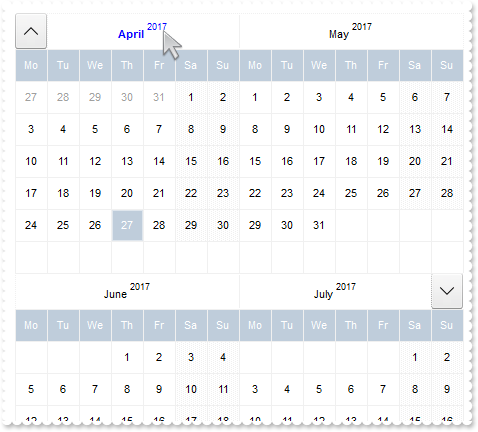
with thisform.Calendar1
	.BeginUpdate
	.Appearance = 0
	.Object.Background(8) = .BackColor
	.FirstDay = 2
	.MaxMonthX = 2
	.MaxMonthY = 2
	.DrawGridLine = 0
	.WeekDays = "Su Mo Tu We Th Fr Sa"
	.MarkToday = .T.
	.AutoSize = 0
	.AlignmentDay = 1
	.FixedCellHeight = 32
	.FixedCellWidth = 32
	var_s = " (( xmax * ymax ) = 1 ) ? `2[b=0][bg=0x01000000]:32,1,3[b=0][bg=0x01000000]:32` : ( ( x = 0 and y = 0 ) ? `2[b=0][bg=0x01000000]"
	var_s = var_s + ":32,1`: ( ( x = xmax - 1 and y = ymax - 1 ) ? `1,3[b=0][bg=0x01000000]:32`: `1` ) )"
	.DateHeaderFormat = var_s
	var_s1 = " ( ( ( month(value) = month(date(``) ) and ( year(value) = year(date(``) ) ) ) ) ? `<b><fgcolor=0000FF>` : `` ) + `<c><%month%><"
	var_s1 = var_s1 + "/b> <off -6><font ;7><%year%>`"
	.Object.DateHeaderField(1) = var_s1
	var_s2 = "gCJKBOI4NBQaBQAhQNJJIIhShQACERCAIA0RD7zf5hiJZJJEIJUPDaMZkUAQGAOP4DRShOgvHIGQA0U5CbKzOIZYRIICzCaUX4PS4hRgEGg/QaKJLhGSESIIZoMfAMMI"
	var_s2 = var_s2 + "kKQzJxDDBJaCMaoQSABVhAXgQRBLRFdNhIB4QY4PfyUJB7AYAFo+DIWOb7LDdiIAJJFJxEVxCMCCgIA="
	.Object.HTMLPicture("up") = var_s2
	var_s3 = "gCJKBOI4NBQaBQAhQNJJIIhShQACERCAIA0RD7zf5hiIEM5BJpBhSxR4LfhhAsRKZJIhBKg4J7tRjJBIAEAMAjzWIJba0E5rWQcWaBAoFR7oK4HewRZCMPiMUDLXRoS4"
	var_s3 = var_s3 + "PfjCQJrEhdaJ5ET4YIvTgOJ5kFSTKpkFaTKLEFqTGxyFgTIyuMgCeJaPwDSIKEhlCT5ZoWFT4iIAJJFJxEVxCMCCgIA="
	.Object.HTMLPicture("down") = var_s3
	var_s4 = "gCJKBOI4NBQaBQAhQNJJIIhShQACERCAIA0RD7zf5hiJUJJEIJUPDaMZkEANWACeJvMgBIwSGgXAaxGIQI6RMYAJBzFQQHYBeIzKQNYCpTIYAbwNQmMgAILNfAMEBKGY"
	var_s4 = var_s4 + "uAaIaxMGYDFD2ARVASRNBDNCeSAIDRCW7MAgDDDZDIAKbADgRVrfUCNiIAJJFJxEVxCMCCgI"
	.Object.HTMLPicture("left") = var_s4
	var_s5 = "gCJKBOI4NBQaBQAhQNJJIIhShQACERCAIA0RD7zf5hiIBOZSI5CACuZwcdMRAhnIJNIMKWKPBb8MIFiIJOBILJzhQOYc7YYBY5vVBkiJEJJEIJUHBPMbAARYUI0KKADJ"
	var_s5 = var_s5 + "KEaDEpAVgAYjHYI8GSACgQb4AcRiGCPJgwNQIEzANIICaUUwpUDIBYjKIzBAsAZiWQ1QYABLZTKBAIATL2CUxXJdV8RABJIpOIiuIRgQUBA="
	.Object.HTMLPicture("right") = var_s5
	.Object.DateHeaderField(2) = "<c><img>up</img>"
	.Object.DateHeaderField(3) = "<c><img>down</img>"
	.Object.DateHeaderField(4) = "<c><img>left</img>"
	.Object.DateHeaderField(5) = "<c><img>right</img>"
	with .VisualAppearance
		var_s6 = "gBFLBCJwBAEHhEJAAEhABFgDg6AADACAxSDEMQBQKAAzQFAYbhgHCGAAGQaBUgmFgAQhFcZQSKUOQTDKMIziYBYfgkMIgSbJUgDGAkRRdDSOYIkWA5AiKEYoThCIxzTJ"
		var_s6 = var_s6 + "8aw3CKbYRAKCXfoUAJFP7Fc6ABJMBx3EyhZ89NDYEwTIKBahoehqIheEQyDSJNb2DCIahhMSEbKtCooDhGFpUWzLdxTJJVawHJoABjkS45PjEAJ+SBPUZVRRlFyfO7BK"
		var_s6 = var_s6 + "SjMKKXgkG4zABWVa1bC1FzxQ6mKykKQLQADDIDVZAeL3JTNCS5IyLLDtO77EqmZ5la7cUgRDj4AY7Ua+MzubBZaovOqDYzAey7TDWLRXFDNIzzTgQAyHHrETZHGqwJxM"
		var_s6 = var_s6 + "AEapYGqYpVi2HwzDuQ5oHKIQgggSSUGMOgdE4RhYDwJBVAwIQTH2UYhjQJBRAmZxuCEHZ3icJp5EgKxgAIVgCCQSQSEIBQkCAYhCAIJYKmKNIuFcTBIESPYEk6GBUm+B"
		var_s6 = var_s6 + "ZOmOPgZgWYRTiYEwvEwaIEAAK4KnKOJrgmTpDjCbYJmKSI2CoOxihOLglCuAACioNg8COA4gmcOZOiidg+g+Dh4moOA8CMYokNmCoyiycQ8E8A4iE6D4OjOMgng8ZJji"
		var_s6 = var_s6 + "ITA8CSEouEcKwKkkLJyhQIoIkYU9LjORhcCsAAIACLQ8iaSJ6FKC5jJoaobA8KYoACCRKnmMJzhuDpZnSboMCKGJ4nMPIPDmYAACwKIDk6CoLCeU40m6I5oliMoKDyaI"
		var_s6 = var_s6 + "CokLIpgoThviOKJoGYf4KmUKhMjMLJLCAAojCyaYoiYGoGmqM46CkOwPEoKonAACxKlSdItmiWBeBeDgrioNo3D0KxSlAAAtgsUpYnUPRPEoco8hCa+T40SxbBRj5tEs"
		var_s6 = var_s6 + "HJ1i6JhbGYS4ug8awelQLZAAKZI5C4DxrhYQ9ehmUppWiA48nAPRuFKYpiAAC47laZQ9iuKZSgOPotkuFI7C6C4gACPJAm8eQOhOQZoikDp3kCS5AACPoEk8fBGnqQgp"
		var_s6 = var_s6 + "DOSppD2TxjlyPZD6CfwekQTx5lKP5ImseZTCAL5MAMAAAkoTADmMLpIjISp+HSS4PgyMAADBzAHDSIoPCOUpWjObIKE8NJOHKIwPEaTprBsHpdjWLB9AieQ+DQYwQAAM"
		var_s6 = var_s6 + "R1EOZxWi+bx7HcWQ8msfRYnnDZQACRwxgwc5rGaMZPE0ZxqjWNZtgyRwAAyTZEnuXJzEyAx2kQcxNkye5cEy3cYAcANrGAIH4OAhx3gNGGPAfgIR8jBA4McBMARVhnH4"
		var_s6 = var_s6 + "HQOYmxuCpF2MsecEQVBvGQCcIQug6itGQBoARAQ="
		.Add(1,var_s6)
	endwith
	.EndUpdate
endwith
|
|
140
|
How can I arrange the month's header ( first month only, prev month, next, prev year, picture, ebn, expression)
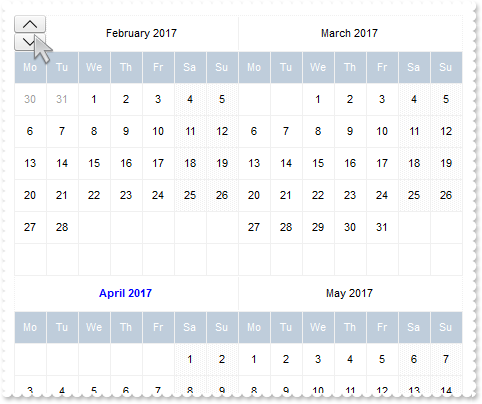
with thisform.Calendar1
	.BeginUpdate
	.Appearance = 0
	.Object.Background(8) = .BackColor
	.FirstDay = 2
	.MaxMonthX = 2
	.MaxMonthY = 2
	.DrawGridLine = 0
	.WeekDays = "Su Mo Tu We Th Fr Sa"
	.MarkToday = .T.
	.AutoSize = 0
	.AlignmentDay = 1
	.FixedCellHeight = 32
	.FixedCellWidth = 32
	.DateHeaderFormat = "( x = 0 and y = 0 ) ? `(2[b=0][bg=0x01000000]/3[b=0][bg=0x01000000]):32,1`: `1`"
	var_s = " ( ( ( month(value) = month(date(``) ) and ( year(value) = year(date(``) ) ) ) ) ? `<b><fgcolor=0000FF>` : `` ) + `<c><%month%> "
	var_s = var_s + "<%year%>`"
	.Object.DateHeaderField(1) = var_s
	var_s1 = "gCJKBOI4NBQaBQAhQNJJIIhShQACERCAIA0RD7zf5hiJZJJEIJUPDaMZkUAQGAOP4DRShOgvHIGQA0U5CbKzOIZYRIICzCaUX4PS4hRgEGg/QaKJLhGSESIIZoMfAMMI"
	var_s1 = var_s1 + "kKQzJxDDBJaCMaoQSABVhAXgQRBLRFdNhIB4QY4PfyUJB7AYAFo+DIWOb7LDdiIAJJFJxEVxCMCCgIA="
	.Object.HTMLPicture("up") = var_s1
	var_s2 = "gCJKBOI4NBQaBQAhQNJJIIhShQACERCAIA0RD7zf5hiIEM5BJpBhSxR4LfhhAsRKZJIhBKg4J7tRjJBIAEAMAjzWIJba0E5rWQcWaBAoFR7oK4HewRZCMPiMUDLXRoS4"
	var_s2 = var_s2 + "PfjCQJrEhdaJ5ET4YIvTgOJ5kFSTKpkFaTKLEFqTGxyFgTIyuMgCeJaPwDSIKEhlCT5ZoWFT4iIAJJFJxEVxCMCCgIA="
	.Object.HTMLPicture("down") = var_s2
	var_s3 = "gCJKBOI4NBQaBQAhQNJJIIhShQACERCAIA0RD7zf5hiJUJJEIJUPDaMZkEANWACeJvMgBIwSGgXAaxGIQI6RMYAJBzFQQHYBeIzKQNYCpTIYAbwNQmMgAILNfAMEBKGY"
	var_s3 = var_s3 + "uAaIaxMGYDFD2ARVASRNBDNCeSAIDRCW7MAgDDDZDIAKbADgRVrfUCNiIAJJFJxEVxCMCCgI"
	.Object.HTMLPicture("left") = var_s3
	var_s4 = "gCJKBOI4NBQaBQAhQNJJIIhShQACERCAIA0RD7zf5hiIBOZSI5CACuZwcdMRAhnIJNIMKWKPBb8MIFiIJOBILJzhQOYc7YYBY5vVBkiJEJJEIJUHBPMbAARYUI0KKADJ"
	var_s4 = var_s4 + "KEaDEpAVgAYjHYI8GSACgQb4AcRiGCPJgwNQIEzANIICaUUwpUDIBYjKIzBAsAZiWQ1QYABLZTKBAIATL2CUxXJdV8RABJIpOIiuIRgQUBA="
	.Object.HTMLPicture("right") = var_s4
	.Object.DateHeaderField(2) = "<c><img>up</img>"
	.Object.DateHeaderField(3) = "<c><img>down</img>"
	.Object.DateHeaderField(4) = "<c><img>left</img>"
	.Object.DateHeaderField(5) = "<c><img>right</img>"
	with .VisualAppearance
		var_s5 = "gBFLBCJwBAEHhEJAAEhABFgDg6AADACAxSDEMQBQKAAzQFAYbhgHCGAAGQaBUgmFgAQhFcZQSKUOQTDKMIziYBYfgkMIgSbJUgDGAkRRdDSOYIkWA5AiKEYoThCIxzTJ"
		var_s5 = var_s5 + "8aw3CKbYRAKCXfoUAJFP7Fc6ABJMBx3EyhZ89NDYEwTIKBahoehqIheEQyDSJNb2DCIahhMSEbKtCooDhGFpUWzLdxTJJVawHJoABjkS45PjEAJ+SBPUZVRRlFyfO7BK"
		var_s5 = var_s5 + "SjMKKXgkG4zABWVa1bC1FzxQ6mKykKQLQADDIDVZAeL3JTNCS5IyLLDtO77EqmZ5la7cUgRDj4AY7Ua+MzubBZaovOqDYzAey7TDWLRXFDNIzzTgQAyHHrETZHGqwJxM"
		var_s5 = var_s5 + "AEapYGqYpVi2HwzDuQ5oHKIQgggSSUGMOgdE4RhYDwJBVAwIQTH2UYhjQJBRAmZxuCEHZ3icJp5EgKxgAIVgCCQSQSEIBQkCAYhCAIJYKmKNIuFcTBIESPYEk6GBUm+B"
		var_s5 = var_s5 + "ZOmOPgZgWYRTiYEwvEwaIEAAK4KnKOJrgmTpDjCbYJmKSI2CoOxihOLglCuAACioNg8COA4gmcOZOiidg+g+Dh4moOA8CMYokNmCoyiycQ8E8A4iE6D4OjOMgng8ZJji"
		var_s5 = var_s5 + "ITA8CSEouEcKwKkkLJyhQIoIkYU9LjORhcCsAAIACLQ8iaSJ6FKC5jJoaobA8KYoACCRKnmMJzhuDpZnSboMCKGJ4nMPIPDmYAACwKIDk6CoLCeU40m6I5oliMoKDyaI"
		var_s5 = var_s5 + "CokLIpgoThviOKJoGYf4KmUKhMjMLJLCAAojCyaYoiYGoGmqM46CkOwPEoKonAACxKlSdItmiWBeBeDgrioNo3D0KxSlAAAtgsUpYnUPRPEoco8hCa+T40SxbBRj5tEs"
		var_s5 = var_s5 + "HJ1i6JhbGYS4ug8awelQLZAAKZI5C4DxrhYQ9ehmUppWiA48nAPRuFKYpiAAC47laZQ9iuKZSgOPotkuFI7C6C4gACPJAm8eQOhOQZoikDp3kCS5AACPoEk8fBGnqQgp"
		var_s5 = var_s5 + "DOSppD2TxjlyPZD6CfwekQTx5lKP5ImseZTCAL5MAMAAAkoTADmMLpIjISp+HSS4PgyMAADBzAHDSIoPCOUpWjObIKE8NJOHKIwPEaTprBsHpdjWLB9AieQ+DQYwQAAM"
		var_s5 = var_s5 + "R1EOZxWi+bx7HcWQ8msfRYnnDZQACRwxgwc5rGaMZPE0ZxqjWNZtgyRwAAyTZEnuXJzEyAx2kQcxNkye5cEy3cYAcANrGAIH4OAhx3gNGGPAfgIR8jBA4McBMARVhnH4"
		var_s5 = var_s5 + "HQOYmxuCpF2MsecEQVBvGQCcIQug6itGQBoARAQ="
		.Add(1,var_s5)
	endwith
	.EndUpdate
endwith
|
|
139
|
How can I arrange the month's header ( all, left, right, prev month, next, prev year, picture, ebn)
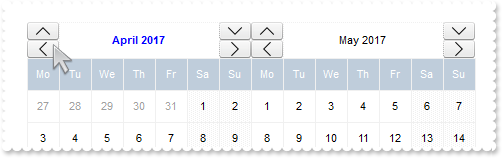
with thisform.Calendar1
	.BeginUpdate
	.Appearance = 0
	.Object.Background(8) = .BackColor
	.FirstDay = 2
	.MaxMonthX = 2
	.MaxMonthY = 2
	.DrawGridLine = 0
	.WeekDays = "Su Mo Tu We Th Fr Sa"
	.MarkToday = .T.
	.AutoSize = 0
	.AlignmentDay = 1
	.FixedCellHeight = 32
	.FixedCellWidth = 32
	.DateHeaderFormat = "(2[b=0][bg=0x01000000]/4[b=0][bg=0x01000000]):32,1,(3[b=0][bg=0x01000000]/5[b=0][bg=0x01000000]):32"
	var_s = " ( ( ( month(value) = month(date(``) ) and ( year(value) = year(date(``) ) ) ) ) ? `<b><fgcolor=0000FF>` : `` ) + `<c><%month%> "
	var_s = var_s + "<%year%>`"
	.Object.DateHeaderField(1) = var_s
	var_s1 = "gCJKBOI4NBQaBQAhQNJJIIhShQACERCAIA0RD7zf5hiJZJJEIJUPDaMZkUAQGAOP4DRShOgvHIGQA0U5CbKzOIZYRIICzCaUX4PS4hRgEGg/QaKJLhGSESIIZoMfAMMI"
	var_s1 = var_s1 + "kKQzJxDDBJaCMaoQSABVhAXgQRBLRFdNhIB4QY4PfyUJB7AYAFo+DIWOb7LDdiIAJJFJxEVxCMCCgIA="
	.Object.HTMLPicture("up") = var_s1
	var_s2 = "gCJKBOI4NBQaBQAhQNJJIIhShQACERCAIA0RD7zf5hiIEM5BJpBhSxR4LfhhAsRKZJIhBKg4J7tRjJBIAEAMAjzWIJba0E5rWQcWaBAoFR7oK4HewRZCMPiMUDLXRoS4"
	var_s2 = var_s2 + "PfjCQJrEhdaJ5ET4YIvTgOJ5kFSTKpkFaTKLEFqTGxyFgTIyuMgCeJaPwDSIKEhlCT5ZoWFT4iIAJJFJxEVxCMCCgIA="
	.Object.HTMLPicture("down") = var_s2
	var_s3 = "gCJKBOI4NBQaBQAhQNJJIIhShQACERCAIA0RD7zf5hiJUJJEIJUPDaMZkEANWACeJvMgBIwSGgXAaxGIQI6RMYAJBzFQQHYBeIzKQNYCpTIYAbwNQmMgAILNfAMEBKGY"
	var_s3 = var_s3 + "uAaIaxMGYDFD2ARVASRNBDNCeSAIDRCW7MAgDDDZDIAKbADgRVrfUCNiIAJJFJxEVxCMCCgI"
	.Object.HTMLPicture("left") = var_s3
	var_s4 = "gCJKBOI4NBQaBQAhQNJJIIhShQACERCAIA0RD7zf5hiIBOZSI5CACuZwcdMRAhnIJNIMKWKPBb8MIFiIJOBILJzhQOYc7YYBY5vVBkiJEJJEIJUHBPMbAARYUI0KKADJ"
	var_s4 = var_s4 + "KEaDEpAVgAYjHYI8GSACgQb4AcRiGCPJgwNQIEzANIICaUUwpUDIBYjKIzBAsAZiWQ1QYABLZTKBAIATL2CUxXJdV8RABJIpOIiuIRgQUBA="
	.Object.HTMLPicture("right") = var_s4
	.Object.DateHeaderField(2) = "<c><img>up</img>"
	.Object.DateHeaderField(3) = "<c><img>down</img>"
	.Object.DateHeaderField(4) = "<c><img>left</img>"
	.Object.DateHeaderField(5) = "<c><img>right</img>"
	with .VisualAppearance
		var_s5 = "gBFLBCJwBAEHhEJAAEhABFgDg6AADACAxSDEMQBQKAAzQFAYbhgHCGAAGQaBUgmFgAQhFcZQSKUOQTDKMIziYBYfgkMIgSbJUgDGAkRRdDSOYIkWA5AiKEYoThCIxzTJ"
		var_s5 = var_s5 + "8aw3CKbYRAKCXfoUAJFP7Fc6ABJMBx3EyhZ89NDYEwTIKBahoehqIheEQyDSJNb2DCIahhMSEbKtCooDhGFpUWzLdxTJJVawHJoABjkS45PjEAJ+SBPUZVRRlFyfO7BK"
		var_s5 = var_s5 + "SjMKKXgkG4zABWVa1bC1FzxQ6mKykKQLQADDIDVZAeL3JTNCS5IyLLDtO77EqmZ5la7cUgRDj4AY7Ua+MzubBZaovOqDYzAey7TDWLRXFDNIzzTgQAyHHrETZHGqwJxM"
		var_s5 = var_s5 + "AEapYGqYpVi2HwzDuQ5oHKIQgggSSUGMOgdE4RhYDwJBVAwIQTH2UYhjQJBRAmZxuCEHZ3icJp5EgKxgAIVgCCQSQSEIBQkCAYhCAIJYKmKNIuFcTBIESPYEk6GBUm+B"
		var_s5 = var_s5 + "ZOmOPgZgWYRTiYEwvEwaIEAAK4KnKOJrgmTpDjCbYJmKSI2CoOxihOLglCuAACioNg8COA4gmcOZOiidg+g+Dh4moOA8CMYokNmCoyiycQ8E8A4iE6D4OjOMgng8ZJji"
		var_s5 = var_s5 + "ITA8CSEouEcKwKkkLJyhQIoIkYU9LjORhcCsAAIACLQ8iaSJ6FKC5jJoaobA8KYoACCRKnmMJzhuDpZnSboMCKGJ4nMPIPDmYAACwKIDk6CoLCeU40m6I5oliMoKDyaI"
		var_s5 = var_s5 + "CokLIpgoThviOKJoGYf4KmUKhMjMLJLCAAojCyaYoiYGoGmqM46CkOwPEoKonAACxKlSdItmiWBeBeDgrioNo3D0KxSlAAAtgsUpYnUPRPEoco8hCa+T40SxbBRj5tEs"
		var_s5 = var_s5 + "HJ1i6JhbGYS4ug8awelQLZAAKZI5C4DxrhYQ9ehmUppWiA48nAPRuFKYpiAAC47laZQ9iuKZSgOPotkuFI7C6C4gACPJAm8eQOhOQZoikDp3kCS5AACPoEk8fBGnqQgp"
		var_s5 = var_s5 + "DOSppD2TxjlyPZD6CfwekQTx5lKP5ImseZTCAL5MAMAAAkoTADmMLpIjISp+HSS4PgyMAADBzAHDSIoPCOUpWjObIKE8NJOHKIwPEaTprBsHpdjWLB9AieQ+DQYwQAAM"
		var_s5 = var_s5 + "R1EOZxWi+bx7HcWQ8msfRYnnDZQACRwxgwc5rGaMZPE0ZxqjWNZtgyRwAAyTZEnuXJzEyAx2kQcxNkye5cEy3cYAcANrGAIH4OAhx3gNGGPAfgIR8jBA4McBMARVhnH4"
		var_s5 = var_s5 + "HQOYmxuCpF2MsecEQVBvGQCcIQug6itGQBoARAQ="
		.Add(1,var_s5)
	endwith
	.EndUpdate
endwith
|
|
138
|
How can I arrange the month's header ( all, left, right, prev month, next, prev year, picture, ebn)
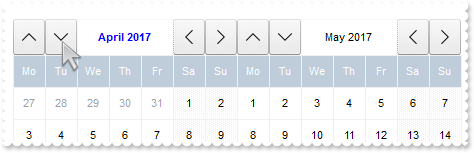
with thisform.Calendar1
	.BeginUpdate
	.Appearance = 0
	.Object.Background(8) = .BackColor
	.FirstDay = 2
	.MaxMonthX = 2
	.MaxMonthY = 2
	.DrawGridLine = 0
	.WeekDays = "Su Mo Tu We Th Fr Sa"
	.MarkToday = .T.
	.AutoSize = 0
	.AlignmentDay = 1
	.FixedCellHeight = 32
	.FixedCellWidth = 32
	.DateHeaderFormat = "2[b=0][bg=0x01000000]:32,3[b=0][bg=0x01000000]:32,1,4[b=0][bg=0x01000000]:32,5[b=0][bg=0x01000000]:32"
	var_s = " ( ( ( month(value) = month(date(``) ) and ( year(value) = year(date(``) ) ) ) ) ? `<b><fgcolor=0000FF>` : `` ) + `<c><%month%> "
	var_s = var_s + "<%year%>`"
	.Object.DateHeaderField(1) = var_s
	var_s1 = "gCJKBOI4NBQaBQAhQNJJIIhShQACERCAIA0RD7zf5hiJZJJEIJUPDaMZkUAQGAOP4DRShOgvHIGQA0U5CbKzOIZYRIICzCaUX4PS4hRgEGg/QaKJLhGSESIIZoMfAMMI"
	var_s1 = var_s1 + "kKQzJxDDBJaCMaoQSABVhAXgQRBLRFdNhIB4QY4PfyUJB7AYAFo+DIWOb7LDdiIAJJFJxEVxCMCCgIA="
	.Object.HTMLPicture("up") = var_s1
	var_s2 = "gCJKBOI4NBQaBQAhQNJJIIhShQACERCAIA0RD7zf5hiIEM5BJpBhSxR4LfhhAsRKZJIhBKg4J7tRjJBIAEAMAjzWIJba0E5rWQcWaBAoFR7oK4HewRZCMPiMUDLXRoS4"
	var_s2 = var_s2 + "PfjCQJrEhdaJ5ET4YIvTgOJ5kFSTKpkFaTKLEFqTGxyFgTIyuMgCeJaPwDSIKEhlCT5ZoWFT4iIAJJFJxEVxCMCCgIA="
	.Object.HTMLPicture("down") = var_s2
	var_s3 = "gCJKBOI4NBQaBQAhQNJJIIhShQACERCAIA0RD7zf5hiJUJJEIJUPDaMZkEANWACeJvMgBIwSGgXAaxGIQI6RMYAJBzFQQHYBeIzKQNYCpTIYAbwNQmMgAILNfAMEBKGY"
	var_s3 = var_s3 + "uAaIaxMGYDFD2ARVASRNBDNCeSAIDRCW7MAgDDDZDIAKbADgRVrfUCNiIAJJFJxEVxCMCCgI"
	.Object.HTMLPicture("left") = var_s3
	var_s4 = "gCJKBOI4NBQaBQAhQNJJIIhShQACERCAIA0RD7zf5hiIBOZSI5CACuZwcdMRAhnIJNIMKWKPBb8MIFiIJOBILJzhQOYc7YYBY5vVBkiJEJJEIJUHBPMbAARYUI0KKADJ"
	var_s4 = var_s4 + "KEaDEpAVgAYjHYI8GSACgQb4AcRiGCPJgwNQIEzANIICaUUwpUDIBYjKIzBAsAZiWQ1QYABLZTKBAIATL2CUxXJdV8RABJIpOIiuIRgQUBA="
	.Object.HTMLPicture("right") = var_s4
	.Object.DateHeaderField(2) = "<c><img>up</img>"
	.Object.DateHeaderField(3) = "<c><img>down</img>"
	.Object.DateHeaderField(4) = "<c><img>left</img>"
	.Object.DateHeaderField(5) = "<c><img>right</img>"
	with .VisualAppearance
		var_s5 = "gBFLBCJwBAEHhEJAAEhABFgDg6AADACAxSDEMQBQKAAzQFAYbhgHCGAAGQaBUgmFgAQhFcZQSKUOQTDKMIziYBYfgkMIgSbJUgDGAkRRdDSOYIkWA5AiKEYoThCIxzTJ"
		var_s5 = var_s5 + "8aw3CKbYRAKCXfoUAJFP7Fc6ABJMBx3EyhZ89NDYEwTIKBahoehqIheEQyDSJNb2DCIahhMSEbKtCooDhGFpUWzLdxTJJVawHJoABjkS45PjEAJ+SBPUZVRRlFyfO7BK"
		var_s5 = var_s5 + "SjMKKXgkG4zABWVa1bC1FzxQ6mKykKQLQADDIDVZAeL3JTNCS5IyLLDtO77EqmZ5la7cUgRDj4AY7Ua+MzubBZaovOqDYzAey7TDWLRXFDNIzzTgQAyHHrETZHGqwJxM"
		var_s5 = var_s5 + "AEapYGqYpVi2HwzDuQ5oHKIQgggSSUGMOgdE4RhYDwJBVAwIQTH2UYhjQJBRAmZxuCEHZ3icJp5EgKxgAIVgCCQSQSEIBQkCAYhCAIJYKmKNIuFcTBIESPYEk6GBUm+B"
		var_s5 = var_s5 + "ZOmOPgZgWYRTiYEwvEwaIEAAK4KnKOJrgmTpDjCbYJmKSI2CoOxihOLglCuAACioNg8COA4gmcOZOiidg+g+Dh4moOA8CMYokNmCoyiycQ8E8A4iE6D4OjOMgng8ZJji"
		var_s5 = var_s5 + "ITA8CSEouEcKwKkkLJyhQIoIkYU9LjORhcCsAAIACLQ8iaSJ6FKC5jJoaobA8KYoACCRKnmMJzhuDpZnSboMCKGJ4nMPIPDmYAACwKIDk6CoLCeU40m6I5oliMoKDyaI"
		var_s5 = var_s5 + "CokLIpgoThviOKJoGYf4KmUKhMjMLJLCAAojCyaYoiYGoGmqM46CkOwPEoKonAACxKlSdItmiWBeBeDgrioNo3D0KxSlAAAtgsUpYnUPRPEoco8hCa+T40SxbBRj5tEs"
		var_s5 = var_s5 + "HJ1i6JhbGYS4ug8awelQLZAAKZI5C4DxrhYQ9ehmUppWiA48nAPRuFKYpiAAC47laZQ9iuKZSgOPotkuFI7C6C4gACPJAm8eQOhOQZoikDp3kCS5AACPoEk8fBGnqQgp"
		var_s5 = var_s5 + "DOSppD2TxjlyPZD6CfwekQTx5lKP5ImseZTCAL5MAMAAAkoTADmMLpIjISp+HSS4PgyMAADBzAHDSIoPCOUpWjObIKE8NJOHKIwPEaTprBsHpdjWLB9AieQ+DQYwQAAM"
		var_s5 = var_s5 + "R1EOZxWi+bx7HcWQ8msfRYnnDZQACRwxgwc5rGaMZPE0ZxqjWNZtgyRwAAyTZEnuXJzEyAx2kQcxNkye5cEy3cYAcANrGAIH4OAhx3gNGGPAfgIR8jBA4McBMARVhnH4"
		var_s5 = var_s5 + "HQOYmxuCpF2MsecEQVBvGQCcIQug6itGQBoARAQ="
		.Add(1,var_s5)
	endwith
	.EndUpdate
endwith
|
|
137
|
How can I arrange the month's header ( left, right, prev month, next, prev year, picture, ebn)
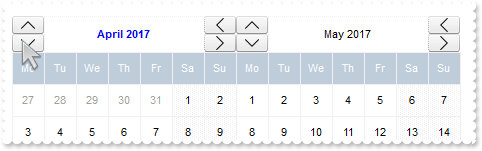
with thisform.Calendar1
	.BeginUpdate
	.Appearance = 0
	.Object.Background(8) = .BackColor
	.FirstDay = 2
	.MaxMonthX = 2
	.MaxMonthY = 2
	.DrawGridLine = 0
	.WeekDays = "Su Mo Tu We Th Fr Sa"
	.MarkToday = .T.
	.AutoSize = 0
	.AlignmentDay = 1
	.FixedCellHeight = 32
	.FixedCellWidth = 32
	.DateHeaderFormat = "(2[b=0][bg=0x01000000]/3[b=0][bg=0x01000000]):32,1,(4[b=0][bg=0x01000000]/5[b=0][bg=0x01000000]):32"
	var_s = " ( ( ( month(value) = month(date(``) ) and ( year(value) = year(date(``) ) ) ) ) ? `<b><fgcolor=0000FF>` : `` ) + `<c><%month%> "
	var_s = var_s + "<%year%>`"
	.Object.DateHeaderField(1) = var_s
	var_s1 = "gCJKBOI4NBQaBQAhQNJJIIhShQACERCAIA0RD7zf5hiJZJJEIJUPDaMZkUAQGAOP4DRShOgvHIGQA0U5CbKzOIZYRIICzCaUX4PS4hRgEGg/QaKJLhGSESIIZoMfAMMI"
	var_s1 = var_s1 + "kKQzJxDDBJaCMaoQSABVhAXgQRBLRFdNhIB4QY4PfyUJB7AYAFo+DIWOb7LDdiIAJJFJxEVxCMCCgIA="
	.Object.HTMLPicture("up") = var_s1
	var_s2 = "gCJKBOI4NBQaBQAhQNJJIIhShQACERCAIA0RD7zf5hiIEM5BJpBhSxR4LfhhAsRKZJIhBKg4J7tRjJBIAEAMAjzWIJba0E5rWQcWaBAoFR7oK4HewRZCMPiMUDLXRoS4"
	var_s2 = var_s2 + "PfjCQJrEhdaJ5ET4YIvTgOJ5kFSTKpkFaTKLEFqTGxyFgTIyuMgCeJaPwDSIKEhlCT5ZoWFT4iIAJJFJxEVxCMCCgIA="
	.Object.HTMLPicture("down") = var_s2
	var_s3 = "gCJKBOI4NBQaBQAhQNJJIIhShQACERCAIA0RD7zf5hiJUJJEIJUPDaMZkEANWACeJvMgBIwSGgXAaxGIQI6RMYAJBzFQQHYBeIzKQNYCpTIYAbwNQmMgAILNfAMEBKGY"
	var_s3 = var_s3 + "uAaIaxMGYDFD2ARVASRNBDNCeSAIDRCW7MAgDDDZDIAKbADgRVrfUCNiIAJJFJxEVxCMCCgI"
	.Object.HTMLPicture("left") = var_s3
	var_s4 = "gCJKBOI4NBQaBQAhQNJJIIhShQACERCAIA0RD7zf5hiIBOZSI5CACuZwcdMRAhnIJNIMKWKPBb8MIFiIJOBILJzhQOYc7YYBY5vVBkiJEJJEIJUHBPMbAARYUI0KKADJ"
	var_s4 = var_s4 + "KEaDEpAVgAYjHYI8GSACgQb4AcRiGCPJgwNQIEzANIICaUUwpUDIBYjKIzBAsAZiWQ1QYABLZTKBAIATL2CUxXJdV8RABJIpOIiuIRgQUBA="
	.Object.HTMLPicture("right") = var_s4
	.Object.DateHeaderField(2) = "<c><img>up</img>"
	.Object.DateHeaderField(3) = "<c><img>down</img>"
	.Object.DateHeaderField(4) = "<c><img>left</img>"
	.Object.DateHeaderField(5) = "<c><img>right</img>"
	with .VisualAppearance
		var_s5 = "gBFLBCJwBAEHhEJAAEhABFgDg6AADACAxSDEMQBQKAAzQFAYbhgHCGAAGQaBUgmFgAQhFcZQSKUOQTDKMIziYBYfgkMIgSbJUgDGAkRRdDSOYIkWA5AiKEYoThCIxzTJ"
		var_s5 = var_s5 + "8aw3CKbYRAKCXfoUAJFP7Fc6ABJMBx3EyhZ89NDYEwTIKBahoehqIheEQyDSJNb2DCIahhMSEbKtCooDhGFpUWzLdxTJJVawHJoABjkS45PjEAJ+SBPUZVRRlFyfO7BK"
		var_s5 = var_s5 + "SjMKKXgkG4zABWVa1bC1FzxQ6mKykKQLQADDIDVZAeL3JTNCS5IyLLDtO77EqmZ5la7cUgRDj4AY7Ua+MzubBZaovOqDYzAey7TDWLRXFDNIzzTgQAyHHrETZHGqwJxM"
		var_s5 = var_s5 + "AEapYGqYpVi2HwzDuQ5oHKIQgggSSUGMOgdE4RhYDwJBVAwIQTH2UYhjQJBRAmZxuCEHZ3icJp5EgKxgAIVgCCQSQSEIBQkCAYhCAIJYKmKNIuFcTBIESPYEk6GBUm+B"
		var_s5 = var_s5 + "ZOmOPgZgWYRTiYEwvEwaIEAAK4KnKOJrgmTpDjCbYJmKSI2CoOxihOLglCuAACioNg8COA4gmcOZOiidg+g+Dh4moOA8CMYokNmCoyiycQ8E8A4iE6D4OjOMgng8ZJji"
		var_s5 = var_s5 + "ITA8CSEouEcKwKkkLJyhQIoIkYU9LjORhcCsAAIACLQ8iaSJ6FKC5jJoaobA8KYoACCRKnmMJzhuDpZnSboMCKGJ4nMPIPDmYAACwKIDk6CoLCeU40m6I5oliMoKDyaI"
		var_s5 = var_s5 + "CokLIpgoThviOKJoGYf4KmUKhMjMLJLCAAojCyaYoiYGoGmqM46CkOwPEoKonAACxKlSdItmiWBeBeDgrioNo3D0KxSlAAAtgsUpYnUPRPEoco8hCa+T40SxbBRj5tEs"
		var_s5 = var_s5 + "HJ1i6JhbGYS4ug8awelQLZAAKZI5C4DxrhYQ9ehmUppWiA48nAPRuFKYpiAAC47laZQ9iuKZSgOPotkuFI7C6C4gACPJAm8eQOhOQZoikDp3kCS5AACPoEk8fBGnqQgp"
		var_s5 = var_s5 + "DOSppD2TxjlyPZD6CfwekQTx5lKP5ImseZTCAL5MAMAAAkoTADmMLpIjISp+HSS4PgyMAADBzAHDSIoPCOUpWjObIKE8NJOHKIwPEaTprBsHpdjWLB9AieQ+DQYwQAAM"
		var_s5 = var_s5 + "R1EOZxWi+bx7HcWQ8msfRYnnDZQACRwxgwc5rGaMZPE0ZxqjWNZtgyRwAAyTZEnuXJzEyAx2kQcxNkye5cEy3cYAcANrGAIH4OAhx3gNGGPAfgIR8jBA4McBMARVhnH4"
		var_s5 = var_s5 + "HQOYmxuCpF2MsecEQVBvGQCcIQug6itGQBoARAQ="
		.Add(1,var_s5)
	endwith
	.EndUpdate
endwith
|
|
136
|
How can I arrange the month's header ( down, next, prev month, next, prev year, picture, ebn)
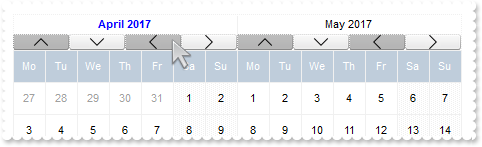
with thisform.Calendar1
	.BeginUpdate
	.Appearance = 0
	.Object.Background(8) = .BackColor
	.FirstDay = 2
	.MaxMonthX = 2
	.MaxMonthY = 2
	.DrawGridLine = 0
	.WeekDays = "Su Mo Tu We Th Fr Sa"
	.MarkToday = .T.
	.AutoSize = 0
	.AlignmentDay = 1
	.FixedCellHeight = 32
	.FixedCellWidth = 32
	.DateHeaderFormat = "1/16;(2[bg=0x01808080],3[bg=0x01000000])[b=15],(4[bg=0x01808080],5[bg=0x01000000])[b=15]"
	var_s = " ( ( ( month(value) = month(date(``) ) and ( year(value) = year(date(``) ) ) ) ) ? `<b><fgcolor=0000FF>` : `` ) + `<c><%month%> "
	var_s = var_s + "<%year%>`"
	.Object.DateHeaderField(1) = var_s
	var_s1 = "gCJKBOI4NBQaBQAhQNJJIIhShQACERCAIA0RD7zf5hiJZJJEIJUPDaMZkUAQGAOP4DRShOgvHIGQA0U5CbKzOIZYRIICzCaUX4PS4hRgEGg/QaKJLhGSESIIZoMfAMMI"
	var_s1 = var_s1 + "kKQzJxDDBJaCMaoQSABVhAXgQRBLRFdNhIB4QY4PfyUJB7AYAFo+DIWOb7LDdiIAJJFJxEVxCMCCgIA="
	.Object.HTMLPicture("up") = var_s1
	var_s2 = "gCJKBOI4NBQaBQAhQNJJIIhShQACERCAIA0RD7zf5hiIEM5BJpBhSxR4LfhhAsRKZJIhBKg4J7tRjJBIAEAMAjzWIJba0E5rWQcWaBAoFR7oK4HewRZCMPiMUDLXRoS4"
	var_s2 = var_s2 + "PfjCQJrEhdaJ5ET4YIvTgOJ5kFSTKpkFaTKLEFqTGxyFgTIyuMgCeJaPwDSIKEhlCT5ZoWFT4iIAJJFJxEVxCMCCgIA="
	.Object.HTMLPicture("down") = var_s2
	var_s3 = "gCJKBOI4NBQaBQAhQNJJIIhShQACERCAIA0RD7zf5hiJUJJEIJUPDaMZkEANWACeJvMgBIwSGgXAaxGIQI6RMYAJBzFQQHYBeIzKQNYCpTIYAbwNQmMgAILNfAMEBKGY"
	var_s3 = var_s3 + "uAaIaxMGYDFD2ARVASRNBDNCeSAIDRCW7MAgDDDZDIAKbADgRVrfUCNiIAJJFJxEVxCMCCgI"
	.Object.HTMLPicture("left") = var_s3
	var_s4 = "gCJKBOI4NBQaBQAhQNJJIIhShQACERCAIA0RD7zf5hiIBOZSI5CACuZwcdMRAhnIJNIMKWKPBb8MIFiIJOBILJzhQOYc7YYBY5vVBkiJEJJEIJUHBPMbAARYUI0KKADJ"
	var_s4 = var_s4 + "KEaDEpAVgAYjHYI8GSACgQb4AcRiGCPJgwNQIEzANIICaUUwpUDIBYjKIzBAsAZiWQ1QYABLZTKBAIATL2CUxXJdV8RABJIpOIiuIRgQUBA="
	.Object.HTMLPicture("right") = var_s4
	.Object.DateHeaderField(2) = "<c><img>up</img>"
	.Object.DateHeaderField(3) = "<c><img>down</img>"
	.Object.DateHeaderField(4) = "<c><img>left</img>"
	.Object.DateHeaderField(5) = "<c><img>right</img>"
	with .VisualAppearance
		var_s5 = "gBFLBCJwBAEHhEJAAEhABFgDg6AADACAxSDEMQBQKAAzQFAYbhgHCGAAGQaBUgmFgAQhFcZQSKUOQTDKMIziYBYfgkMIgSbJUgDGAkRRdDSOYIkWA5AiKEYoThCIxzTJ"
		var_s5 = var_s5 + "8aw3CKbYRAKCXfoUAJFP7Fc6ABJMBx3EyhZ89NDYEwTIKBahoehqIheEQyDSJNb2DCIahhMSEbKtCooDhGFpUWzLdxTJJVawHJoABjkS45PjEAJ+SBPUZVRRlFyfO7BK"
		var_s5 = var_s5 + "SjMKKXgkG4zABWVa1bC1FzxQ6mKykKQLQADDIDVZAeL3JTNCS5IyLLDtO77EqmZ5la7cUgRDj4AY7Ua+MzubBZaovOqDYzAey7TDWLRXFDNIzzTgQAyHHrETZHGqwJxM"
		var_s5 = var_s5 + "AEapYGqYpVi2HwzDuQ5oHKIQgggSSUGMOgdE4RhYDwJBVAwIQTH2UYhjQJBRAmZxuCEHZ3icJp5EgKxgAIVgCCQSQSEIBQkCAYhCAIJYKmKNIuFcTBIESPYEk6GBUm+B"
		var_s5 = var_s5 + "ZOmOPgZgWYRTiYEwvEwaIEAAK4KnKOJrgmTpDjCbYJmKSI2CoOxihOLglCuAACioNg8COA4gmcOZOiidg+g+Dh4moOA8CMYokNmCoyiycQ8E8A4iE6D4OjOMgng8ZJji"
		var_s5 = var_s5 + "ITA8CSEouEcKwKkkLJyhQIoIkYU9LjORhcCsAAIACLQ8iaSJ6FKC5jJoaobA8KYoACCRKnmMJzhuDpZnSboMCKGJ4nMPIPDmYAACwKIDk6CoLCeU40m6I5oliMoKDyaI"
		var_s5 = var_s5 + "CokLIpgoThviOKJoGYf4KmUKhMjMLJLCAAojCyaYoiYGoGmqM46CkOwPEoKonAACxKlSdItmiWBeBeDgrioNo3D0KxSlAAAtgsUpYnUPRPEoco8hCa+T40SxbBRj5tEs"
		var_s5 = var_s5 + "HJ1i6JhbGYS4ug8awelQLZAAKZI5C4DxrhYQ9ehmUppWiA48nAPRuFKYpiAAC47laZQ9iuKZSgOPotkuFI7C6C4gACPJAm8eQOhOQZoikDp3kCS5AACPoEk8fBGnqQgp"
		var_s5 = var_s5 + "DOSppD2TxjlyPZD6CfwekQTx5lKP5ImseZTCAL5MAMAAAkoTADmMLpIjISp+HSS4PgyMAADBzAHDSIoPCOUpWjObIKE8NJOHKIwPEaTprBsHpdjWLB9AieQ+DQYwQAAM"
		var_s5 = var_s5 + "R1EOZxWi+bx7HcWQ8msfRYnnDZQACRwxgwc5rGaMZPE0ZxqjWNZtgyRwAAyTZEnuXJzEyAx2kQcxNkye5cEy3cYAcANrGAIH4OAhx3gNGGPAfgIR8jBA4McBMARVhnH4"
		var_s5 = var_s5 + "HQOYmxuCpF2MsecEQVBvGQCcIQug6itGQBoARAQ="
		.Add(1,var_s5)
	endwith
	.EndUpdate
endwith
|
|
135
|
How can I arrange the month's header ( down, next, prev month, picture, ebn)
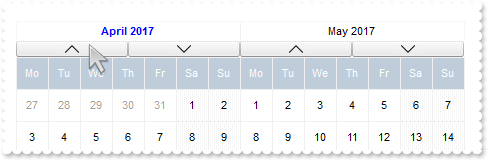
with thisform.Calendar1
	.BeginUpdate
	.Appearance = 0
	.Object.Background(8) = .BackColor
	.FirstDay = 2
	.MaxMonthX = 2
	.MaxMonthY = 2
	.DrawGridLine = 0
	.WeekDays = "Su Mo Tu We Th Fr Sa"
	.MarkToday = .T.
	.AutoSize = 0
	.AlignmentDay = 1
	.FixedCellHeight = 32
	.FixedCellWidth = 32
	.DateHeaderFormat = "1/16;2[b=0][bg=0x01000000],3[b=0][bg=0x01000000]"
	var_s = " ( ( ( month(value) = month(date(``) ) and ( year(value) = year(date(``) ) ) ) ) ? `<b><fgcolor=0000FF>` : `` ) + `<c><%month%> "
	var_s = var_s + "<%year%>`"
	.Object.DateHeaderField(1) = var_s
	var_s1 = "gCJKBOI4NBQaBQAhQNJJIIhShQACERCAIA0RD7zf5hiJZJJEIJUPDaMZkUAQGAOP4DRShOgvHIGQA0U5CbKzOIZYRIICzCaUX4PS4hRgEGg/QaKJLhGSESIIZoMfAMMI"
	var_s1 = var_s1 + "kKQzJxDDBJaCMaoQSABVhAXgQRBLRFdNhIB4QY4PfyUJB7AYAFo+DIWOb7LDdiIAJJFJxEVxCMCCgIA="
	.Object.HTMLPicture("up") = var_s1
	var_s2 = "gCJKBOI4NBQaBQAhQNJJIIhShQACERCAIA0RD7zf5hiIEM5BJpBhSxR4LfhhAsRKZJIhBKg4J7tRjJBIAEAMAjzWIJba0E5rWQcWaBAoFR7oK4HewRZCMPiMUDLXRoS4"
	var_s2 = var_s2 + "PfjCQJrEhdaJ5ET4YIvTgOJ5kFSTKpkFaTKLEFqTGxyFgTIyuMgCeJaPwDSIKEhlCT5ZoWFT4iIAJJFJxEVxCMCCgIA="
	.Object.HTMLPicture("down") = var_s2
	var_s3 = "gCJKBOI4NBQaBQAhQNJJIIhShQACERCAIA0RD7zf5hiJUJJEIJUPDaMZkEANWACeJvMgBIwSGgXAaxGIQI6RMYAJBzFQQHYBeIzKQNYCpTIYAbwNQmMgAILNfAMEBKGY"
	var_s3 = var_s3 + "uAaIaxMGYDFD2ARVASRNBDNCeSAIDRCW7MAgDDDZDIAKbADgRVrfUCNiIAJJFJxEVxCMCCgI"
	.Object.HTMLPicture("left") = var_s3
	var_s4 = "gCJKBOI4NBQaBQAhQNJJIIhShQACERCAIA0RD7zf5hiIBOZSI5CACuZwcdMRAhnIJNIMKWKPBb8MIFiIJOBILJzhQOYc7YYBY5vVBkiJEJJEIJUHBPMbAARYUI0KKADJ"
	var_s4 = var_s4 + "KEaDEpAVgAYjHYI8GSACgQb4AcRiGCPJgwNQIEzANIICaUUwpUDIBYjKIzBAsAZiWQ1QYABLZTKBAIATL2CUxXJdV8RABJIpOIiuIRgQUBA="
	.Object.HTMLPicture("right") = var_s4
	.Object.DateHeaderField(2) = "<c><img>up</img>"
	.Object.DateHeaderField(3) = "<c><img>down</img>"
	.Object.DateHeaderField(4) = "<c><img>left</img>"
	.Object.DateHeaderField(5) = "<c><img>right</img>"
	with .VisualAppearance
		var_s5 = "gBFLBCJwBAEHhEJAAEhABFgDg6AADACAxSDEMQBQKAAzQFAYbhgHCGAAGQaBUgmFgAQhFcZQSKUOQTDKMIziYBYfgkMIgSbJUgDGAkRRdDSOYIkWA5AiKEYoThCIxzTJ"
		var_s5 = var_s5 + "8aw3CKbYRAKCXfoUAJFP7Fc6ABJMBx3EyhZ89NDYEwTIKBahoehqIheEQyDSJNb2DCIahhMSEbKtCooDhGFpUWzLdxTJJVawHJoABjkS45PjEAJ+SBPUZVRRlFyfO7BK"
		var_s5 = var_s5 + "SjMKKXgkG4zABWVa1bC1FzxQ6mKykKQLQADDIDVZAeL3JTNCS5IyLLDtO77EqmZ5la7cUgRDj4AY7Ua+MzubBZaovOqDYzAey7TDWLRXFDNIzzTgQAyHHrETZHGqwJxM"
		var_s5 = var_s5 + "AEapYGqYpVi2HwzDuQ5oHKIQgggSSUGMOgdE4RhYDwJBVAwIQTH2UYhjQJBRAmZxuCEHZ3icJp5EgKxgAIVgCCQSQSEIBQkCAYhCAIJYKmKNIuFcTBIESPYEk6GBUm+B"
		var_s5 = var_s5 + "ZOmOPgZgWYRTiYEwvEwaIEAAK4KnKOJrgmTpDjCbYJmKSI2CoOxihOLglCuAACioNg8COA4gmcOZOiidg+g+Dh4moOA8CMYokNmCoyiycQ8E8A4iE6D4OjOMgng8ZJji"
		var_s5 = var_s5 + "ITA8CSEouEcKwKkkLJyhQIoIkYU9LjORhcCsAAIACLQ8iaSJ6FKC5jJoaobA8KYoACCRKnmMJzhuDpZnSboMCKGJ4nMPIPDmYAACwKIDk6CoLCeU40m6I5oliMoKDyaI"
		var_s5 = var_s5 + "CokLIpgoThviOKJoGYf4KmUKhMjMLJLCAAojCyaYoiYGoGmqM46CkOwPEoKonAACxKlSdItmiWBeBeDgrioNo3D0KxSlAAAtgsUpYnUPRPEoco8hCa+T40SxbBRj5tEs"
		var_s5 = var_s5 + "HJ1i6JhbGYS4ug8awelQLZAAKZI5C4DxrhYQ9ehmUppWiA48nAPRuFKYpiAAC47laZQ9iuKZSgOPotkuFI7C6C4gACPJAm8eQOhOQZoikDp3kCS5AACPoEk8fBGnqQgp"
		var_s5 = var_s5 + "DOSppD2TxjlyPZD6CfwekQTx5lKP5ImseZTCAL5MAMAAAkoTADmMLpIjISp+HSS4PgyMAADBzAHDSIoPCOUpWjObIKE8NJOHKIwPEaTprBsHpdjWLB9AieQ+DQYwQAAM"
		var_s5 = var_s5 + "R1EOZxWi+bx7HcWQ8msfRYnnDZQACRwxgwc5rGaMZPE0ZxqjWNZtgyRwAAyTZEnuXJzEyAx2kQcxNkye5cEy3cYAcANrGAIH4OAhx3gNGGPAfgIR8jBA4McBMARVhnH4"
		var_s5 = var_s5 + "HQOYmxuCpF2MsecEQVBvGQCcIQug6itGQBoARAQ="
		.Add(1,var_s5)
	endwith
	.EndUpdate
endwith
|
|
134
|
How can I arrange the month's header ( left, right center, next, prev month, picture, ebn)
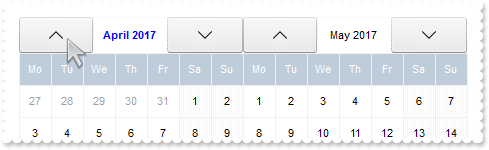
with thisform.Calendar1
	.BeginUpdate
	.Appearance = 0
	.Object.Background(8) = .BackColor
	.FirstDay = 2
	.MaxMonthX = 2
	.MaxMonthY = 2
	.DrawGridLine = 0
	.WeekDays = "Su Mo Tu We Th Fr Sa"
	.MarkToday = .T.
	.AutoSize = 0
	.AlignmentDay = 1
	.FixedCellHeight = 32
	.FixedCellWidth = 32
	.DateHeaderFormat = "2[b=0][bg=0x01000000],1,3[b=0][bg=0x01000000]"
	var_s = " ( ( ( month(value) = month(date(``) ) and ( year(value) = year(date(``) ) ) ) ) ? `<b><fgcolor=0000FF>` : `` ) + `<c><%month%> "
	var_s = var_s + "<%year%>`"
	.Object.DateHeaderField(1) = var_s
	var_s1 = "gCJKBOI4NBQaBQAhQNJJIIhShQACERCAIA0RD7zf5hiJZJJEIJUPDaMZkUAQGAOP4DRShOgvHIGQA0U5CbKzOIZYRIICzCaUX4PS4hRgEGg/QaKJLhGSESIIZoMfAMMI"
	var_s1 = var_s1 + "kKQzJxDDBJaCMaoQSABVhAXgQRBLRFdNhIB4QY4PfyUJB7AYAFo+DIWOb7LDdiIAJJFJxEVxCMCCgIA="
	.Object.HTMLPicture("up") = var_s1
	var_s2 = "gCJKBOI4NBQaBQAhQNJJIIhShQACERCAIA0RD7zf5hiIEM5BJpBhSxR4LfhhAsRKZJIhBKg4J7tRjJBIAEAMAjzWIJba0E5rWQcWaBAoFR7oK4HewRZCMPiMUDLXRoS4"
	var_s2 = var_s2 + "PfjCQJrEhdaJ5ET4YIvTgOJ5kFSTKpkFaTKLEFqTGxyFgTIyuMgCeJaPwDSIKEhlCT5ZoWFT4iIAJJFJxEVxCMCCgIA="
	.Object.HTMLPicture("down") = var_s2
	var_s3 = "gCJKBOI4NBQaBQAhQNJJIIhShQACERCAIA0RD7zf5hiJUJJEIJUPDaMZkEANWACeJvMgBIwSGgXAaxGIQI6RMYAJBzFQQHYBeIzKQNYCpTIYAbwNQmMgAILNfAMEBKGY"
	var_s3 = var_s3 + "uAaIaxMGYDFD2ARVASRNBDNCeSAIDRCW7MAgDDDZDIAKbADgRVrfUCNiIAJJFJxEVxCMCCgI"
	.Object.HTMLPicture("left") = var_s3
	var_s4 = "gCJKBOI4NBQaBQAhQNJJIIhShQACERCAIA0RD7zf5hiIBOZSI5CACuZwcdMRAhnIJNIMKWKPBb8MIFiIJOBILJzhQOYc7YYBY5vVBkiJEJJEIJUHBPMbAARYUI0KKADJ"
	var_s4 = var_s4 + "KEaDEpAVgAYjHYI8GSACgQb4AcRiGCPJgwNQIEzANIICaUUwpUDIBYjKIzBAsAZiWQ1QYABLZTKBAIATL2CUxXJdV8RABJIpOIiuIRgQUBA="
	.Object.HTMLPicture("right") = var_s4
	.Object.DateHeaderField(2) = "<c><img>up</img>"
	.Object.DateHeaderField(3) = "<c><img>down</img>"
	.Object.DateHeaderField(4) = "<c><img>left</img>"
	.Object.DateHeaderField(5) = "<c><img>right</img>"
	with .VisualAppearance
		var_s5 = "gBFLBCJwBAEHhEJAAEhABFgDg6AADACAxSDEMQBQKAAzQFAYbhgHCGAAGQaBUgmFgAQhFcZQSKUOQTDKMIziYBYfgkMIgSbJUgDGAkRRdDSOYIkWA5AiKEYoThCIxzTJ"
		var_s5 = var_s5 + "8aw3CKbYRAKCXfoUAJFP7Fc6ABJMBx3EyhZ89NDYEwTIKBahoehqIheEQyDSJNb2DCIahhMSEbKtCooDhGFpUWzLdxTJJVawHJoABjkS45PjEAJ+SBPUZVRRlFyfO7BK"
		var_s5 = var_s5 + "SjMKKXgkG4zABWVa1bC1FzxQ6mKykKQLQADDIDVZAeL3JTNCS5IyLLDtO77EqmZ5la7cUgRDj4AY7Ua+MzubBZaovOqDYzAey7TDWLRXFDNIzzTgQAyHHrETZHGqwJxM"
		var_s5 = var_s5 + "AEapYGqYpVi2HwzDuQ5oHKIQgggSSUGMOgdE4RhYDwJBVAwIQTH2UYhjQJBRAmZxuCEHZ3icJp5EgKxgAIVgCCQSQSEIBQkCAYhCAIJYKmKNIuFcTBIESPYEk6GBUm+B"
		var_s5 = var_s5 + "ZOmOPgZgWYRTiYEwvEwaIEAAK4KnKOJrgmTpDjCbYJmKSI2CoOxihOLglCuAACioNg8COA4gmcOZOiidg+g+Dh4moOA8CMYokNmCoyiycQ8E8A4iE6D4OjOMgng8ZJji"
		var_s5 = var_s5 + "ITA8CSEouEcKwKkkLJyhQIoIkYU9LjORhcCsAAIACLQ8iaSJ6FKC5jJoaobA8KYoACCRKnmMJzhuDpZnSboMCKGJ4nMPIPDmYAACwKIDk6CoLCeU40m6I5oliMoKDyaI"
		var_s5 = var_s5 + "CokLIpgoThviOKJoGYf4KmUKhMjMLJLCAAojCyaYoiYGoGmqM46CkOwPEoKonAACxKlSdItmiWBeBeDgrioNo3D0KxSlAAAtgsUpYnUPRPEoco8hCa+T40SxbBRj5tEs"
		var_s5 = var_s5 + "HJ1i6JhbGYS4ug8awelQLZAAKZI5C4DxrhYQ9ehmUppWiA48nAPRuFKYpiAAC47laZQ9iuKZSgOPotkuFI7C6C4gACPJAm8eQOhOQZoikDp3kCS5AACPoEk8fBGnqQgp"
		var_s5 = var_s5 + "DOSppD2TxjlyPZD6CfwekQTx5lKP5ImseZTCAL5MAMAAAkoTADmMLpIjISp+HSS4PgyMAADBzAHDSIoPCOUpWjObIKE8NJOHKIwPEaTprBsHpdjWLB9AieQ+DQYwQAAM"
		var_s5 = var_s5 + "R1EOZxWi+bx7HcWQ8msfRYnnDZQACRwxgwc5rGaMZPE0ZxqjWNZtgyRwAAyTZEnuXJzEyAx2kQcxNkye5cEy3cYAcANrGAIH4OAhx3gNGGPAfgIR8jBA4McBMARVhnH4"
		var_s5 = var_s5 + "HQOYmxuCpF2MsecEQVBvGQCcIQug6itGQBoARAQ="
		.Add(1,var_s5)
	endwith
	.EndUpdate
endwith
|
|
133
|
How can I arrange the month's header (right up down, next, prev month, picture, ebn)
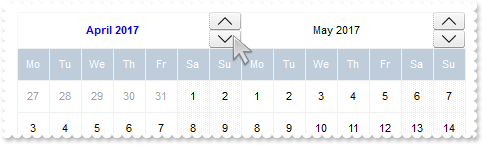
with thisform.Calendar1
	.BeginUpdate
	.Appearance = 0
	.Object.Background(8) = .BackColor
	.FirstDay = 2
	.MaxMonthX = 2
	.MaxMonthY = 2
	.DrawGridLine = 0
	.WeekDays = "Su Mo Tu We Th Fr Sa"
	.MarkToday = .T.
	.AutoSize = 0
	.AlignmentDay = 1
	.FixedCellHeight = 32
	.FixedCellWidth = 32
	.DateHeaderFormat = "1,(2[b=0][bg=0x01000000]/3[b=0][bg=0x01000000]):32"
	var_s = " ( ( ( month(value) = month(date(``) ) and ( year(value) = year(date(``) ) ) ) ) ? `<b><fgcolor=0000FF>` : `` ) + `<c><%month%> "
	var_s = var_s + "<%year%>`"
	.Object.DateHeaderField(1) = var_s
	var_s1 = "gCJKBOI4NBQaBQAhQNJJIIhShQACERCAIA0RD7zf5hiJZJJEIJUPDaMZkUAQGAOP4DRShOgvHIGQA0U5CbKzOIZYRIICzCaUX4PS4hRgEGg/QaKJLhGSESIIZoMfAMMI"
	var_s1 = var_s1 + "kKQzJxDDBJaCMaoQSABVhAXgQRBLRFdNhIB4QY4PfyUJB7AYAFo+DIWOb7LDdiIAJJFJxEVxCMCCgIA="
	.Object.HTMLPicture("up") = var_s1
	var_s2 = "gCJKBOI4NBQaBQAhQNJJIIhShQACERCAIA0RD7zf5hiIEM5BJpBhSxR4LfhhAsRKZJIhBKg4J7tRjJBIAEAMAjzWIJba0E5rWQcWaBAoFR7oK4HewRZCMPiMUDLXRoS4"
	var_s2 = var_s2 + "PfjCQJrEhdaJ5ET4YIvTgOJ5kFSTKpkFaTKLEFqTGxyFgTIyuMgCeJaPwDSIKEhlCT5ZoWFT4iIAJJFJxEVxCMCCgIA="
	.Object.HTMLPicture("down") = var_s2
	var_s3 = "gCJKBOI4NBQaBQAhQNJJIIhShQACERCAIA0RD7zf5hiJUJJEIJUPDaMZkEANWACeJvMgBIwSGgXAaxGIQI6RMYAJBzFQQHYBeIzKQNYCpTIYAbwNQmMgAILNfAMEBKGY"
	var_s3 = var_s3 + "uAaIaxMGYDFD2ARVASRNBDNCeSAIDRCW7MAgDDDZDIAKbADgRVrfUCNiIAJJFJxEVxCMCCgI"
	.Object.HTMLPicture("left") = var_s3
	var_s4 = "gCJKBOI4NBQaBQAhQNJJIIhShQACERCAIA0RD7zf5hiIBOZSI5CACuZwcdMRAhnIJNIMKWKPBb8MIFiIJOBILJzhQOYc7YYBY5vVBkiJEJJEIJUHBPMbAARYUI0KKADJ"
	var_s4 = var_s4 + "KEaDEpAVgAYjHYI8GSACgQb4AcRiGCPJgwNQIEzANIICaUUwpUDIBYjKIzBAsAZiWQ1QYABLZTKBAIATL2CUxXJdV8RABJIpOIiuIRgQUBA="
	.Object.HTMLPicture("right") = var_s4
	.Object.DateHeaderField(2) = "<c><img>up</img>"
	.Object.DateHeaderField(3) = "<c><img>down</img>"
	.Object.DateHeaderField(4) = "<c><img>left</img>"
	.Object.DateHeaderField(5) = "<c><img>right</img>"
	with .VisualAppearance
		var_s5 = "gBFLBCJwBAEHhEJAAEhABFgDg6AADACAxSDEMQBQKAAzQFAYbhgHCGAAGQaBUgmFgAQhFcZQSKUOQTDKMIziYBYfgkMIgSbJUgDGAkRRdDSOYIkWA5AiKEYoThCIxzTJ"
		var_s5 = var_s5 + "8aw3CKbYRAKCXfoUAJFP7Fc6ABJMBx3EyhZ89NDYEwTIKBahoehqIheEQyDSJNb2DCIahhMSEbKtCooDhGFpUWzLdxTJJVawHJoABjkS45PjEAJ+SBPUZVRRlFyfO7BK"
		var_s5 = var_s5 + "SjMKKXgkG4zABWVa1bC1FzxQ6mKykKQLQADDIDVZAeL3JTNCS5IyLLDtO77EqmZ5la7cUgRDj4AY7Ua+MzubBZaovOqDYzAey7TDWLRXFDNIzzTgQAyHHrETZHGqwJxM"
		var_s5 = var_s5 + "AEapYGqYpVi2HwzDuQ5oHKIQgggSSUGMOgdE4RhYDwJBVAwIQTH2UYhjQJBRAmZxuCEHZ3icJp5EgKxgAIVgCCQSQSEIBQkCAYhCAIJYKmKNIuFcTBIESPYEk6GBUm+B"
		var_s5 = var_s5 + "ZOmOPgZgWYRTiYEwvEwaIEAAK4KnKOJrgmTpDjCbYJmKSI2CoOxihOLglCuAACioNg8COA4gmcOZOiidg+g+Dh4moOA8CMYokNmCoyiycQ8E8A4iE6D4OjOMgng8ZJji"
		var_s5 = var_s5 + "ITA8CSEouEcKwKkkLJyhQIoIkYU9LjORhcCsAAIACLQ8iaSJ6FKC5jJoaobA8KYoACCRKnmMJzhuDpZnSboMCKGJ4nMPIPDmYAACwKIDk6CoLCeU40m6I5oliMoKDyaI"
		var_s5 = var_s5 + "CokLIpgoThviOKJoGYf4KmUKhMjMLJLCAAojCyaYoiYGoGmqM46CkOwPEoKonAACxKlSdItmiWBeBeDgrioNo3D0KxSlAAAtgsUpYnUPRPEoco8hCa+T40SxbBRj5tEs"
		var_s5 = var_s5 + "HJ1i6JhbGYS4ug8awelQLZAAKZI5C4DxrhYQ9ehmUppWiA48nAPRuFKYpiAAC47laZQ9iuKZSgOPotkuFI7C6C4gACPJAm8eQOhOQZoikDp3kCS5AACPoEk8fBGnqQgp"
		var_s5 = var_s5 + "DOSppD2TxjlyPZD6CfwekQTx5lKP5ImseZTCAL5MAMAAAkoTADmMLpIjISp+HSS4PgyMAADBzAHDSIoPCOUpWjObIKE8NJOHKIwPEaTprBsHpdjWLB9AieQ+DQYwQAAM"
		var_s5 = var_s5 + "R1EOZxWi+bx7HcWQ8msfRYnnDZQACRwxgwc5rGaMZPE0ZxqjWNZtgyRwAAyTZEnuXJzEyAx2kQcxNkye5cEy3cYAcANrGAIH4OAhx3gNGGPAfgIR8jBA4McBMARVhnH4"
		var_s5 = var_s5 + "HQOYmxuCpF2MsecEQVBvGQCcIQug6itGQBoARAQ="
		.Add(1,var_s5)
	endwith
	.EndUpdate
endwith
|
|
132
|
How can I arrange the month's header (left, next, prev month, picture, ebn)
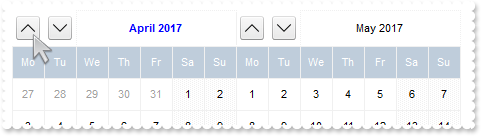
with thisform.Calendar1
	.BeginUpdate
	.Appearance = 0
	.Object.Background(8) = .BackColor
	.FirstDay = 2
	.MaxMonthX = 2
	.MaxMonthY = 2
	.DrawGridLine = 0
	.WeekDays = "Su Mo Tu We Th Fr Sa"
	.MarkToday = .T.
	.AutoSize = 0
	.AlignmentDay = 1
	.FixedCellHeight = 32
	.FixedCellWidth = 32
	var_s = "("+chr(34)+""+chr(34)+"[b=0],("+chr(34)+""+chr(34)+"[b=0]/24;2[b=0][bg=0x01000000]/"+chr(34)+""+chr(34)+"[b=0]):24,"+chr(34)+""+chr(34)+"[b=0]):32,("+chr(34)+""+chr(34)+"[b=0],("+chr(34)+""+chr(34)+"[b=0]/24;3[b=0][bg=0x01000000]/"+chr(34)+""+chr(34)+"[b=0]):24,"+chr(34)+""+chr(34)+"[b=0"
	var_s = var_s + "]):32,1"
	.DateHeaderFormat = var_s
	var_s1 = " ( ( ( month(value) = month(date(``) ) and ( year(value) = year(date(``) ) ) ) ) ? `<b><fgcolor=0000FF>` : `` ) + `<c><%month%> "
	var_s1 = var_s1 + "<%year%>`"
	.Object.DateHeaderField(1) = var_s1
	var_s2 = "gCJKBOI4NBQaBQAhQNJJIIhShQACERCAIA0RD7zf5hiJZJJEIJUPDaMZkUAQGAOP4DRShOgvHIGQA0U5CbKzOIZYRIICzCaUX4PS4hRgEGg/QaKJLhGSESIIZoMfAMMI"
	var_s2 = var_s2 + "kKQzJxDDBJaCMaoQSABVhAXgQRBLRFdNhIB4QY4PfyUJB7AYAFo+DIWOb7LDdiIAJJFJxEVxCMCCgIA="
	.Object.HTMLPicture("up") = var_s2
	var_s3 = "gCJKBOI4NBQaBQAhQNJJIIhShQACERCAIA0RD7zf5hiIEM5BJpBhSxR4LfhhAsRKZJIhBKg4J7tRjJBIAEAMAjzWIJba0E5rWQcWaBAoFR7oK4HewRZCMPiMUDLXRoS4"
	var_s3 = var_s3 + "PfjCQJrEhdaJ5ET4YIvTgOJ5kFSTKpkFaTKLEFqTGxyFgTIyuMgCeJaPwDSIKEhlCT5ZoWFT4iIAJJFJxEVxCMCCgIA="
	.Object.HTMLPicture("down") = var_s3
	var_s4 = "gCJKBOI4NBQaBQAhQNJJIIhShQACERCAIA0RD7zf5hiJUJJEIJUPDaMZkEANWACeJvMgBIwSGgXAaxGIQI6RMYAJBzFQQHYBeIzKQNYCpTIYAbwNQmMgAILNfAMEBKGY"
	var_s4 = var_s4 + "uAaIaxMGYDFD2ARVASRNBDNCeSAIDRCW7MAgDDDZDIAKbADgRVrfUCNiIAJJFJxEVxCMCCgI"
	.Object.HTMLPicture("left") = var_s4
	var_s5 = "gCJKBOI4NBQaBQAhQNJJIIhShQACERCAIA0RD7zf5hiIBOZSI5CACuZwcdMRAhnIJNIMKWKPBb8MIFiIJOBILJzhQOYc7YYBY5vVBkiJEJJEIJUHBPMbAARYUI0KKADJ"
	var_s5 = var_s5 + "KEaDEpAVgAYjHYI8GSACgQb4AcRiGCPJgwNQIEzANIICaUUwpUDIBYjKIzBAsAZiWQ1QYABLZTKBAIATL2CUxXJdV8RABJIpOIiuIRgQUBA="
	.Object.HTMLPicture("right") = var_s5
	.Object.DateHeaderField(2) = "<c><img>up</img>"
	.Object.DateHeaderField(3) = "<c><img>down</img>"
	.Object.DateHeaderField(4) = "<c><img>left</img>"
	.Object.DateHeaderField(5) = "<c><img>right</img>"
	with .VisualAppearance
		var_s6 = "gBFLBCJwBAEHhEJAAEhABFgDg6AADACAxSDEMQBQKAAzQFAYbhgHCGAAGQaBUgmFgAQhFcZQSKUOQTDKMIziYBYfgkMIgSbJUgDGAkRRdDSOYIkWA5AiKEYoThCIxzTJ"
		var_s6 = var_s6 + "8aw3CKbYRAKCXfoUAJFP7Fc6ABJMBx3EyhZ89NDYEwTIKBahoehqIheEQyDSJNb2DCIahhMSEbKtCooDhGFpUWzLdxTJJVawHJoABjkS45PjEAJ+SBPUZVRRlFyfO7BK"
		var_s6 = var_s6 + "SjMKKXgkG4zABWVa1bC1FzxQ6mKykKQLQADDIDVZAeL3JTNCS5IyLLDtO77EqmZ5la7cUgRDj4AY7Ua+MzubBZaovOqDYzAey7TDWLRXFDNIzzTgQAyHHrETZHGqwJxM"
		var_s6 = var_s6 + "AEapYGqYpVi2HwzDuQ5oHKIQgggSSUGMOgdE4RhYDwJBVAwIQTH2UYhjQJBRAmZxuCEHZ3icJp5EgKxgAIVgCCQSQSEIBQkCAYhCAIJYKmKNIuFcTBIESPYEk6GBUm+B"
		var_s6 = var_s6 + "ZOmOPgZgWYRTiYEwvEwaIEAAK4KnKOJrgmTpDjCbYJmKSI2CoOxihOLglCuAACioNg8COA4gmcOZOiidg+g+Dh4moOA8CMYokNmCoyiycQ8E8A4iE6D4OjOMgng8ZJji"
		var_s6 = var_s6 + "ITA8CSEouEcKwKkkLJyhQIoIkYU9LjORhcCsAAIACLQ8iaSJ6FKC5jJoaobA8KYoACCRKnmMJzhuDpZnSboMCKGJ4nMPIPDmYAACwKIDk6CoLCeU40m6I5oliMoKDyaI"
		var_s6 = var_s6 + "CokLIpgoThviOKJoGYf4KmUKhMjMLJLCAAojCyaYoiYGoGmqM46CkOwPEoKonAACxKlSdItmiWBeBeDgrioNo3D0KxSlAAAtgsUpYnUPRPEoco8hCa+T40SxbBRj5tEs"
		var_s6 = var_s6 + "HJ1i6JhbGYS4ug8awelQLZAAKZI5C4DxrhYQ9ehmUppWiA48nAPRuFKYpiAAC47laZQ9iuKZSgOPotkuFI7C6C4gACPJAm8eQOhOQZoikDp3kCS5AACPoEk8fBGnqQgp"
		var_s6 = var_s6 + "DOSppD2TxjlyPZD6CfwekQTx5lKP5ImseZTCAL5MAMAAAkoTADmMLpIjISp+HSS4PgyMAADBzAHDSIoPCOUpWjObIKE8NJOHKIwPEaTprBsHpdjWLB9AieQ+DQYwQAAM"
		var_s6 = var_s6 + "R1EOZxWi+bx7HcWQ8msfRYnnDZQACRwxgwc5rGaMZPE0ZxqjWNZtgyRwAAyTZEnuXJzEyAx2kQcxNkye5cEy3cYAcANrGAIH4OAhx3gNGGPAfgIR8jBA4McBMARVhnH4"
		var_s6 = var_s6 + "HQOYmxuCpF2MsecEQVBvGQCcIQug6itGQBoARAQ="
		.Add(1,var_s6)
	endwith
	.EndUpdate
endwith
|
|
131
|
How can I arrange the month's header (left, right, next, prev month, picture, ebn)
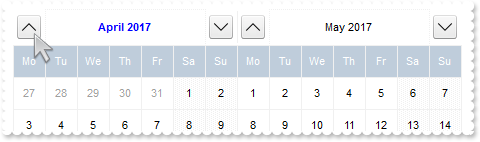
with thisform.Calendar1
	.BeginUpdate
	.Appearance = 0
	.Object.Background(8) = .BackColor
	.FirstDay = 2
	.MaxMonthX = 2
	.MaxMonthY = 2
	.DrawGridLine = 0
	.WeekDays = "Su Mo Tu We Th Fr Sa"
	.MarkToday = .T.
	.AutoSize = 0
	.AlignmentDay = 1
	.FixedCellHeight = 32
	.FixedCellWidth = 32
	var_s = "("+chr(34)+""+chr(34)+"[b=0],("+chr(34)+""+chr(34)+"[b=0]/24;2[b=0][bg=0x01000000]/"+chr(34)+""+chr(34)+"[b=0]):24,"+chr(34)+""+chr(34)+"[b=0]):32,1,("+chr(34)+""+chr(34)+"[b=0],("+chr(34)+""+chr(34)+"[b=0]/24;3[b=0][bg=0x01000000]/"+chr(34)+""+chr(34)+"[b=0]):24,"+chr(34)+""+chr(34)+"[b"
	var_s = var_s + "=0]):32"
	.DateHeaderFormat = var_s
	var_s1 = " ( ( ( month(value) = month(date(``) ) and ( year(value) = year(date(``) ) ) ) ) ? `<b><fgcolor=0000FF>` : `` ) + `<c><%month%> "
	var_s1 = var_s1 + "<%year%>`"
	.Object.DateHeaderField(1) = var_s1
	var_s2 = "gCJKBOI4NBQaBQAhQNJJIIhShQACERCAIA0RD7zf5hiJZJJEIJUPDaMZkUAQGAOP4DRShOgvHIGQA0U5CbKzOIZYRIICzCaUX4PS4hRgEGg/QaKJLhGSESIIZoMfAMMI"
	var_s2 = var_s2 + "kKQzJxDDBJaCMaoQSABVhAXgQRBLRFdNhIB4QY4PfyUJB7AYAFo+DIWOb7LDdiIAJJFJxEVxCMCCgIA="
	.Object.HTMLPicture("up") = var_s2
	var_s3 = "gCJKBOI4NBQaBQAhQNJJIIhShQACERCAIA0RD7zf5hiIEM5BJpBhSxR4LfhhAsRKZJIhBKg4J7tRjJBIAEAMAjzWIJba0E5rWQcWaBAoFR7oK4HewRZCMPiMUDLXRoS4"
	var_s3 = var_s3 + "PfjCQJrEhdaJ5ET4YIvTgOJ5kFSTKpkFaTKLEFqTGxyFgTIyuMgCeJaPwDSIKEhlCT5ZoWFT4iIAJJFJxEVxCMCCgIA="
	.Object.HTMLPicture("down") = var_s3
	var_s4 = "gCJKBOI4NBQaBQAhQNJJIIhShQACERCAIA0RD7zf5hiJUJJEIJUPDaMZkEANWACeJvMgBIwSGgXAaxGIQI6RMYAJBzFQQHYBeIzKQNYCpTIYAbwNQmMgAILNfAMEBKGY"
	var_s4 = var_s4 + "uAaIaxMGYDFD2ARVASRNBDNCeSAIDRCW7MAgDDDZDIAKbADgRVrfUCNiIAJJFJxEVxCMCCgI"
	.Object.HTMLPicture("left") = var_s4
	var_s5 = "gCJKBOI4NBQaBQAhQNJJIIhShQACERCAIA0RD7zf5hiIBOZSI5CACuZwcdMRAhnIJNIMKWKPBb8MIFiIJOBILJzhQOYc7YYBY5vVBkiJEJJEIJUHBPMbAARYUI0KKADJ"
	var_s5 = var_s5 + "KEaDEpAVgAYjHYI8GSACgQb4AcRiGCPJgwNQIEzANIICaUUwpUDIBYjKIzBAsAZiWQ1QYABLZTKBAIATL2CUxXJdV8RABJIpOIiuIRgQUBA="
	.Object.HTMLPicture("right") = var_s5
	.Object.DateHeaderField(2) = "<c><img>up</img>"
	.Object.DateHeaderField(3) = "<c><img>down</img>"
	.Object.DateHeaderField(4) = "<c><img>left</img>"
	.Object.DateHeaderField(5) = "<c><img>right</img>"
	with .VisualAppearance
		var_s6 = "gBFLBCJwBAEHhEJAAEhABFgDg6AADACAxSDEMQBQKAAzQFAYbhgHCGAAGQaBUgmFgAQhFcZQSKUOQTDKMIziYBYfgkMIgSbJUgDGAkRRdDSOYIkWA5AiKEYoThCIxzTJ"
		var_s6 = var_s6 + "8aw3CKbYRAKCXfoUAJFP7Fc6ABJMBx3EyhZ89NDYEwTIKBahoehqIheEQyDSJNb2DCIahhMSEbKtCooDhGFpUWzLdxTJJVawHJoABjkS45PjEAJ+SBPUZVRRlFyfO7BK"
		var_s6 = var_s6 + "SjMKKXgkG4zABWVa1bC1FzxQ6mKykKQLQADDIDVZAeL3JTNCS5IyLLDtO77EqmZ5la7cUgRDj4AY7Ua+MzubBZaovOqDYzAey7TDWLRXFDNIzzTgQAyHHrETZHGqwJxM"
		var_s6 = var_s6 + "AEapYGqYpVi2HwzDuQ5oHKIQgggSSUGMOgdE4RhYDwJBVAwIQTH2UYhjQJBRAmZxuCEHZ3icJp5EgKxgAIVgCCQSQSEIBQkCAYhCAIJYKmKNIuFcTBIESPYEk6GBUm+B"
		var_s6 = var_s6 + "ZOmOPgZgWYRTiYEwvEwaIEAAK4KnKOJrgmTpDjCbYJmKSI2CoOxihOLglCuAACioNg8COA4gmcOZOiidg+g+Dh4moOA8CMYokNmCoyiycQ8E8A4iE6D4OjOMgng8ZJji"
		var_s6 = var_s6 + "ITA8CSEouEcKwKkkLJyhQIoIkYU9LjORhcCsAAIACLQ8iaSJ6FKC5jJoaobA8KYoACCRKnmMJzhuDpZnSboMCKGJ4nMPIPDmYAACwKIDk6CoLCeU40m6I5oliMoKDyaI"
		var_s6 = var_s6 + "CokLIpgoThviOKJoGYf4KmUKhMjMLJLCAAojCyaYoiYGoGmqM46CkOwPEoKonAACxKlSdItmiWBeBeDgrioNo3D0KxSlAAAtgsUpYnUPRPEoco8hCa+T40SxbBRj5tEs"
		var_s6 = var_s6 + "HJ1i6JhbGYS4ug8awelQLZAAKZI5C4DxrhYQ9ehmUppWiA48nAPRuFKYpiAAC47laZQ9iuKZSgOPotkuFI7C6C4gACPJAm8eQOhOQZoikDp3kCS5AACPoEk8fBGnqQgp"
		var_s6 = var_s6 + "DOSppD2TxjlyPZD6CfwekQTx5lKP5ImseZTCAL5MAMAAAkoTADmMLpIjISp+HSS4PgyMAADBzAHDSIoPCOUpWjObIKE8NJOHKIwPEaTprBsHpdjWLB9AieQ+DQYwQAAM"
		var_s6 = var_s6 + "R1EOZxWi+bx7HcWQ8msfRYnnDZQACRwxgwc5rGaMZPE0ZxqjWNZtgyRwAAyTZEnuXJzEyAx2kQcxNkye5cEy3cYAcANrGAIH4OAhx3gNGGPAfgIR8jBA4McBMARVhnH4"
		var_s6 = var_s6 + "HQOYmxuCpF2MsecEQVBvGQCcIQug6itGQBoARAQ="
		.Add(1,var_s6)
	endwith
	.EndUpdate
endwith
|
|
130
|
How can I arrange the month's header (right, next, prev month, picture, ebn)
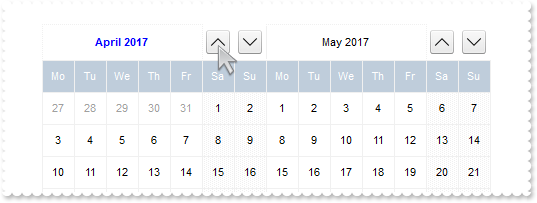
with thisform.Calendar1
	.BeginUpdate
	.Appearance = 0
	.Object.Background(8) = .BackColor
	.FirstDay = 2
	.MaxMonthX = 2
	.MaxMonthY = 2
	.DrawGridLine = 0
	.WeekDays = "Su Mo Tu We Th Fr Sa"
	.MarkToday = .T.
	.AutoSize = 0
	.AlignmentDay = 1
	.FixedCellHeight = 32
	.FixedCellWidth = 32
	var_s = "1,("+chr(34)+""+chr(34)+"[b=0],("+chr(34)+""+chr(34)+"[b=0]/24;2[b=0][bg=0x01000000]/"+chr(34)+""+chr(34)+"[b=0]):24,"+chr(34)+""+chr(34)+"[b=0]):32,("+chr(34)+""+chr(34)+"[b=0],("+chr(34)+""+chr(34)+"[b=0]/24;3[b=0][bg=0x01000000]/"+chr(34)+""+chr(34)+"[b=0]):24,"+chr(34)+""+chr(34)+"[b"
	var_s = var_s + "=0]):32"
	.DateHeaderFormat = var_s
	var_s1 = " ( ( ( month(value) = month(date(``) ) and ( year(value) = year(date(``) ) ) ) ) ? `<b><fgcolor=0000FF>` : `` ) + `<c><%month%> "
	var_s1 = var_s1 + "<%year%>`"
	.Object.DateHeaderField(1) = var_s1
	var_s2 = "gCJKBOI4NBQaBQAhQNJJIIhShQACERCAIA0RD7zf5hiJZJJEIJUPDaMZkUAQGAOP4DRShOgvHIGQA0U5CbKzOIZYRIICzCaUX4PS4hRgEGg/QaKJLhGSESIIZoMfAMMI"
	var_s2 = var_s2 + "kKQzJxDDBJaCMaoQSABVhAXgQRBLRFdNhIB4QY4PfyUJB7AYAFo+DIWOb7LDdiIAJJFJxEVxCMCCgIA="
	.Object.HTMLPicture("up") = var_s2
	var_s3 = "gCJKBOI4NBQaBQAhQNJJIIhShQACERCAIA0RD7zf5hiIEM5BJpBhSxR4LfhhAsRKZJIhBKg4J7tRjJBIAEAMAjzWIJba0E5rWQcWaBAoFR7oK4HewRZCMPiMUDLXRoS4"
	var_s3 = var_s3 + "PfjCQJrEhdaJ5ET4YIvTgOJ5kFSTKpkFaTKLEFqTGxyFgTIyuMgCeJaPwDSIKEhlCT5ZoWFT4iIAJJFJxEVxCMCCgIA="
	.Object.HTMLPicture("down") = var_s3
	var_s4 = "gCJKBOI4NBQaBQAhQNJJIIhShQACERCAIA0RD7zf5hiJUJJEIJUPDaMZkEANWACeJvMgBIwSGgXAaxGIQI6RMYAJBzFQQHYBeIzKQNYCpTIYAbwNQmMgAILNfAMEBKGY"
	var_s4 = var_s4 + "uAaIaxMGYDFD2ARVASRNBDNCeSAIDRCW7MAgDDDZDIAKbADgRVrfUCNiIAJJFJxEVxCMCCgI"
	.Object.HTMLPicture("left") = var_s4
	var_s5 = "gCJKBOI4NBQaBQAhQNJJIIhShQACERCAIA0RD7zf5hiIBOZSI5CACuZwcdMRAhnIJNIMKWKPBb8MIFiIJOBILJzhQOYc7YYBY5vVBkiJEJJEIJUHBPMbAARYUI0KKADJ"
	var_s5 = var_s5 + "KEaDEpAVgAYjHYI8GSACgQb4AcRiGCPJgwNQIEzANIICaUUwpUDIBYjKIzBAsAZiWQ1QYABLZTKBAIATL2CUxXJdV8RABJIpOIiuIRgQUBA="
	.Object.HTMLPicture("right") = var_s5
	.Object.DateHeaderField(2) = "<c><img>up</img>"
	.Object.DateHeaderField(3) = "<c><img>down</img>"
	.Object.DateHeaderField(4) = "<c><img>left</img>"
	.Object.DateHeaderField(5) = "<c><img>right</img>"
	with .VisualAppearance
		var_s6 = "gBFLBCJwBAEHhEJAAEhABFgDg6AADACAxSDEMQBQKAAzQFAYbhgHCGAAGQaBUgmFgAQhFcZQSKUOQTDKMIziYBYfgkMIgSbJUgDGAkRRdDSOYIkWA5AiKEYoThCIxzTJ"
		var_s6 = var_s6 + "8aw3CKbYRAKCXfoUAJFP7Fc6ABJMBx3EyhZ89NDYEwTIKBahoehqIheEQyDSJNb2DCIahhMSEbKtCooDhGFpUWzLdxTJJVawHJoABjkS45PjEAJ+SBPUZVRRlFyfO7BK"
		var_s6 = var_s6 + "SjMKKXgkG4zABWVa1bC1FzxQ6mKykKQLQADDIDVZAeL3JTNCS5IyLLDtO77EqmZ5la7cUgRDj4AY7Ua+MzubBZaovOqDYzAey7TDWLRXFDNIzzTgQAyHHrETZHGqwJxM"
		var_s6 = var_s6 + "AEapYGqYpVi2HwzDuQ5oHKIQgggSSUGMOgdE4RhYDwJBVAwIQTH2UYhjQJBRAmZxuCEHZ3icJp5EgKxgAIVgCCQSQSEIBQkCAYhCAIJYKmKNIuFcTBIESPYEk6GBUm+B"
		var_s6 = var_s6 + "ZOmOPgZgWYRTiYEwvEwaIEAAK4KnKOJrgmTpDjCbYJmKSI2CoOxihOLglCuAACioNg8COA4gmcOZOiidg+g+Dh4moOA8CMYokNmCoyiycQ8E8A4iE6D4OjOMgng8ZJji"
		var_s6 = var_s6 + "ITA8CSEouEcKwKkkLJyhQIoIkYU9LjORhcCsAAIACLQ8iaSJ6FKC5jJoaobA8KYoACCRKnmMJzhuDpZnSboMCKGJ4nMPIPDmYAACwKIDk6CoLCeU40m6I5oliMoKDyaI"
		var_s6 = var_s6 + "CokLIpgoThviOKJoGYf4KmUKhMjMLJLCAAojCyaYoiYGoGmqM46CkOwPEoKonAACxKlSdItmiWBeBeDgrioNo3D0KxSlAAAtgsUpYnUPRPEoco8hCa+T40SxbBRj5tEs"
		var_s6 = var_s6 + "HJ1i6JhbGYS4ug8awelQLZAAKZI5C4DxrhYQ9ehmUppWiA48nAPRuFKYpiAAC47laZQ9iuKZSgOPotkuFI7C6C4gACPJAm8eQOhOQZoikDp3kCS5AACPoEk8fBGnqQgp"
		var_s6 = var_s6 + "DOSppD2TxjlyPZD6CfwekQTx5lKP5ImseZTCAL5MAMAAAkoTADmMLpIjISp+HSS4PgyMAADBzAHDSIoPCOUpWjObIKE8NJOHKIwPEaTprBsHpdjWLB9AieQ+DQYwQAAM"
		var_s6 = var_s6 + "R1EOZxWi+bx7HcWQ8msfRYnnDZQACRwxgwc5rGaMZPE0ZxqjWNZtgyRwAAyTZEnuXJzEyAx2kQcxNkye5cEy3cYAcANrGAIH4OAhx3gNGGPAfgIR8jBA4McBMARVhnH4"
		var_s6 = var_s6 + "HQOYmxuCpF2MsecEQVBvGQCcIQug6itGQBoARAQ="
		.Add(1,var_s6)
	endwith
	.EndUpdate
endwith
|
|
129
|
Can I specify a different foreground color for the current month
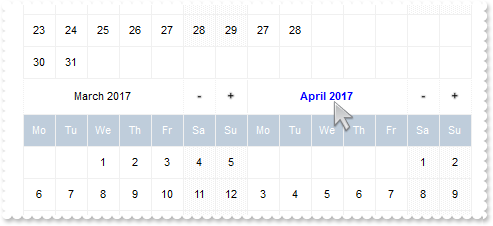
with thisform.Calendar1
	.BeginUpdate
	.Appearance = 0
	.Object.Background(8) = .BackColor
	.FirstDay = 2
	.MaxMonthX = 2
	.MaxMonthY = 2
	.DrawGridLine = 0
	.WeekDays = "Su Mo Tu We Th Fr Sa"
	.MarkToday = .T.
	.AutoSize = 0
	.AlignmentDay = 1
	.FixedCellHeight = 32
	.FixedCellWidth = 32
	.DateHeaderFormat = "1,2:32,3:32"
	var_s = " ( ( ( month(value) = month(date(``) ) and ( year(value) = year(date(``) ) ) ) ) ? `<b><fgcolor=0000FF>` : `` ) + `<c><%month%> "
	var_s = var_s + "<%year%>`"
	.Object.DateHeaderField(1) = var_s
	.EndUpdate
endwith
|
|
128
|
How do I change the +/- when using the custom format for month's header (with no background)
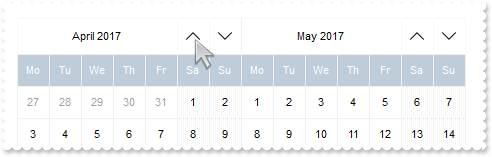
with thisform.Calendar1
	.BeginUpdate
	.Appearance = 0
	.Object.Background(8) = .BackColor
	.FirstDay = 2
	.MaxMonthX = 2
	.MaxMonthY = 2
	.DrawGridLine = 0
	.WeekDays = "Su Mo Tu We Th Fr Sa"
	.MarkToday = .T.
	.AutoSize = 0
	.AlignmentDay = 1
	.FixedCellHeight = 32
	.FixedCellWidth = 32
	.DateHeaderFormat = "1,2:32,3:32"
	var_s = "gCJKBOI4NBQaBQAhQNJJIIhShQACERCAIA0RD7zf5hiJZJJEIJUPDaMZkUAQGAOP4DRShOgvHIGQA0U5CbKzOIZYRIICzCaUX4PS4hRgEGg/QaKJLhGSESIIZoMfAMMI"
	var_s = var_s + "kKQzJxDDBJaCMaoQSABVhAXgQRBLRFdNhIB4QY4PfyUJB7AYAFo+DIWOb7LDdiIAJJFJxEVxCMCCgIA="
	.Object.HTMLPicture("up") = var_s
	var_s1 = "gCJKBOI4NBQaBQAhQNJJIIhShQACERCAIA0RD7zf5hiIEM5BJpBhSxR4LfhhAsRKZJIhBKg4J7tRjJBIAEAMAjzWIJba0E5rWQcWaBAoFR7oK4HewRZCMPiMUDLXRoS4"
	var_s1 = var_s1 + "PfjCQJrEhdaJ5ET4YIvTgOJ5kFSTKpkFaTKLEFqTGxyFgTIyuMgCeJaPwDSIKEhlCT5ZoWFT4iIAJJFJxEVxCMCCgIA="
	.Object.HTMLPicture("down") = var_s1
	.Object.DateHeaderField(2) = "<c><img>up</img>"
	.Object.DateHeaderField(3) = "<c><img>down</img>"
	.EndUpdate
endwith
|
|
127
|
How do I change the +/- when using the custom format for month's header (with background)
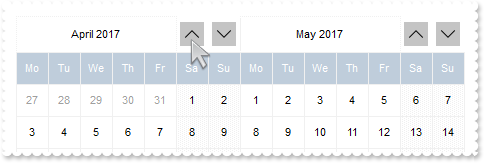
with thisform.Calendar1
	.BeginUpdate
	.Appearance = 0
	.Object.Background(8) = .BackColor
	.FirstDay = 2
	.MaxMonthX = 2
	.MaxMonthY = 2
	.DrawGridLine = 0
	.WeekDays = "Su Mo Tu We Th Fr Sa"
	.MarkToday = .T.
	.AutoSize = 0
	.AlignmentDay = 1
	.FixedCellHeight = 32
	.FixedCellWidth = 32
	var_s = "1,("+chr(34)+""+chr(34)+"[b=0],("+chr(34)+""+chr(34)+"[b=0]/24;2[b=0][bg=RGB(196,196,196)]/"+chr(34)+""+chr(34)+"[b=0]):24,"+chr(34)+""+chr(34)+"[b=0]):32,("+chr(34)+""+chr(34)+"[b=0],("+chr(34)+""+chr(34)+"[b=0]/24;3[b=0][bg=RGB(196,196,196)]/"+chr(34)+""+chr(34)+"[b"
	var_s = var_s + "=0]):24,"+chr(34)+""+chr(34)+"[b=0]):32"
	.DateHeaderFormat = var_s
	var_s1 = "gCJKBOI4NBQaBQAhQNJJIIhShQACERCAIA0RD7zf5hiJZJJEIJUPDaMZkUAQGAOP4DRShOgvHIGQA0U5CbKzOIZYRIICzCaUX4PS4hRgEGg/QaKJLhGSESIIZoMfAMMI"
	var_s1 = var_s1 + "kKQzJxDDBJaCMaoQSABVhAXgQRBLRFdNhIB4QY4PfyUJB7AYAFo+DIWOb7LDdiIAJJFJxEVxCMCCgIA="
	.Object.HTMLPicture("up") = var_s1
	var_s2 = "gCJKBOI4NBQaBQAhQNJJIIhShQACERCAIA0RD7zf5hiIEM5BJpBhSxR4LfhhAsRKZJIhBKg4J7tRjJBIAEAMAjzWIJba0E5rWQcWaBAoFR7oK4HewRZCMPiMUDLXRoS4"
	var_s2 = var_s2 + "PfjCQJrEhdaJ5ET4YIvTgOJ5kFSTKpkFaTKLEFqTGxyFgTIyuMgCeJaPwDSIKEhlCT5ZoWFT4iIAJJFJxEVxCMCCgIA="
	.Object.HTMLPicture("down") = var_s2
	.Object.DateHeaderField(2) = "<c><img>up</img>"
	.Object.DateHeaderField(3) = "<c><img>down</img>"
	.EndUpdate
endwith
|
|
126
|
How can I arrange the month's header (right, next, prev month)
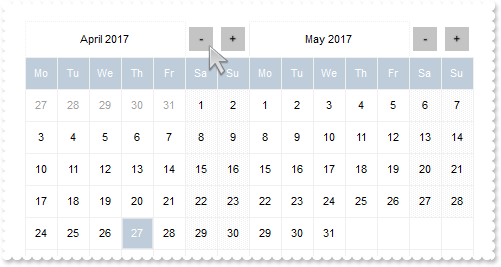
with thisform.Calendar1
	.BeginUpdate
	.Appearance = 0
	.Object.Background(8) = .BackColor
	.FirstDay = 2
	.MaxMonthX = 2
	.MaxMonthY = 2
	.DrawGridLine = 0
	.WeekDays = "Su Mo Tu We Th Fr Sa"
	.MarkToday = .T.
	.AutoSize = 0
	.AlignmentDay = 1
	.FixedCellHeight = 32
	.FixedCellWidth = 32
	var_s = "1,("+chr(34)+""+chr(34)+"[b=0],("+chr(34)+""+chr(34)+"[b=0]/24;2[b=0][bg=RGB(196,196,196)]/"+chr(34)+""+chr(34)+"[b=0]):24,"+chr(34)+""+chr(34)+"[b=0]):32,("+chr(34)+""+chr(34)+"[b=0],("+chr(34)+""+chr(34)+"[b=0]/24;3[b=0][bg=RGB(196,196,196)]/"+chr(34)+""+chr(34)+"[b"
	var_s = var_s + "=0]):24,"+chr(34)+""+chr(34)+"[b=0]):32"
	.DateHeaderFormat = var_s
	.EndUpdate
endwith
|
|
125
|
How do I display the week number according, so the January 1st is in the first week
with thisform.Calendar1
	.BeginUpdate
	.FirstDay = 1
	.DisplayWeekNumberAs = 1
	.ShowWeeks = .T.
	.Date = {^2016-1-1}
	.EndUpdate
endwith
|
|
124
|
How do I display the week number according to ISO8601 standard
with thisform.Calendar1
	.BeginUpdate
	.FirstDay = 2
	.DisplayWeekNumberAs = 0
	.ShowWeeks = .T.
	.Date = {^2016-1-1}
	.EndUpdate
endwith
|
|
123
|
Just seen the BackgroundExt property. Not sure what I can do with that
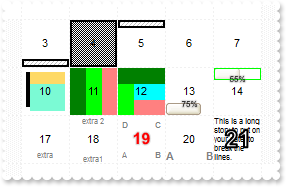
with thisform.Calendar1
	.BeginUpdate
	.VisualAppearance.Add(1,"c:\exontrol\images\normal.ebn")
	.AlignmentDay = 1
	.FixedCellWidth = 48
	.FixedCellHeight = 48
	.AutoSize = 0
	.MaxMonthX = 1
	.MaxMonthY = 1
	.Date = {^2014-2-1}
	.ShowNonMonthDays = .F.
	.DrawGridLine = 2
	with .Events
		.Add({^2014-2-3}).BackgroundExt = "bottom[8,pattern=0x006,patterncolor=RGB(190,190,190),frame=RGB(0,0,0),framethick]"
		.Add({^2014-2-4}).BackgroundExt = "bottom[100%,pattern=0x003,frame=RGB(0,0,0),framethick]"
		.Add({^2014-2-5}).BackgroundExt = "top[8,pattern=0x006,patterncolor=RGB(190,190,190),frame=RGB(0,0,0),framethick]"
		var_s = "top[4](left[4],right[4],client),bottom[4](left[4],right[4],client),left[4],right[4],client(left[10%](top[90%,back=RGB(0,0,0)]),t"
		var_s = var_s + "op[30%,back=RGB(254,217,102)],client[back=RGB(123,250,212)])"
		.Add({^2014-2-10}).BackgroundExt = var_s
		.Add({^2014-2-11}).BackgroundExt = "left[33%,back=RGB(0,128,0)],left[33%,back=RGB(0,255,0)],client[back=RGB(255,128,128)]"
		.Add({^2014-2-12}).BackgroundExt = "top[33%,back=RGB(0,128,0)],left[33%,back=RGB(0,255,0)],client[back=RGB(255,128,128)](top[50%,back=RGB(0,255,255)])"
		.Add({^2014-2-13}).BackgroundExt = "bottom[12](left[75%,back=0x01000000]),none[(0,100%-22,100%,22),text=`<sha ;;0><font ;6>75%`,align=0x11]"
		var_s1 = "top[12](left[55%,back=0x01FEFEFE]),none[(0,0,100%,12),pattern=0x000,frame=RGB(0,255,0)],none[(0,0,100%,22),text=`<sha ;;0><font "
		var_s1 = var_s1 + ";6>55%`,align=0x11]"
		.Add({^2014-2-14}).BackgroundExt = var_s1
		.Add({^2014-2-17}).BackgroundExt = "bottom[16,align=0x11,text=`<fgcolor 808080><font ;6>extra`]"
		.Add({^2014-2-18}).BackgroundExt = "root[text=`<fgcolor 808080><font ;6>extra 2`,align=0x01](bottom[16,text=`<fgcolor 808080><font ;6>extra1`,align=0x21])"
		with .Add({^2014-2-19})
			var_s2 = "top[4](left[4],right[4],client),bottom[4](left[4],right[4],client),left[4],right[4],client[text=`<fgcolor 808080><font ;6><b>B`,"
			var_s2 = var_s2 + "align=0x22](client[text=`<fgcolor 808080><font ;6><b>A`,align=0x20](client[text=`<fgcolor 808080><font ;6><b>D`,align=0x00](clie"
			var_s2 = var_s2 + "nt[text=`<fgcolor 808080><font ;6><b>C`,align=0x02](client))))"
			.BackgroundExt = var_s2
			.Caption = "<sha ;;0><font ;12><fgcolor FF0000><b><%day%>"
		endwith
		.Add({^2014-2-20}).BackgroundExt = "root[text=`<fgcolor 808080><b>B`,align=0x22](client[text=`<fgcolor 808080><b>A`,align=0x20])"
		with .Add({^2014-2-21})
			.BackgroundExt = "root[align=0,wordwrap,text=`<font ;6>This is a long story to put on your date, to break the lines. `]"
			.Caption = "<b><fgcolor FFFFFF><out 1;2><font ;18><%day%>"
		endwith
	endwith
	.EndUpdate
endwith
|
|
122
|
How can I show a pattern over a date
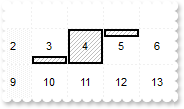
with thisform.Calendar1
	.AlignmentDay = 1
	.FixedCellWidth = 36
	.FixedCellHeight = 36
	.AutoSize = 0
	.MaxMonthX = 1
	.MaxMonthY = 1
	.Date = {^2014-2-1}
	.ShowNonMonthDays = .F.
	.Events.Add({^2014-2-3}).BackgroundExt = "bottom[8,pattern=0x006,patterncolor=RGB(190,190,190),frame=RGB(0,0,0),framethick]"
	.Events.Add({^2014-2-4}).BackgroundExt = "bottom[100%,pattern=0x006,patterncolor=RGB(190,190,190),frame=RGB(0,0,0),framethick]"
	.Events.Add({^2014-2-5}).BackgroundExt = "top[8,pattern=0x006,patterncolor=RGB(190,190,190),frame=RGB(0,0,0),framethick]"
	.DrawGridLine = 2
endwith
|
|
121
|
Can I use PNG picture files
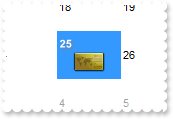
with thisform.Calendar1
	.Object.HTMLPicture("pic1") = "c:\exontrol\images\card.png"
	.AlignmentDay = 0
	.FixedCellWidth = 64
	.FixedCellHeight = 48
	.AutoSize = 0
	.MaxMonthX = 1
	.MaxMonthY = 1
	.Events.Add(thisform.Calendar1.Date).Caption = "<sha><b><%day%></b></sha> <r><img>pic1</img>"
endwith
|
|
120
|
Is it possible to display a custom-size picture assigned to a date
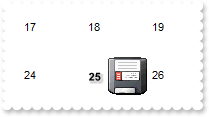
with thisform.Calendar1
	.Object.HTMLPicture("pic1") = "c:\exontrol\images\zipdisk.gif"
	.AlignmentDay = 0
	.FixedCellWidth = 64
	.FixedCellHeight = 48
	.AutoSize = 0
	.MaxMonthX = 1
	.MaxMonthY = 1
	.Events.Add(thisform.Calendar1.Date).Caption = "<sha><b><%day%></b></sha> <r><img>pic1</img>"
endwith
|
|
119
|
How can I assign a caption and an icon to a date
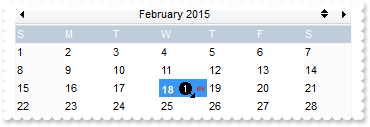
with thisform.Calendar1
	var_s = "gBJJgBAIDAAGAAEAAQhYAf8Pf4hh0QihCJo2AEZjQAjEZFEaIEaEEaAIAkcbk0olUrlktl0vmExmUzmk1m03nE5nU7nk9n0/oFBoVDolFo1HpFJpVLplNp1PqFRqVTql"
	var_s = var_s + "Vq1XrFZrVbrldr1fsFhsVjslls1ntFptVrtltt1vuFxuVzul1u13vF5vV7vl9v1/wGBwWDwmFw2HxGJxWLxmNx0xiFdyOTh8Tf9ZymXx+QytcyNgz8r0OblWjyWds+m0"
	var_s = var_s + "ka1Vf1ta1+r1mos2xrG2xeZ0+a0W0qOx3GO4NV3WeyvD2XJ5XL5nN51aiw+lfSj0gkUkAEllHanHI5j/cHg8EZf7w8vl8j4f/qfEZeB09/vjLAB30+kZQAP/P5/H6/yN"
	var_s = var_s + "AOAEAwCjMBwFAEDwJBMDwLBYAP2/8Hv8/gAGAD8LQs9w/nhDY/oygIA="
	.Images(var_s)
	.AlignmentDay = 0
	.FixedCellWidth = 48
	.AutoSize = 0
	.MaxMonthX = 1
	.MaxMonthY = 1
	.Events.Add(thisform.Calendar1.Date).Caption = "<sha><b><%day%></b></sha> <r><img>1</img><off -4><sha;;0><fgcolor FF0000><font ;6>ev</sha>"
endwith
|
|
118
|
How can I assign a caption to a date
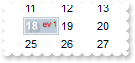
with thisform.Calendar1
	.AlignmentDay = 0
	.FixedCellWidth = 36
	.AutoSize = 0
	.MaxMonthX = 1
	.MaxMonthY = 1
	with .Events.Add(thisform.Calendar1.Date)
		.Caption = "<sha><b><%day%></b><r><off -4><sha;;0><fgcolor FF0000><font ;6>ev</sha></sha> 1"
		.Marker = .T.
	endwith
endwith
|
|
117
|
How do I align the day in the calendar control
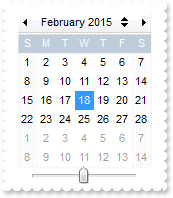
with thisform.Calendar1
	.AlignmentDay = 1
endwith
|
|
116
|
How do I specify a different foreground color for weekday headers (S M T W T F S)
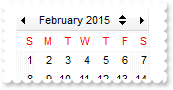
with thisform.Calendar1
	.Object.Background(6) = RGB(255,255,255)
	.Object.Background(28) = RGB(255,0,0)
endwith
|
|
115
|
How does localization work
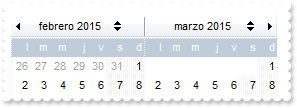
with thisform.Calendar1
	.FirstDay = .LocFirstDay && .LocFirstDay
	.MonthNames = .LocMonthNames()
	.WeekDays = .LocWeekDays()
endwith
|
|
114
|
How can I change the control's Visual appearance
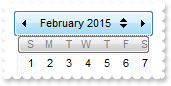
with thisform.Calendar1
	var_s = "gBFLBWIgBAEHhEJAEGg6EhCDC0HA0IdT/iyAjAAdcWf8YQAAAcKkEThQCCsiAMRhQBkMHhgABEIBsILBQHRCOp0OhvNwgGM+AUImMHmcHms3nM7ns/GUtmEIB0IIc2GQ"
	var_s = var_s + "gFo0q1VrAygI"
	.VisualDesign = var_s
endwith
|
|
113
|
How can I align the picture on the control's background
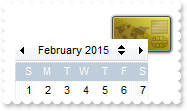
with thisform.Calendar1
	.Picture = thisform.Calendar1.ExecuteTemplate("loadpicture(`c:\exontrol\images\card.png`)")
	.PictureDisplay = 2
endwith
|
|
112
|
Is it possible to place a picture on the control's background
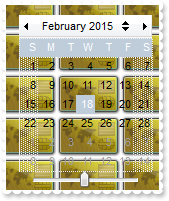
with thisform.Calendar1
	.Picture = thisform.Calendar1.ExecuteTemplate("loadpicture(`c:\exontrol\images\card.png`)")
endwith
|
|
111
|
Is it possible to specify the color or the visual appearance (EBN) for selected dates when the control has no focus

with thisform.Calendar1
	.VisualAppearance.Add(1,"c:\exontrol\images\normal.ebn")
	.Object.Background(68) = 0x1000000
	.Object.Background(69) = RGB(0,0,0)
	.HideSelection = .F.
endwith
|
|
110
|
Is it possible to specify the color for selected dates when the control loses the focus

with thisform.Calendar1
	.Object.Background(68) = RGB(128,128,128)
	.Object.Background(69) = RGB(0,0,0)
	.HideSelection = .F.
endwith
|
|
109
|
Can I change the visual appearance for the tooltip, using your EBN files
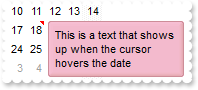
with thisform.Calendar1
	.ToolTipDelay = 1
	.ToolTipWidth = 364
	.VisualAppearance.Add(1,"c:\exontrol\images\normal.ebn")
	.Object.Background(64) = 0x1aa80f0
	.Events.Add(thisform.Calendar1.Date).Comment = "This is a text that shows up when the cursor hovers the date"
	.HideSelection = .T.
endwith
|
|
108
|
Can I change the color of the control's border (EBN files)
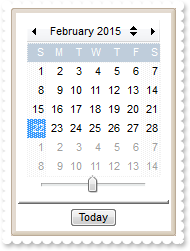
with thisform.Calendar1
	.VisualAppearance.Add(1,"c:\exontrol\images\normal.ebn")
	.Appearance = 27966412 && 0x1aabbc8 Or AppearanceEnum.Etched
endwith
|
|
107
|
Is it possible to change the color for days that are not in the month
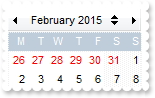
with thisform.Calendar1
	.FirstDay = 2
	.ShowNonMonthDays = .T.
	.NonMonthDaysColor = RGB(255,0,0)
endwith
|
|
106
|
How can I change the foreground color for non-working days
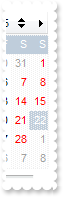
with thisform.Calendar1
	.FirstDay = 2
	.NonworkingDaysForeColor = RGB(255,0,0)
endwith
|
|
105
|
How do I change the appearance for the months
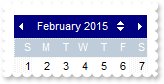
with thisform.Calendar1
	.Object.Background(8) = RGB(0,0,128)
	.Object.Background(21) = RGB(255,255,255)
endwith
|
|
104
|
How can I show the more months with its full size
with thisform.Calendar1
	.AutoSize = 1
	.MaxMonthX = 2
	.MaxMonthY = 2
endwith
|
|
103
|
How can I show the calendar with its full size
with thisform.Calendar1
	.AutoSize = 1
	.MaxMonthX = 1
	.MaxMonthY = 1
endwith
|
|
102
|
How can I hide the separator above the Today button
with thisform.Calendar1
	.Object.Background(13) = .BackColor
endwith
|
|
101
|
How do I limit the dates being displayed or selected
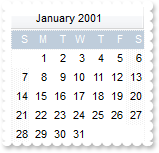
with thisform.Calendar1
	.MaxMonthX = 1
	.MaxMonthY = 1
	.ShowYearScroll = .F.
	.MinDate = {^2001-1-1}
	.MaxDate = {^2001-1-31}
	.Date = {^2001-1-1}
endwith
|