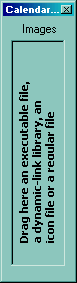
The user can add images at design time, by drag and drop files to control's images panel. Use the ShowImageList property to hide the control's images panel. The ImageSize property defines the size (width/height) of the icons within the control's Images collection. Use the Image property to assign an icon to a date. Use the CheckImage property to change the visual appearance of the control's checkbox.
The following sample loads icons from a BASE64 encoded strings:
With Calendar1
    .BackColor = vbWhite
    .AutoSize = False
    .FixedCellWidth = 32
    .Images "gBJJgBAICAAGAAEAAQhYAf8Pf4hh0QihCJo2AEZjQAjEZFEaIEaEEaAIAkcbk0olUrlktl0vmExmUzmk1m03nE5nU7nk9n0/oFBoVDolFo1HpFJpVLplNp1PqFRqVTqlVq1XrFZrVbrldr1fsFhsVjslls1ntFptVrtltt1vuFxuVzul1u13vF5vV7vl9v1/wGBwWDwkbiAAQGJqrAxgAxjAwt8w+Pib/x2NymJQFNymdzGNyNyymHyefyGeyGaoOoy+n02V2GhtOlyG0jOb28Z1lAykb1mjh+w0nB2Vg4GW22I3Wg3G9nfO5eQ32vw+q4fI4OH4tT4+t2GZxW95ugneq6fSjXd6+IxXW7PE7dR23r3e45Xe80z8H26Pszbuvc7EBO8+KqvXA73ss37Xpo1j8v7BDLNVALYwK7jGuq9sNM3CjbOgnMFtq4L7QjAkLKs/bhQS2EJsU5KhxK+0SRXE6tQ7FcbwlFz4KVEsPxqrr1sNFbdqvIUgSRJMlSXJCLB8lcno8kCRJIACSpRK6cO1JiZIojZ+H+ebLI0eAfnBMaMnAB5wB+jZwAOYAHzdOABzmQEsscA87t9Os6vTPs+EAA8+TfNwBnxOUyAGf1EoyfIHn+T8hx4gIA=="
    With .Events.Add(Date + 1)
        .Image = 1
    End With
    With .Events.Add(Date + 2)
        .Image = 2
    End With
End With
If you run the sample you will see:

The following sample uses the Microsoft Image List control:
CalendarCombo1.Images ImageList1.hImageList